Introduction
This manual provides comprehensive instructions for the installation, operation, and maintenance of the Yolin EBike Display Meter YL81F K5. The YL81F color LCD display offers various functions to enhance your riding experience, including battery level display, boost gear adjustment, speed display (real-time, maximum, average), mileage display (single and total), power push control, headlight control, error code display, and customizable parameter settings.
Коопсуздук маалыматы
Always ensure your e-bike is powered off before installing or removing the display. Do not attempt to disassemble the display unit. Keep the display away from extreme temperatures and direct sunlight for prolonged periods. Ensure all connections are secure and waterproof to prevent damage from moisture.
Пакеттин мазмуну
Пакетте бардык компоненттер бар экенин текшериңиз:
- Yolin YL81F K5 EBike Display Meter
- 5-pin waterproof male connector cable (150mm exposed length)
- Handlebar mounting bracket (fits 22.2 mm, 25.4 mm, and 31.8 mm handlebars)
Орнотуу жана орнотуу
Follow these steps for proper installation of your YL81F K5 display:
- Дисплейди орнотуу:
Select a suitable position on your e-bike handlebar. The flexible bracket accommodates handlebar sizes of 22.2 mm, 25.4 mm, and 31.8 mm. Securely attach the display bracket to the handlebar using the provided screws. Ensure the display is firmly in place and does not obstruct your view же велосипедди башкаруу.

Image: YL81F K5 display mounted on an e-bike handlebar, demonstrating its typical installation position and clear visibility of the screen.
- Кабелдерди туташтыруу:
Locate the 5-pin waterproof male connector on the display cable. Connect this to the corresponding female connector on your e-bike's wiring harness. Ensure the connection is firm and fully seated to maintain its waterproof integrity.

Сүрөт: деталдуу view of the 5-pin waterproof connector, highlighting its design for secure and moisture-resistant connections.
- Кубаттуулугу:
The YL81F display is compatible with 24V, 36V, 48V, and 60V e-bike battery systems. Ensure your e-bike's battery voltage matches one of these specifications.
- Баштапкы күйгүзүү:
After installation, power on your e-bike. The display should illuminate and show the default screen. If it does not, recheck all connections.
Иштөө нускамалары
The YL81F K5 display provides various functions accessible via its K5 buttons.
Дисплейview:

Сүрөт: комплекстүү view of the YL81F K5 display, illustrating its vibrant color screen and the integrated K5 button controls.
- Күйгүзүү/өчүрүү: Press and hold the power button (usually the middle button on the K5 control) to turn the display on or off.
- Boost Gear Adjustment: Use the '+' and '-' buttons on the K5 control to adjust the assist level (boost gear). The current level will be indicated on the screen.
- Ылдамдык көрсөтүү: The display shows real-time speed. You can cycle through maximum speed (MAX) and average speed (AVG) by short-pressing a specific button (refer to on-screen prompts or specific button functions).
- Пробег дисплей: View single trip mileage (TRIP) and total mileage (ODO). A short press of a button typically switches between these modes.
- Фараны башкаруу: Press the headlight button (if available on K5 control) to turn the e-bike's headlights on or off. An indicator on the display will confirm the status.
- Ката коду дисплей: In case of a system malfunction, the display will show an error code. Refer to the Troubleshooting section for common codes and solutions.
- Параметр орнотуулары: Access the settings menu by long-pressing a specific button combination (e.g., '+' and '-' simultaneously). Here you can adjust parameters such as wheel diameter, speed limit, and unit settings (km/h or mph).
Жекелештирилген башкаруу элементтери:
The YL81F display allows for customization of key bike parameters. This includes setting the wheel diameter for accurate speed and mileage readings, and adjusting the speed limit according to local regulations or personal preference. The vibrant color screen provides clear visibility of all data, including real-time trip and total mileage logging, and voltage дисплей.
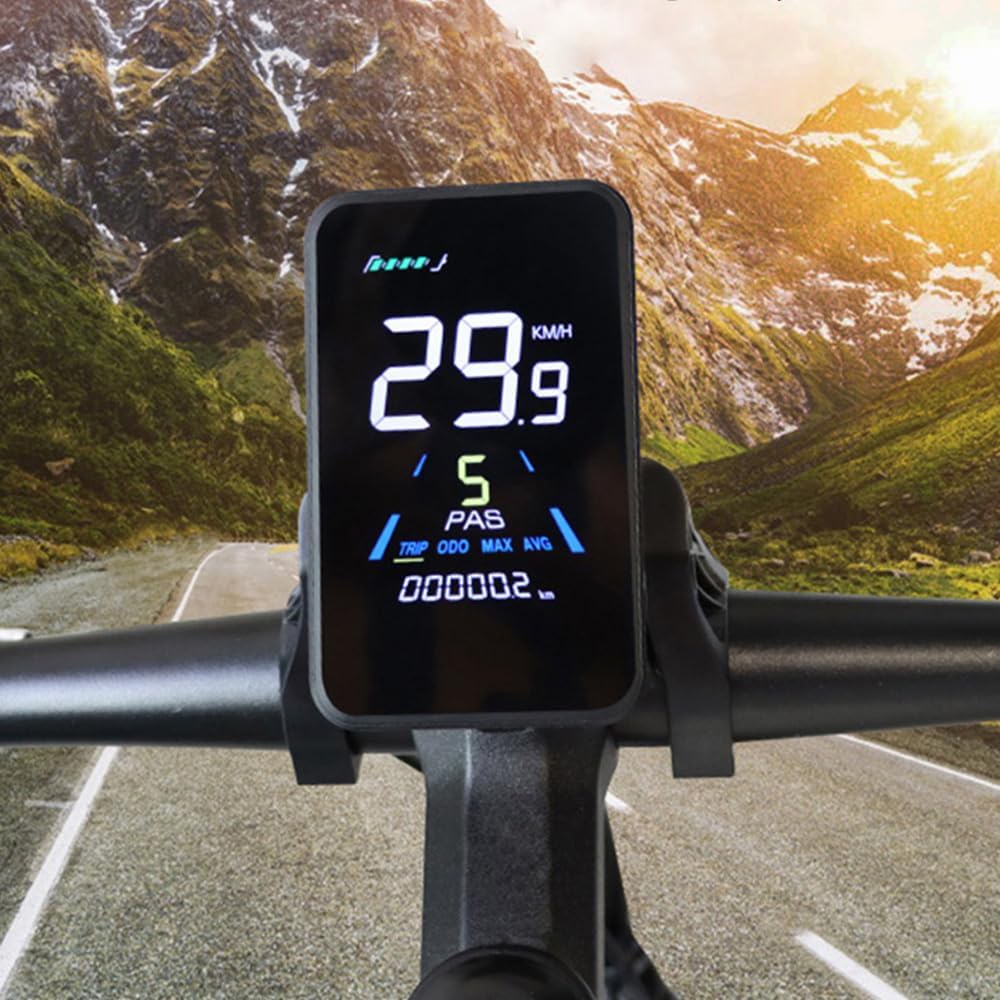
Image: The YL81F K5 display illuminated in a low-light setting, showcasing its clear and vibrant color screen with speed and mileage information.
Техникалык тейлөө
Proper maintenance ensures the longevity and optimal performance of your YL81F K5 display.
- Тазалоо: жумшак колдонуу, damp cloth to wipe the display screen and housing. Avoid abrasive cleaners or solvents that could damage the screen or plastic.
- Туташуу текшерүү: Periodically inspect the 5-pin waterproof connector for any signs of wear, corrosion, or loose connections. Ensure it remains securely seated.
- Курчап турган чөйрөнү коргоо: While the display is designed to withstand harsh conditions, avoid prolonged exposure to direct sunlight, extreme heat, or heavy rain when the e-bike is not in use.
- Программалык камсыздоонун жаңыртуулары: Өндүрүүчүнү текшериңиз website or contact customer service for information on potential firmware updates that may improve performance or add features.
Проблемаларды чечүү
This section addresses common issues you might encounter with your YL81F K5 display.
| Көйгөй | Мүмкүн себеп | Чечим |
|---|---|---|
| Дисплей күйбөйт. | Loose connection, low battery, incompatible voltage. | Check all cable connections, ensure battery is charged, verify battery voltagэлектрондук шайкештик (24V-60V). |
| Ылдамдык/километр көрсөткүчтөрү туура эмес. | Дөңгөлөктүн диаметри туура эмес коюлган. | Параметр жөндөөлөрүнө кирип, дөңгөлөктүн диаметрин электрондук велосипедиңиздин дөңгөлөк өлчөмүнө дал келтириңиз. |
| Ката коду көрсөтүлдү. | Системанын бузулушу, сенсор маселеси. | Note the error code and consult the manufacturer's support or online resources for specific code meanings and solutions. Often, restarting the e-bike can clear temporary errors. |
| Баскычтар жооп бербейт. | Кир/таштандылар, ички ката. | Clean around the buttons. If the issue persists, contact customer support. |
Техникалык шарттар
Key technical specifications for the Yolin YL81F K5 EBike Display Meter:
- Модел: YL81F K5
- Дисплей түрү: Түстүү LCD
- Тtage Шайкештик: 24В, 36В, 48В, 60В
- Туташтыргыч түрү: 5-pin waterproof male connector
- Cable Length (exposed): 150мм
- Рутка Clamp Диаметри: 22.2 мм, 25.4 мм, 31.8 мм
- Материал: ABS, LCD, Tempered Glass, Nylon Bracket
- Өлчөмдөрү (болжол менен): 95 мм (Ж) x 59.86 мм (В)
- Sensor Types Supported: Speed Sensor, Current Sensor, GPS Sensor
- Адам интерфейсинин киргизүүсү: Buttons
- Өндүрүүчү: ЁЛИН

Image: Technical drawing illustrating the precise dimensions of the YL81F K5 display unit and its mounting bracket.
Кепилдик маалымат
The Yolin EBike Display Meter YL81F K5 comes with a 1 жылдык Өндүрүүчүнүн Кепилдиги. This warranty covers defects in materials and workmanship under normal use. It does not cover damage caused by misuse, accidents, unauthorized modifications, or improper installation.
For warranty claims, please retain your proof of purchase and contact customer support with details of the issue.
Колдоо жана Байланыш
For further assistance, technical support, or inquiries regarding your Yolin YL81F K5 display, please contact our online customer service. When contacting support, please be prepared to provide the serial number of your display (located on the back of the unit) and details of your original purchase.

Сүрөт: арткы view of the YL81F K5 display, indicating the specific location where the serial number is printed.
Маанилүү эскертүү: As mentioned in the product description, the YL81F LCD display has various communication protocols. To ensure plug-and-play compatibility, it is highly recommended to contact customer service before or after purchase and provide information about your original display.


