
Introduction
The LifePro Pacer Mini Pro Treadmill is a compact and versatile walking pad designed for light exercise and fitness in both home and office environments. Its adjustable incline and variable speed settings allow for a customized workout experience, helping you stay active throughout your day. This manual provides essential information for the safe and effective use, setup, operation, and maintenance of your Pacer Mini Pro Treadmill.
Маанилүү коопсуздук маалыматы
Please read and understand all instructions before operating the treadmill. Failure to follow these instructions may result in injury or damage to the product.
- Чуркоо жолун ар дайым тегиз, туруктуу бетке коюңуз.
- Иш учурунда балдарды жана үй жаныбарларын чуркоо жолунан алыс кармаңыз.
- Do not use the treadmill if it is damaged or malfunctioning.
- Кандайдыр бир жаңы көнүгүү программасын баштоодон мурун дарыгер менен кеңешиңиз.
- Электр шнурунун кыпчылып же бузулуп калбагандыгын текшериңиз.
- Do not attempt to service the treadmill yourself. Contact customer support for assistance.
Пакеттин мазмуну
Пакетте бардык компоненттер бар экенин текшериңиз:
- LifePro Pacer Mini Pro Treadmill Unit
- Алыстан башкаруу
- Электр кабели
- Майлоочу май
- Жөнгө салынуучу туткасы
- Планшеттин ээси
Жайгашуу
Follow these steps to set up your LifePro Pacer Mini Pro Treadmill:
- Пакеттен чыгаруу: Чуркоо жолун жана бардык компоненттерди таңгактан этияттык менен алып салыңыз.
- Жайгашкан жери: Choose a flat, stable surface for the treadmill. Ensure there is adequate space around the unit for safe operation.
- Handlebar and Feet Assembly: While the main unit comes pre-assembled, minimal assembly is required. Attach the adjustable handlebar and the incline feet as instructed in the included quick start guide. Ensure all screws are tightened securely.
- Баштапкы майлоо: The treadmill may come with some initial lubrication. Refer to the maintenance section for instructions on how to check and apply lubricant if needed before first use.
- Кубат туташуу: Кубат шнурун чуркоо жолуна, андан кийин жерге туташтырылган электр розеткасына туташтырыңыз.

Иштөө нускамалары
Operating your Pacer Mini Pro Treadmill is straightforward:
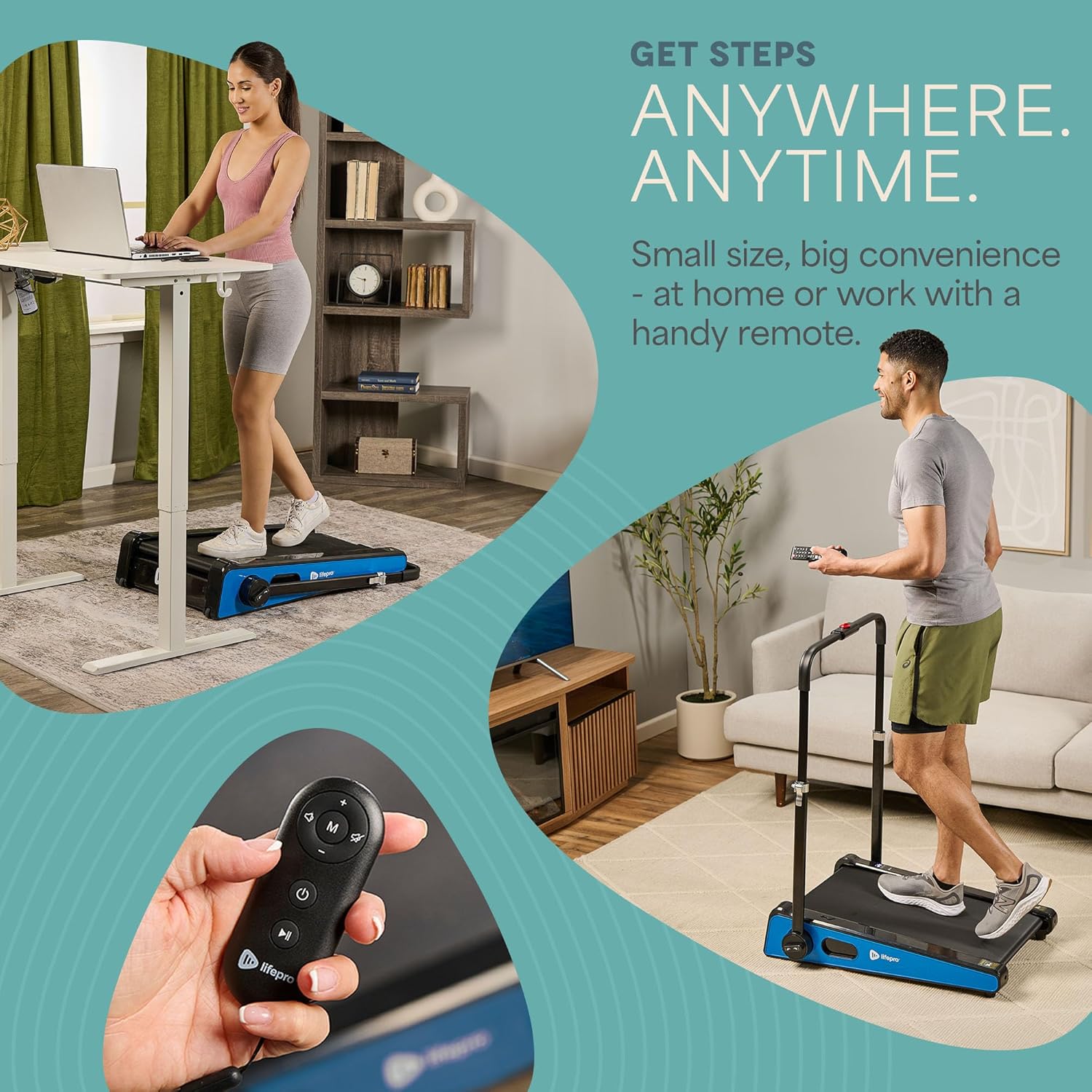
- Күйгүзүү: Plug in the treadmill and press the power button on the unit or the remote control. The LED display will illuminate.
- Ылдамдыкты жөндөө: Use the remote control to increase or decrease the walking speed. The maximum speed is 3 MPH. The current speed will be shown on the LED display.
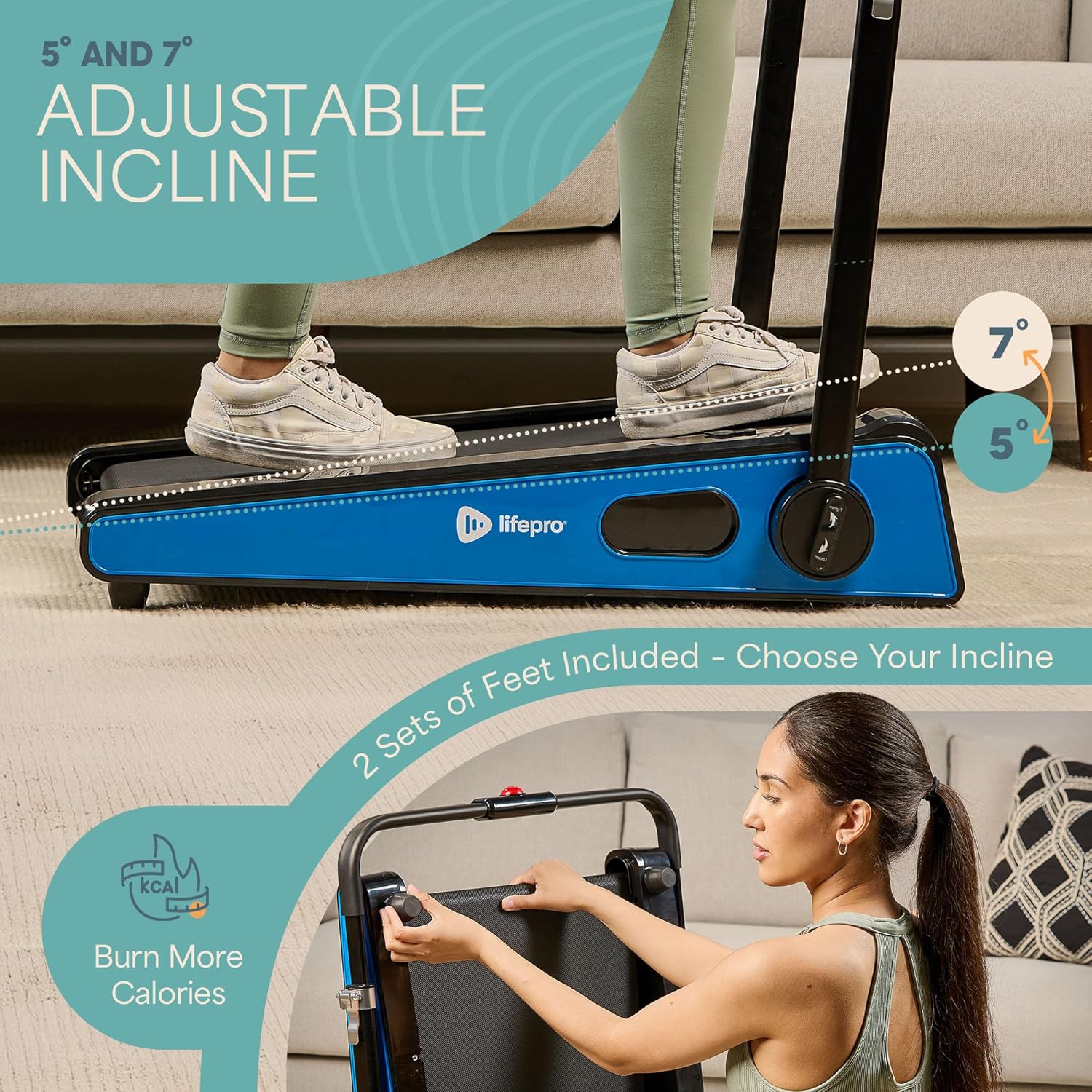
- Эңкейүүнү тууралоо: The treadmill offers adjustable incline settings of 5 or 7 degrees. To change the incline, manually adjust the feet at the rear of the treadmill. Refer to the setup section and product diagrams for visual guidance.
- Сиздин машыгууңузга мониторинг жүргүзүү: The LED display shows important workout metrics such as speed, calories burned, and distance covered. This helps you track your progress and stay motivated.
- Өчүрүү: To stop your workout, press the stop button on the remote control or the unit. For complete power off, unplug the treadmill from the power outlet.

Техникалык тейлөө
Үзгүлтүксүз техникалык тейлөө чуркоо жолуңуздун узак мөөнөттүү иштешин жана оптималдуу иштешин камсыз кылат:
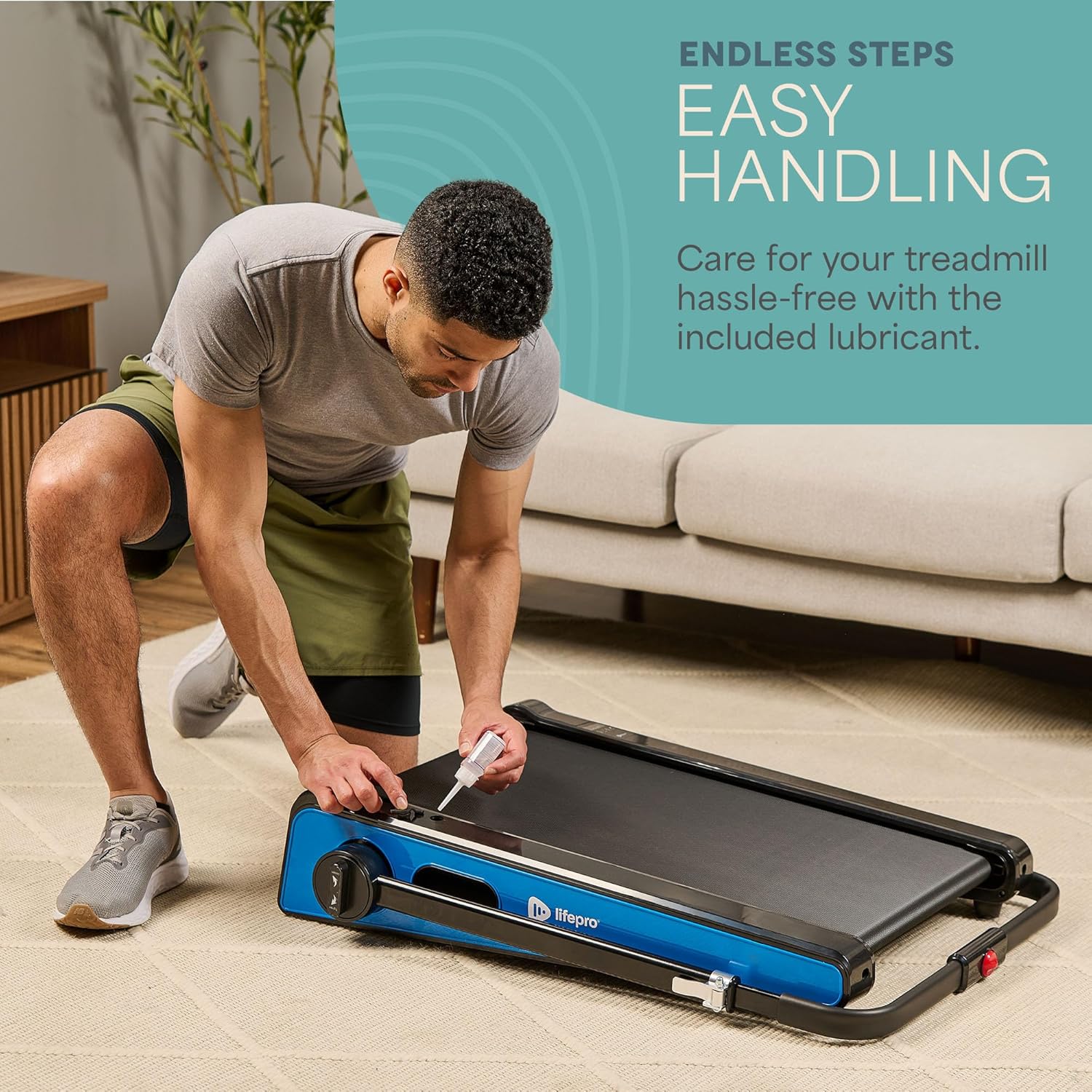
- Майлоо: The walking belt requires periodic lubrication to reduce friction and wear. A dedicated slot on the upper left side of the treadmill allows for easy injection of the provided lubricant. Lubricate as needed, typically every few months depending on usage.
- Тазалоо: Чуркоо жолун жарнама менен сүртүңүзamp терди жана чаңды кетирүү үчүн ар бир колдонуудан кийин чүпүрөк менен сүртүңүз. Абразивдүү тазалагычтарды колдонбоңуз.
- Сактагыч: The Pacer Mini Pro is designed for compact storage. It can be easily stored under a couch, desk, or in a closet thanks to its small footprint and built-in wheels for portability.
Проблемаларды чечүү
If you encounter any issues with your treadmill, refer to the following common solutions:
- Чуркоо жолу күйбөй жатат: Ensure the power cord is securely plugged into both the treadmill and a working electrical outlet. Check the power switch on the unit.
- Belt slipping or uneven: The walking belt may require adjustment or lubrication. Refer to the maintenance section for lubrication instructions. For belt tension adjustment, consult the detailed manual or contact customer support.
- адаттан тыш үндөр: Stop using the treadmill immediately and inspect for any loose parts or obstructions. If the noise persists, contact customer support.
For issues not covered here, please contact LifePro customer support for assistance.
Техникалык шарттар
| Бренд | Life Pro |
| Модель номери | LP-PCRMP-BLU-VC |
| Түс | Blue with Handlebar |
| Продукциянын өлчөмдөрү (D x W x Y) | 83.1 см х 63.5 см х 104.1 см |
| Элемент Салмагы | 53.9 фунт |
| Материал | Дат баспаган болот |
| Максималдуу ылдамдык | 3 миль/саат |
| жылуучу Кулак | 5 же 7 градус |
| Өзгөчө өзгөчөлүк | Компакт дизайн |
| Сунушталган Колдонуулар | Light exercise, walking, home and office use |
| Максаттуу аудитория | бойго жеткен |
| Максималдуу ат күчү | 1.75 HP |
| Дисплей түрү | LED |
| Power Source | Электр зымдары |
| Байланыш технологиясы | Ethernet |
| Эсептөөчү түрү | Санарип |
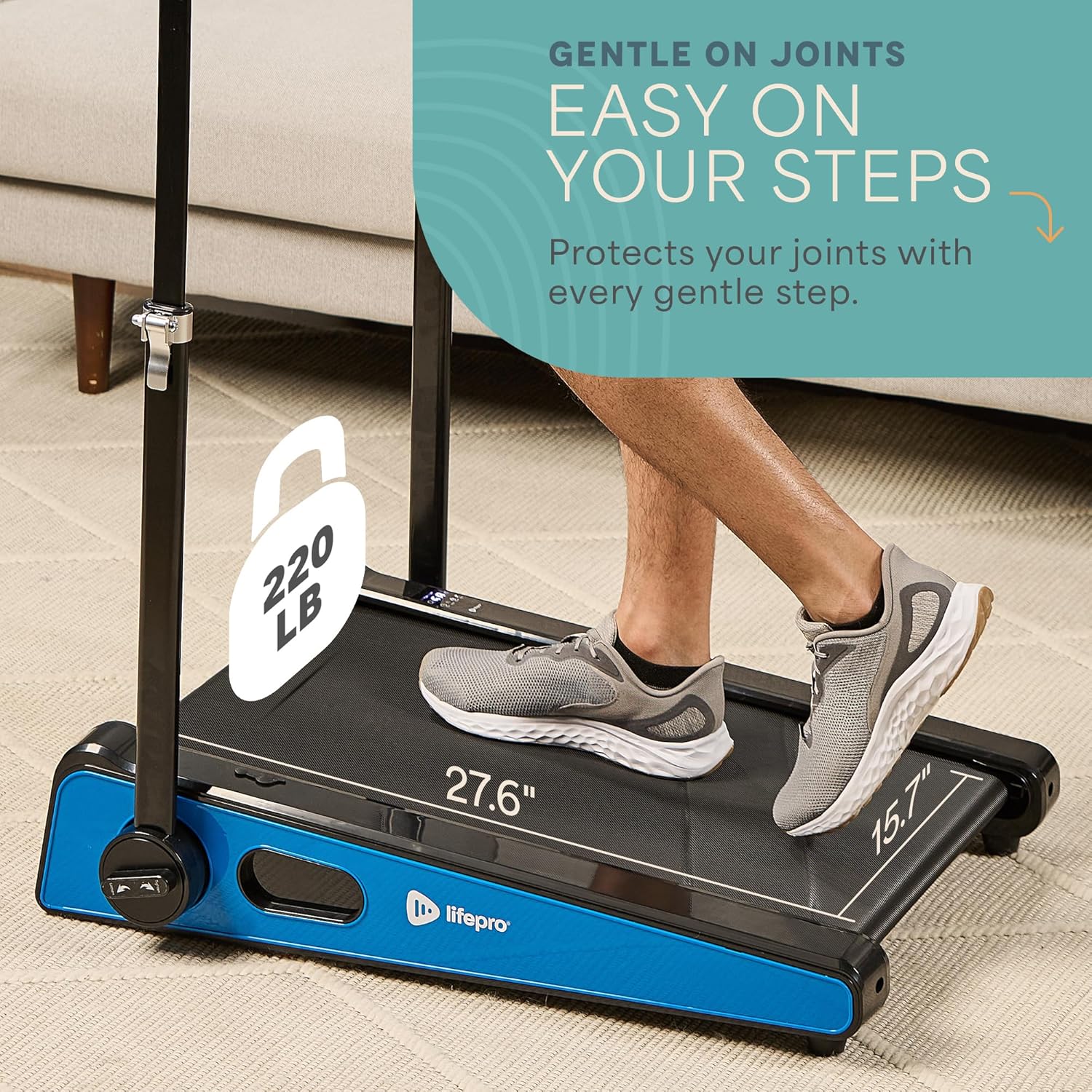
| Максималдуу салмак боюнча сунуш | 220 фунт |
| Программалардын саны | 1 |
| Running Surface Length | 40 дюйм |
| Running Surface Width | 15.7 дюйм |
| Screen Size | 30 дюйм |
| Ассамблея талап кылынат | Minimal (Handlebar and feet attachment) |
| UPC | 810161332328 |
Кепилдик жана колдоо
LifePro is committed to providing high-quality products and customer satisfaction. The LifePro Pacer Mini Pro Treadmill comes with a өмүр бою кепилдик, инвестицияңыз үчүн жан дүйнө тынчтыгын камсыз кылуу.
For any questions, concerns, or technical support, please contact LifePro customer service:
- Webсайт: www.lifeprofitness.com (Чыгample link, please replace with actual support link if available)
- Электрондук почта: support@lifeprofitness.com (Чыгampэлектрондук почтаңыз болсо, мүмкүн болсо, чыныгы колдоо электрондук почтасы менен алмаштырыңыз)
- Телефон: [Insert Phone Number Here]
Please have your model number (LP-PCRMP-BLU-VC) and proof of purchase ready when contacting support.