
Introduction
This manual provides detailed instructions for the Micool Bluetooth Headset V5.4 (Model DY20PLUS). Please read this manual carefully before using the product to ensure proper operation and to maximize its features and lifespan. This headset is designed for clear communication and comfortable wear, featuring advanced noise cancellation and long battery life.
Коопсуздук маалыматы
To ensure safe and proper use of your headset, please observe the following guidelines:
- Do not expose the headset to extreme temperatures, direct sunlight, or high humidity.
- Avoid dropping or subjecting the headset to strong impacts, which may damage internal components.
- Do not attempt to disassemble, repair, or modify the headset. This will void the warranty and may cause harm.
- Гарнитураны жана анын аксессуарларын балдар жана үй жаныбарлары жетпеген жерде сактаңыз.
- Use only the provided USB-C charging cable or a certified equivalent to prevent damage to the battery.
- Угуу жөндөмүнө зыян келтирбөө үчүн узак убакыт бою жогорку үн деңгээлинде угуудан качыңыз.
Пакеттин мазмуну
Пакетиңизде бардык буюмдар бар экенин текшериңиз:
- Micool Bluetooth Headset (DY20PLUS)
- USB-C заряддоо кабели
- User Manual
- Additional Eartips (Sizes L, M, S)
- Кулак илгич

Image: Micool Bluetooth Headset and its accessories, including different sized eartips and a charging cable.
Продукт бүттүview
Familiarize yourself with the various components and controls of your Micool Bluetooth Headset:

Сүрөт: алдыңкы view of the Micool Bluetooth Headset, highlighting the main call button, volume controls, and the LED battery indicator lights.
- Көп функциялуу баскыч: Used for power on/off, answering/ending calls, and playing/pausing music.
- Үн +/- баскычтары: Adjust volume, skip tracks, and check battery level.
- LED күч дисплей: Indicates the remaining battery level with four segments.
- Микрофон: Equipped with dual-mic noise reduction for clear voice input during calls.
- USB-C заряддоо порту: For connecting the charging cable to power the headset.
Жайгашуу
1. Гарнитураны заряддоо
Before initial use, fully charge your headset to ensure optimal battery performance.
- USB-C кубаттоочу кабелин гарнитуранын кубаттоо портуна туташтырыңыз.
- Кабелдин экинчи учун USB кубат булагына туташтырыңыз (мисалы, компьютер, дубал адаптер).
- The LED power display will illuminate to indicate charging. A full charge typically takes approximately 1.5-2 hours.
2. Түзмөк менен жупташтыруу
The headset utilizes Bluetooth 5.4 for a stable and efficient wireless connection up to 50 meters.
- Ensure the headset is powered off and fully charged.
- Press and hold the Multi-function Button for approximately 3-5 seconds until the LED indicator flashes blue and red alternately. This indicates the headset is in pairing mode.
- On your desired device (smartphone, tablet, laptop), enable Bluetooth and search for available devices.
- Select "DY20PLUS" from the list of found devices.
- Once successfully connected, the LED indicator will flash blue slowly.
3. Connecting to Two Devices Simultaneously (Multi-point Connection)
The DY20PLUS supports connecting to two Bluetooth devices concurrently, allowing seamless switching between them.
- Pair the headset with the first device following the steps above.
- Disable Bluetooth on the first device. The headset will re-enter pairing mode (flashing blue and red).
- Гарнитураны экинчи аппарат менен жупташтырыңыз.
- Re-enable Bluetooth on the first device. The headset should automatically connect to both devices. You can now receive calls or play audio from either device.
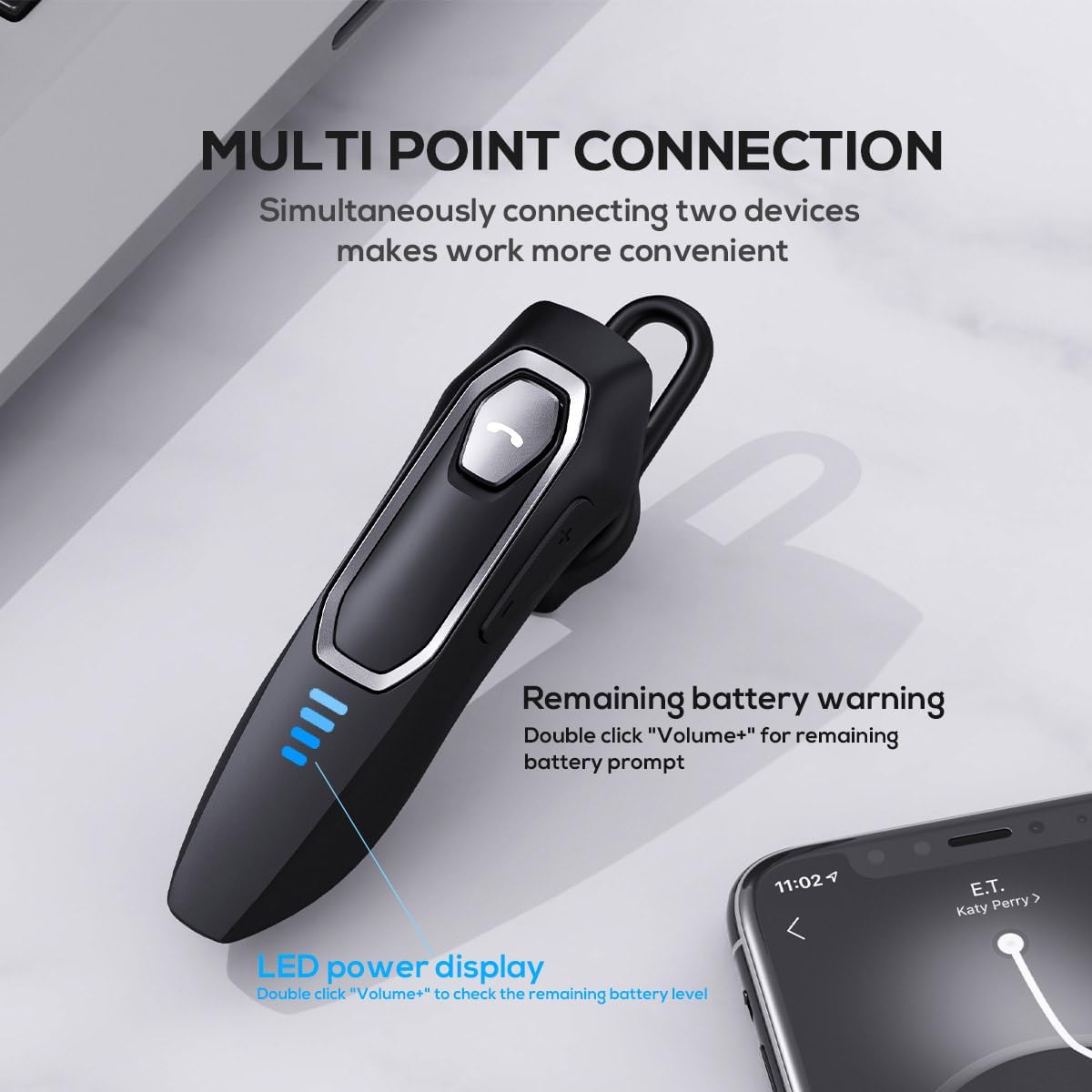
Image: The Micool headset demonstrating its multi-point connection capability, allowing simultaneous connection to two devices.
Иштөө нускамалары
Күйгүзүү/өчүрүү
- Күйгүзүү: Көп функциялуу баскычты 3 секунд басып туруңуз.
- Өчүрүү: Көп функциялуу баскычты 5 секунд басып туруңуз.
Чалууларды башкаруу
- Чалууга жооп берүү/аяктоо: Көп функциялуу баскычты кыска басыңыз.
- Чакырууну четке кагуу: Көп функциялуу баскычты 2 секунд басып туруңуз.
- Микрофондун үнүн басуу/ачуу: During a call, press and hold the Volume "-" button for approximately 2 seconds.
- Redial Last Outgoing Call: Triple-tap the Multi-function Button.

Image: Illustration of the mute function, activated by holding the Volume '-' button.
Музыканы ойнотуу
- Ойнотуу/тындыруу: Көп функциялуу баскычты кыска басыңыз.
- Кийинки трек: Press and hold the Volume "+" button for 2 seconds.
- Мурунку трек: Press and hold the Volume "-" button for 2 seconds.
Үндү көзөмөлдөө
- Көлөмүн жогорулатуу: Short press the Volume "+" button.
- Көлөмдү азайтуу: Short press the Volume "-" button.
Үн жардамчысы
- Үн жардамчысын жандыруу (Siri, Google Assistant ж.б.): Double-click the Multi-function Button.
LED Power Display
- The four LED lights indicate the remaining battery level, with each light representing approximately 25% charge.
- To check the remaining power, double-click the Volume "+" button.
Image: The LED power display on the headset, indicating battery level.
Техникалык тейлөө
Proper maintenance will help extend the life of your Micool Bluetooth Headset:
- Clean the headset regularly with a soft, dry, lint-free cloth.
- Абразивдүү тазалоочу каражаттарды, эриткичтерди же күчтүү химиялык заттарды колдонбоңуз, анткени алар бетине же ички компоненттерине зыян келтириши мүмкүн.
- Гарнитураны күн нурунан жана экстремалдык температурадан алыс салкын, кургак жерде сактаңыз.
- Ensure the USB-C charging port is free of dust and debris to maintain proper charging connection.
- If the headset gets wet, wipe it dry immediately. Do not charge it until it is completely dry.
Проблемаларды чечүү
Эгерде сиз гарнитураңыз менен кандайдыр бир көйгөйлөргө туш болсоңуз, төмөнкү кеңири таралган көйгөйлөрдү жана чечимдерди караңыз:
| Көйгөй | Мүмкүн себеп | Чечим |
|---|---|---|
| Гарнитура күйбөй жатат. | Батарея аз же түгөнүп калган. | Charge the headset fully using the provided USB-C cable. |
| Түзмөк менен жупташтыруу мүмкүн эмес. | Гарнитура жупташтыруу режиминде эмес; түзмөктө Bluetooth өчүрүлгөн; түзмөк өтө алыс. | Ensure headset is in pairing mode (flashing red/blue); enable Bluetooth on your device; move device closer (within 50m). Clear previous Bluetooth connections if necessary. |
| Үн жок же үн сапаты начар. | Volume too low; headset not connected; audio source issue; interference. | Adjust headset and device volume; re-pair headset; check audio source; move away from other wireless devices. |
| Микрофон иштебей жатат. | Mute function active; microphone blocked; device settings. | Deactivate mute function (hold Volume "-" for 2s); ensure microphone is clear; check microphone settings on your device. |
| Батареянын иштөө мөөнөтү кыска. | Headset not fully charged; high volume usage; aging battery. | Ensure full charge before use; reduce volume; if issue persists after full charge, contact support. |
Техникалык шарттар
- Модель аты: DY20PLUS
- Байланыш технологиясы: Зымсыз (Bluetooth)
- Bluetooth версиясы: 5.4
- Bluetooth диапазону: 50 метрге чейин
- Батареянын иштөө мөөнөтү (сүйлөшүү убактысы): 36 саатка чейин
- Батареянын иштөө мөөнөтү (музыканы ойнотуу): 45 саатка чейин
- Заряддоо убактысы: Болжол менен 1.5-2 саат
- Заряддоо порту: USB-C
- Ызы-чууну көзөмөлдөө: Активдүү ызы-чууну жокко чыгаруу (кош микрофон)
- Шайкеш түзмөктөр: Smartphones, Tablets, Smart Speakers
- Салмагы: 2.08 унция (болжол менен 59 грамм)
- Материал: Акрилонитрил бутадиен стирол (ABS)
- Сууга туруктуулук деңгээли: Сууга чыдамдуу
- Жыштык диапазону: 20 Гц - 20 000 Гц
Кепилдик жана колдоо
Micool products are designed for reliability and performance. For detailed warranty information, including coverage and terms, please refer to the warranty card included with your product or visit the official Micool webсайт.
For technical support, troubleshooting assistance, or any inquiries regarding your Micool Bluetooth Headset, please contact our customer service team through the contact information provided on your product packaging or via the Micool Amazon Store:
Micool Amazon Store: Дүкөнгө кириңиз
Our support team is available to assist you with any questions or concerns you may have.