
Micool BT-X easy
Micool BT-X Easy кулакчындары үчүн колдонуучунун колдонмосу
Model: BT-X easy
Introduction
Thank you for choosing the Micool BT-X Easy On-Ear Headphones. These headphones are designed to provide a comfortable listening experience with high-quality audio and extended battery life. Featuring Bluetooth 5.4 technology and a unique open-ear design, they are perfect for various activities, from sports to daily commutes.
Кутуда эмне бар
- Micool BT-X Easy On-Ear Headphones (Left & Right)
- Зымсыз кубаттоо кутусу
- USB-C заряддоо кабели
- User Manual
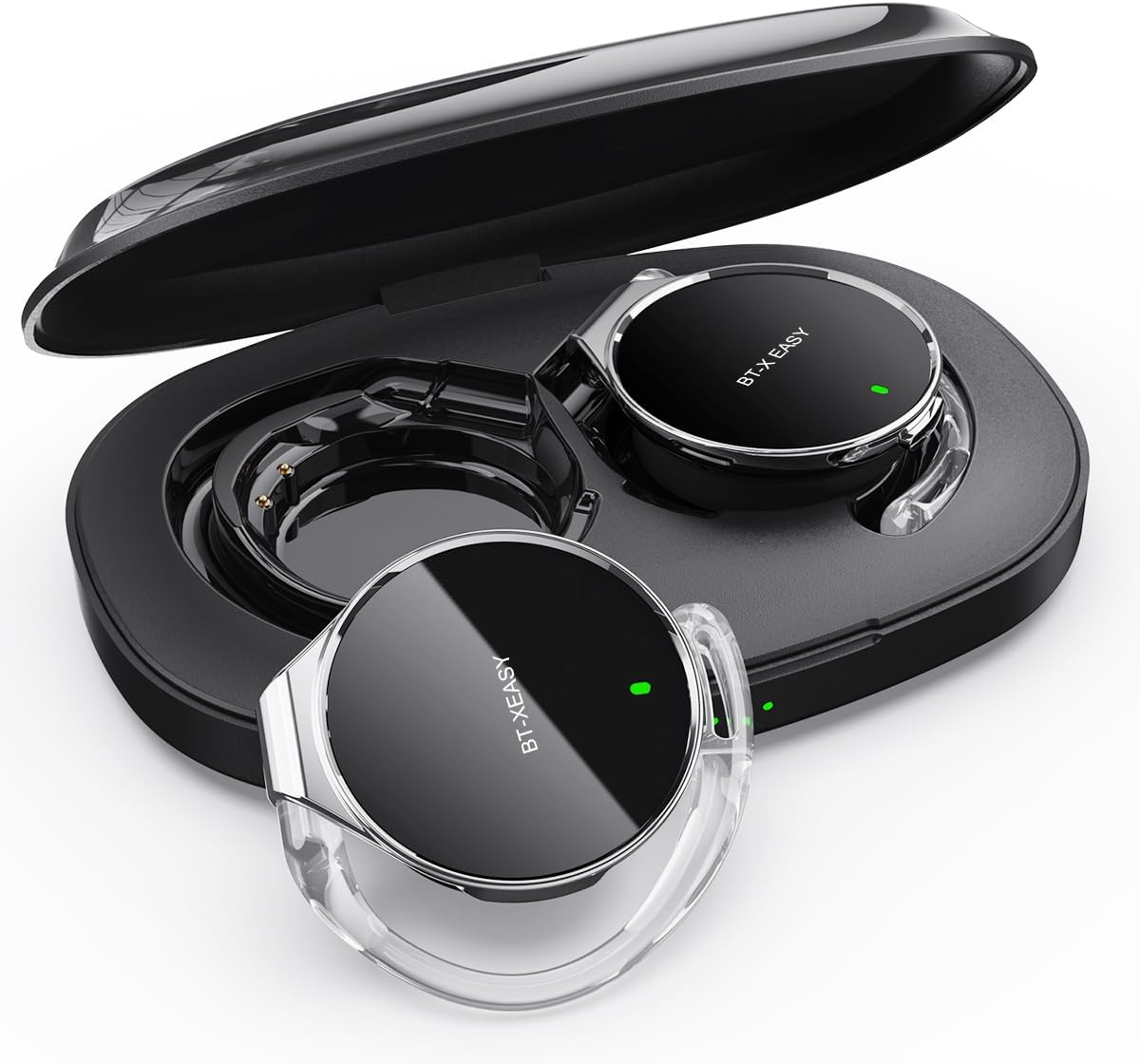
Image: Micool BT-X Easy On-Ear Headphones and their charging case, showing the headphones placed inside the open case.
Продукт өзгөчөлүктөрү
- HD Stereo Audio: 28mm speakers for rich bass and clear sound.
- Bluetooth 5.4: Fast pairing, stable connection, and reliable use.
- Ызы-чууну азайтуу: ANC+ENC adaptive noise reduction for clearer calls with 4 microphones.
- Батареянын узак иштөө мөөнөтү: Up to 18 hours of music playback on a single charge, and up to 52 hours total with the charging case.
- Ыңгайлуу ылайыктуу: Small, lightweight 36mm diameter with sponge earcup design for comfortable wear without ear compression.
- Көп чекиттүү туташуу: Connect to two devices simultaneously (e.g., phone, laptop, tablet).
- Интуитивдик башкаруулар: Easy control of music and calls via multifunction buttons.
- Сууга чыдамдуу: Чачкычтарга жана терге туруштук берүү үчүн иштелип чыккан.

Сүрөт: Жакын план view of the headphone highlighting its compact design and touch control area.
Жайгашуу
1. Баштапкы заряддоо
Before first use, fully charge the headphones and the charging case. Connect the provided USB-C cable to the charging case and a power source. The 4-stage power indicator lights on the case will show the charging progress (each light represents 25% battery capacity).

Image: The charging case displaying its 4-stage battery indicator lights.
2. Түзмөк менен жупташтыруу
- Заряддоо кутучасын ачыңыз. Наушник автоматтык түрдө жупташтыруу режимине өтөт.
- Түзмөгүңүздө (смартфон, планшет, ноутбук) Bluetooth иштетиңиз.
- Издөө "BT-XEASY" in the list of available Bluetooth devices and select it to connect.
- Туташкандан кийин үн билдирүүсү ийгиликтүү жупташтырууну ырастайт.
3. Multi-point Connection (Optional)
To connect to a second device, disconnect the headphones from the first device's Bluetooth settings. Then, pair with the second device following the steps above. Reconnect to the first device from its Bluetooth settings. The headphones will now be connected to both devices simultaneously.
Иштөө нускамалары
Наушник тагынуу
- 1-кадам: Open the ear-hook at a 30° angle.
- 2-кадам: Rotate the headphone around your ear to the bottom of the ear-hook.
- 3-кадам: Наушниктерди басыңыз жана clamp them tightly to your ear.
- 4-кадам: Adjust the angle to make wearing more comfortable.

Image: Step-by-step visual guide on how to properly wear the on-ear headphones.
Touch Controls
The BT-X Easy headphones feature intuitive touch controls on each headset for easy management of audio and calls.
| Функция | Акция |
|---|---|
| Музыканы ойнотуу/тындыруу | x1 чыкылдатыңыз |
| Чалууга жооп берүү/аяктоо | x1 чыкылдатыңыз |
| Чакырууну четке кагуу | Узак басуу |
| Mute (in call) | Click x2 (prompt sound will confirm) |
| Кийинки трек | Click x2 (Right Headphone) |
| Мурунку трек | Click x2 (Left Headphone) |
| Үндү көтөрүү | Hold (Right Headphone) |
| Үндү төмөндөтүү | Hold (Left Headphone) |

Image: Diagram illustrating the touch control functions on the headphone.
Расмий продукт Video
Video: An official product video from Micool demonstrating the features and usage of the BT-X Easy On-Ear Headphones. This video provides a visual guide to the product's design, comfort, and functionality, including how to wear them and use the touch controls.
Техникалык тейлөө
- Тазалоо: Наушниктерди жана кубаттоочу кутуну тазалоо үчүн жумшак, кургак чүпүрөктү колдонуңуз. Абразивдүү тазалагычтарды же эриткичтерди колдонбоңуз.
- Сактагыч: When not in use, store the headphones in their charging case to protect them and ensure they are charged for next use.
- Батареяга кам көрүү: Батареянын иштөө мөөнөтүн узартуу үчүн, кулакчындарды бат-баттан толук кубаттап турбаңыз. Узак мөөнөткө колдонулбаса да, аларды дайыма заряддап туруңуз.
- Суу каршылык: The headphones are water-resistant, but not waterproof. Avoid submerging them in water or exposing them to heavy rain. Dry them thoroughly if they get wet.
Проблемаларды чечүү
| Көйгөй | Мүмкүн чечим |
|---|---|
| Кулакчындар жупташкан жок | Ensure headphones are charged. Turn off and on Bluetooth on your device. Forget "BT-XEASY" from your device's Bluetooth list and re-pair. |
| Үн жок же үнү төмөн | Check device volume and headphone volume. Ensure headphones are properly connected. Try playing different audio sources. |
| Бир кулакчын иштебей жатат | Place both headphones back in the charging case, close the lid, wait a few seconds, then open and try again. Ensure both are charged. |
| Заряддоо куту заряддалбай жатат | Check USB-C cable and power adapter. Ensure proper connection. |
| Туташуу туруксуз | Move closer to your device. Avoid strong electromagnetic interference. Ensure no other devices are trying to connect simultaneously. |
Техникалык шарттар
| Өзгөчөлүк | Деталь |
|---|---|
| Модель аты | BT-X easy |
| Байланыш технологиясы | Зымсыз (Bluetooth 5.4) |
| Аудио драйвер түрү | Динамикалык драйвер (28 мм динамиктер) |
| Батареянын иштөө мөөнөтү (наушник) | 18 саатка чейин |
| Батареянын жалпы иштөө мөөнөтү (корпус менен) | 52 саатка чейин |
| Noise Control | Active Noise Cancellation (ANC+ENC for calls) |
| Микрофондор | 4 Микрофондор |
| Сууга туруктуулук деңгээли | Сууга чыдамдуу |
| Материал | Акрилонитрил бутадиен стирол (ABS) |
| Элемент Салмагы | 5 унция |
| UPC | 775494925862 |
Кепилдик жана колдоо
Micool provides 24-hour after-sales service for all purchased items. For any issues or inquiries, please contact Micool customer support through the official brand store or the platform where you purchased the product.
For detailed warranty information, please refer to the warranty card included in your product packaging or visit the official Micool webсайт. Коргоо пландары кеңейтилген камтуу үчүн да жеткиликтүү болушу мүмкүн.
Micool Brand Store: Visit Micool Store on Amazon
Ask a question about this manual
Ask about setup, troubleshooting, compatibility, parts, safety, or missing instructions. Manuals+ will review the question and use this page’s manual context to help answer it.