
Introduction
This manual provides essential information for the proper setup, operation, and maintenance of your My Arcade Sonic The Hedgehog Joystick Player. Please read this manual thoroughly before using the product to ensure a safe and enjoyable gaming experience.
Продукт бүттүview
The My Arcade Sonic The Hedgehog Joystick Player is a portable retro gaming console featuring classic SEGA titles. It offers an authentic arcade experience with a joystick and dedicated buttons.
Негизги өзгөчөлүктөрү:
- Officially licensed SEGA game console.
- High-resolution 3.5-inch full-color display.
- камтыйт Sonic the Hedgehog жана Соник кирпи 2.
- 3.5mm headphone jack for private audio.
- Үндү башкаруу менен орнотулган динамик.
- Жөнгө салынуучу экран жарыктыгы.
- Powered by 4 AA batteries (not included) or USB-C cable (not included).
Компоненттери:
- Gaming Console Unit
- Джойстик
- Action Buttons (A, B, C)
- Башкы бет баскычы
- Credit/Start Button
- Үндү көзөмөлдөө (+/-)
- Жарыктыкты көзөмөлдөө
- 3.5 мм гарнитура уясы
- USB-C Power Input (5V IN)
- Battery Compartment (requires 4 AA batteries)

The My Arcade Sonic The Hedgehog Joystick Player, a portable retro gaming console.
Жайгашуу
Консольду кубаттоо:
- Батарея орнотуу: Locate the battery compartment on the back of the console. Insert 4 AA batteries (not included), ensuring correct polarity.
- USB-C Power (Optional): Alternatively, connect a USB-C cable (not included) to the 5V IN port on the back of the console to power it.
Алгачкы колдонуу:
- Peel off the protective screen sticker before use.
- Turn on the console using the power switch located on the back.

Арткы view of the console, highlighting the battery compartment, USB-C port, and headphone jack.
Иштөө нускамалары
Game Selection and Start:
- Once powered on, use the joystick to navigate and select your desired game (Sonic the Hedgehog or Соник кирпи 2) from the main menu.
- басыңыз START/CREDIT button to add virtual coins and begin the game.
- To skip the Sonic demo mode, press the START/CREDIT баскычы.
Башкаруу каражаттары:
- Джойстик: Controls character movement.
- Action Buttons (A, B, C): Perform in-game actions such as jumping or attacking.
- Үндү башкаруу (+/-): Adjust the sound level of the built-in speaker using the buttons on the back of the console.
- Экран жарыктыгы: Adjust the screen brightness using the dedicated button on the back.
- Гарнитура уячасы: For private listening, connect 3.5mm headphones to the headphone jack on the back.
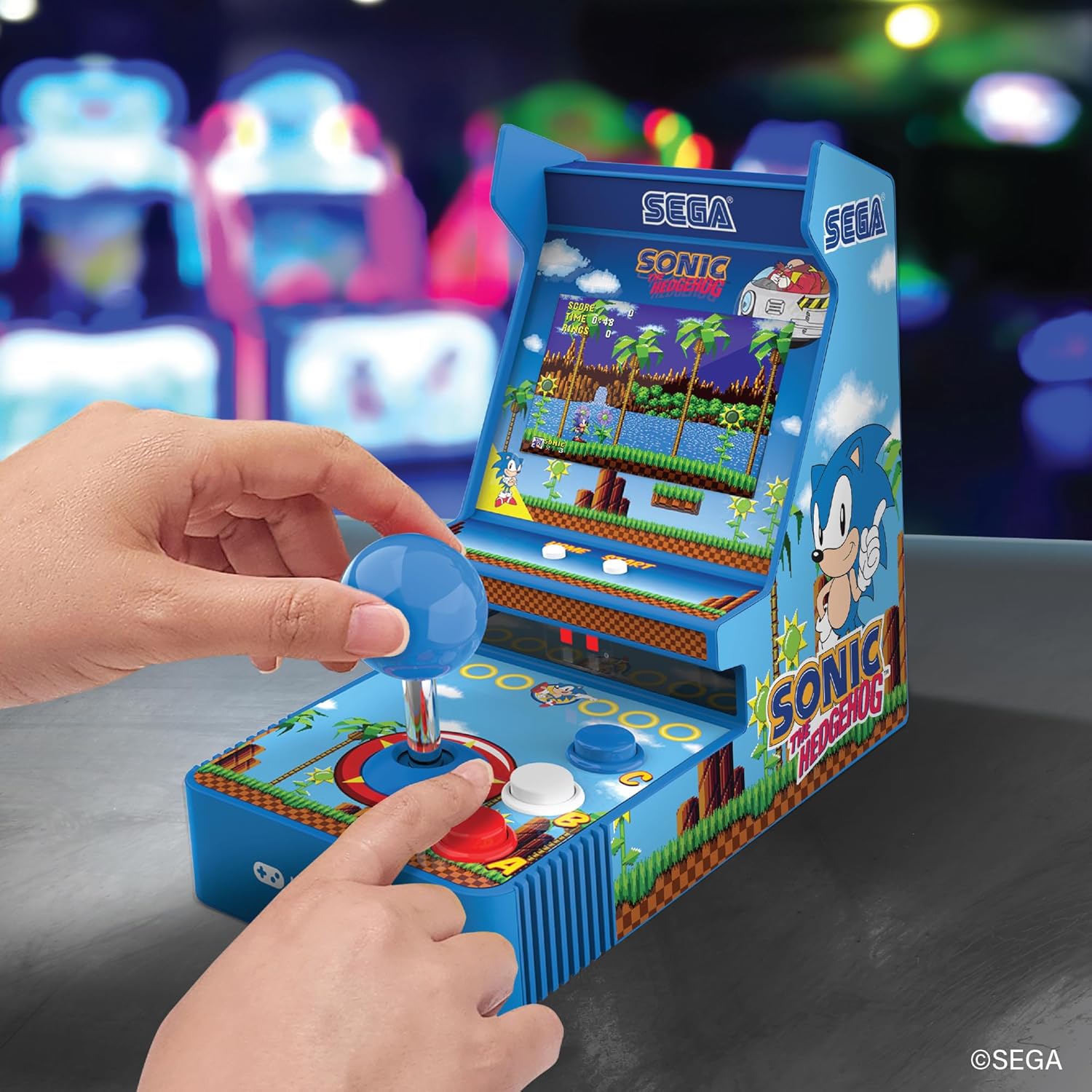
Фронт view of the console, showing the joystick, action buttons, and screen during gameplay.
Official video demonstrating the My Arcade Sonic Arcade Game in action, showcasing gameplay and features.
Техникалык тейлөө
To ensure the longevity of your My Arcade Sonic The Hedgehog Joystick Player, follow these simple maintenance guidelines:
- Keep the console clean by wiping it with a soft, dry cloth. Avoid using abrasive cleaners or solvents.
- Консолду салкын, кургак жерде, күндүн түз тийген нурларынан жана өтө жогорку температурадан алыс сактаңыз.
- If not in use for an extended period, remove the AA batteries to prevent leakage.
Проблемаларды чечүү
If you encounter any issues with your My Arcade Sonic The Hedgehog Joystick Player, refer to the following common solutions:
- Консоль күйбөйт: Ensure that fresh AA batteries are correctly installed or that the USB-C cable is securely connected to a power source.
- Game does not start from demo mode: басыңыз START/CREDIT button to exit demo mode and begin gameplay.
- Үн жок: Check the volume control buttons on the back of the console. If headphones are connected, ensure they are fully plugged in and functioning correctly.
- Экран күңүрт: Adjust the screen brightness using the dedicated button on the back of the console.
If problems persist, please contact My Arcade customer support for further assistance.
Техникалык шарттар
| Өзгөчөлүк | Деталь |
|---|---|
| Продукциянын өлчөмдөрү | 4"L x 6.8"W x 7.6"H |
| Controller Type | Джойстик |
| Элемент Салмагы | 0.63 килограмм (1.39 фунт) |
| Screen Size | 3.5 дюйм |
| Power Source | 4 AA batteries (not included) or USB Type C (not included) |
| Аппараттык интерфейс | USB түрү C |
| Дисплей түрү | LCD |
| Материал | Пластик |
| Эстутум сактоо сыйымдуулугу | 4 MB |
| Модель номери | DGUNL-7157 |
| UPC | 845620071579 |
Коопсуздук маалыматы
- Кичинекей бөлүктөрүнө байланыштуу 3 жашка чейинки балдар үчүн ылайыктуу эмес.
- Колдонуу учурунда жаш балдарды дайыма көзөмөлдөп туруңуз.
- Do not expose the console to water or excessive moisture.
- Консольду түшүрүп алуудан же катуу соккуга кабылтуудан алыс болуңуз.
- Use only recommended battery types and ensure correct installation.
Кепилдик жана колдоо
For warranty information or technical support, please refer to the official My Arcade webсайтка же кардарларды тейлөө бөлүмүнө кайрылыңыз. Сатып алганыңыздын далили катары сатып алуу дүмүрчөгүңүздү сактаңыз.