
1. Киришүү
This manual provides detailed instructions for the installation, operation, and maintenance of the TMEZON MZ-VDP-NE160 4-wire doorbell camera. This outdoor station is designed to work seamlessly with compatible TMEZON videophone monitors, such as the MZ-IP-V728TW, to provide secure and convenient visitor management for your property.
2. Коопсуздук маалыматы
Please read and understand all safety instructions before installing or operating this device. Failure to follow these instructions may result in electric shock, fire, or damage to the product.
- Электр коопсуздугу: Installation should be performed by a qualified electrician or technician. Ensure power is disconnected before any wiring work.
- Суу таасири: While designed for outdoor use, avoid direct high-pressure water jets. Ensure all connections are properly sealed.
- Температура: Түзмөктү анын иштөө диапазонунан тышкары өтө жогорку температураларга дуушар кылбаңыз.
- Тазалоо: Тазалоо үчүн жумшак, кургак чүпүрөктү колдонуңуз. Абразивдүү тазалагычтарды же эриткичтерди колдонбоңуз.
3. Пакеттин мазмуну
Пакетте бардык компоненттер бар экенин текшериңиз:
- 1 x TMEZON MZ-VDP-NE160 Doorbell Camera Unit
- Монтаждоо бурамалар жана дубал сайгычтар
- Зымдарды туташтыргычтар
- Колдонуучунун Колдонмосу (бул документ)
4. Продукт бүтүп калдыview
The TMEZON MZ-VDP-NE160 is an outdoor doorbell camera unit. It features a camera for video surveillance, a microphone for audio input, a speaker for audio output, and a call button to initiate communication with the indoor monitor.
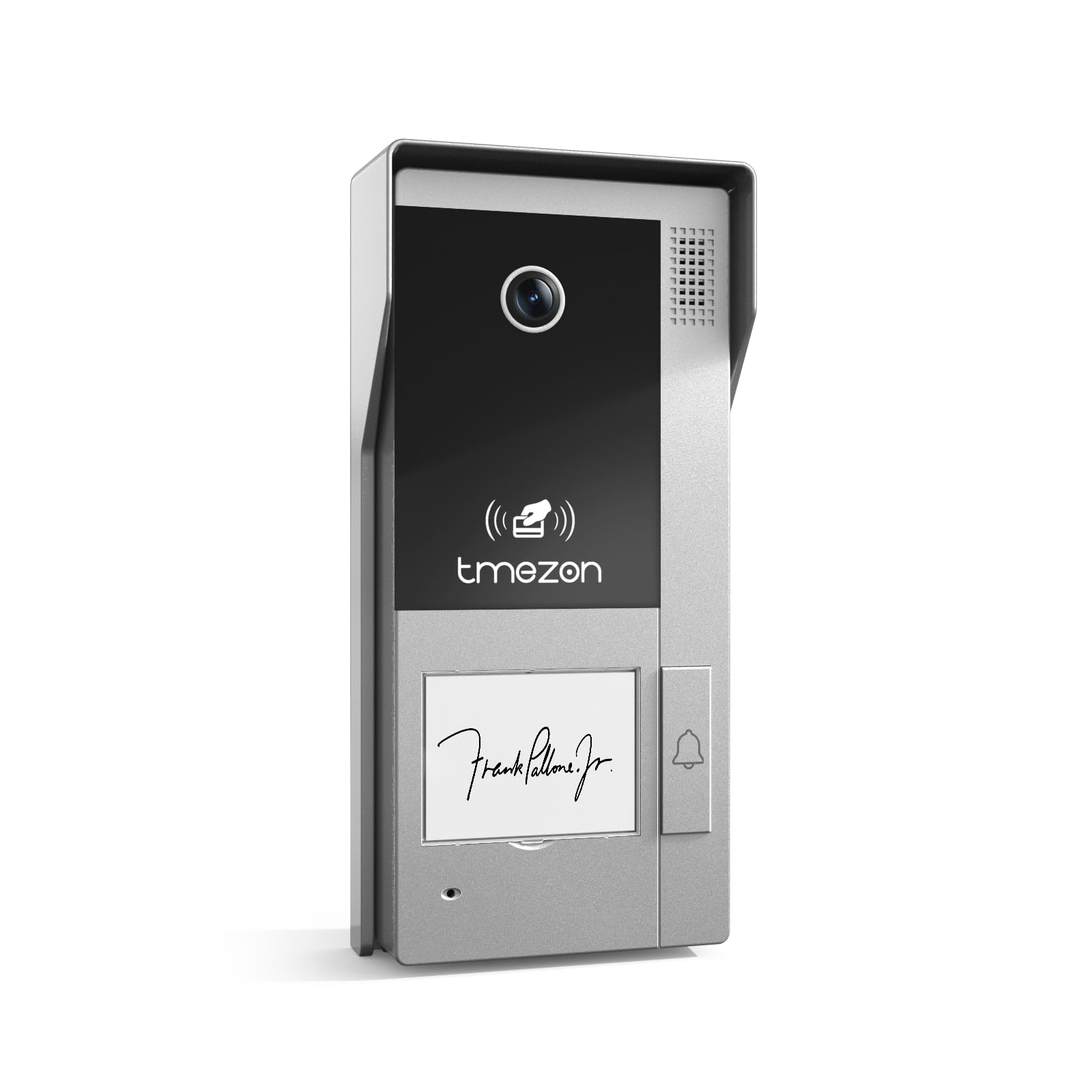
Сүрөт 1: Алдыңкы view of the TMEZON MZ-VDP-NE160 doorbell camera, showing the camera lens, call button, microphone, and speaker grille.
Негизги компоненттерге төмөнкүлөр кирет:
- Камера линзасы: Видео түрмөгүн тартып алат.
- Чалуу баскычы: Activates the indoor monitor and initiates communication.
- Микрофон: Коноктордон аудио жаздырып алат.
- Баяндамачы: Allows two-way audio communication.
- Wiring Terminal (Rear): For connecting the 4-wire cable to the indoor monitor and power supply.
5. Орнотуу жана орнотуу
The MZ-VDP-NE160 is a 4-wire system. Proper wiring is crucial for correct operation. It is recommended to consult a professional for installation if you are unfamiliar with electrical wiring.
5.1 Монтаждалуучу жер
- Choose a location near your entrance, typically at a height of 1.4 to 1.6 meters (4.6 to 5.2 feet) from the ground, ensuring a clear view зыяратчылардын.
- Avoid direct sunlight or strong light sources that could cause glare on the camera.
- Монтаждоо бетинин тегиз жана туруктуу болушун камсыз кылыңыз.
5.2 Электр кошуу схемасы (жалпы)
The doorbell camera connects to the indoor monitor (e.g., MZ-IP-V728TW) using a 4-wire cable. The typical connections are:
- Зым 1: Аудио
- Зым 2: Video
- Зым 3: Жер (GND)
- Зым 4: Кубат (DC 12V)
Note: Refer to the specific wiring diagram provided with your indoor monitor for precise connection details. Ensure polarity is correct for power connections.
5.3 Орнотуу кадамдары
- Кубатты өчүрүү: Before starting, ensure all power to the existing doorbell system and the indoor monitor is turned off at the circuit breaker.
- Монтаждык кронштейн: Secure the mounting bracket (if applicable, or the unit directly) to the wall using the provided screws and wall plugs.
- Зым туташуу: Connect the 4-wire cable from the indoor monitor to the corresponding terminals on the rear of the MZ-VDP-NE160 doorbell camera. Ensure connections are secure.
- Коопсуздук бирдиги: Attach the doorbell camera unit to the mounting bracket or directly to the wall, ensuring it is firmly in place.
- Күчтү калыбына келтирүү: Бардык туташуулар орнотулуп, бекитилгенден кийин, системаны электр менен камсыз кылууну калыбына келтириңиз.
- Сыноо системасы: Test the doorbell functionality by pressing the call button and verifying communication with the indoor monitor.
6. Иштөө нускамалары
The TMEZON MZ-VDP-NE160 doorbell camera operates in conjunction with your TMEZON indoor monitor.
- Конокко чалуу: When a visitor presses the call button on the MZ-VDP-NE160, the indoor monitor will ring and display the video feed from the doorbell camera.
- Эки тараптуу байланыш: On the indoor monitor, you can answer the call to engage in two-way audio communication with the visitor.
- Door Release (if connected): If an electronic door lock is connected to your indoor monitor system, you can typically unlock the door from the indoor monitor during a call.
- Мониторинг: Some indoor monitors allow you to manually view the live video feed from the doorbell camera at any time, even without a visitor pressing the button.
7. Техникалык тейлөө
Regular maintenance helps ensure the longevity and optimal performance of your doorbell camera.
- Тазалоо: Periodically wipe the camera lens and the front panel with a soft, slightly damp чаңды жана кирди тазалоо үчүн кездеме. Катуу химиялык заттарды же абразивдүү материалдарды колдонбоңуз.
- Байланыштарды текшерүү: Annually, inspect the wiring connections for any signs of corrosion or loosening. Ensure the unit is securely mounted.
- Программалык камсыздоо жаңыртуулары: While this specific unit does not have user-updatable software, ensure your indoor monitor's firmware is up to date for best compatibility and features.
8. Кыйынчылыктарды
If you encounter issues with your MZ-VDP-NE160 doorbell camera, refer to the following common problems and solutions:
| Көйгөй | Мүмкүн себеп | Чечим |
|---|---|---|
| No video/audio on indoor monitor |
|
|
| Чакыруу баскычы жооп бербей жатат |
|
|
| Видеонун сапаты начар |
|
|
Эгерде бул чечимдерди колдонуп көргөндөн кийин да көйгөй чечилбесе, TMEZON кардарларды колдоо кызматына кайрылыңыз.
9. Техникалык шарттар
| Өзгөчөлүк | Деталь |
|---|---|
| Модел | MZ-VDP-NE160 |
| Бренд | TMEZON |
| Продукциянын өлчөмдөрү (L x W x Y) | 1 x 1 x 1 см |
| Зымдар түрү | 4-зым системасы |
| Operating Voltage | 240 Volts (System dependent, typically 12V DC for the unit itself, 240V might refer to power supply input) |
| Энергияны керектөө | 5 Ватт |
| Түс | Боз |
| Камтылган компоненттер | Коңгуроо бирдиги |
10. Кепилдик жана колдоо
For warranty information and technical support, please refer to the documentation provided with your complete TMEZON videophone system or visit the official TMEZON webсайт. Сатып алуу квитанциясын кепилдик дооматтары үчүн сатып алуунун далили катары сактаңыз.
For direct assistance, you may contact TMEZON customer service through their official channels.