
UNITOPSCI A4034A3
UNITOPSCI 10.4 Inch Single Din Adjustable Vertical Car Stereo
User Manual
Model: A4034A3 | Brand: UNITOPSCI
1. Киришүү
This manual provides detailed instructions for the installation, operation, and maintenance of your UNITOPSCI 10.4 Inch Single Din Adjustable Vertical Car Stereo. Please read this manual thoroughly before using the product to ensure proper function and safety.
Негизги өзгөчөлүктөрү:
- 10.4 Inch IPS 1280*480 Vertical Touchscreen with Detachable & Adjustable Design
- Wireless CarPlay & Android Auto Support
- Hands-Free чалуу жана аудио агым үчүн Bluetooth 5.2
- FM/AM/RDS Radio with EQ Adjustments
- USB & TF Card Playback and Charging
- Mirror Link Functionality
- Арткы бөлүгүн колдоо View Camera and Steering Wheel Control (SWC)
- Seven Color Backlight Options

Figure 1.1: ашыкview of the UNITOPSCI 10.4 Inch Car Stereo with included backup camera and smartphone integration icons.
2. Кутуда эмне бар
Пакетиңиздин мазмунун төмөндөгү тизме менен текшериңиз:
- 1 x Car MP5 Player
- 1 x Кубат кабели
- 1 x Horn Cable
- 1 x Микрофон
- 1 х Монтаждык кашаа
- 1 x User Manual
- 1 x D-BUS кабели
- 1 x 12 LEDs Backup Camera
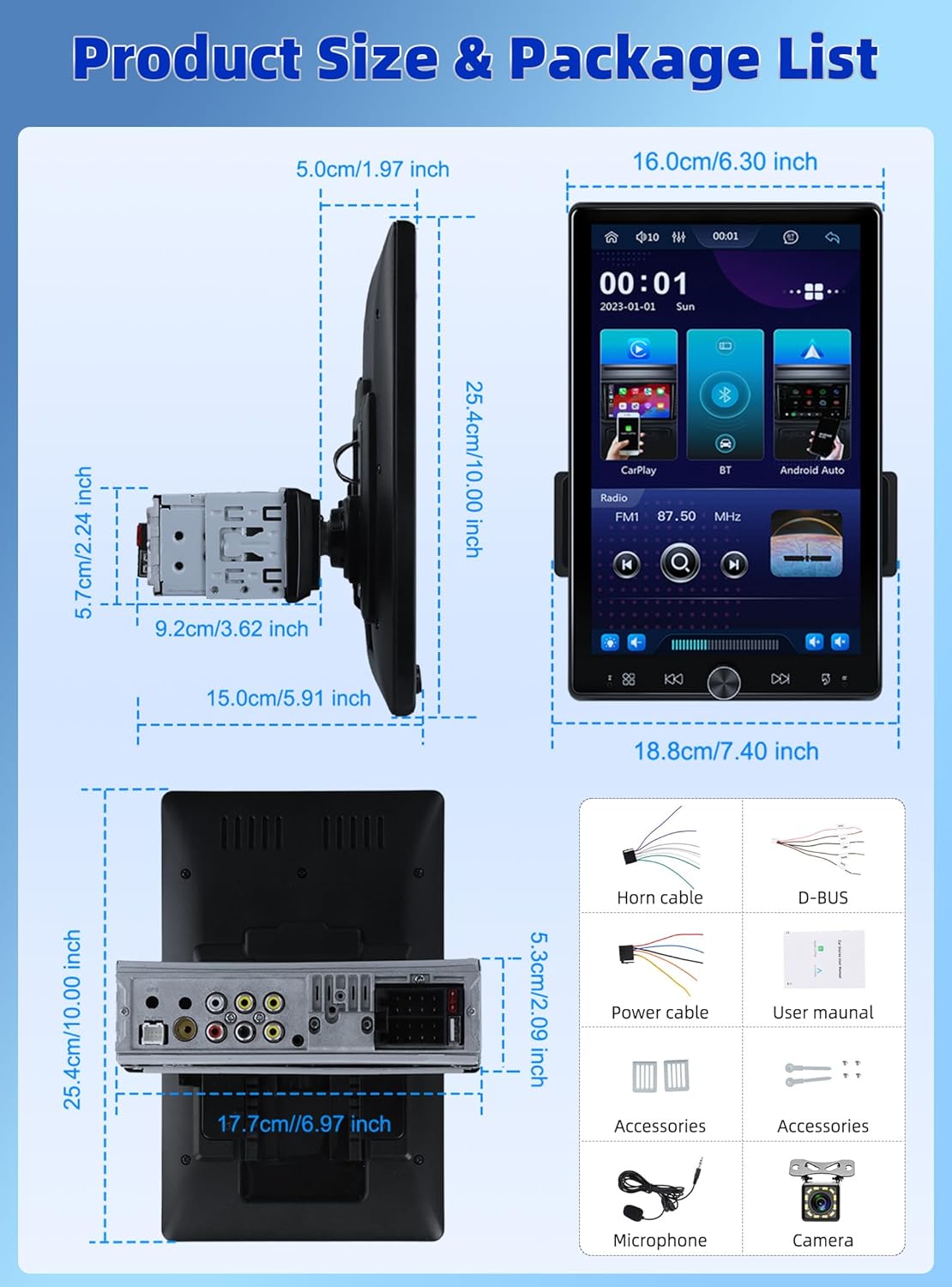
Figure 2.1: Diagram showing the dimensions of the car stereo and a visual representation of the included package contents.
3. Орнотуу жана орнотуу
Оптималдуу иштөө үчүн туура орнотуу абдан маанилүү. Бул түзүлүштү кесипкөй адис орнотушу сунушталат.
3.1 Экранды тууралоо
The 10.4-inch floating touchscreen is designed for adjustability to provide the best viewing angle. It can be adjusted in three directions:
- Approximately 30° front/rear tilt
- Approximately 30° left/right tilt
- Approximately 5cm vertical movement

Figure 3.1: Illustration of the adjustable and floating design of the 10.4-inch touchscreen, highlighting tilt and vertical movement capabilities.
3.2 Арткы View Камеранын зымдары
To enable the automatic display of the reversing video, connect the included rear view camera according to the diagram below. Ensure the trigger wire (labeled "back" or "reverse" on the power cable) is connected to the reversing light positive.
- The rear camera features 12 LED lights for clear images in various conditions.
- A 170° horizontal wide angle provides a comprehensive view.

Figure 3.2: Detailed wiring diagram for connecting the rear view camera to the car stereo system.
4. Иштөө нускамалары
4.1 Wireless CarPlay & Android Auto
Connect your smartphone wirelessly or via USB to access CarPlay or Android Auto. This allows seamless integration of your phone's contacts, GPS navigation, music, and other applications directly on the car stereo screen.

Figure 4.1: Display showing the Wireless CarPlay and Android Auto interfaces, including voice assistant prompts.
4.2 Bluetooth 5.2 Байланыш
The unit features advanced Bluetooth 5.2 technology for faster and more stable connections. Use Bluetooth for hands-free calling and streaming music with lossless sound quality.

Figure 4.2: Screenshots illustrating the Bluetooth 5.2 interface for hands-free calls and music playback.
4.3 FM/RDS Radio and EQ
Enjoy digital stereo FM radio with 18 preset stations. The RDS function provides real-time road conditions, news, and weather. Customize your audio experience using the multi-band EQ mode.

Figure 4.3: Visuals of the FM/RDS radio interface and the adjustable equalizer settings.
4.4 USB & TF Card Functionality
The unit supports USB for media playback and phone charging. The TF card slot allows for playing various audio formats.
4.5 Knob Control and Backlight
A physical knob provides easy adjustment for volume, mute, and power on/off. The unit also features seven customizable backlight colors to match your car's interior.

Figure 4.4: Depiction of the various interfaces, USB charging capability, the adjustable knob, and the seven-color backlight feature.
4.6 Рулду башкаруу (SWC)
If your vehicle supports it, connect the SWC wires to control various functions (e.g., switch songs, adjust volume) directly from your steering wheel for convenience and safety.
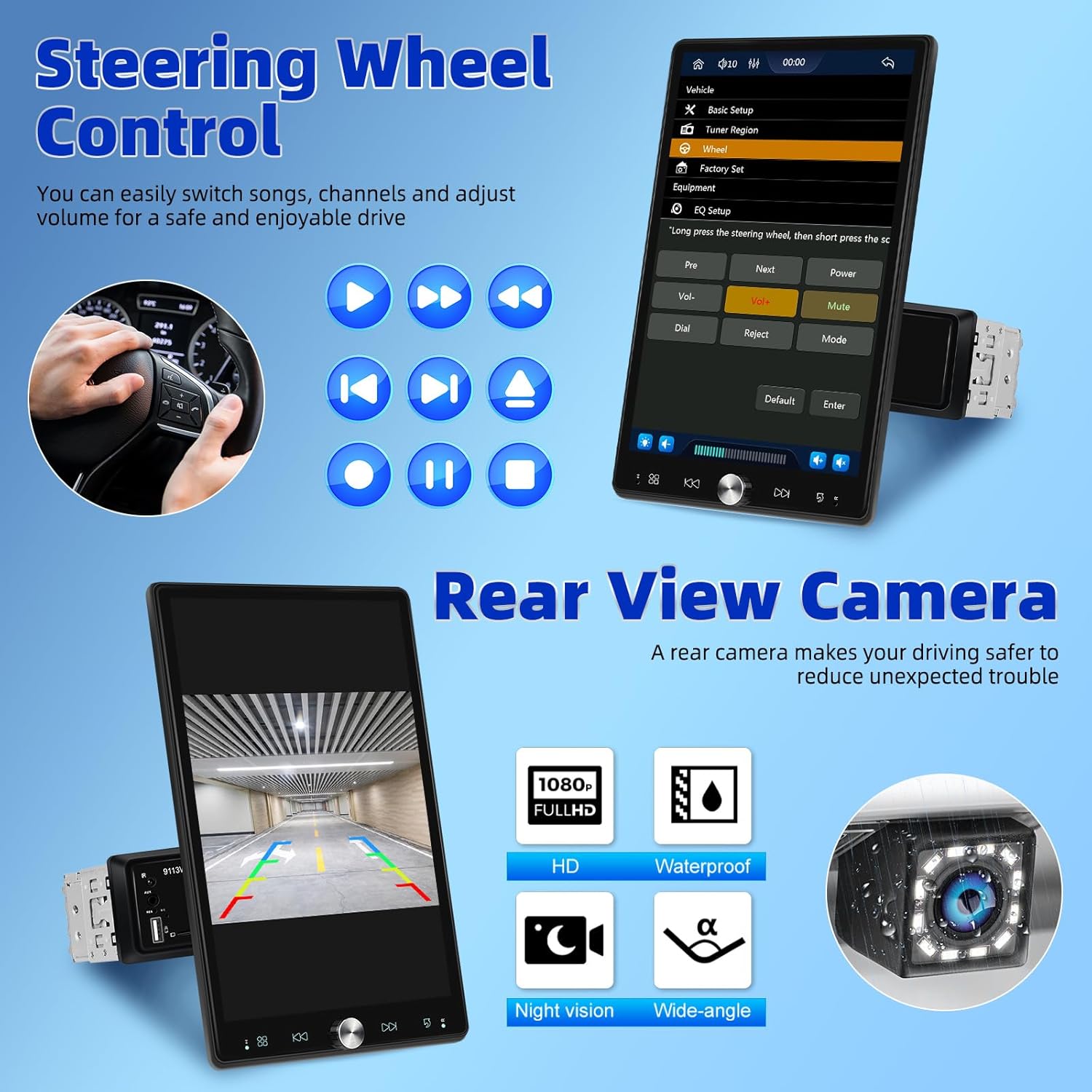
Figure 4.5: Illustration of steering wheel control functionality and the display of the rear view камера берүү.
4.7 Mirror Link
The mirror link function allows you to display your smartphone's screen directly onto the car stereo's display.
5. Техникалык тейлөө
Унаа стереоңуздун узак иштөөсүн жана оптималдуу иштешин камсыз кылуу үчүн, төмөнкү тейлөө көрсөтмөлөрүн аткарыңыз:
- Тазалоо: Экранды жана сыртын тазалоо үчүн жумшак, кургак чүпүрөктү колдонуңуз. өжөр тактар үчүн, бир аз гampкездемени суу менен сүртүңүз. Абразивдүү тазалоочу каражаттардан же эриткичтерден алыс болуңуз.
- Температура: Аппаратты экстремалдык температурага, түз күн нуруна узак убакытка же жогорку нымдуулукка дуушар кылбаңыз.
- Вентиляция: Ашыкча ысып кетүүнүн алдын алуу үчүн желдетүү тешиктери жабылбагандыгын текшериңиз.
- Күч: Disconnect power before performing any cleaning or maintenance.
6. Кыйынчылыктарды
Унаа стереоңузда көйгөйлөргө туш болсоңуз, төмөнкү жалпы көйгөйлөрдү жана чечимдерди караңыз:
| Көйгөй | Мүмкүн себеп | Чечим |
|---|---|---|
| Күч жок | Электр туташуусу бошоп калган; сактагыч күйүп кеткен | Электр кабелдерин жана туташууларын текшериңиз; Зарыл болсо, сактагычты текшерип, алмаштырыңыз. |
| Үн жок | Үнү өтө төмөн; Үнсүз режим иштетилген; Динамиктин зымдарында көйгөй бар | Көлөмүн жогорулатуу; Үнсүздү өчүрүү; Динамик байланыштарын текшериңиз. |
| Bluetooth туташпай жатат | Bluetooth off on device/stereo; Pairing mode not active | Ensure Bluetooth is enabled on both devices; Put stereo into pairing mode; Delete previous pairings and re-pair. |
| CarPlay/Android Auto иштебей жатат | Incorrect USB cable; Software glitch; Phone compatibility | Use original or certified USB cable; Restart phone and stereo; Check phone's compatibility with CarPlay/Android Auto. |
| Арткы камера көрүнбөйт | Incorrect wiring; Camera malfunction | Verify all camera wiring, especially the trigger wire; Test camera with another display if possible. |
If the problem persists after trying these solutions, please contact UNITOPSCI customer support.
7. Техникалык шарттар
| Өзгөчөлүк | Спецификация |
|---|---|
| Продукциянын өлчөмдөрү | 5.91 x 7.4 x 10 дюйм (15.0 x 18.8 x 25.4 см) |
| Элемент Салмагы | 2.2 фунт (1 килограмм) |
| Модель номери | A4034A3 |
| Байланыш технологиясы | Көмөкчү, Bluetooth, USB |
| Controller Type | Hand Control |
| Шайкеш түзмөктөр | Смартфон, Динамик |
| Туташтыргыч түрү | USB түрү А |
| Аудио чыгаруу режими | Моно |
| Чыгуу күчү | 180 Ватт |
| Screen Size | 10.4 дюйм |
| Screen Resolution | 1280*480P |
8. Кепилдик жана колдоо
UNITOPSCI is committed to providing high-quality products and satisfactory services. Your product comes with the following support:
- Replacement Available: Within 24 Months of purchase.
- Тез жооп: Кардарларды колдоо кызматы 16 сааттын ичинде жооп берүүгө багытталган.
- Lifetime After-Sales: Consult and Technical Support.
- Кайтаруу саясаты: 60-days No Worry to Return.
For online support, please contact us at: UNITOPSCI@126.com


Figure 8.1: Information regarding UNITOPSCI's customer support, warranty, and contact details.