
1. Киришүү
Thank you for choosing the Auusda T156A 15.6-inch Business Laptop. This manual provides essential information for setting up, operating, and maintaining your new laptop. Please read this manual thoroughly before using the device to ensure proper function and longevity. This laptop is designed for productivity and portability, featuring a 4-core processor, 8GB DDR4 RAM, and a 512GB M.2 PCIe NVMe SSD, all running on Windows 11 Pro.
2. Пакеттин мазмуну
Пакетте бардык буюмдар бар экенин текшериңиз:
- Auusda T156A Laptop
- Кубаттуу адаптер жана кабель
- Тунук баскычтоптун капкагы
- Spanish Keyboard Cover
- Көрсөтмө (бул документ)

Image: The laptop, power adapter, and keyboard covers as included in the package.
3. Продукт бүтүп калдыview
3.1 Негизги өзгөчөлүктөрү
- Күчтүү аткаруу: Equipped with a 4-core N95 processor (1.7-3.4 GHz) and 8GB DDR4 RAM for efficient multitasking.
- AmpСактагыч: Features a 512GB M.2 PCIe NVMe SSD for fast data access and sufficient storage.
- Vibrant Full HD Display: A 15.6" Full HD IPS LCD screen offers clear visuals with wide viewбурчтар.
- Ыңгайлуу өзгөчөлүктөрү: Includes a backlit keyboard for low-light use and a fingerprint reader for secure access.
- Connectivity & Versatility: Offers Bluetooth, an SD card reader, and essential ports for various devices.

Сүрөт: An overview of the Auusda T156A laptop with its main features labeled.
3.2 Процессор жана эс тутум
The laptop is powered by an Intel N95 4-core processor, capable of speeds up to 3.4 GHz, ensuring smooth operation for business and academic tasks. It comes with 8GB of DDR4 RAM and a 512GB M.2 PCIe NVMe Solid State Drive (SSD) for quick boot times and application loading.

Image: A visual representation of the 4-core N95 processor chip.

Image: The laptop highlighting its 8GB RAM and 512GB SSD configuration.
3.3 Дисплей
Experience clear and vibrant visuals on the 15.6-inch Full HD (1920x1080) IPS LCD display. The screen features a narrow bezel and supports 16 million colors, providing an immersive viewing experience. A privacy shutter is integrated for the webкамера

Image: The laptop's 15.6-inch Full HD IPS LCD display and its features.
3.4 Баскычтоп жана сенсордук такта
The laptop features a full-size backlit keyboard, allowing comfortable typing in various lighting conditions. The integrated touchpad includes a fingerprint sensor for secure and quick login.

Image: The backlit keyboard and the fingerprint ID sensor on the touchpad.
3.5 Порттар жана туташуу
The Auusda T156A offers a range of connectivity options:
- DC Power Input
- USB-A Ports (multiple)
- HDMI чыгышы
- microSD карта окугуч
- Наушник уясы
- Bluetooth and Wi-Fi (802.11ac, 802.11ax)
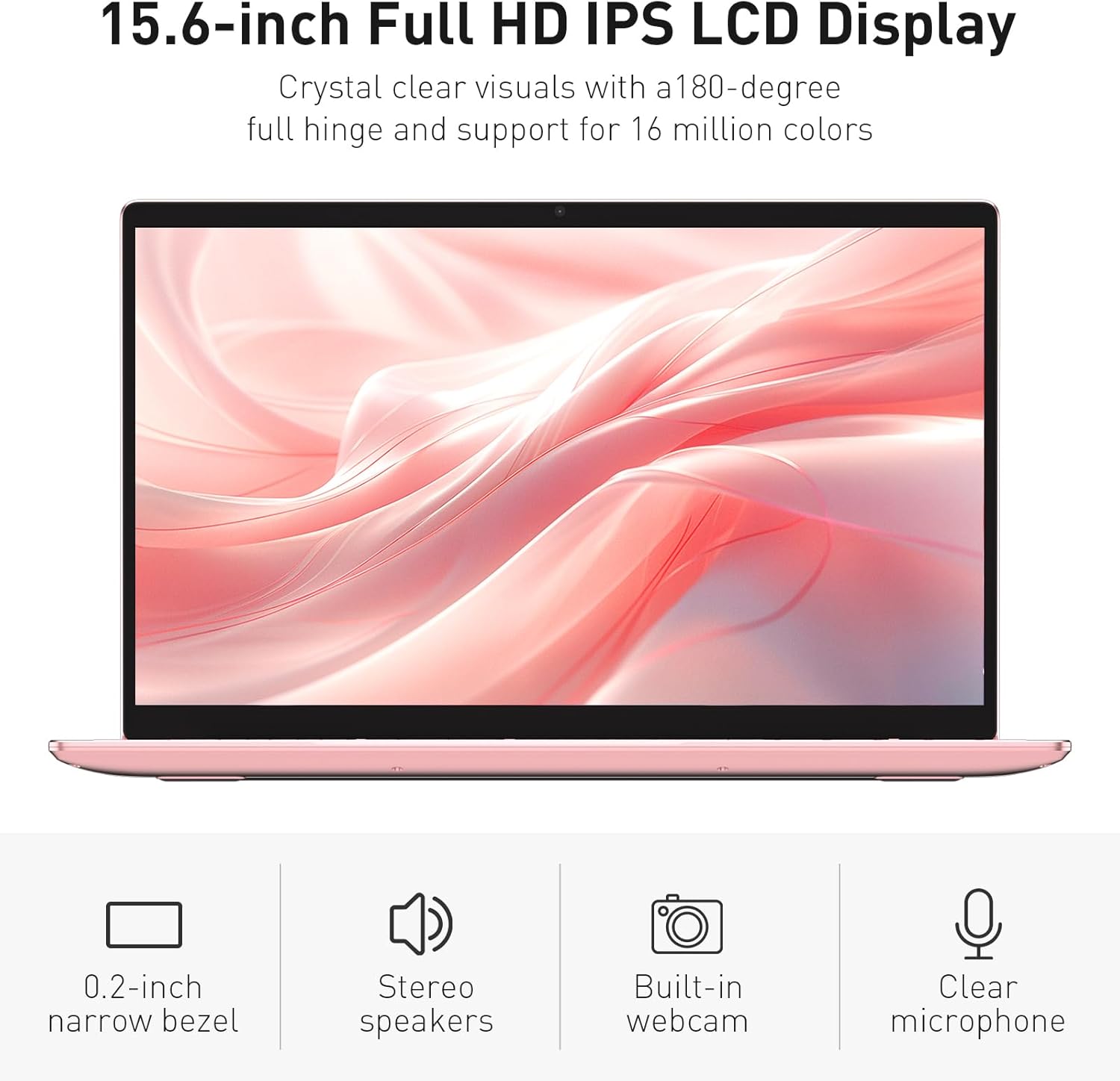
Image: The various ports available on the sides of the laptop.
4. Орнотуу
4.1 Баштапкы күйгүзүү жана заряддоо
- Ноутбукту жана кубат адаптерин кутудан чыгарыңыз.
- Connect the power adapter to the DC power input port on the laptop and then to a power outlet.
- Allow the laptop to charge for at least 30 minutes before initial use, or until the charging indicator light shows a full charge.
- Ноутбукту иштетүү үчүн кубат баскычын басыңыз.
4.2 Windows 11 Pro орнотуулары
Follow the on-screen instructions to complete the initial Windows 11 Pro setup. This will include:
- Аймагыңызды жана клавиатураңызды тандоо.
- Wi-Fi тармагына туташууда.
- Лицензиялык келишимди кабыл алуу.
- Колдонуучу аккаунтун түзүү же Microsoft аккаунту менен кирүү.
4.3 Манжа изи сенсорун орнотуу
For enhanced security, set up the fingerprint sensor:
- Once Windows is set up, navigate to Орнотуулар > Каттоо эсептери > Кирүү параметрлери.
- "Windows Hello Fingerprint" астынан чыкылдатыңыз Жайгашуу.
- Follow the on-screen prompts to register your fingerprint. You will be asked to lift and place your finger multiple times on the sensor until it is fully registered.
5. Ноутбукту иштетүү
5.1 Негизги колдонуу
- Күйгүзүү/өчүрүү: Ноутбукту күйгүзүү же өчүрүү үчүн баскычтоптун жогорку оң бурчунда жайгашкан кубат баскычын басыңыз.
- Уйку режими: Close the lid or press the power button briefly to put the laptop into sleep mode.
- Restart/Shut Down: Access these options from the Start Menu in Windows.
5.2 Жарык клавиатураны башкаруу
The keyboard backlight can be adjusted or turned off using the function keys. Look for the key with a keyboard icon (often F5 or F6) to cycle through brightness levels or toggle the backlight on/off.
5.3 Webcam Privacy Shutter
интеграцияланган webcam includes a physical privacy shutter. Slide the small cover located directly above the webcam lens to open or close it, ensuring your privacy when the camera is not in use.
5.4 Тышкы түзмөктөрдү туташтыруу
Use the available ports to connect peripherals:
- USB түзмөктөрү: Plug USB drives, mice, or keyboards into the USB-A ports.
- Тышкы дисплей: Connect an external monitor or projector using the HDMI port.
- Аудио: Use the headphone jack for headphones or external speakers.
- MicroSD картасы: Insert a microSD card into the dedicated slot for additional storage or data transfer.
5.5 Оюндун натыйжалуулугу
The Auusda T156A is capable of handling light gaming and provides a smooth experience for many popular titles. For optimal performance, ensure your drivers are updated and close unnecessary background applications.
Video: Demonstration of the Auusda T156A laptop's light gaming capabilities.
Видео: Кыска клип шоуcasing the laptop's performance during racing games.
6. Техникалык тейлөө
- Тазалоо: Экранды жана сыртты тазалоо үчүн жумшак, түксүз чүпүрөктү колдонуңуз. Кежир тактар үчүн, гampчүпүрөккө суу же экранды тазалоочу каражат. Катуу химиялык заттардан алыс болуңуз.
- Батареяга кам көрүү: To prolong battery life, avoid fully discharging the battery frequently. It is recommended to keep the battery charged between 20% and 80% when possible. Store the laptop in a cool, dry place.
- Программалык камсыздоо жаңыртуулары: Оптималдуу иштөөнү жана коопсуздукту камсыз кылуу үчүн Windows жаңыртууларын жана драйвер жаңыртууларын үзгүлтүксүз текшерип жана орнотуп туруңуз.
- Вентиляция: Ашыкча ысып кетүүнүн алдын алуу үчүн ноутбуктун желдеткичтери тоскоол болбогонун текшериңиз. Ноутбукту катуу, тегиз жерде колдонуңуз.
- Маалыматтын камдык көчүрмөсү: Дайыма маалыматтын жоголушун алдын алуу үчүн тышкы дискке же булут сактагычка маанилүү маалыматтардын камдык көчүрмөсүн сактоо.
7. Кыйынчылыктарды
This section addresses common issues you might encounter with your Auusda T156A laptop.
| Көйгөй | Мүмкүн чечим |
|---|---|
| Ноутбук күйбөйт. | Ensure the power adapter is securely connected and the outlet is working. Try charging the laptop for a while before attempting to power it on again. |
| Экран бош же кара. | Check if the laptop is powered on. Try pressing Fn + F1 (or the display toggle key) to ensure the display is not turned off. Connect to an external monitor to check if the issue is with the laptop's screen. |
| Wi-Fi туташуу маселелери. | Windows жөндөөлөрүндө Wi-Fi иштетилгенин текшериңиз. Роутериңизди жана ноутбугуңузду өчүрүп-күйгүзүңүз. Жаңыртылган Wi-Fi драйверлерин текшериңиз. |
| Манжа изинин сенсору иштебей жатат. | Ensure your finger is clean and dry. Re-register your fingerprint in Windows settings. Check for driver updates for the fingerprint sensor. |
| Баскычтоптун жарыгы иштебейт. | Press the dedicated backlight function key (e.g., Fn + F5 or F6) to toggle or adjust brightness. |
| Ноутбук жай иштеп жатат. | Close unnecessary applications. Check Task Manager for resource-intensive processes. Ensure sufficient free space on the SSD. Run a malware scan. |
8. Техникалык шарттар
Detailed technical specifications for the Auusda T156A laptop:
| Өзгөчөлүк | Деталь |
|---|---|
| Бренд | Auusda |
| Модель аты | T156A |
| Screen Size | 15.6 дюйм |
| Катуу дисктин өлчөмү | 512 ГБ (SSD) |
| CPU модели | Intel N95 (4-Core, 1.7 GHz base, up to 3.4 GHz turbo) |
| RAM эстутум орнотулган өлчөмү | 8 ГБ DDR4 |
| Операция системасы | Windows 11 Pro |
| Өзгөчөлүктөр | Backlit Keyboard, Fingerprint Reader |
| Графикалык сопроцессор | UHD Graphics (Integrated) |
| Байланыш технологиясы | Bluetooth, Wi-Fi (802.11ac, 802.11ax) |
| Порттардын саны | 2 (USB-A, HDMI, microSD, Headphone Jack) |
| Батарея клеткасынын түрү | Литий Полимер (6000 мАч) |
| Элементтин өлчөмдөрү (L x W x Калыңдыгы) | 14"L x 9"W x 0.7"Mh |
| Native Resolution | 1920 x 1080 пиксель |
| Жаңыртуу ылдамдыгы | 60 Гц |
| Webcam Capability | Yes (with privacy shutter) |
9. Кепилдик жана колдоо
9.1 Продукциянын кепилдиги
The Auusda T156A laptop comes with a 2 жылдык Өндүрүүчүнүн Кепилдиги. Please retain your proof of purchase for warranty claims. For detailed warranty terms and conditions, refer to the documentation provided with your product or contact Auusda customer support.
9.2 Кардарларды колдоо
For technical assistance, troubleshooting, or service inquiries, please visit the official Auusda Store or contact their customer support channels. You can find more information and support resources at the Auusda Official Store on Amazon.
Video: A short promotional video from the Auusda Official Store, showcasing the laptop's features for college students.