
Introduction
Thank you for choosing the LAMAX W9.2 Action Camera. This manual provides essential information for the proper setup, operation, and maintenance of your device. Please read it thoroughly before use to ensure optimal performance and longevity of your camera.
Продукт бүттүview
The LAMAX W9.2 is a versatile action camera designed to capture high-quality videos and photos in various environments. It features dual displays, advanced stabilization, and a robust waterproof design.
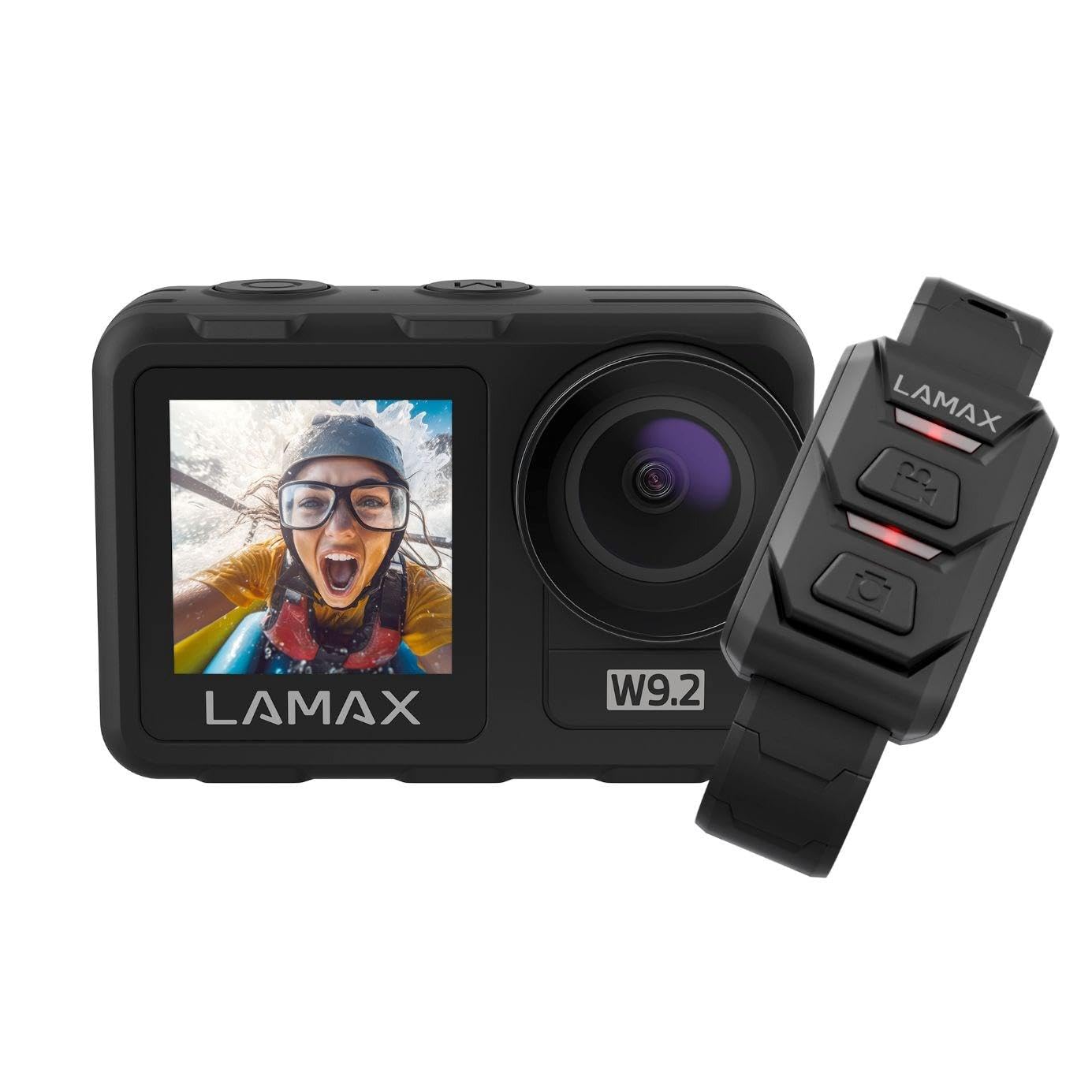
Сүрөт: алдыңкы view of the LAMAX W9.2 Action Camera, showcasing its compact design and dual display feature.
Негизги өзгөчөлүктөрү:
- Кош дисплей: A 2-inch rear touchscreen for settings and playback, and a 1.4-inch front screen for selfie framing.
- Жогорку чечилиштеги видео: Up to 5K at 60 frames per second (FPS) and 1080p at 120 FPS.
- Суу өткөрбөйт дизайн: Waterproof up to 12 meters (40 feet) without an additional case. With a waterproof case, it can be used up to 40 meters (130 feet).
- MAXSmooth Stabilization: Advanced electronic image stabilization for smooth footage.
- 20 мегапикселдик сүрөттөр: Жогорку чечилиштеги сүрөттөрдү тартыңыз.
- Интеграцияланган Wi-Fi: For quick transfer and sharing of content to your mobile device.
- Чыгармачыл режимдер: Includes slow motion, timelapse, accelerated video, and long exposure.
- Ийкемдүү башкаруу: Touchscreen operation, physical buttons, and remote control compatibility.
Жайгашуу
1. Батареяны орнотуу
- Камерадагы батарея бөлүкчөсүн табыңыз.
- Бөлүмдүн капкагын ачыңыз.
- Insert the provided battery, ensuring the correct orientation of the contacts.
- Батарея уясынын капкагын бекем жабыңыз.
- Charge the battery fully before first use using the supplied USB cable.
2. Эстутум картасын киргизүү
- Сүрөттөрдү жана видеолорду сактоо үчүн камерага microSD картасы (кошулбаган) керек.
- microSD картасын белгиленген уячага ал ордуна чыкылдаганча салыңыз.
- Ensure the card is formatted in the camera's settings menu for optimal performance.
- Use a high-speed microSD card (Class 10 or UHS-I/UHS-3 recommended) for 4K/5K recording.
3. Баштапкы күйгүзүү
- Press and hold the Power/Mode button to turn on the camera.
- Тилди, күндү жана убакытты коюу үчүн экрандагы көрсөтмөлөрдү аткарыңыз.
Камераны иштетүү
Негизги башкаруу элементтери:
- Кубат / режим баскычы: Press and hold to power on/off. Press briefly to switch between video, photo, and playback modes.
- Жапкыч/Тандоо баскычы: Press to start/stop recording video or take a photo. In menu, use to confirm selection.
- Өйдө/ылдый баскычтары: Navigate menu options or zoom (if applicable).
- Rear Touchscreen: Swipe and tap to access settings and modes.
- Алдыңкы дисплей: Primarily for framing selfies or monitoring camera status.
Видео жаздыруу:
- Switch to video mode using the Power/Mode button or touchscreen.
- Adjust video resolution and other settings via the touchscreen menu.
- Press the Shutter/Select button to begin recording. A red indicator light will flash.
- Press the Shutter/Select button again to stop recording.
Сүрөткө тартуу:
- Switch to photo mode.
- Adjust photo settings (e.g., resolution, exposure) via the touchscreen menu.
- Press the Shutter/Select button to take a photo.
Wi-Fi туташуусу:
- Enable Wi-Fi in the camera settings.
- Download the official LAMAX app on your smartphone.
- Connect your phone to the camera's Wi-Fi network (SSID and password displayed on camera screen).
- Use the app to control the camera, view жаша фооtage, жана которуу files.
Чыгармачыл режимдер:
- Жай кыймыл: Жай кыймылда ойнотуу үчүн видеону жогорку кадр ылдамдыгы менен жазат.
- Убакыт аралыгы: Белгиленген аралыктар менен бир катар сүрөттөрдү тартып, аларды видеого тигип берет.
- Accelerated Video: Records video at a lower frame rate for fast-motion playback.
- Узак экспозиция: Allows for longer shutter speeds to capture more light in low-light conditions.
- Access these modes through the camera's menu and adjust settings as desired.
Гидроизоляция боюнча көрсөтмөлөр
The LAMAX W9.2 is designed to be waterproof up to 12 meters (40 feet) without an external housing. For deeper dives, an additional waterproof case is required, extending its capability to 40 meters (130 feet).
- Before submerging the camera, ensure all port covers (battery, USB, HDMI) are securely closed.
- Regularly inspect the seals for any dirt, debris, or damage. Clean and replace if necessary.
- Туздуу сууда колдонгондон кийин, камераны таза суу менен чайкап, жакшылап кургатыңыз.
- Do not open the battery or memory card compartment while the camera is wet or submerged.
Техникалык тейлөө
- Тазалоо: Use a soft, lint-free cloth to clean the camera body and lenses. For stubborn dirt, slightly dampчүпүрөктү суу менен. Катуу химиялык заттардан алыс болуңуз.
- Сактагыч: Камераны салкын, кургак жерде күндүн тике тийген нурунан жана экстремалдык температурадан алыс сактаңыз. Узак мөөнөткө сактасаңыз, батареяны алып салыңыз.
- Батареяга кам көрүү: Do not expose batteries to high temperatures or dispose of them in fire. Recycle used batteries responsibly.
- Программалык камсыздоонун жаңыртуулары: Check the official LAMAX webоптималдуу иштешин жана жаңы функцияларга жетүүнү камсыз кылуу үчүн прошивка жаңыртуулары үчүн сайт.
Проблемаларды чечүү
Камера күйбөй жатат:
- Батарея толук заряддалганын жана туура салынганын текшериңиз.
- Мүмкүн болсо, башка батарейканы колдонуп көрүңүз.
- Press and hold the Power/Mode button for at least 5 seconds.
Recording Stops Unexpectedly:
- Эстутум картасы толуп калганын текшериңиз.
- Ensure you are using a high-speed memory card (Class 10 or higher).
- Камерадагы эстутум картасын форматтаңыз.
- The camera might be overheating in extreme conditions; allow it to cool down.
Wi-Fi туташуу маселелери:
- Ensure Wi-Fi is enabled on the camera and your smartphone.
- Камераны да, смартфонуңузду да өчүрүп-күйгүзүңүз.
- Make sure you are within the Wi-Fi range.
- Туура Wi-Fi сырсөзүн текшериңиз.
Сүрөттүн/видеонун сапаты начар:
- Камера линзасын тазалаңыз.
- Check resolution settings.
- Ensure sufficient lighting.
- Verify MAXSmooth stabilization is enabled for video.
Техникалык шарттар
| Модель аты | W9.2 |
| Video Resolution | Up to 5K/60FPS, 4K, 1080p/120FPS |
| Сүрөттүн резолюциясы | 20 мегапиксел |
| Суу өткөрбөйт | 12m (without case), 40m (with waterproof case) |
| Турукташтыруу | MAXSmooth (Anti-shake) |
| Дисплейлер | Rear: 2-inch Touchscreen; Front: 1.4-inch |
| Байланыш | Wi-Fi, HDMI |
| Фото сенсор технологиясы | CMOS |
| Видео жазуунун форматы | MOV |
| Өзгөчөлүктөр | Slow motion, Timer, Wind noise reduction |
| Өлчөмдөр | 3.2 x 6.4 x 4.2 см |
| Салмагы | 127 г |
| Батарея | C batteries (included) |
Кепилдик жана колдоо
For warranty information and technical support, please refer to the official LAMAX webсайтына кириңиз же жергиликтүү дистрибьюторуңузга кайрылыңыз. Кепилдик талаптары үчүн сатып алганыңызды тастыктаган документти сактап коюңуз.
Онлайн ресурстар: For the latest information, FAQs, and firmware updates, visit the official LAMAX support page: www.lamax.eu