
1. Киришүү
This manual provides detailed instructions for the setup, operation, and maintenance of your Vrriis WL081 Wireless HDMI Transmitter and Receiver kit. This system is designed to wirelessly extend a 1080P Full HD HDMI signal up to 1300 feet in open environments, offering features such as HDMI loop out and IR remote control support. Please read this manual thoroughly before using the product to ensure proper functionality and safety.
2. Пакеттин мазмуну
Төмөндө тизмеленген нерселердин баары пакетиңизге камтылганын текшериңиз. Эгерде кандайдыр бир нерселер жок болсо же бузулса, кардарларды колдоо менен байланышыңыз.
- 1 x Зымсыз HDMI өткөргүч (TX)
- 1 x Wireless HDMI Receiver (RX)
- 2 x Antennas (for TX)
- 2 x Antennas (for RX)
- 2 x USB-C кубат кабелдери
- 2 x Power Adapters (5V2A)
- 2 x IR Extension Cables
- 1 x User Manual
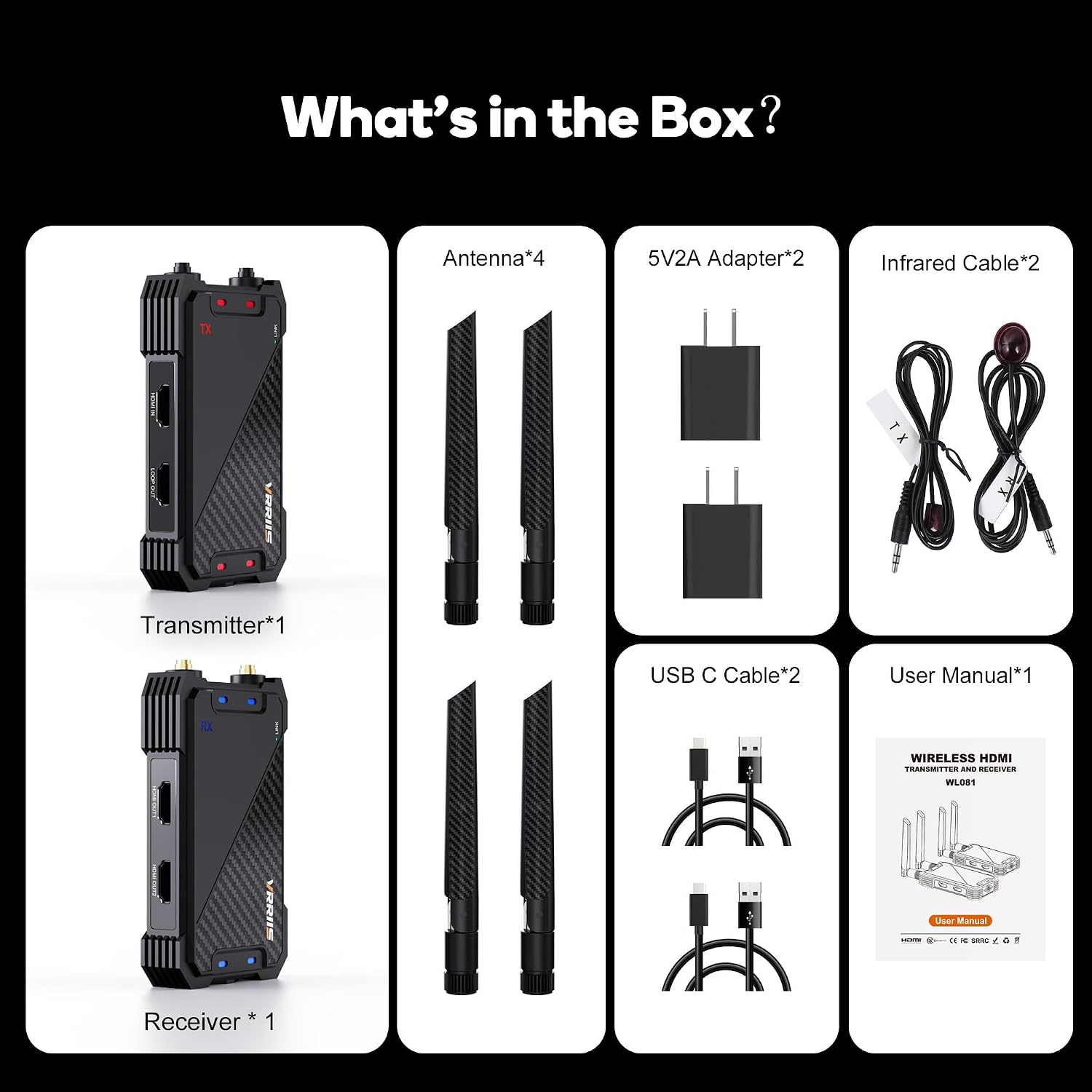
Figure 2.1: Included components in the Vrriis WL081 kit.
3. Продукт бүтүп калдыview
The Vrriis WL081 system consists of a Transmitter (TX) unit and a Receiver (RX) unit, each equipped with specific ports and indicators for seamless operation.
3.1 Өткөргүч (TX) блогу
- HDMI IN: Connects to your HDMI source device (e.g., laptop, set-top box, camera).
- LOOP UT: Provides a local HDMI output for connecting a monitor near the source.
- IR OUT: Connects the IR extension cable to control the source device remotely.
- USB-C: Кубат киргизүү порту.
- LINK көрсөткүчү: Алуучу менен байланыштын абалын көрсөтөт.
- POWER көрсөткүчү: Кубаттын абалын көрсөтөт.
3.2 Кабыл алгыч (RX) блогу
- HDMI OUT: Connects to your display device (e.g., TV, projector).
- IR IN: Connects the IR extension cable to receive remote control signals.
- USB-C: Кубат киргизүү порту.
- LINK көрсөткүчү: Indicates connection status with the transmitter.
- POWER көрсөткүчү: Кубаттын абалын көрсөтөт.
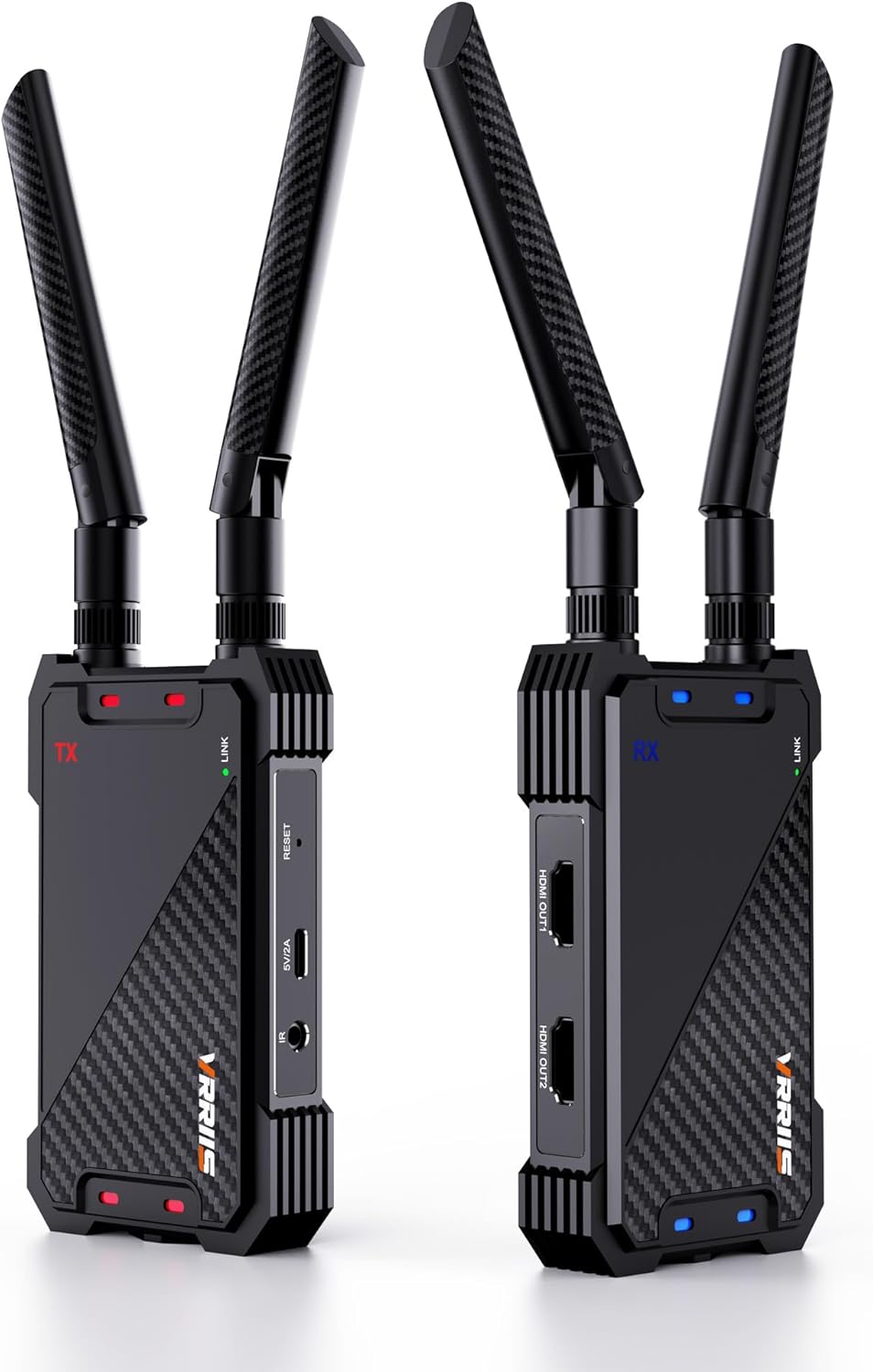
Figure 3.1: Vrriis WL081 Transmitter (left) and Receiver (right) units.
4. Орнотуу нускамалары
Follow these steps for initial setup and pairing of your wireless HDMI system.
4.1 Баштапкы туташуу
- Attach the antennas to both the Transmitter (TX) and Receiver (RX) units.
- Connect your HDMI source device (e.g., laptop, set-top box) to the HDMI-IN port of the TX unit using an HDMI cable.
- Connect your display device (e.g., TV, projector) to the HDMI OUT port of the RX unit using an HDMI cable.
- If desired, connect a local monitor to the LOOP OUT port of the TX unit.
- Connect the IR extension cable to the IR OUT port on the TX unit and position the IR emitter near the IR sensor of your source device.
- Connect the IR extension cable to the IR IN port on the RX unit and position the IR receiver in a location where it can receive signals from your remote control.
- Connect the USB-C power cables to both the TX and RX units, then plug the power adapters into electrical outlets. The power indicators on both units should illuminate.

Figure 4.1: Connection diagram for the Vrriis WL081 system, illustrating HDMI IN, LOOP OUT, and HDMI OUT connections.

Figure 4.2: IR pass-back setup for remote control functionality.
4.2 Жупташтыруу боюнча көрсөтмөлөр
The transmitter and receiver units are typically pre-paired from the factory. If you need to re-pair them or add additional receivers, follow these steps:
- Ensure both the Transmitter (TX) and Receiver (RX) are powered on.
- Observe the green LINK light on both units.
- Connect the HDMI IN port on the TX unit to the HDMI OUT port on the RX unit using an HDMI cable.
- After successful pairing, both the green LINK lights on the TX and RX units will flash. If pairing fails, the lights will not flash.
- Эскертүү: If pairing fails, reset both the transmitter and receiver, re-power them, then re-plug the HDMI cable and repeat the pairing steps.
- Once pairing is complete, disconnect the HDMI cable used for pairing and reconnect your source and display devices for normal use.

Figure 4.3: Pairing procedure for Transmitter and Receiver.
5. Иштөө нускамалары
5.1 Негизги операция
Once the TX and RX units are paired and connected to your source and display devices, the system will automatically transmit the HDMI signal. Ensure both units have a clear line of sight or minimal obstructions for optimal performance.
5.2 Using HDMI Loop Out
The TX unit features an HDMI LOOP OUT port. This allows you to connect a local display (e.g., a monitor) directly to the transmitter, enabling you to view the source content simultaneously at the source location without any additional latency.
5.3 Инфракызыл алыстан башкаруу функциясы
The included IR extension cables enable you to control your HDMI source device from the location of the receiver. Point your remote control at the IR receiver connected to the RX unit. The signal will be transmitted wirelessly back to the TX unit, which then relays the command to your source device via the IR emitter.
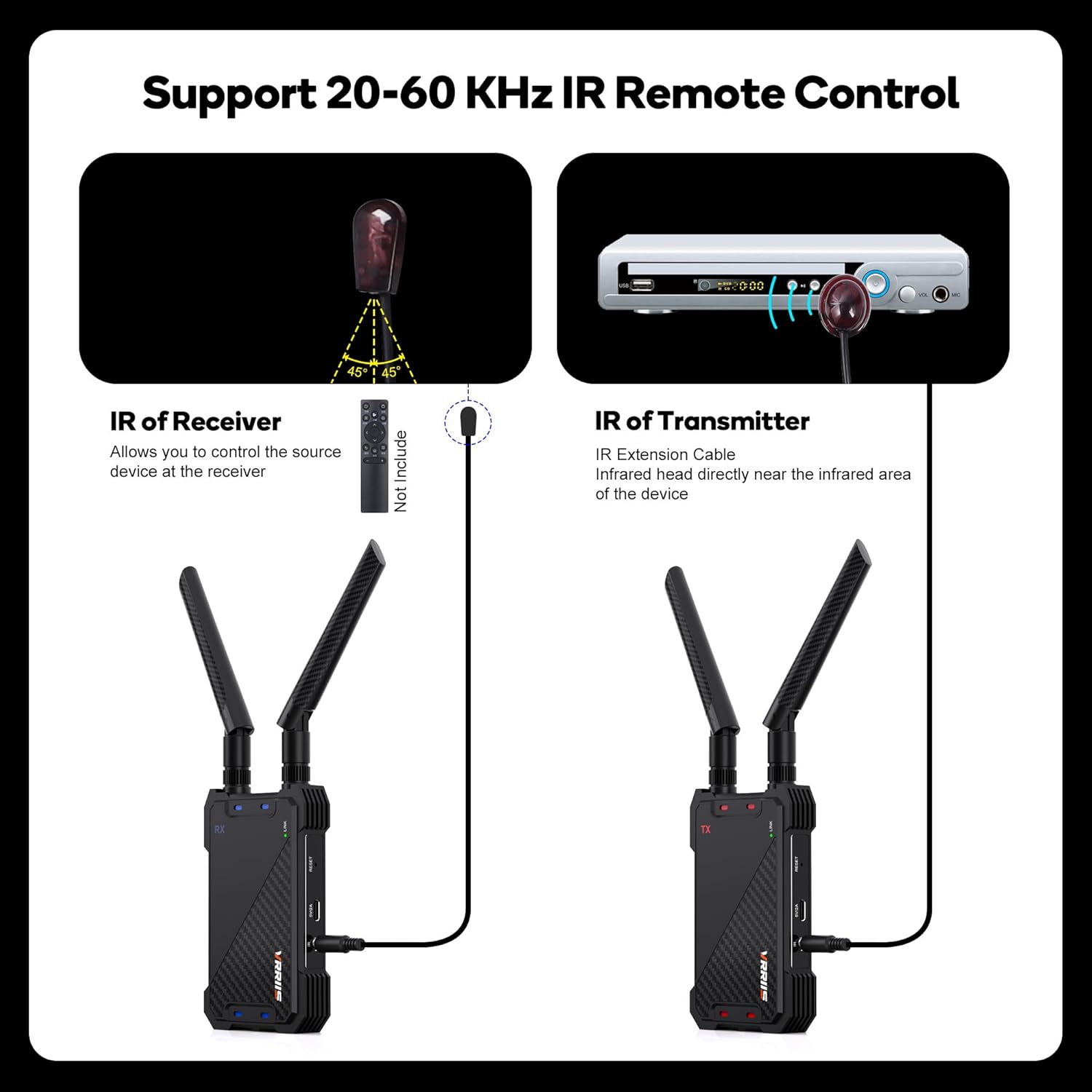
Figure 5.1: IR Remote Control setup.
5.4 Multi-Receiver Support (1 TX to 5 RXs)
The Vrriis WL081 system supports connecting one transmitter to up to five receivers simultaneously. This allows you to distribute the HDMI signal to multiple displays. Each additional receiver must be paired with the original transmitter following the pairing instructions in Section 4.2. Note that as the number of connected receivers increases, the effective wireless transmission distance may decrease.

Figure 5.2: Support for multiple receivers (up to 5 RXs) from a single transmitter.
6. Техникалык тейлөө
To ensure the longevity and optimal performance of your Vrriis WL081 system, follow these maintenance guidelines:
- Тазалоо: Use a soft, dry cloth to clean the units. Avoid using liquid cleaners or abrasive materials.
- Сактагыч: Эгерде аппараттар көпкө чейин колдонулбаса, аларды салкын, кургак жерде, күндүн нуру түз тийген жерлерден жана өтө жогорку температурадан алыс сактаңыз.
- Вентиляция: Ашыкча ысып кетпеши үчүн, түзүлүштөрдүн айланасында жакшы желдетүүнү камсыз кылыңыз. Желдетүү тешиктерин жаппаңыз.
- Күч: Use only the provided power adapters. Using incompatible power sources may damage the device.
7. Кыйынчылыктарды
If you encounter issues with your Vrriis WL081 system, refer to the following troubleshooting steps:
| Көйгөй | Мүмкүн себеп | Чечим |
|---|---|---|
| No picture/signal on display |
|
|
| Intermittent signal/picture drops |
|
|
| Инфракызыл алыстан башкаруу пульту иштебей жатат |
|
|
| Latency/delay in video |
|
|
| Cannot transmit copyrighted content (HDCP) |
|
|
8. Техникалык шарттар
Technical specifications for the Vrriis WL081 Wireless HDMI Transmitter and Receiver.
- Модел: WL081
- Бренд: Vrriis
- Түсү: Кара
- Өткөрүү расстояние: Up to 1300 feet (line of sight, open field)
- Чечимди колдоо: Up to 1080p @60Hz Full HD
- Кечирүү: Болжол менен 0.05 секунд
- Зымсыз жыштык: 2.4 ГГц / 5 ГГц кош диапазондуу
- IR алыстан башкаруу: 20-60 KHz frequency support
- HDMI укурук чыгышы: Ооба
- Көп кабыл алгычты колдоо: 1 өткөргүчтөн 5 кабыл алгычка чейин
- HDCP колдоо: HDCP 1.4
- Кубат киргизүү: USB-C, 5V2A
- Шайкеш түзмөктөр: Laptop, Projector, Set Top Box, Television, DSLR, etc.
- Элемент Салмагы: Болжол менен 1.27 фунт (жалпы пакет)
- Пакеттин өлчөмдөрү: Болжол менен 7.83 x 5.98 x 2.44 дюйм

Figure 8.1: Key features of the Vrriis WL081.
9. Кепилдик жана колдоо
For warranty information or technical assistance, please refer to the product packaging or contact Vrriis customer support directly. You can typically find contact details on the manufacturer's website or through your purchase platform. When contacting support, please have your product model number (WL081) and purchase details ready.