
1. Киришүү
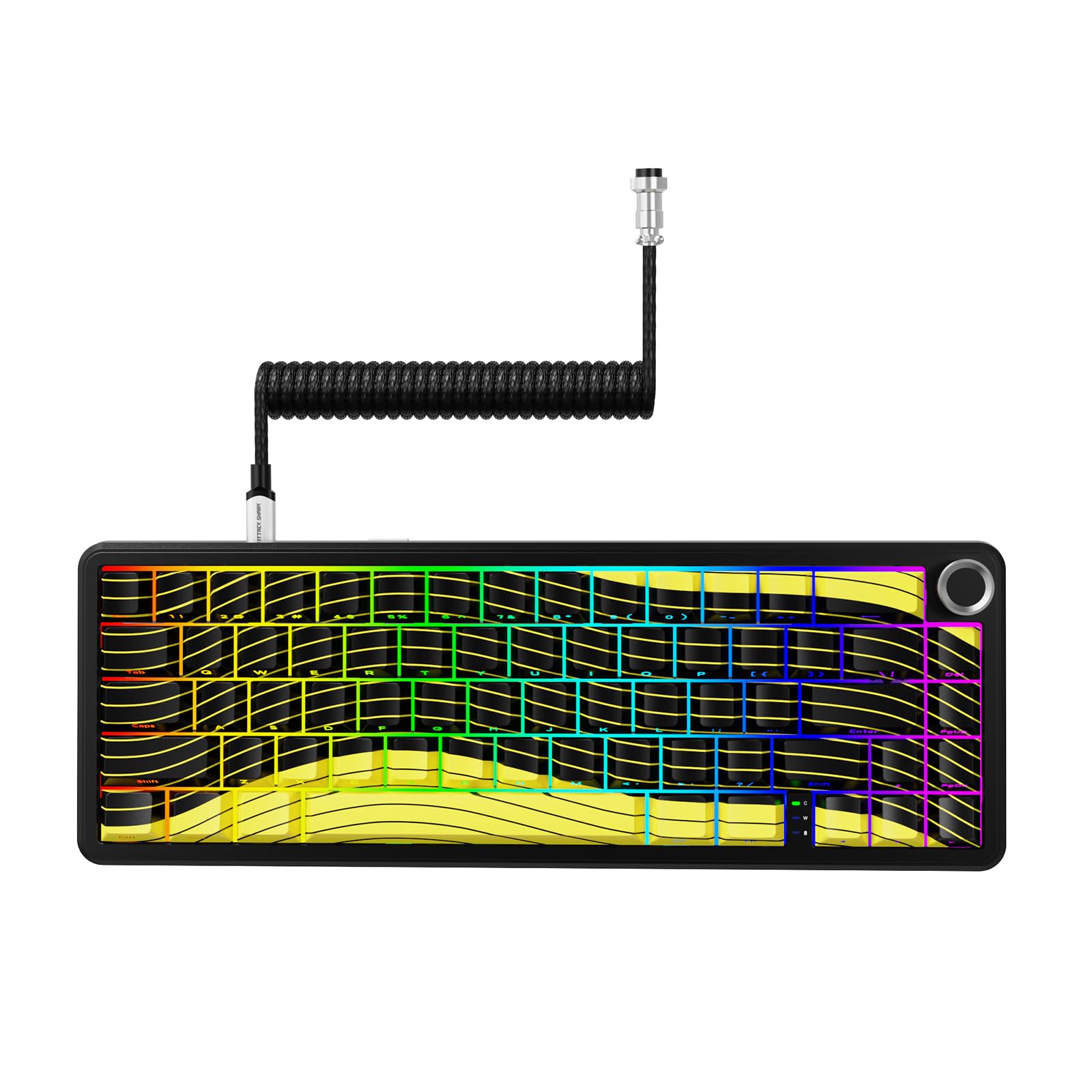
The MAMBASNAKE Attack Shark X65PRO HE is a high-performance 60% magnetic mechanical keyboard designed for gaming and productivity. It features Hall Effect magnetic switches for adjustable actuation, rapid trigger functionality, and a blazing 8,000Hz polling rate for ultra-fast response times. With triple-mode connectivity (wired, Bluetooth, 2.4GHz wireless), hot-swappable switches, and a customizable web-based driver, this keyboard offers unparalleled flexibility and precision.

2. Орнотуу
2.1 Пакеттин мазмуну
- Attack Shark X65PRO HE Magnetic Mechanical Keyboard
- CNC Aluminum Volume Knob (pre-installed or separate)
- Оролгон USB-C кабели
- Колдонуучунун Колдонмосу (бул документ)
2.2 Баштапкы туташуу
The X65PRO HE supports three connection modes: wired, 2.4GHz wireless, and Bluetooth.
- Зымдуу режим: Connect the provided coiled USB-C cable to the keyboard's USB-C port and the other end to your computer's USB port. The keyboard will be automatically recognized.
- 2.4 ГГц зымсыз режими: Locate the 2.4GHz USB receiver (usually stored in a compartment on the keyboard). Plug the receiver into an available USB port on your computer. Switch the keyboard to 2.4GHz mode using the switch on the back or side of the keyboard. The keyboard should connect automatically.
- Bluetooth режими: Switch the keyboard to Bluetooth mode using the switch on the back or side of the keyboard. On your computer or device, search for Bluetooth devices and select "X65PRO HE" to pair.
2.3 Эргономикалык жөнгө салуу
Клавиатурада эки баскычтуу баскыч барtage adjustable kickstand with three height options. Adjust the kickstand to your preferred angle for optimal ergonomic comfort during extended use.
3. Иштөө нускамалары
3.1 Hall Effect Magnetic Switches & Adjustable Actuation
The X65PRO HE utilizes Hall Effect magnetic switches, allowing for precise and customizable actuation points from 0.1mm to 3.4mm. This feature enables rapid trigger functionality, where keys reset instantly upon release, providing a competitive edge in fast-paced games.

To adjust actuation points and other switch settings, use the web-based driver software.
3.2 Web-Based Driver Software
The X65PRO HE features an innovative web-based driver for comprehensive customization. This driver allows you to:
- Adjust individual key actuation points (0.1mm to 3.4mm).
- Тез триггер жөндөөлөрүн конфигурациялаңыз.
- Program macros.
- RGB жарык эффекттерин өзгөчөлөштүрүү.
- Remap keys.
кирүү web driver by connecting your keyboard and navigating to the official MAMBASNAKE support website (refer to packaging or product page for URL). No software installation is required.

3.3 CNC Multifunctional Knob
The integrated CNC-machined knob provides quick control over various functions:
- Айлантуу: Adjust volume (default) or RGB brightness/speed.
- Пресс: Mute/unmute (default) or cycle through RGB modes.
The specific functions of the knob can be customized via the web-негизделген айдоочу.

3.4 RGB жарыктандыруу
The X65PRO HE features customizable RGB lighting with 16 million colors. Lighting effects can be adjusted using the web-based driver or through pre-programmed shortcuts (refer to the driver for specific key combinations).
3.5 Батареяны башкаруу
The keyboard is equipped with a 3000mAh rechargeable battery for wireless operation.
- Заряддоо: Connect the keyboard via the USB-C cable to a computer or a USB power adapter. The RGB lighting may indicate charging status.
- Батареянын иштөө мөөнөтү: Battery life varies based on usage and RGB lighting intensity. For optimal battery life, consider reducing RGB brightness or disabling it when not needed.

4. Техникалык тейлөө
4.1 Тазалоо
- Баскыч капкактары: жумшак колдонуу, damp cloth with mild soap and water to clean the keycaps. Ensure they are completely dry before reattaching.
- Клавиатуранын корпусу: Клавиатуранын корпусун кургак же бир аз кургак чүпүрөк менен сүртүңүзamp кездеме. Ашыкча нымдуулуктан сактаныңыз.
- Чаңды тазалоо: Баскыч капкактары менен өчүргүчтөрдүн ортосундагы чаңды жана калдыктарды тазалоо үчүн кысылган абаны колдонуңуз.
4.2 Ыкчам алмаштыруучу которгучтар
The X65PRO HE features hot-swappable magnetic switches, allowing for easy replacement or customization without soldering.
- Которгучту алып салуу: Use a switch puller tool (not included) to gently grip the switch and pull it straight up.
- Коммутатор орнотуу: Align the pins of the new switch with the holes on the PCB. Press down gently until the switch clicks into place. Ensure the switch is seated correctly and functions properly.

5. Кыйынчылыктарды
5.1 Баскычтоп жооп бербейт
- Байланышты текшерүү: Ensure the USB-C cable is securely connected, or the 2.4GHz receiver is properly plugged in, or Bluetooth is paired.
- Кубат которгучу: Клавиатуранын кубат которгучу "ON" абалында экенин текшериңиз.
- Батарея деңгээли: If in wireless mode, ensure the battery is charged. Connect the USB-C cable to charge.
- Try Different Port/Device: Test the keyboard on a different USB port or computer to rule out port or device issues.
5.2 RGB жарыктандыруу туура эмес иштеүүдө
- Орнотууларды текшерүү: колдонуу web-based driver to verify RGB settings and ensure lighting is enabled.
- Жарыктык: Adjust brightness using the CNC knob or driver.
- Кайтаруу: Perform a factory reset (if available via driver or specific key combination) to restore default lighting.
5.3 Катталбаган ачкычтар же эки жолу терүү
- Иштетүү чекити: Adjust the actuation point for the affected key(s) using the web-based driver. A very low actuation point might cause unintended presses.
- Switch Seating: Ensure the magnetic switch is fully seated in its socket. Gently press down on the keycap.
- Которуу алмаштыруу: If a specific key continues to malfunction, consider replacing the hot-swappable switch.
6. Техникалык шарттар
| Өзгөчөлүк | Деталь |
|---|---|
| Бренд | MAMBASNAKE |
| Модел | X65PRO HE |
| Байланыш технологиясы | USB-C (Wired), 2.4GHz Wireless, Bluetooth |
| Которуу түрү | Hall Effect Magnetic Switches (Hot-Swappable) |
| Иш-аракет пункту | Adjustable from 0.1mm to 3.4mm (0.01mm precision) |
| Добуш берүү көрсөткүчү | 8,000Hz |
| Жооп убактысы | 0.125ms (wired mode) |
| Скандоо ылдамдыгы | 128K (for all keys) |
| Макет | 60% (66 ачкыч) |
| Баскыч капкактары | 5-Sided Dye-Sub PBT Keycaps |
| RGB жарыктандыруу | 16 миллион түс, ыңгайлаштырылуучу |
| Батарея сыйымдуулугу | 3000mAh |
| Материал | Алюминий, Пластик |
| Камтылган компоненттер | CNC Aluminum Volume Knob, Coiled Cable |
| Шайкеш түзмөктөр | PC (Windows, Mac, Linux, iOS) |
7. Кепилдик жана колдоо
7.1 Продукциянын кепилдиги
The MAMBASNAKE Attack Shark X65PRO HE keyboard comes with a 1 жылдык чектелген кепилдик сатып алынган күндөн тартып. Бул кепилдик кадимки колдонуудагы өндүрүштүк кемчиликтерди жана чеберчиликти камтыйт. Туура эмес колдонуудан, кырсыктардан, уруксатсыз өзгөртүүлөрдөн же кадимки эскирүүдөн келип чыккан зыянды камтыбайт. Кепилдик дооматтары үчүн сатып алганыңызды тастыктаган документти сактап коюңуз.
7.2 Кардарларды колдоо
For technical assistance, troubleshooting, or warranty inquiries, please contact MAMBASNAKE customer support.
- Онлайн колдоо: Visit the official MAMBASNAKE webКөп берилүүчү суроолор, драйверлерди жүктөө жана байланыш маалыматы үчүн сайт.
- Электрондук почта колдоо: Продуктуңуздун таңгагына же расмий өкүлгө кайрылыңыз webкардарларды колдоо электрондук почта дареги үчүн сайт.
When contacting support, please have your product model (X65PRO HE) and proof of purchase ready.