
Introduction
Thank you for choosing the SONICAKE Sprint QAM-15 Electric Guitar Amplifier. This portable 15-watt combo amplifier is designed for practice, travel, and small gigs, offering versatile tone control and essential connectivity. This manual provides detailed instructions to help you get the most out of your ampөмүрлүү.
Негизги өзгөчөлүктөрү:
- Portable & Lightweight Design (approx. 7.45 lbs, 11.5"x11.5"x4.5")
- Dual-Channel Versatility (Clean and Overdrive)
- Enhanced Connectivity (3.5mm Headphone Output, 3.5mm AUX Input)
- Professional Sound Control (3-Band EQ: Treble, Mid, Bass, Gain, Volume)
- Closed-Back Design for High-Quality Audio Output
Коопсуздук нускамалары
Please read and understand these safety instructions before operating your ampкөтөргүч. Бул колдонмону келечектеги маалымат үчүн сактаңыз.
- Кубат булагы: туташтыруу ampкөрсөтүлгөн электр менен камсыздоого гана көтөргүчtagе бирдикте көрсөтүлгөндөй.
- Вентиляция: Эч кандай вентиляция тешиктерин жаап албаңыз. айланасында адекваттуу аба агымын камсыз кылуу ampысып кетүүнүн алдын алуу үчүн көтөргүч.
- Суу жана ным: ачыкка чыгарбагыла amplifier to rain, moisture, or any liquids. Do not place objects filled with liquids on the ampөмүрлүү.
- Жылуулук булактары: сактаңыз amplifier away from heat sources such as radiators, heat registers, stoves, or other apparatus (including ampкөтөргүчтөр) жылуулукту пайда кылуучу.
- Тазалоо: Кургак чүпүрөк менен гана тазалаңыз. Суюктук же аэрозоль тазалагычтарды колдонуудан алыс болуңуз.
- Тейлөө: Бул продуктту өзүңүз тейлөөгө аракет кылбаңыз. Бардык тейлөөнү квалификациялуу тейлөө кызматкерлерине тапшырыңыз.
- Кабелдер: Электр шнурунун басылып кетүүсүнөн же кысып калуудан сактаңыз, өзгөчө сайгычтарда, розеткаларда жана алар аппараттан чыга турган жеринде.
Продукт бүттүview

Фронт view of the SONICAKE Sprint QAM-15 Electric Guitar Ampкөтөргүч, көрсөтүүчүasing анын компакттуу конструкциясы жана башкаруу панели.
Башкаруу панелинин өзгөчөлүктөрү:

Деталдаштырылган view -ныкы amplifier's control panel, highlighting each knob and input for user reference.
- КИРҮҮ: 1/4" (6.35mm) jack for connecting your electric guitar.
- УТУШ: алдын ала көлөмүн көзөмөлдөйтamplification or distortion. Higher settings increase saturation.
- OD (Overdrive) баскычы: Toggles between the clean channel and the overdrive channel. Press in for overdrive, out for clean.
- VOL (Көлөмү): Жалпы чыгаруу көлөмүн тууралайт ampөмүрлүү.
- TRE (Treble): жогорку жыштыктагы жоопту тууралайт ampөмүрлүү.
- MID (Middle): Adjusts the mid-range frequency response of the ampөмүрлүү.
- Бас: Төмөнкү жыштыктагы жоопту тууралайт ampөмүрлүү.
- AUX (Кошумча) киргизүү: 3.5mm jack for connecting external audio devices (e.g., MP3 player, phone) to play along with backing tracks.
- PHONES (Headphone Output): 3.5mm jack for connecting headphones for silent practice. Mutes the main speaker when in use.
- POWER которуштуруу: бурат ampөмүрдү күйгүзүү же өчүрүү.
- POWER Indicator LED: болгондо жарык берет ampкөтөргүч күйгүзүлгөн.
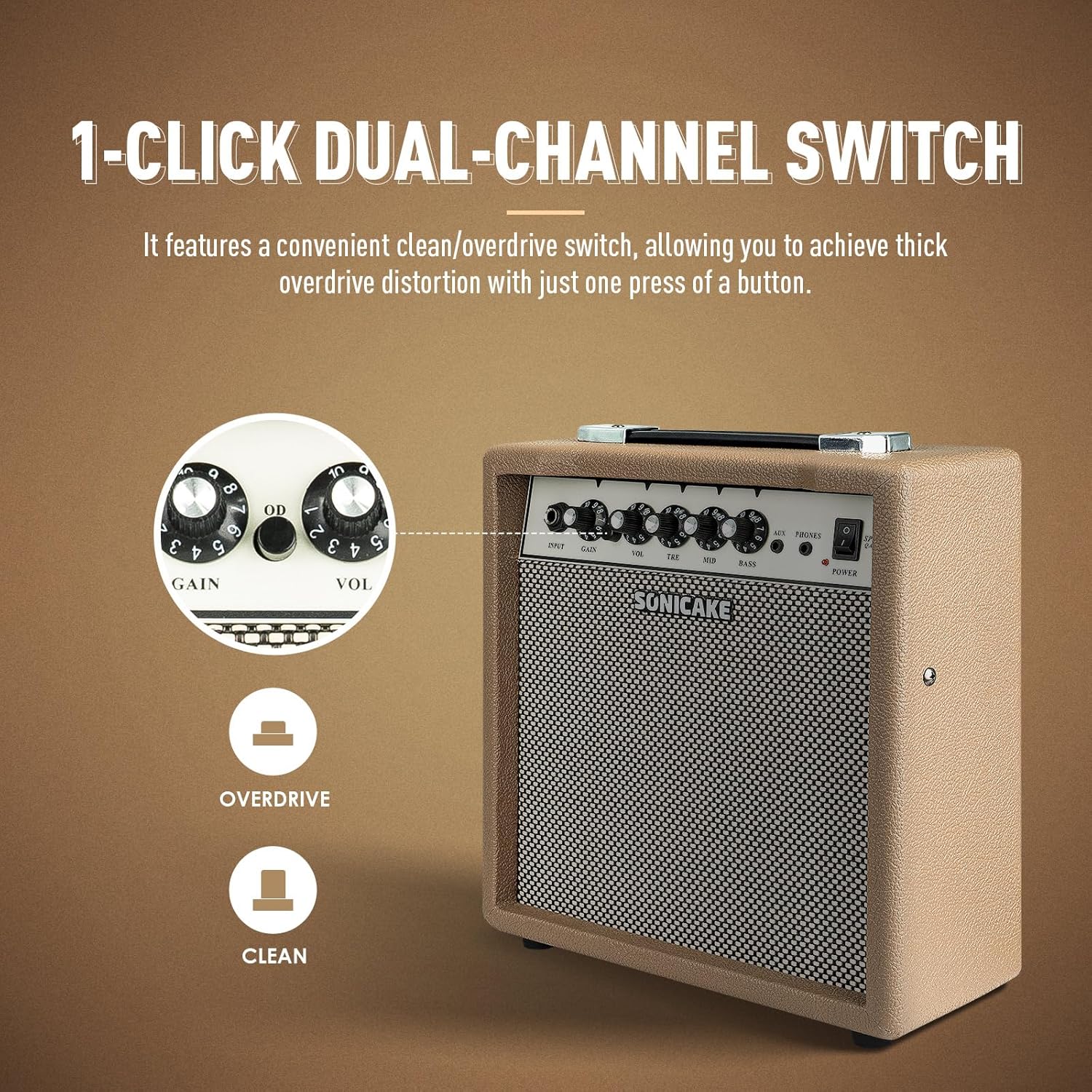
The OD button allows for instant switching between clean and overdrive tones.
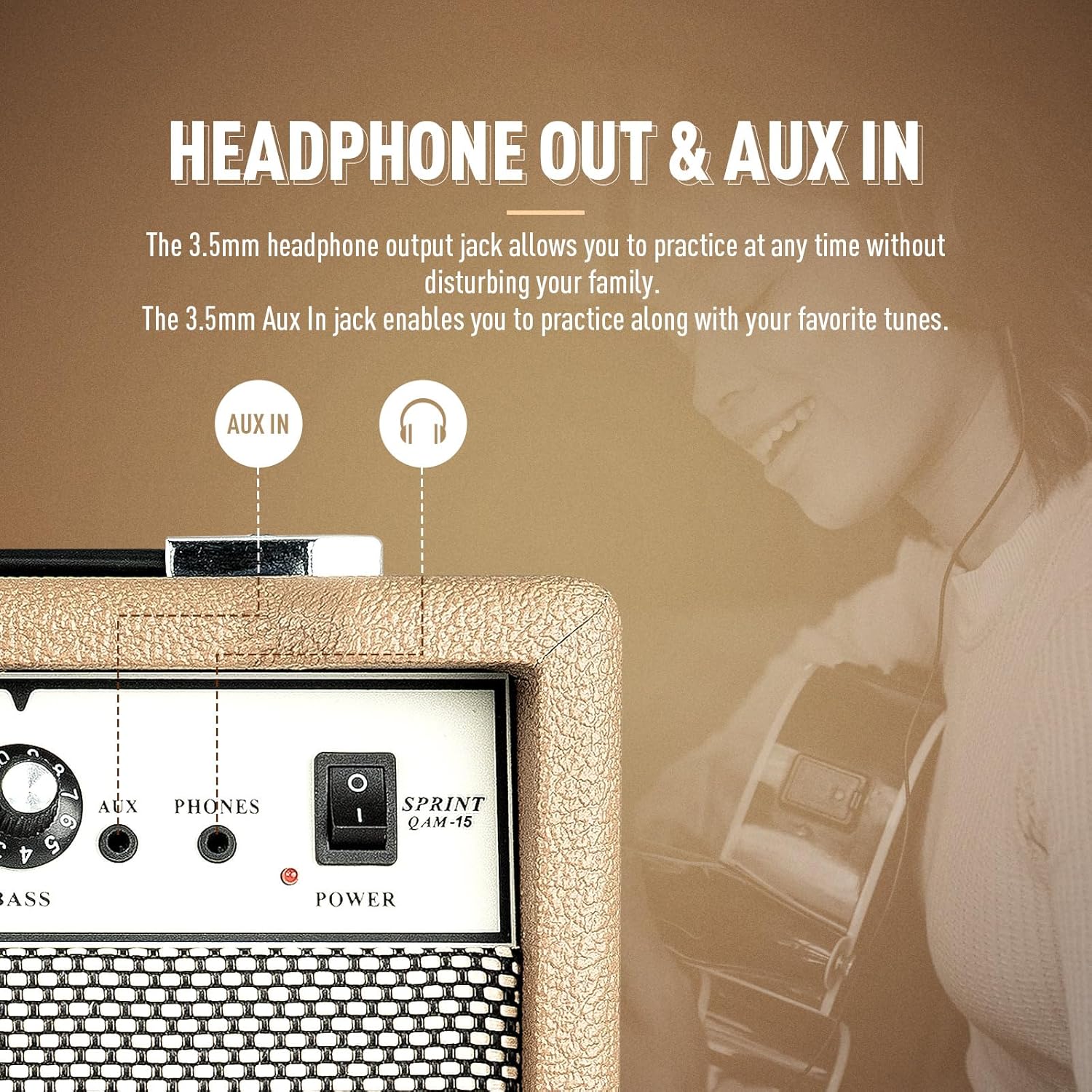
The amplifier features dedicated AUX In and Headphone Out jacks for versatile practice options.
Жайгашуу
- Пакеттен чыгаруу: Кылдаттык менен алып салуу ampанын таңгагынан көтөргүч. Зыяндын белгилерин текшериңиз.
- Жайгашкан жери: кой amplifier on a stable, flat surface. Ensure there is adequate space around the unit for ventilation.
- Кубат туташуу: Берилген электр кабелин туташтырыңыз amplifier's power input jack and then to a suitable electrical outlet. Ensure the power switch on the amplifier is in the 'OFF' position before connecting to power.
- Гитара туташуу: Connect your electric guitar to the 'INPUT' jack on the amplifier's front panel using a standard 1/4" (6.35mm) instrument cable.
- Баштапкы жөндөөлөр: Before powering on, set the 'VOL' knob to its minimum position (fully counter-clockwise) and the 'GAIN' knob to a low setting. Set the 'TRE', 'MID', and 'BASS' knobs to their center (12 o'clock) positions.
Иштөө нускамалары
Негизги операция:
- Күйгүзүү: Flip the 'POWER' switch to the 'ON' position. The power indicator LED will illuminate.
- Үндү тууралоо: Slowly turn the 'VOL' knob clockwise to increase the overall output volume to your desired level.
- Өчүрүү: When finished, turn the 'VOL' knob to its minimum position, then flip the 'POWER' switch to the 'OFF' position.
Канал тандоо:
The Sprint QAM-15 features two distinct channels: Clean and Overdrive.
- Таза канал: With the 'OD' button in the 'OUT' position, the amplifier operates in the clean channel, providing a clear, uncolored tone.
- Overdrive Channel: Press the 'OD' button 'IN' to engage the overdrive channel. This adds distortion and sustain to your guitar tone. The 'GAIN' knob becomes more active in this mode.
Tone Control (3-Band EQ):
Use the 'TRE', 'MID', and 'BASS' knobs to shape your ampлифтердин үнү:
- TRE (Treble): Adjusts the brightness and clarity of your sound. Turn clockwise for more sparkle, counter-clockwise for a warmer tone.
- MID (Middle): Controls the presence and punch of your sound. Adjust to cut through a mix or to create a scooped sound.
- Бас: Adjusts the low-end fullness and depth of your sound. Turn clockwise for a thicker, heavier tone, counter-clockwise for a tighter sound.
Көзөмөлдү алуу:
The 'GAIN' knob controls the amount of signal sent to the amplifier's pre-amp stage. Higher gain settings result in more distortion and sustain, particularly noticeable in the overdrive channel. Experiment with the 'GAIN' and 'VOL' knobs to find your desired balance of distortion and overall loudness.
Байланыш:
- AUX киргизүү: Connect an external audio device (e.g., smartphone, tablet, MP3 player) to the 'AUX' input using a 3.5mm stereo cable. This allows you to play along with backing tracks or your favorite music through the amplifier's speaker. The volume of the AUX input is controlled by your external device.
- Гарнитуранын чыгышы: Connect a pair of headphones to the 'PHONES' output using a 3.5mm stereo plug. This will mute the amplifier's main speaker, allowing for silent practice. The headphone volume is controlled by the amplifier's 'VOL' knob.
Техникалык тейлөө
- Тазалоо: Дайыма сүртүп туруңуз amplifier's exterior with a soft, dry, lint-free cloth. Do not use abrasive cleaners, solvents, or waxes.
- Сактагыч: Узак мөөнөткө колдонулбаганда, сактаңыз ampliifier салкын, кургак жерде, тике күндүн нурунан жана экстремалдык температурадан алыс.
- Колдонуу: Always carry the amplifier using its handle. Avoid dropping or subjecting the unit to strong impacts.
- Вентиляция: камсыз кылуу amplifier's ventilation openings remain clear of dust and debris.
Проблемаларды чечүү
If you encounter issues with your SONICAKE Sprint QAM-15 amplifier, төмөнкү жалпы көйгөйлөрдү жана чечимдерди карагыла:
| Көйгөй | Мүмкүн себеп | Чечим |
|---|---|---|
| Үн жок ampөмүрлүү. |
|
|
| Үн бурмаланган же ызы-чуу. |
|
|
| AUX киргизүүсү иштебей жатат. |
|
|
If the problem persists after trying these solutions, please contact SONICAKE customer support or a qualified technician.
Техникалык шарттар

Dimensions of the SONICAKE Sprint QAM-15 ampөмүрлүү.
- Модел: QAM-15
- Чыгуу Wattage: 15 Ватт
- Элемент Салмагы: Болжол менен 7.94 фунт (3.6 кг)
- Продукциянын өлчөмдөрү: 4.53 x 11.42 x 11.42 дюйм (11.5 x 29 x 29 см)
- Шайкеш түзмөктөр: Электр гитара
- Материал түрү: Пластик
- Түсү: Беж
Кепилдик жана колдоо
For detailed warranty information, please refer to the warranty card included with your product or visit the official SONICAKE webсайт. Кепилдик дооматтар үчүн сатып алганыңыздын далилин сактаңыз.
For technical support, product registration, or further inquiries, please visit the official SONICAKE webсайтында көрсөтүлгөн байланыш маалыматы аркылуу алардын кардарларды тейлөө бөлүмүнө кайрылыңыз webсайт.