
Introduction
The ATTACK SHARK X65PRO HE is a high-performance 60% ultra-compact wireless gaming keyboard designed for precision and speed. Featuring Hall Effect magnetic switches, rapid trigger functionality, adjustable actuation points, and tri-mode connectivity, this keyboard offers a customizable and responsive gaming experience. This manual provides detailed instructions for setup, operation, maintenance, and troubleshooting to help you maximize your keyboard's potential.

Image: The ATTACK SHARK X65PRO HE keyboard showcasing its compact design and key features like Magnetic Switch, 0.01mm RT Accuracy, Adjustable Actuation Point, 0.125ms Latency, Snap Tap, RGB Lighting, Tri-Mode Connection, and Web Айдоочу.
Негизги өзгөчөлүктөрү
- 60% Ultra-compact Layout: Space-saving design ideal for gaming and typing, allowing for more mouse movement.
- RT Keyboard with Adjustable Actuation: Fully adjustable Hall magnetic switches with 0.01mm accuracy, allowing actuation points from 0.1mm to 3.4mm for lightning-fast response.
- 8000Гц добуш берүү ылдамдыгы: Achieves 0.125ms input latency in wired mode and 1000Hz in wireless mode for quick response times.
- Web Айдоочу: Өзүн-өзү өнүктүргөн web-based driver for customizing macros, RGB lighting, and performance settings without installation.
- Үч режимдик туташуу: Supports Bluetooth, 2.4GHz wireless, and USB-C wired connectivity for versatile device pairing.
- CNC Metal Knob: Allows for precise and quick volume adjustments.
- Snap Tap & Dynamic Keystroke: Advanced features for faster directional changes and up to 4 actions in one stroke.
- RGB Lighting & 5-Side Dye-sub PBT Keycaps: 16.8 million-color RGB lighting with dynamic effects and durable, vibrant PBT keycaps.
Жайгашуу
Баскычтобуңуз туташууда
The X65PRO HE keyboard offers three connection modes: USB-C wired, 2.4GHz wireless, and Bluetooth. Choose the mode that best suits your device and preference.
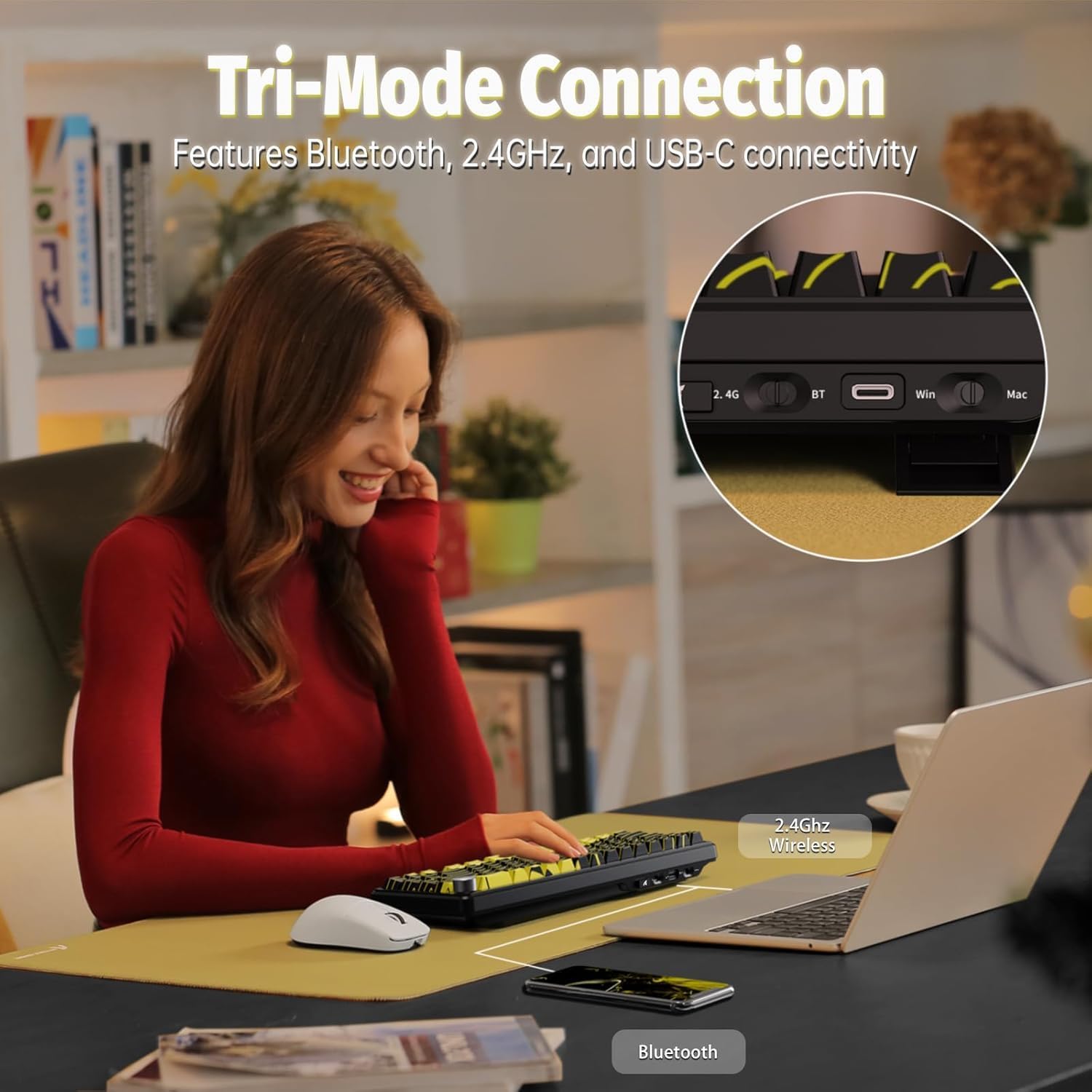
Image: A user operating the keyboard, illustrating the Tri-Mode Connection options (2.4G Wireless, Bluetooth, USB-C) for seamless device pairing.
1. USB-C зымдуу туташуусу
- Locate the USB-C port on the keyboard and your computer.
- Connect the provided USB-C cable to both the keyboard and your computer.
- The keyboard will be automatically recognized and ready for use. This mode supports an 8000Hz polling rate.
2. 2.4 ГГц зымсыз туташуу
- Locate the 2.4GHz USB receiver (dongle) included with your keyboard.
- USB ресиверди компьютериңиздеги жеткиликтүү USB портуна сайыңыз.
- Switch the keyboard's mode selector to 2.4G wireless. The keyboard should connect automatically. This mode supports a 1000Hz polling rate.
3. Bluetooth туташуусу
- Баскычтоптун режим тандагычын Bluetooth'га которуңуз.
- On your device (PC, Mac, smartphone, tablet), go to Bluetooth settings and enable Bluetooth.
- Издөө new devices and select "ATTACK SHARK X65PRO HE" from the list.
- Жупташтыруу процессин аяктоо үчүн экрандагы көрсөтмөлөрдү аткарыңыз.
Иштөө нускамалары
Жөнгө салынуучу иштетүү жана тез иштетүү
The X65PRO HE features Hall Effect magnetic switches, allowing for precise customization of each key's actuation point and rapid trigger functionality. This enables keys to reset and re-press faster, providing a competitive edge in gaming.

Сүрөт: деталдуу view of the magnetic switches, highlighting 0.01mm RT accuracy, 100 million click lifespan, 40±5gf operation force, and an adjustable actuation range of 0.1-3.4mm.
You can customize individual key actuation points within a global range of 0.1mm to 3.4mm using the dedicated web driver software. This allows for fine-tuning sensitivity to match your playstyle.
8000 Гц сурамжылоо ылдамдыгы
Experience ultra-low latency with an 8000Hz polling rate in wired mode, reducing input lag to an unprecedented 0.125ms. In wireless mode, the polling rate is 1000Hz, still ensuring fast and responsive input.

Image: A visual representation of the 8000Hz polling rate, demonstrating the rapid 0.125ms response time and 128K scan rate of the keyboard.
Web Драйверди ыңгайлаштыруу
The X65PRO HE utilizes a self-developed web driver for comprehensive customization. Access the web driver to:
- Configure macros for complex command sequences.
- RGB жарык эффекттерин жана түстөрүн тууралаңыз.
- Set individual key actuation points.
- Manage performance settings like polling rate.
- Utilize advanced functions such as DKS (Dynamic Keystroke) and SOCD (Simultaneous Opposite Cardinal Directions).

Image: A screenshot of the web driver interface, showing options to customize key functions, RGB lighting, and performance settings.
RGB жарык көзөмөлдөө
The keyboard features 16.8 million-color RGB lighting with various preset effects and bottom lighting. You can customize these effects using the web driver or directly via keyboard shortcuts.

Сүрөт: жакын план view клавиатура шоусунунasing its vibrant full RGB lighting effects and south-facing RGB switches.
Keyboard Lighting Shortcuts:
- FN + PgDn: Негизги арткы жарык эффектиси
- FN + X: Keyboard light switch / power saving mode switch
- FN + [: Main backlight speed -
- FN +]: Негизги жарыктын ылдамдыгы +
- FN + ↑: Негизги жарыктын жарыктыгы +
- FN + ↓: Main backlight brightness -
- FN + ←: Switch the backlight direction
- FN + →: Switch the backlight color (Order: colorful, red, green, blue, yellow, purple, cyan, white)

Image: A visual guide to the keyboard's lighting instructions, showing key combinations for changing effects, speed, brightness, direction, and color.
CNC металл туткасы
The integrated CNC metal knob provides convenient control over media functions. Press the knob to mute/unmute audio, and rotate it to adjust the volume.

Image: A close-up of the CNC metal knob, illustrating its function for volume adjustment and mute/unmute.
Техникалык тейлөө
To ensure the longevity and optimal performance of your ATTACK SHARK X65PRO HE keyboard, follow these maintenance guidelines:
- Тазалоо: Use a soft, dry cloth to wipe the surface of the keyboard. For dust and debris between keycaps, use compressed air. Avoid using harsh chemicals or abrasive materials.
- Клавиатураны алып салуу: If you need to remove keycaps for deeper cleaning or replacement, use a keycap puller to avoid damaging the switches. Pull straight up with gentle, even force.
- Сактагыч: Узак мөөнөткө колдонулбаганда, клавиатураны кургак, салкын жерде күндүн тике тийген нурунан жана өтө температурадан алыс сактаңыз.
- Суюктук таасири: Клавиатурага суюктук төгүп албаңыз. Эгерде суюктук төгүлүп кетсе, клавиатураны дароо сууруп, аны кургатуу үчүн оодарып, кайра туташтыруудан мурун толугу менен кургатыңыз.
Проблемаларды чечүү
If you encounter issues with your ATTACK SHARK X65PRO HE keyboard, refer to the following common troubleshooting steps:
| Көйгөй | Чечим |
|---|---|
| Баскычтоп жооп бербей жатат (Зымдуу) | USB-C кабели клавиатурага жана компьютерге бекем туташып турганын текшериңиз. Башка USB портун же кабелин колдонуп көрүңүз. |
| Баскычтоп жооп бербей жатат (2.4 ГГц зымсыз) | Ensure the 2.4GHz USB receiver is plugged in and the keyboard is switched to 2.4G mode. Check battery level. Re-pair the keyboard with the receiver if necessary (refer to web driver for pairing instructions). |
| Клавиатура жооп бербей жатат (Bluetooth) | Ensure Bluetooth is enabled on your device and the keyboard is in Bluetooth mode. Check battery level. Re-pair the keyboard in your device's Bluetooth settings. |
| RGB жарыгы иштебейт же туура эмес | Check keyboard lighting shortcuts (FN + PgDn, FN + X) or use the web driver to adjust settings. Ensure the keyboard is not in power-saving mode. |
| Баскычтар эки жолу терилип жатат же катталбай жатат | This could be related to actuation point settings. Use the web driver to adjust the actuation point for the affected keys. Ensure switches are clean and free of debris. |
| CNC knob not adjusting volume | Ensure the keyboard is properly connected. Check if any software or operating system settings are overriding the volume control. |
| Web driver not accessible | Ensure your computer has an active internet connection. Try a different web browser. Clear browser cache if issues persist. |
Техникалык шарттар
| Өзгөчөлүк | Деталь |
|---|---|
| Модел | X65PRO HE |
| Бренд | ATTACK SHARK |
| Макет | 60% Ultra-compact, 68 Keys |
| Которуу түрү | Холл эффектиси бар магниттик өчүргүчтөр (сызыктуу) |
| Иштетүү диапазону | 0.1mm to 3.4mm (Adjustable) |
| RT тактыгы | 0.01мм |
| Добуш берүү көрсөткүчү (зымдуу) | 8000Hz |
| Добуш берүү ылдамдыгы (зымсыз) | 1000Hz |
| Скандоо ылдамдыгы | 128KHz |
| Байланыш | USB-C, 2.4GHz Wireless, Bluetooth |
| Баскыч капкактары | 5-Side Dye-sub PBT |
| Арткы жарыктандыруу | RGB (16.8 миллион түс) |
| Батарея сыйымдуулугу | 3000mAh |
| Шайкеш түзмөктөр | PC, Mac, Gaming Console, Smartphone, Tablet |
| Камтылган компоненттер | USB кабели |
Кепилдик маалымат
The ATTACK SHARK X65PRO HE Gaming Keyboard comes with a 1 жылдык кепилдик from the date of purchase. This warranty covers manufacturing defects and malfunctions under normal use. It does not cover damage caused by misuse, accidents, unauthorized modifications, or normal wear and tear. Please retain your proof of purchase for warranty claims.
Колдоо
For further assistance, technical support, or warranty inquiries, please visit the official ATTACK SHARK website or contact their customer service. You can often find FAQs, driver downloads, and additional resources online.
Официалдуу Webсайт: Amazon'догу ATTACK SHARK дүкөнү
Продукт видеосу
Video: An official product video from MAGIC-REFINER Direct showcasing the X65PRO HE Rapid Trigger Wireless Gaming Keyboard's features and design.