
1. Киришүү
Сатып алганыңыз үчүн рахматasing the Trevi RA 7F50 BT Portable Multiband Radio. This device offers versatile audio entertainment with FM, AM, and SW radio bands, wireless connectivity, and MP3 playback via USB and Micro SD. Its integrated solar panel and USB Type-C charging port ensure power availability wherever you go. Please read this manual carefully to ensure proper use and maintenance of your radio.
2. Коопсуздук маалыматы
- Аппаратты жамгырдын, нымдуулуктун же экстремалдык температуранын таасиринде калтырбаңыз.
- Радиону түшүрүп алуудан же катуу соккуга кабылтуудан алыс болуңуз.
- Do not disassemble the unit. Repairs should only be performed by qualified personnel.
- Балдар жетпеген жерде сактаңыз.
- Заряддоодо туура желдетүүнү камсыз кылыңыз.
- Use only the provided USB Type-C cable for charging or a certified equivalent.
3. Продукт бүтүп калдыview
Familiarize yourself with the components and controls of your Trevi RA 7F50 BT radio.
Фронт View
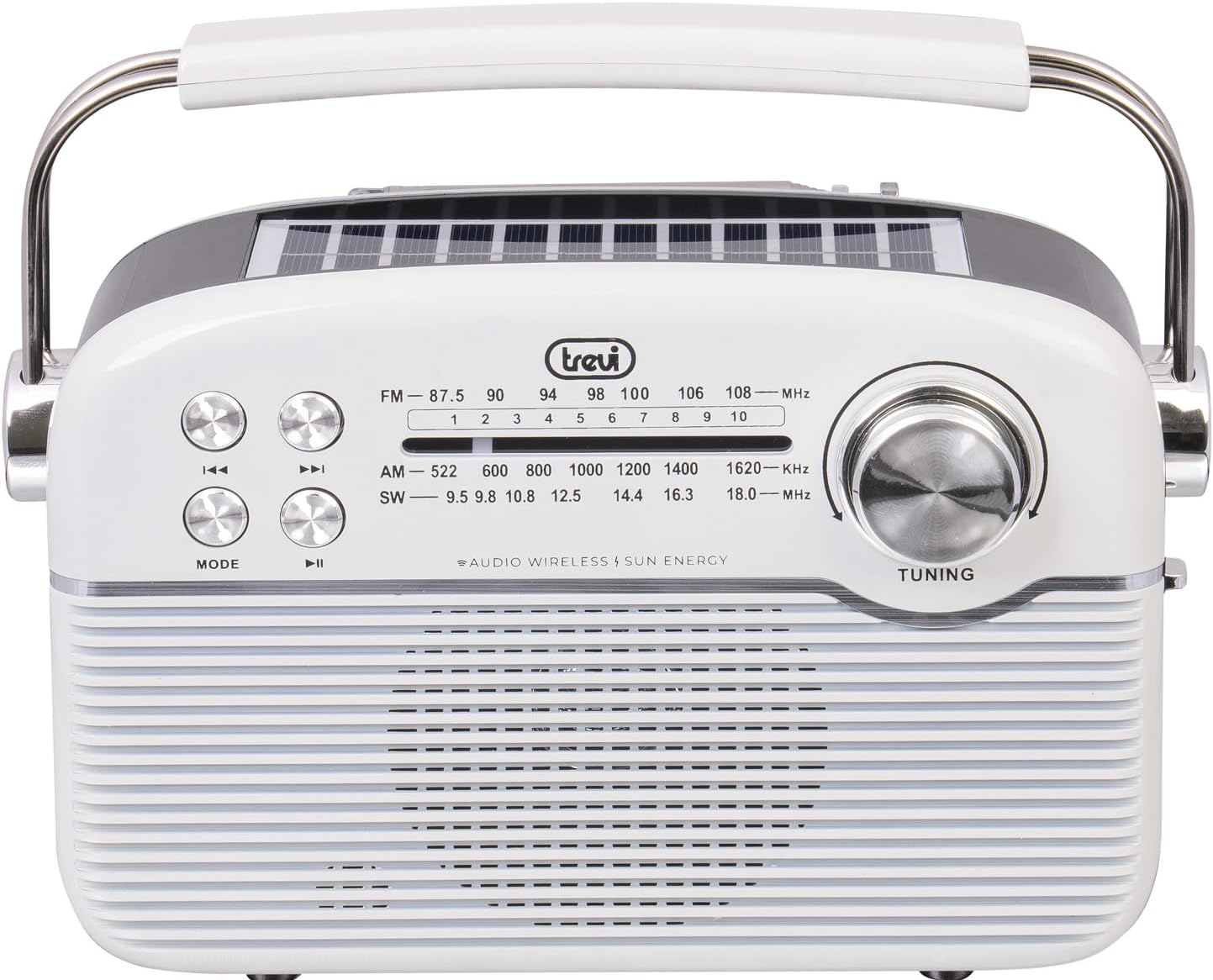
Сүрөт: алдыңкы view of the Trevi RA 7F50 BT radio. Visible elements include the main speaker grille, frequency display for FM, AM, and SW bands, control buttons for playback and mode selection, and a large tuning dial on the right side. The Trevi logo is centered above the frequency display.
Жогорку жана каптал View

Сүрөт: Үстү жана капталы view of the Trevi RA 7F50 BT radio. This perspective clearly shows the integrated solar panel on the top surface, designed for charging. The sturdy carrying handle is also prominent, extending across the top of the unit. The side view reveals the rounded edges and overall compact design.
Арткы View

Сүрөт: Арткы view of the Trevi RA 7F50 BT radio. The telescopic antenna is visible at the top. Below it, the various input ports are shown, including a USB port for flash drives, a Micro SD card slot for memory cards, and a USB Type-C port for charging the internal battery. The back panel also features a textured design.
Башкаруу каражаттары жана порттор:
- Тюнинг терүү: Радио жыштыктарын тандоо үчүн.
- Режим баскычы: Switches between radio (FM/AM/SW), Wireless, and MP3 (USB/Micro SD) modes.
- Ойнотуу/тындыруу баскычы: Controls playback in MP3 and Wireless modes.
- Мурунку/Кийинки трек баскычтары: Navigates tracks in MP3 and Wireless modes, or fine-tunes radio frequency.
- Үндү көзөмөлдөө: Аудио чыгаруу деңгээлин тууралайт.
- USB порт: USB флэш-дисктерди туташтыруу үчүн.
- Микро SD карта слоту: For inserting Micro SD memory cards.
- USB Type-C порту: Ички батареяны заряддоо үчүн.
- Телескопиялык антенна: Жакшыртылган радио кабыл алуу үчүн.
- Күн панели: Integrated on top for solar charging.
4. Орнотуу
4.1 Батареяны заряддоо
The Trevi RA 7F50 BT radio is equipped with a rechargeable lithium battery (1500 mAh) and offers two charging methods:
- USB Type-C заряддоо: Connect the provided USB Type-C cable to the radio's charging port and the other end to a standard USB power adapter (not included) or a computer's USB port. The charging indicator light will illuminate.
- Күн кубаты: Place the radio with its solar panel facing direct sunlight. The integrated 80 mA solar panel will slowly recharge the battery. This method is ideal for maintaining charge or for emergency power in outdoor environments.
Алгачкы колдонуудан мурун батарейканы толук кубаттоо сунушталат.
4.2 Баштапкы күйгүзүү
Locate the Power On/Off switch, usually on the side or back of the unit. Slide it to the "ON" position. The radio will power on, and the display (if available) will light up.
5. Иштөө нускамалары
5.1 Radio Operation (FM/AM/SW)
- Радио режимин тандаңыз: басыңыз РЕЖИМ баскычын каалаган радио диапазонуна жеткенге чейин кайталап басыңыз (FM, AM же SW).
- Антеннаны узартуу: For optimal FM and SW reception, fully extend the telescopic antenna. For AM, the internal ferrite antenna is typically sufficient.
- Станцияга күүлүү: айлантыңыз TUNING dial to scan for stations. The frequency display will show the current frequency.
- Үндү тууралоо: Use the volume control knob to set the desired listening level.
5.2 Wireless Connectivity (Bluetooth)
- Enter Wireless Mode: басыңыз РЕЖИМ button repeatedly until "BT" or "Wireless" appears on the display (if applicable), or you hear an audible prompt indicating Bluetooth pairing mode.
- Түзмөк менен жупташтыруу: On your smartphone, tablet, or other Bluetooth-enabled device, go to the Bluetooth settings and search for available devices. Select "Trevi RA 7F50 BT" from the list.
- Ырастоо: Once paired, the radio will indicate a successful connection (e.g., an audible tone or stable indicator light).
- Аудио ойнотуу: You can now play audio from your connected device through the radio's speaker. Use the radio's playback controls (Play/Pause, Previous/Next) or your device's controls.
5.3 MP3 Playback (USB/Micro SD)
- Медиа киргизүү: Insert a USB flash drive into the USB port or a Micro SD card into the Micro SD slot. Ensure the media contains MP3 audio files.
- Enter MP3 Mode: басыңыз РЕЖИМ button repeatedly until the radio automatically switches to MP3 playback mode, or you hear an audible prompt.
- Ойнотуу башкаруулары: колдонуу Ойнотуу/Тыныгуу button to start or pause playback. Use the Мурунку/Кийинки трек тректердин ортосунда өтүү үчүн баскычтар.
6. Техникалык тейлөө
- Тазалоо: Радиону жумшак, кургак чүпүрөк менен сүртүңүз. Абразивдүү тазалагычтарды же эриткичтерди колдонбоңуз.
- Батареяга кам көрүү: To prolong battery life, avoid fully discharging the battery frequently. Recharge regularly, especially if the unit will be stored for an extended period.
- Сактагыч: Радиону салкын, кургак жерде, түз күндүн нурунан жана экстремалдык температурадан алыс сактаңыз.
7. Кыйынчылыктарды
| Көйгөй | Мүмкүн себеп | Чечим |
|---|---|---|
| Күч жок | Батарея түгөндү; Кубат өчүк. | Charge the battery via USB-C or solar panel; Ensure power switch is ON. |
| Радио кабыл алуу начар | Антенна узартылган эмес; Алсыз сигнал; Интерференция. | Fully extend the telescopic antenna; Reposition the radio; Try tuning to a stronger station. |
| Cannot connect via Wireless (Bluetooth) | Radio not in Wireless mode; Device not discoverable; Already connected to another device. | Press MODE to enter Wireless mode; Ensure your device's Bluetooth is on and discoverable; Disconnect from other devices. |
| MP3 fileойнобойт | Туура эмес file format; USB/Micro SD not inserted correctly; Corrupted media. | камсыз кылуу files are MP3 format; Reinsert USB/Micro SD; Try different media. |
8. Техникалык шарттар
- Модел: RA 7F50 BT
- Радио топтору: FM, AM, SW
- Байланыш: Wireless (Bluetooth), USB, Micro SD
- Кубат булагы: Rechargeable Lithium Battery (1500 mAh), Solar Panel (80 mA max), USB Type-C
- Киргизүү көлөмүtage: 3.7V DC
- Өлчөмдөрү: 25L x 11W x 20H cm (approx.)
- Салмагы: 0.98 кг (болжол менен)
- Камтылган компоненттер: USB / Type-C charging cable, User Manual
9. Кутуда эмне бар
- Trevi RA 7F50 BT көчмө көп тилкелүү радио
- USB / Type-C Charging Cable
- User Manual
10. Кепилдик жана колдоо
This product is covered by a standard manufacturer's warranty. For detailed warranty information, technical support, or service inquiries, please refer to the warranty card included with your product or visit the official Trevi webсайт. Кепилдик дооматтар үчүн сатып алганыңыздын далилин сактаңыз.