
Introduction
This manual provides detailed instructions for the Rapoo VH650 Virtual 7.1 Channel RGB Gaming Headset. Please read this guide carefully to ensure proper setup, operation, and maintenance of your headset. This will help you maximize your gaming audio experience and prolong the life of your device.
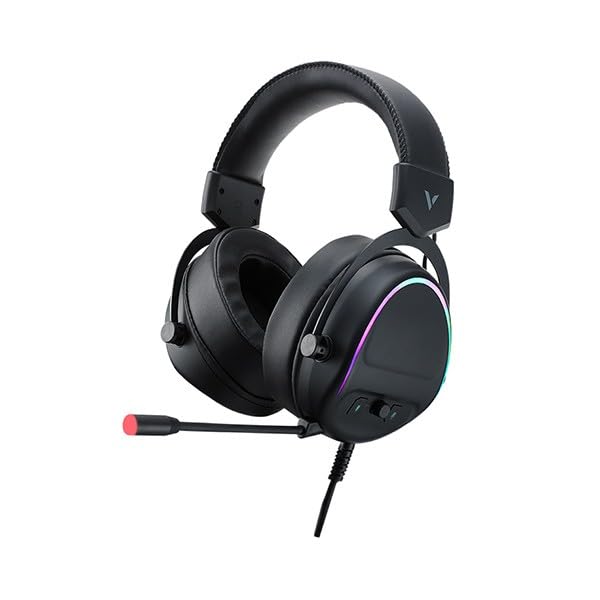
Figure 1: Rapoo VH650 Gaming Headset
Өзгөчөлүктөрү
The Rapoo VH650 Gaming Headset is designed to deliver an immersive audio experience with its advanced features:
- Virtual 7.1 Channel Surround Sound: Experience precise positional audio, crucial for competitive gaming, allowing you to hear every detail from all directions.
- Brilliant RGB LED Backlight: Dynamic RGB lighting on the earcups enhances your gaming setup with vibrant colors and a modern aesthetic.
- Omnidirectional Noise-Canceling Microphone: The 360° adjustable microphone effectively reduces ambient noise, ensuring clear and precise communication with your teammates.
- High-Quality 50mm Sound Drivers: Equipped with powerful 50mm dynamic drivers, the headset delivers rich audio with deep bass and clear highs, optimized for gaming sound effects and music.
- Adjustable Metal Headband: The retractable single-head metal beam design ensures durability and a comfortable fit for various head sizes.
- Multi-function Ear Controls: Convenient controls located on the earcup allow for quick adjustments to volume and microphone settings.
- Over-Ear Design with Thick Ear Covers: Provides comfort during long gaming sessions and helps isolate external noise.

Figure 2: Virtual 7.1 Surround Sound for enhanced audio positioning.

Figure 3: RGB lighting on the earcups adds a vibrant gaming atmosphere.

Figure 4: The adjustable noise-canceling microphone ensures clear voice chat.

Figure 5: 50mm drivers provide powerful and clear audio.
Орнотуу нускамалары
- Гарнитураны туташтыруу: Plug the USB connector of the Rapoo VH650 headset into an available USB port on your computer or game console.
- Driver Installation (for PC):
- For Windows PCs, the operating system will typically install the necessary drivers automatically.
- To enable and customize the Virtual 7.1 Surround Sound and RGB lighting, download the dedicated Rapoo VH650 software from the official Rapoo webсайт.
- Программаны орнотууну аяктоо үчүн экрандын көрсөтмөлөрүн аткарыңыз.
- Аудио конфигурациясы:
- Windows: Go to 'Sound Settings' (right-click the speaker icon in the taskbar). Ensure 'Rapoo VH650' is selected as the default playback and recording device.
- Оюн консолдору: Navigate to the audio settings within your console's system menu and select the Rapoo VH650 as the audio output and input device.
- Тууралоону тууралоо: Adjust the metal headband to ensure a comfortable and secure fit over your ears. Position the microphone appropriately for clear voice capture.
Иштөө нускамалары
- Үндү көзөмөлдөө: Use the volume wheel or buttons located on the left earcup to adjust the audio output level.
- Микрофондун үнүн басуу/ачуу: A dedicated button on the earcup or inline control allows you to quickly mute or unmute the microphone. An LED indicator may show the microphone status.
- RGB жарыкты башкаруу: If installed, use the Rapoo software on your PC to customize RGB lighting effects, colors, and patterns. Some headsets may have a physical button for cycling through preset lighting modes.
- Virtual 7.1 Surround Sound Activation: Activate and configure the Virtual 7.1 Surround Sound feature through the Rapoo software. This software allows for fine-tuning of audio profiles and positional sound.
Техникалык тейлөө
- Тазалоо: Наушниктерди жана баш боолорду сүртүү үчүн жумшак, кургак чүпүрөктү колдонуңуз. өжөр кир үчүн, бир аз гamp кездемени колдонсо болот, бирок нымдуулуктун динамик торчолоруна же микрофонго кирбегенин текшериңиз. Катуу химиялык заттарды же абразивдүү тазалоочу каражаттарды колдонбоңуз.
- Сактагыч: When not in use, store the headset in a clean, dry place away from direct sunlight and extreme temperatures. Avoid wrapping the cable tightly to prevent damage.
- Кабельге кам көрүү: Handle the USB cable gently. Avoid pulling on the cable to disconnect the headset; always grasp the plug.
Проблемаларды чечүү
- Гарнитурадан үн жок:
- Ensure the USB cable is securely connected to your device.
- Check the headset's volume control and ensure it is not at minimum or muted.
- Verify that the Rapoo VH650 is selected as the default audio output device in your computer's or console's sound settings.
- Түзмөккө тиешелүү маселени болтурбоо үчүн гарнитураны башка түзмөктө сынап көрүңүз.
- Микрофон иштебейт:
- Ensure the microphone is not muted via the headset's control or software.
- Check that the Rapoo VH650 is selected as the default recording device in your sound settings.
- Түзмөгүңүздүн үн жөндөөлөрүнөн микрофондун деңгээлин тууралаңыз.
- Микрофондун штангасы оозуңузга туура жайгаштырылганын текшериңиз.
- RGB жарыктандыруу иштебей жатат:
- Гарнитура USB аркылуу туура туташтырылганын текшериңиз.
- If using PC software, verify that the lighting effects are enabled and configured correctly.
- Check for any physical lighting control buttons on the headset.
Техникалык шарттар
| Өзгөчөлүк | Спецификация |
|---|---|
| Бренд | Rapoo |
| Модел | VH650 |
| Түс | Кара |
| Байланыш технологиясы | Wired (USB for 7.1 Virtual Surround Sound) |
| Аудио драйвер түрү | Динамикалык драйвер |
| Айдоочунун диаметри | 50мм |
| Наушник форма фактору | Кулак үстүндө |
| Кулак жайгаштыруу | Кулак үстүндө |
| Импеданс | 3 Ом |
| Noise Control | None (Microphone features noise-canceling) |
| Микрофон | Omnidirectional, Noise-Canceling, Rotary |
| Өзгөчөлүктөр | Virtual 7.1 Channel Sound, RGB Backlight, Gaming-specific sound engine |
| Шайкеш түзмөктөр | Desktop Computers, Laptops, Mobile Phones (with adapter, not included), Game Consoles |
| Продукт үчүн атайын колдонуу | Оюндар |
| Элемент Салмагы | 150 грамм |
| Камтылган компоненттер | User Manual |
| Өндүрүлгөн өлкө | Кытай |
Кепилдик жана колдоо
The Rapoo VH650 Gaming Headset comes with a эки жылдык кепилдик сатып алынган күндөн тартып өндүрүш кемчиликтерин жабуу. Кепилдик дооматтары үчүн сатып алганыңыздын далилин сактап коюңуз.
For technical support, troubleshooting assistance, or warranty inquiries, please visit the official Rapoo website or contact their customer service department. You can usually find contact information, FAQs, and driver downloads on the support section of their webсайт.
Онлайн ресурстар:
- Расмий Рапу Website (for drivers and support)
- Product registration (if available)