
1. Продукт бүтүп калдыview
The TP-Link TL-MC102 is a media converter designed to facilitate the conversion between 1000BASE-SX fiber and 1000Base-T copper media. It supports Gigabit Ethernet standards (IEEE802.3ab 1000Base-T and IEEE802.3z 1000Base-SX) and is compatible with multi-mode fiber optic cables using SC-Type connectors. This device operates at 850nm wavelength for both transmitting and receiving data, offering full wire-speed forwarding. It can function as a standalone unit or be integrated into TP-Link's MC1400 chassis. Key features include Auto MDI/MDI-X for the TX port and front panel status LEDs for easy monitoring.
The TL-MC102 extends fiber optic distances up to 0.55 kilometers (550 meters) when using 50/125µm multi-mode fiber, or 220 meters with 62.5/125µm multi-mode fiber.
2. Пакеттин мазмуну
Пакетиңизде төмөнкү заттар бар экенин текшериңиз:
- 1 x TL-MC102 Gigabit SFP to RJ45 Fiber Media Converter
- 1 х кубат адаптери
- 1 x Орнотуу колдонмосу
3. Продукциянын өзгөчөлүктөрү
- 1000BASE-SX буласын 1000Base-T жез чөйрөсүнө жана тескерисинче айландырат.
- Supports auto-negotiation for Half-Duplex / Full-Duplex transfer modes.
- Features auto MDI/MDI-X for the TX port.
- FX портундагы Күч/Автоматтык которуу режими үчүн которгучтун конфигурациясын камсыз кылат.
- Extends fiber distance up to 550m (1,800 feet) using 50/125µm Multi-Mode Fiber.
- Extends fiber distance up to 220m (720 feet) using 62.5/125µm Multi-Mode Fiber.
- Equipped with easy-to-view Тармактын активдүүлүгүн көзөмөлдөө үчүн LED индикаторлору.
- External power supply for operation.
- Operates at a wavelength of 850nm.
- Maximum power consumption: 1.66W.
- Complies with IEEE 802.3ab and IEEE 802.3z standards.
4. Техникалык жабдыктар бүттүview
The TL-MC102 features a compact design with essential ports and LED indicators for status monitoring.
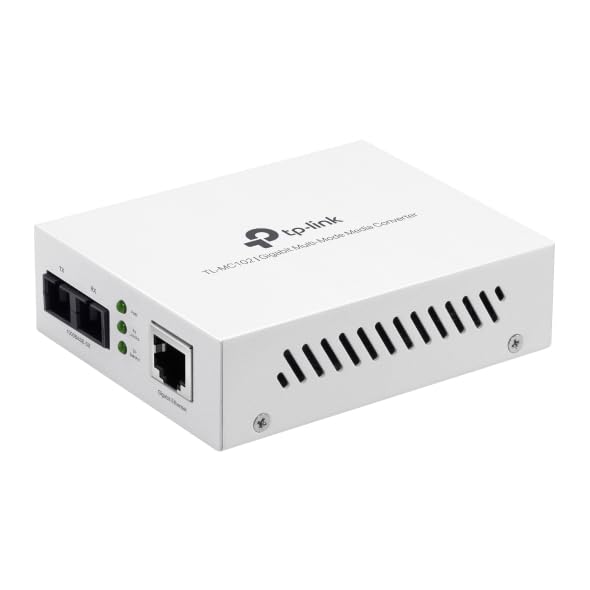
1-сүрөт: Фронт view of the TL-MC102 Gigabit SFP to RJ45 Fiber Media Converter. This image shows the compact white casing of the device, highlighting its ports and LED indicators on the front panel.
Порттор жана туташтыргычтар:
- RJ45 Port (TX): Standard Ethernet port for connecting to copper-based network devices (e.g., switch, router, computer) using an Ethernet cable. Supports 10/100/1000Mbps speeds and Auto MDI/MDI-X.
- SFP Port (FX): Slot for an SFP (Small Form-Factor Pluggable) module. This port is used for fiber optic connections. The TL-MC102 is designed for 1000BASE-SX multi-mode SFP modules.
- Кубат киргизүү: Тышкы кубат адаптери үчүн туташтыргыч.
LED көрсөткүчтөрү:
The front panel LEDs provide real-time status information about the converter's operation:
- PWR (кубат):
- Күйүк: The converter is powered on.
- Өчүк: The converter is powered off.
- FX шилтемеси/аракети (оптикалык була шилтемеси/иш-аракет):
- Күйүк: A fiber link is established.
- Жаркылдоо: Маалыматтар була-оптикалык байланыш аркылуу берилет же кабыл алынат.
- Өчүк: No fiber link is established.
- TX Link/Act (Copper Link/Activity):
- Күйүк: A copper Ethernet link is established.
- Жаркылдоо: Data is being transmitted or received over the copper link.
- Өчүк: No copper Ethernet link is established.
- TX 1000 (Copper Speed):
- Күйүк: The copper port is operating at 1000Mbps.
- Өчүк: The copper port is operating at 10/100Mbps.
5. Орнотуу нускамалары
Follow these steps to set up your TL-MC102 media converter:
- Өчүрүү түзмөктөрү: Before making any connections, ensure that all devices (e.g., switch, router, computer) to be connected to the media converter are powered off.
- Insert SFP Module: Carefully insert a compatible 1000BASE-SX multi-mode SFP module into the SFP port (FX) of the TL-MC102. Ensure it clicks into place.
- Була кабелин туташтыруу: Connect one end of a multi-mode fiber optic cable (with SC-Type connectors) to the SFP module in the TL-MC102. Connect the other end of the fiber cable to a compatible fiber optic device (e.g., fiber switch, another media converter).
- Ethernet кабелин туташтыруу: Connect one end of an Ethernet cable to the RJ45 port (TX) of the TL-MC102. Connect the other end of the Ethernet cable to the Ethernet port of your copper-based network device (e.g., switch, router, PC).
- Кубат адаптерин туташтыруу: Plug the provided power adapter into the power input of the TL-MC102, then plug the other end into a standard electrical outlet.
- Түзмөктөрдү күйгүзүү: Power on the TL-MC102. The PWR LED should illuminate. Then, power on your connected network devices.
- Байланыштарды текшерүү: Check the LED indicators on the TL-MC102. The FX Link/Act and TX Link/Act LEDs should illuminate, indicating successful link establishment. If data is flowing, these LEDs will flash. The TX 1000 LED should be on if the copper connection is at Gigabit speed.
Эскертүү: Ensure that the fiber optic cable type (multi-mode) and connector type (SC) match the requirements of the SFP module and the connected fiber device.
6. Иштөө нускамалары
Once properly set up, the TL-MC102 operates automatically to convert signals between fiber and copper media. No further configuration is typically required for basic operation.
Мониторинг абалы:
Regularly observe the LED indicators on the front panel to monitor the status of your network connections:
- Катуу Жек Строу менен LED indicates the device is receiving power.
- Катуу FX Link/Act жана TX шилтемеси/Акт LEDs confirm active network links on both fiber and copper sides.
- Жаркылдоо FX Link/Act жана TX шилтемеси/Акт LEDs indicate active data transmission.
- Катуу TX1000 LED confirms a Gigabit Ethernet connection on the copper side.
If any Link/Act LED is off when it should be on, refer to the Troubleshooting section.
7. Техникалык тейлөө
To ensure optimal performance and longevity of your TL-MC102, consider the following maintenance guidelines:
- Тазалыкты сактоо: Regularly clean the exterior of the device with a soft, dry cloth. Avoid using liquid or aerosol cleaners.
- Вентиляция: Ашыкча ысып кетпеши үчүн, түзмөк жакшы желдетилген жерге коюлганын текшериңиз. Желдетүү тешиктерин жаппаңыз.
- Кабелдик башкаруу: Keep fiber and Ethernet cables neatly organized and free from kinks or excessive bends, especially fiber optic cables which are sensitive to bending.
- Электр камсыздоо: Use only the power adapter provided with the device. If a replacement is needed, ensure it meets the exact specifications.
- Курчап турган чөйрө: Operate the device within its specified environmental conditions (temperature, humidity) to prevent damage.
- Программалык камсыздоонун жаңыртуулары: While media converters typically do not require frequent firmware updates, check the TP-Link support website periodically for any recommended updates for your model.
8. Кыйынчылыктарды
If you encounter issues with your TL-MC102, refer to the following common problems and solutions:
- Кубат жок (PWR LED өчүк):
- Ensure the power adapter is securely connected to the converter and a working electrical outlet.
- Башка аспапка туташтыруу менен электр розеткасынын иштешин текшериңиз.
- Кубат адаптери бузулганын текшериңиз.
- Оптикалык була байланышы жок (FX байланышы/Акт LED өчүк):
- Verify that the SFP module is correctly inserted into the SFP port.
- Check the fiber optic cable for damage or kinks.
- Ensure the fiber cable connectors are clean and properly seated at both ends.
- Confirm that the connected fiber device is powered on and functioning correctly.
- Ensure the SFP module and the connected fiber device are compatible (e.g., multi-mode to multi-mode, correct wavelength).
- No Copper Link (TX Link/Act LED Off):
- Check the Ethernet cable for damage and ensure it is securely connected to both the TL-MC102 and the network device.
- Туташкан тармак түзмөгү (мисалы, коммутатор, роутер, компьютер) күйүк экенин жана анын Ethernet порту активдүү экенин текшериңиз.
- Башка Ethernet кабелин колдонуп көрүңүз.
- Ensure the network device's Ethernet port is configured correctly (e.g., not disabled).
- Жай тармак ылдамдыгы:
- Check the TX 1000 LED. If it's off, the copper connection is not at Gigabit speed. This could be due to the connected device or cable.
- Ensure all connected devices (including the SFP module) support Gigabit Ethernet.
- Inspect Ethernet and fiber cables for damage or poor connections.
- Үзгүлтүктүү туташуу:
- Check all cable connections (power, Ethernet, fiber) for looseness.
- Аппараттын ысып кетпегендигин текшериңиз.
- Verify that the power supply is stable.
- Consider testing with different cables or SFP modules if available.
9. Техникалык шарттар
| Өзгөчөлүк | Description |
|---|---|
| Бренд | TP-Link |
| Модель номери | TL-MC102 |
| Аппараттык интерфейс | Ethernet, SFP |
| Шайкеш түзмөктөр | NICs, Network Switch, Router |
| Data Link Protocol | Ethernet |
| Маалыматтарды өткөрүү ылдамдыгы | Секундасына 1 Гигабит |
| Fiber Type | Көп режимдүү була (1000BASE-SX) |
| Толкун узундугу | 850нм |
| Максималдуу була аралыгы | 550m (50/125µm MMF), 220m (62.5/125µm MMF) |
| Энергияны керектөө | Макс 1.66 Вт |
| Стандарттар | IEEE 802.3ab, IEEE 802.3z |
| Элемент Салмагы | 0.46 фунт |
| UPC | 810142823715 |
10. Кепилдик жана колдоо
Кепилдик маалыматы:
The TP-Link TL-MC102 comes with a 2 жылдык Өндүрүүчүнүн Кепилдиги. Please retain your proof of purchase for warranty claims. For detailed warranty terms and conditions, refer to the official TP-Link webсайтка же продуктуңузга кошулган кепилдик картасы.
Техникалык колдоо:
For technical support, product updates, and additional resources, please visit the official TP-Link support webсайт. Адатта, сиз көп берилүүчү суроолорду, көйгөйлөрдү чечүү боюнча колдонмолорду жана кардарларды тейлөө үчүн байланыш маалыматын ал жерден таба аласыз.
TP-Link расмий Webсайт: www.tp-link.com