
1. Киришүү
This manual provides essential information for setting up, operating, maintaining, and troubleshooting your CyberpowerPC Gamer Supreme Gaming PC, model SLCAI15000A2. Please read this manual thoroughly before using your new computer to ensure proper functionality and longevity.
2. Коопсуздук маалыматы
Observe the following safety guidelines to prevent damage to your system and ensure personal safety:
- Электр камсыздоо: Use only the power cord provided with your system. Ensure the power outlet is properly grounded.
- Вентиляция: Do not block ventilation openings. Ensure adequate airflow around the computer to prevent overheating.
- Суюктук жана нымдуулук: Keep the computer away from liquids and excessive moisture. Do not operate the computer with wet hands.
- Жайгашкан жери: Place the computer on a stable, flat surface. Avoid placing it near heat sources or in direct sunlight.
- Тейлөө: Do not attempt to service the computer yourself. Refer all servicing to qualified service personnel.
3. Пакеттин мазмуну
Пакетте бардык буюмдар бар экенин текшериңиз:
- CyberpowerPC Gamer Supreme Gaming PC (SLCAI15000A2)
- Электр кабели
- Оюн клавиатурасы
- Оюн чычкан
- Documentation (Quick Start Guide, Driver Discs if applicable)
4. Орнотуу
4.1. Физикалык орнотуу
- Компьютерди таңгактан чыгарыңыз: Компьютерди жана бардык аксессуарларды таңгактан кылдаттык менен чыгарып алыңыз.
- Перифериялык түзүлүштөрдү туташтыруу:
- Монитор(лор)уңузду компьютердин арт жагында жайгашкан графикалык карта портторуна (HDMI же DisplayPort) туташтырыңыз.
- Connect the keyboard and mouse to any available USB ports.
- Connect speakers or headphones to the audio jacks if desired.
- For wired internet, connect an Ethernet cable to the LAN port. For wireless, ensure antennas are attached if provided.
- Туташуу кубаты: Plug the power cord into the power supply unit (PSU) at the rear of the PC, then plug the other end into a grounded electrical outlet.
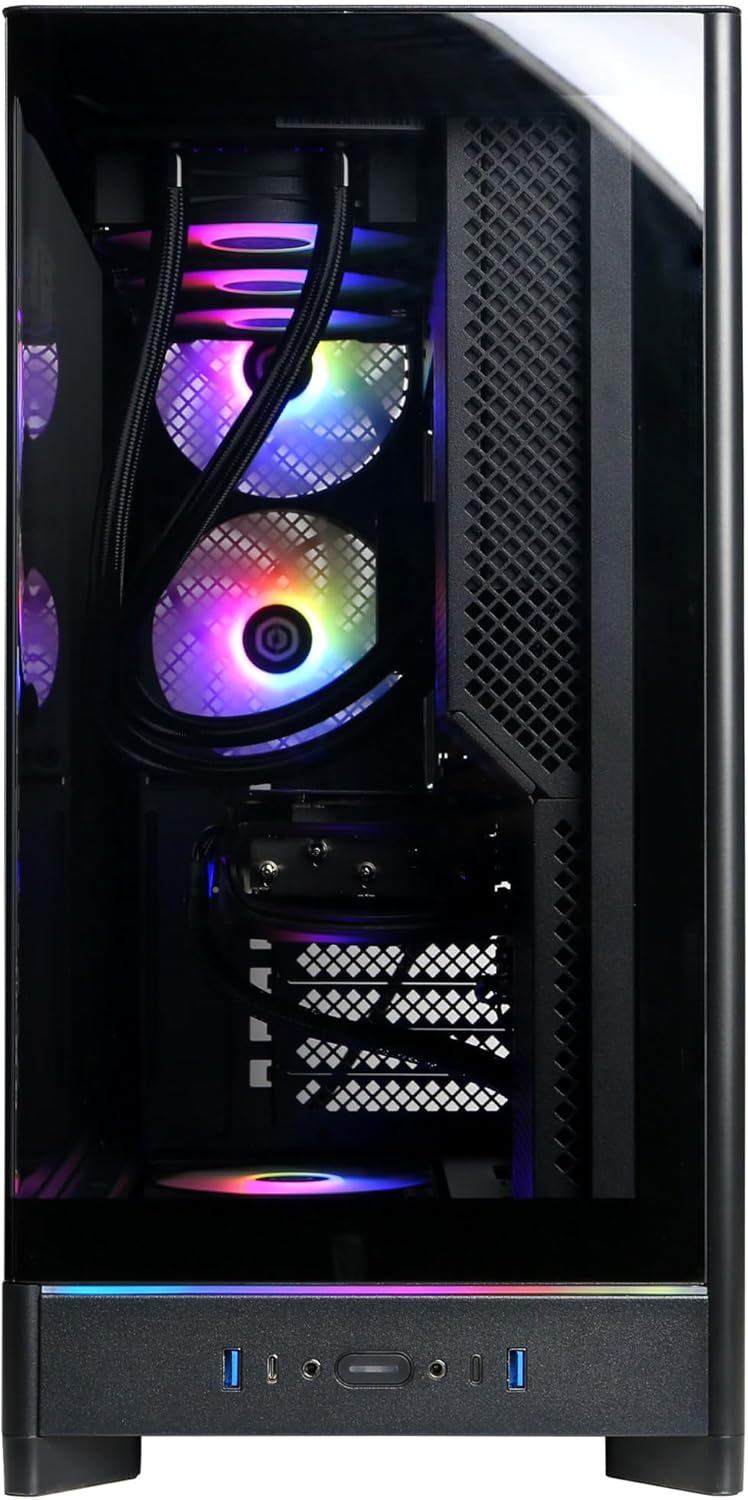
Image: Front panel connections including USB ports and power button.

Сүрөт: деталдуу view of the front input/output ports for easy access.
4.2. Баштапкы күйгүзүү
- Press the power button located on the front of the PC.
- The system will boot up, and you should see the operating system loading on your monitor.
4.3. Операциялык системаны орнотуу
Your CyberpowerPC comes with Windows 11 Home pre-installed. Follow the on-screen instructions to complete the initial setup, which includes:
- Аймагыңызды жана клавиатураңызды тандоо.
- Тармакка туташуу (зымдуу же зымсыз).
- Microsoft каттоо жазуусу менен кирүү же жергиликтүү каттоо жазуусун түзүү.
- Купуялык жөндөөлөрүн орнотуу.
5. Компьютериңизди иштетүү
5.1. Жалпы колдонуу
Once the operating system setup is complete, your PC is ready for use. You can install applications, browse the internet, and engage in gaming. Familiarize yourself with the Windows 11 interface for optimal experience.

Image: Internal components of the PC, showcasing the liquid cooling and RGB lighting.

Image: A different angle of the PC's interior, showing the high-performance graphics card and memory.
5.2. Байланыш
Your PC offers a variety of connectivity options:
- USB порттору: Includes 2 x USB-C 3.1, 4 x USB-A 3.1, and 2 x USB-A 2.0 for connecting various devices.
- Видео чыгуулары: 1 x HDMI and 3 x DisplayPort for multiple monitor setups.
- Тармак: 1 x LAN port for wired internet and WiFi 6 for high-speed wireless connectivity.
- Bluetooth: Зымсыз перифериялык түзүлүштөрдү туташтыруу үчүн Bluetooth 5.3.
- Аудио: 7.1 Channel Audio for immersive sound experiences.
6. Техникалык тейлөө
Regular maintenance helps ensure the longevity and performance of your PC:
- Тазалоо: Periodically clean the exterior of the case with a soft, dry cloth. Use compressed air to clear dust from ventilation grilles and internal components (ensure the PC is powered off and unplugged).
- Программалык камсыздоо жаңыртуулары: Keep your operating system, drivers (especially graphics drivers), and applications updated to the latest versions for security and performance improvements.
- Маалыматтын камдык көчүрмөсү: Маанилүү маалыматтардын камдык көчүрмөсүн үзгүлтүксүз тышкы дискке же булут сактагычына сактап туруңуз.

Сүрөт: Жогорку view of the PC chassis, illustrating the ventilation design.

Сүрөт: каптал view of the PC, showing the solid panel and potential rear airflow.
7. Кыйынчылыктарды
If you encounter issues with your PC, consider the following basic troubleshooting steps:
- Кубат жок: Ensure the power cord is securely connected to both the PC and the wall outlet. Check if the power supply switch at the back of the PC is in the 'ON' position.
- Дисплей жок: Verify that your monitor is powered on and correctly connected to the graphics card ports (not the motherboard video outputs). Try a different video cable or monitor if available.
- Системанын токтоп калышы/кыйраштары: Restart the PC. Ensure all drivers are updated. Check for overheating by monitoring temperatures with software.
- Перифериялык иштебейт: Перифериялык түзмөктү башка USB портуна туташтырып көрүңүз. Перифериялык түзмөктүн драйверлери орнотулганын текшериңиз.
- Жай аткаруу: Close unnecessary applications. Check for malware or viruses. Ensure sufficient free space on your primary drive.
For more complex issues, refer to the CyberpowerPC support webсайтка же техникалык колдоо менен байланышыңыз.
8. Техникалык шарттар
| Компонент | Спецификация |
|---|---|
| Модель номери | SLCAI15000A2 |
| Операция системасы | Windows 11 Home |
| CPU | AMD Ryzen 9 9950X 4.3GHz (16 Cores) |
| Чипсет | AMD B850 |
| Графикалык карта | NVIDIA GeForce RTX 5090 32 ГБ |
| RAM | 64 ГБ DDR5 |
| Сактагыч | 4TB PCIe 4.0 NVMe SSD |
| Байланыш | WiFi 6, Bluetooth 5.3, 1x LAN |
| USB порттору | 2x USB-C 3.1, 4x USB-A 3.1, 2x USB-A 2.0 |
| Video Output | 1x HDMI, 3x DisplayPort |
| Аудио | 7.1 Аудио каналы |
| Муздатуу | Liquid Cool CPU |
| Өлчөмдөр | 17.6 x 9.2 x 20 дюйм |
9. Кепилдик жана колдоо
Your CyberpowerPC Gamer Supreme Gaming PC is covered by a 1 жылдык тетиктер жана эмгек кепилдиги. Мындан тышкары, сиз аласыз Өмүр бою акысыз техникалык колдоо.
For warranty claims, technical assistance, or further inquiries, please visit the official CyberpowerPC support webсайтына кириңиз же алардын кардарларды тейлөө бөлүмүнө кайрылыңыз. Колдоо кызматын издеп жатканда сатып алуу дүмүрчөгүңүздү жана продуктунун сериялык номерин оңой эле жаныңызда кармаңыз.
Онлайн колдоо: www.cyberpowerpc.com/support