
1. Киришүү
This manual provides detailed instructions for the safe and efficient operation of your Lichamp 4-пакет Solar Camping Lantern. Designed for versatility, this LED lantern offers multiple power and lighting modes, making it suitable for various indoor and outdoor applications, including camping, power utages, and emergency situations. Please read this manual thoroughly before use and retain it for future reference.
2. Продукциянын өзгөчөлүктөрү
- Компакт жана көчмө: Collapsible design for easy storage and transport.
- Бир нече кубат параметрлери: Supports solar charging, USB recharging, and 3x AA battery power (not included).
- Үч жарык режими: Offers 600 lumens bright white, 200 lumens standard white, and a warm orange light mode.
- Шашылыш электр банкы: Built-in rechargeable battery can charge small electronic devices via USB.
- Туруктуу курулуш: Crafted from military-grade ABS material, weather-resistant and built for longevity.
- Бүктөлүүчү тутка: Integrated handle for carrying or hanging the lantern.
- Караңгыда жарк этүүчү которгуч: For easy location in low-light conditions.

Figure 2.1: Lichamp 4-пакет Solar Camping Lanterns with included USB cables.
3. Пакеттин мазмуну
Ар бир пакетте төмөнкүлөр камтылган:
- 4 x Lichamp Күн Сamping Lanterns
- 4 x USB заряддоо кабелдери
4. Орнотуу
- Баштапкы төлөм: Before first use, it is recommended to fully charge the lantern using the provided USB cable. Connect the USB cable to the lantern's charging port and a compatible USB power source (e.g., wall adapter, computer). The charging indicator light will blink red while charging and turn solid red when fully charged.
- AA Battery Installation (Optional): For additional power, unscrew the bottom cap of the lantern and insert 3 AA batteries (not included) according to the polarity markings. Replace the cap securely.
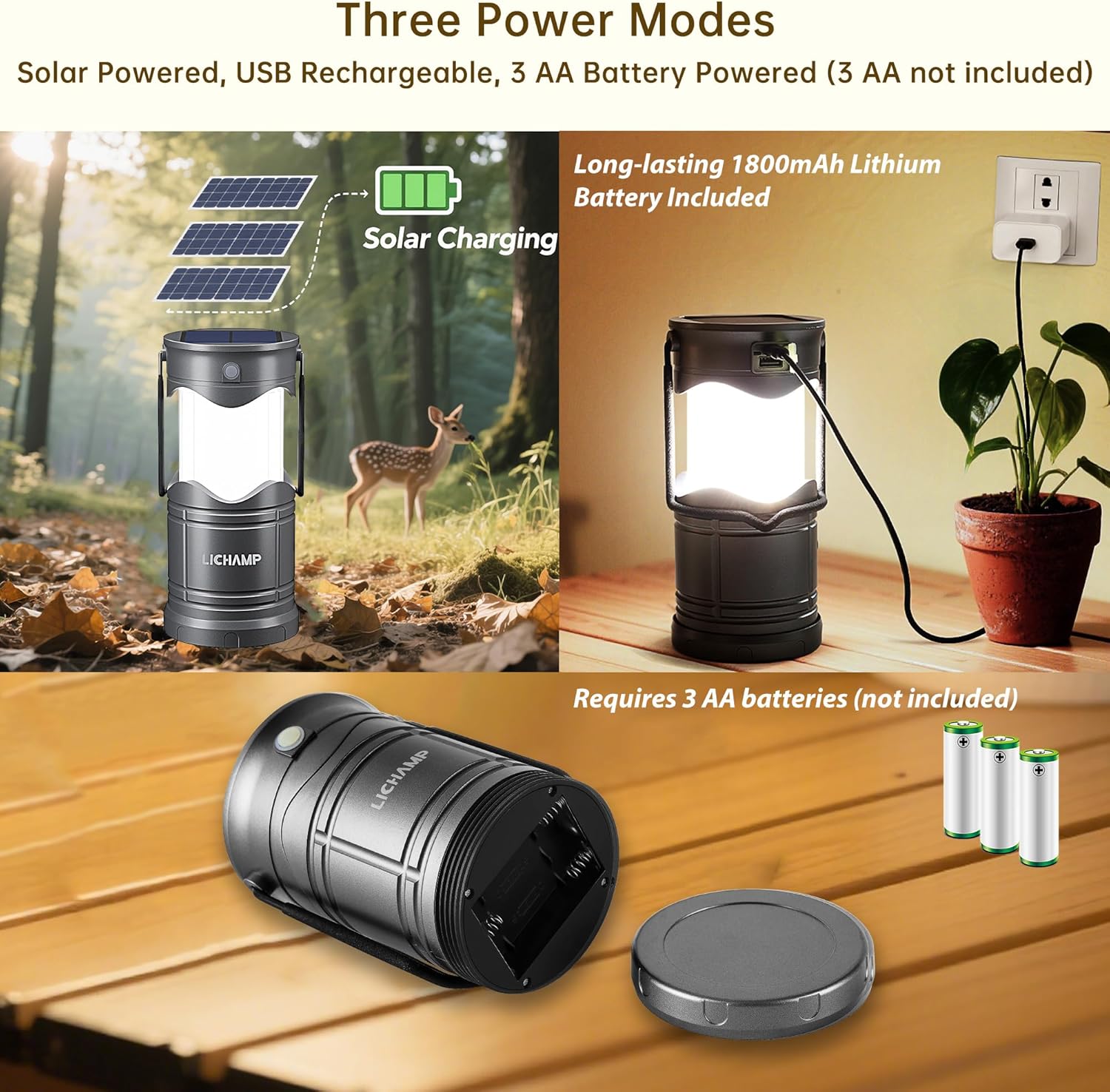
Figure 4.1: Illustration of the three power modes: solar, USB, and AA battery.
5. Иштөө нускамалары
5.1 Күйгүзүү/өчүрүү жана жарыктыкты жөндөө
- Күйгүзүү: Simply pull the top section of the lantern upwards to extend it. The lantern will automatically illuminate.
- Жарыкты тууралоо үчүн: Partially collapse the lantern to reduce the light output. The more it is collapsed, the dimmer the light will be.
- Өчүрүү: Fully collapse the lantern by pushing the top section down until it is completely closed. The light will turn off automatically.
5.2 Жарык режимдерин өзгөртүү
With the lantern extended and illuminated, press the power button located on the side to cycle through the three light modes:
- Bright White Light (600 lumens)
- Standard White Light (200 lumens)
- Warm Orange Light

Figure 5.1: The three available light modes of the lantern.
5.3 Power Bank катары колдонуу
The lantern can serve as an emergency power bank to charge small electronic devices. Open the rubber cover on the side to access the USB output port. Connect your device's charging cable to this port. The lantern's internal battery will provide power to your device.
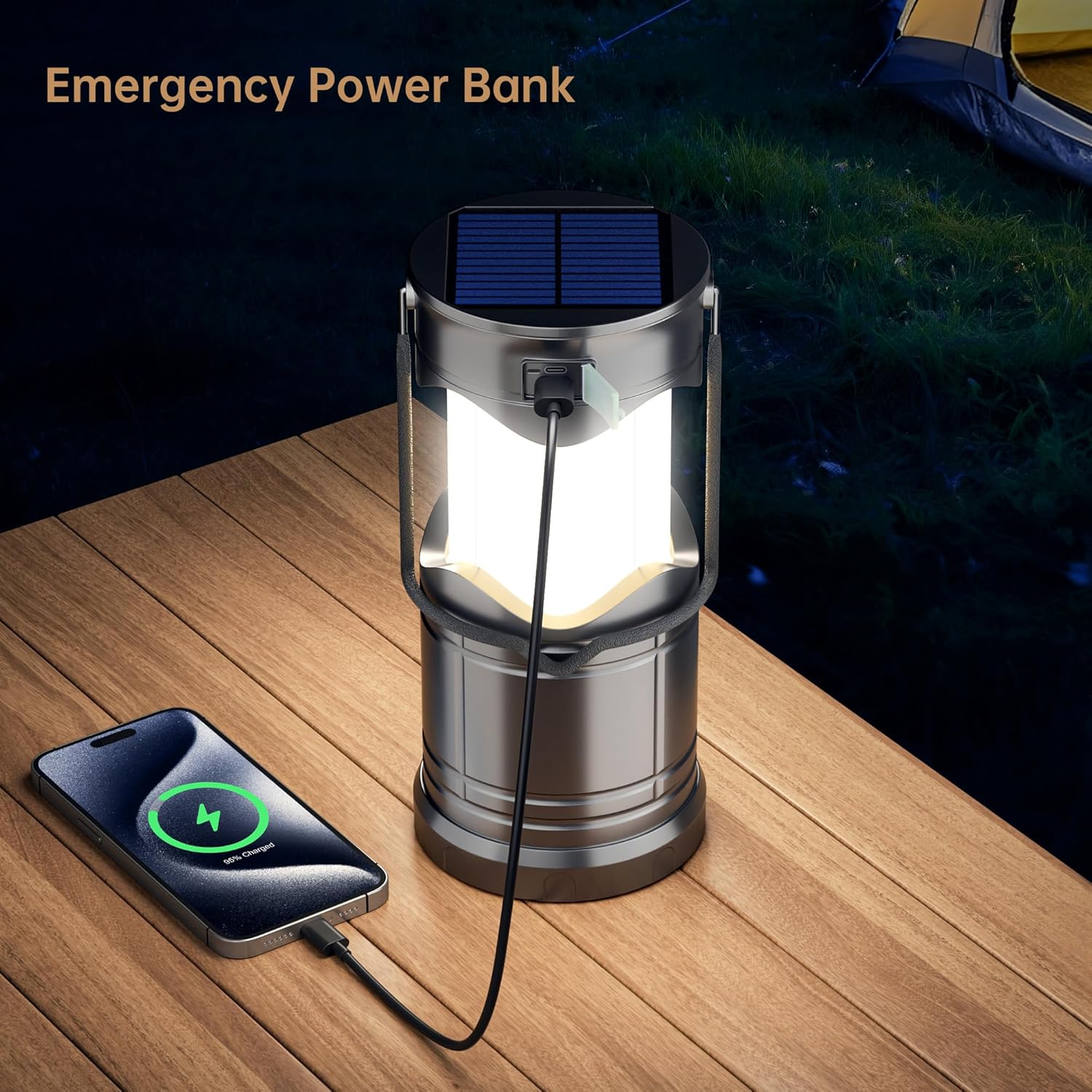
Figure 5.2: The lantern functioning as an emergency power bank.
6. Кубаттоо параметрлери
- Күн кубаты: Place the lantern with the solar panel facing direct sunlight. The solar panel is located on the top of the lantern. This method charges the internal rechargeable battery.
- USB Recharging: Use the provided USB cable to connect the lantern's charging port to any standard USB power source. The charging indicator will show status.
- AA Батарея кубаттуулугу: If the internal rechargeable battery is depleted, the lantern can be powered by 3 AA batteries (not included). This provides an alternative power source.
Video 6.1: An official product video demonstrating the Lichamp Solar Lantern's features and operation.
7. Техникалык тейлөө
- Тазалоо: Фонарды жумшак менен сүртүңүз, гamp кездеме. Абразивдүү тазалагычтарды же эриткичтерди колдонбоңуз.
- Сактагыч: Store the lantern in a cool, dry place when not in use. If storing for extended periods, ensure the internal battery is partially charged and recharge it every 3-6 months to maintain battery health.
- Батареяга кам көрүү: If using AA batteries, remove them if the lantern will not be used for a long time to prevent leakage.
8. Кыйынчылыктарды
- Фонар күйбөйт: Ensure the lantern is fully extended. Check the internal rechargeable battery level or replace the AA batteries if in use.
- кубаттоо маселелери: Verify that the USB cable is securely connected to both the lantern and the power source. For solar charging, ensure the solar panel is exposed to direct sunlight.
- Күңүрт жарык чыгаруу: The internal rechargeable battery may be low. Recharge the lantern.
9. Техникалык шарттар
| Өзгөчөлүк | Деталь |
|---|---|
| Продукциянын өлчөмдөрү | 3.74"L x 3.62"W x 5.1"H |
| Элемент Салмагы | 3.34 фунт (4 пакет үчүн) |
| Жарык булагы түрү | Жарык чыгаруучу диод (LED) |
| Жарыктык | 600 люменге чейин |
| Power Source | Solar Powered, USB Rechargeable, 3x AA Battery Powered |
| Материал | Акрилонитрил бутадиен стирол (ABS) |
| Сууга туруктуулук деңгээли | Сууга чыдамдуу |
| Модель номери | CLS-K004GH |
10. Коопсуздук маалыматы
- Do not look directly into the LED light when illuminated, as it may cause eye strain or temporary vision impairment.
- Балдар жетпеген жерде сактаңыз.
- Do not disassemble or modify the lantern. This may void the warranty and pose a safety risk.
- Avoid exposing the lantern to extreme temperatures or open flames.
- Ensure the charging port cover is securely closed when not in use to maintain water resistance.
11. Кепилдик жана колдоо
This product is CE certified, ensuring it meets high environmental and safety standards. For any questions, concerns, or support needs, please refer to the contact information provided with your purchase or visit the official Lichamp webсайт.