
CREWORKS KZ-F2
CREWORKS 2L Digital Ultrasonic Cleaner User Manual
Model: KZ-F2
Introduction
This manual provides essential information for the safe and efficient operation of your CREWORKS 2L Digital Ultrasonic Cleaner. This ultrasonic cleaner is designed to effectively clean various items such as jewelry, glasses, coins, and makeup brushes by utilizing ultrasonic waves and a heating function. Please read this manual thoroughly before initial use and retain it for future reference.
Коопсуздук нускамалары
Failure to follow these safety instructions may result in injury or damage to the unit.
- ЖОК блокту демонтаждоо.
- ЖОК use the cleaner unattended.
- ДАЙЫМА use sufficient fluid in the tank.
- Unplug the unit before filling or draining the tank.
- ДАЙЫМА place items to be cleaned in the provided basket.
- ЖОК let items to be cleaned directly touch the bottom of the tank.
- Агрегаттын туруктуу, түз бетине коюлганын текшериңиз.
- Агрегатты балдардан жана үй жаныбарларынан алыс кармаңыз.
- Негизги блокту сууга же башка суюктуктарга салбаңыз.
Кутуда эмне бар
- 1x CREWORKS Ultrasonic Cleaner
- 1x Cleaning Basket
- 1x Кубат Сымы
- 1x Колдонуучунун колдонмосу

Image: The CREWORKS 2L Digital Ultrasonic Cleaner shown with its included accessories: the main unit, a stainless steel cleaning basket, a power cord, and the user manual.
Жайгашуу
- Жайгашкан жери: Place the ultrasonic cleaner on a stable, flat, and dry surface, ensuring adequate ventilation around the unit.
- Танкты толтуруңуз: Open the lid and carefully fill the stainless steel tank with water or an appropriate cleaning solution. Do not exceed the "MAX" fill line indicated inside the tank. Ensure the fluid level is above the "MIN" line.
- Себетти салуу: Place the cleaning basket into the tank. This basket is designed to hold items and prevent them from directly touching the tank's bottom, which is crucial for effective and safe cleaning.
- Туташуу кубаты: Plug the power cord into the back of the unit and then into a grounded electrical outlet (110-120V AC, 60Hz).
- Күйгүзүү: Flip the main power switch located on the back of the unit to the "ON" position. The control panel will illuminate.
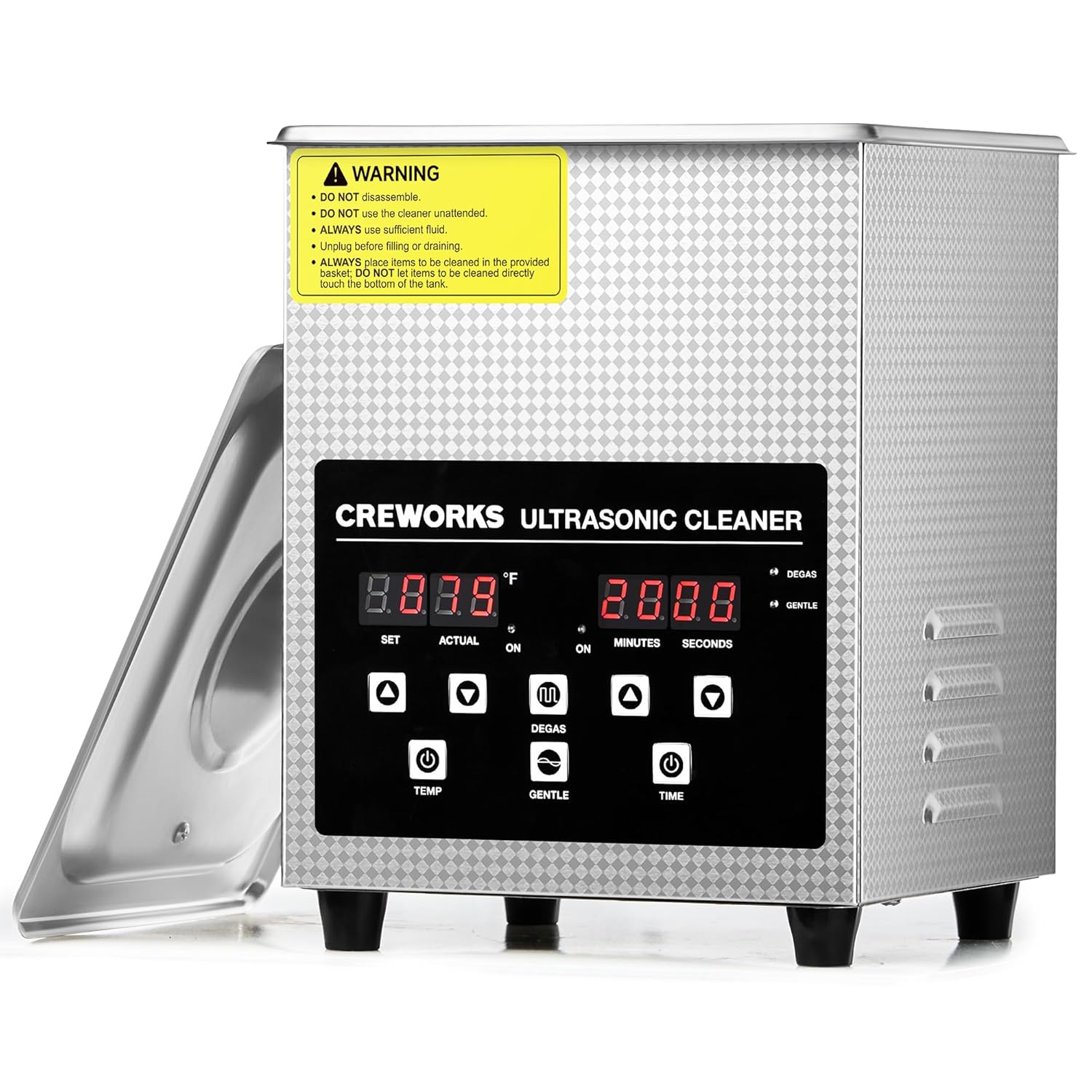
Image: The main unit of the CREWORKS 2L Digital Ultrasonic Cleaner, showing the front control panel and the open lid revealing the stainless steel tank.
Иштөө нускамалары
Башкаруу панелиview

Сүрөт: деталдуу view of the digital control panel, showing the temperature display (SET/ACTUAL), timer display (MINUTES/SECONDS), and control buttons for temperature, time, Degas mode, and Gentle mode.
- Температура дисплейи: Shows set and actual temperature in Fahrenheit.
- Таймер дисплей: Shows set and remaining cleaning time in minutes and seconds.
- TEMP Buttons (▲/▼): Adjust the desired cleaning fluid temperature (32°F to 176°F).
- TIME Buttons (▲/▼): Adjust the cleaning duration (1 to 30 minutes).
- DEGAS Button: Activates the degas mode to remove dissolved gases from the cleaning solution, enhancing cleaning efficiency.
- GENTLE Button: Activates the gentle mode, reducing ultrasonic intensity for delicate items.
Тазалоо процедурасы
- Объекттерди кошуу: Place the items to be cleaned into the cleaning basket. Ensure items are fully submerged in the cleaning solution but do not overcrowd the basket.
- Температураны коюу: колдонуу ТЕМП ▲/▼ buttons to set the desired cleaning temperature. The unit will begin heating the solution. For optimal cleaning, it is recommended to use warm water or allow the unit to pre-heat.
- Activate Degas Mode (Optional): басыңыз ДЕГАС button. This mode removes dissolved gases from the cleaning solution, which can improve cavitation and cleaning effectiveness. Run for 1-2 minutes before starting the main cleaning cycle.
- Тазалоо режимин тандоо:
- For general cleaning, no special mode is needed after degas.
- For delicate items (e.g., circuit boards, Invisaligns, fragile jewelry), press the ЖУМШАК button to reduce the ultrasonic intensity.
- Убакытты коюу: колдонуу TIME ▲/▼ buttons to set the desired cleaning duration. The recommended cleaning time varies depending on the item and level of dirt.
- Тазалоону баштоо: The unit will automatically start the ultrasonic cleaning process once the temperature and time are set. The timer will count down.
- Аяктоо: Once the timer reaches zero, the ultrasonic cleaning will stop automatically.
- Элементтерди алып салуу: Carefully lift the basket out of the tank. Rinse the cleaned items under clean water and dry them thoroughly.
- Дренаждык танк: Unplug the unit from the power outlet before draining the used cleaning solution.

Image: Visual representation of the Degas mode, showing gas bubbles being removed, and a graph illustrating the reduced sound pressure of the Gentle mode compared to the standard mode.

Image: A comparison showing the effectiveness of the ultrasonic cleaner on various items, including eyeglasses, a razor, and a circuit board, before and after cleaning.
Техникалык тейлөө
- Дренаж: After each use, unplug the unit and drain the used cleaning solution from the tank.
- Танкты тазалоо: Wipe the inside of the stainless steel tank with a soft cloth. Do not use abrasive cleaners or scouring pads, as they may scratch the surface.
- Тышкы тазалоо: Агрегаттын сыртын жумшак, гamp кездеме. Башкаруу панелине же электрдик бөлүктөргө суу кирип кетпеши үчүн этият болуңуз.
- Сактагыч: Store the unit in a cool, dry place away from direct sunlight and moisture. Ensure the tank is completely dry before storage.
- Basket Care: The stainless steel basket can be rinsed with water and dried.
Проблемаларды чечүү
| Көйгөй | Мүмкүн себеп | Чечим |
|---|---|---|
| Түзмөк күйбөйт. | Power cord not properly connected; Power switch off; No power from outlet. | Ensure power cord is securely plugged in. Turn the main power switch on. Check the power outlet with another device. |
| УЗИ үн/вибрациясы жок. | Insufficient water/solution; Unit not powered on; Malfunction. | Ensure fluid level is between MIN and MAX lines. Verify unit is powered on and timer is set. If problem persists, contact customer support. |
| Cleaning results are poor. | Incorrect cleaning solution; Overcrowding; Insufficient cleaning time/temperature; Air bubbles in solution. | Use appropriate cleaning solution. Clean fewer items at a time. Increase cleaning time or temperature. Use Degas mode before cleaning. |
| Аппарат өтө ызы-чуу. | Normal operation sound; Items touching tank bottom. | Some operational noise is normal. Ensure items are placed in the basket and not directly touching the tank bottom. |
Техникалык шарттар
| Өзгөчөлүк | Деталь |
|---|---|
| Модел | KZ-F2 |
| Жалпы көлөмү | 2 л (0.5 гал.) |
| Киргизүү көлөмүtage | 110-120В AC, 60Гц |
| УЗИ жыштыгы | 40 кГц |
| УЗИ күч | 60 Вт |
| Жылытуу күчү | 150 Вт |
| Температура диапазону | 32-176°F (0-80°C) |
| Таймер диапазону | 1-30 мүнөт |
| Танк материалы | 304 Дат баспас болот |
| Бактын өлчөмдөрү (узундугу x туурасы x бийиктиги) | 6 x 5.5 x 4.7 дюйм |
| Жалпы өлчөмдөрү (L x W x Y) | 6.9 x 6.5 x 9.1 дюйм |
| Таза Салмак | Болжол менен 5.56 фунт |
| Өндүрүүчү | ЭКИПАЖДАР |

Image: A visual guide to the dimensions of the CREWORKS 2L Digital Ultrasonic Cleaner, including the overall unit size and the internal tank dimensions, along with the cleaning basket.
Кепилдик жана колдоо
CREWORKS stands behind the quality of its products. This ultrasonic cleaner comes with a 1-Year Promise. For any questions, technical assistance, or warranty claims, please contact CREWORKS customer service. Our dedicated support team is available 24/7 сага жардам берүү үчүн.
Please refer to the contact information provided in the included user manual or visit the official CREWORKS webколдоо чоо-жайы үчүн сайт.
Ask a question about this manual
Ask about setup, troubleshooting, compatibility, parts, safety, or missing instructions. Manuals+ will review the question and use this page’s manual context to help answer it.