
Electronic Spices W88-B
Electroni Spices W88-B 20A Solar Charger Controller User Manual
Model: W88-B
1. Киришүү
The Electronic Spices W88-B 20A Solar Charger Controller is designed to efficiently manage the charging and discharging of 12V/24V solar power systems. This controller optimizes battery performance and extends battery life by preventing overcharging, over-discharging, and short circuits. It features dual USB ports for charging mobile devices and other USB-powered gadgets directly from the solar system. Utilizing intelligent PWM charging technology, it enhances energy conversion efficiency, making it suitable for off-grid solar setups, RVs, boats, and small solar installations. The user-friendly LCD display provides real-time data for effective monitoring and management. Constructed with durable and heat-resistant materials, the W88-B controller offers reliable long-term performance in various environmental conditions.
2. Негизги өзгөчөлүктөрү
- Модел: W88-B
- Rated Voltage: 12V/24V automatic identification
- Номиналдуу ток: 20A
- Макс. PV Voltage: 50V
- Макс. PV киргизүү күчү: 130W (for 12V system) / 260W (for 24V system)
- Дисплей түрү: LCD/LED display for real-time monitoring
- Кубаттоо технологиясы: PWM battery charging
- USB порттору: Түзмөктү кубаттоо үчүн кош USB порттору
- Коргоо өзгөчөлүктөрү: Overcharging, over-discharging, short circuit, over-current, over-voltage, overheating, and lightning protection.
- Батарея шайкештиги: Suitable for lead-acid battery, lithium iron battery, lithium battery.
- Материал: Бышык пластик жана металл конструкциясы.
3. Продукт бүтүп калдыview жана Өлчөмдөр
The W88-B solar charge controller features a compact design with clearly labeled terminals and an intuitive LCD display. Below are images illustrating the product's appearance and its key dimensions.

Сүрөт 3.1: Алдыңкы view of the Electroni Spices W88-B Solar Charger Controller, showing the LCD display, control buttons, USB ports, and terminal connections.

Figure 3.2: Dimensions of the W88-B Solar Charger Controller, indicating a length of 131 mm and a width of 69 mm.
4. Коопсуздук жөнүндө маалымат жана коргоо функциялары
Always observe safety precautions when working with electrical systems. Ensure all connections are secure and correct before applying power. The W88-B controller incorporates multiple protection features to ensure safe operation of your solar system:
- Ашыкча ток коргоо: Ашыкча ток агымынан келип чыккан зыяндын алдын алат.
- Ашыкча заряддан коргоо: Stops charging when the battery is full to prevent overcharging.
- Кыска туташуулардан коргоо: Кыска туташуулар болгондо автоматтык түрдө өчүрүлөт.
- Voltage Коргоо: Protects against damage from excessively high voltage.
- Ашыкча ысытуудан коргоо: Ички температура коопсуз чектен ашып кетсе, өчөт.
- Чагылгандан коргоо: Offers defense against lightning strikes.

Figure 4.1: Visual representation of the various protection features integrated into the W88-B Solar Charger Controller.
5. Орнотуу жана орнотуу
Proper installation is crucial for the optimal performance and longevity of your solar charge controller. Follow these steps carefully:
- Алгач батареяны туташтырыңыз: Connect the battery to the charge controller. Ensure correct polarity (+ to + and - to -). The controller will detect the battery voltage (12V же 24V) автоматтык түрдө.
- Күн панелдерин туташтыруу: Connect the solar panels to the charge controller. Again, observe correct polarity.
- Connect DC Load (Optional): Connect your DC load (e.g., DC lights) to the load terminals of the controller.
- Инверторду туташтыруу (кошумча): If using an inverter for AC loads, connect it to the battery terminals (not directly to the controller's load terminals).
Маанилүү: Always connect the battery to the controller first, then the solar panels, and finally the load. Disconnect in the reverse order: load, then solar panels, then battery.
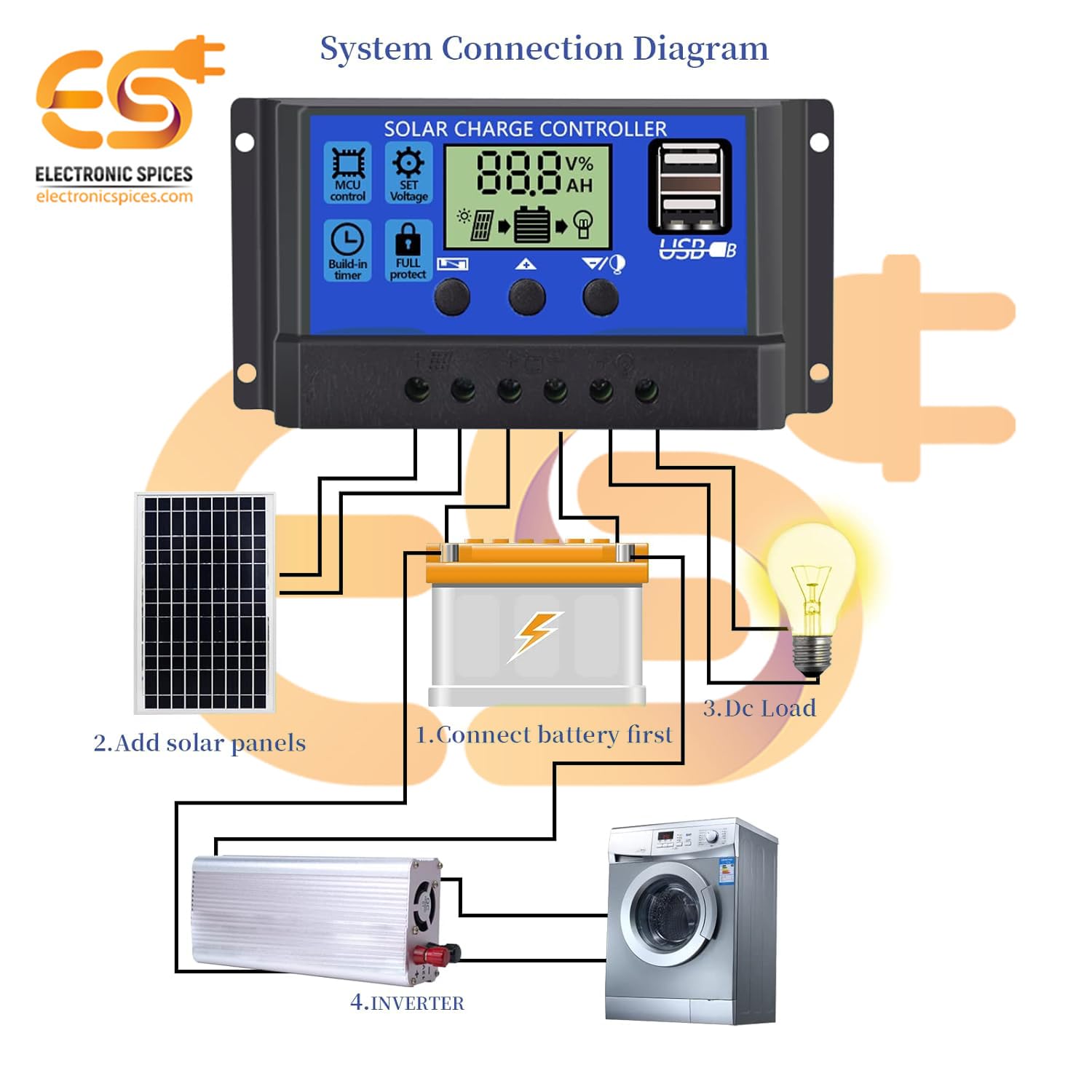
Figure 5.1: System connection diagram illustrating the proper sequence for connecting the battery, solar panels, DC load, and inverter to the solar charge controller.

Figure 5.2: A quick visual guide for connecting the solar panels, battery, and DC load to the W88-B controller.
6. Иштөө нускамалары
The W88-B controller features an LCD display that provides real-time information about your solar system's status.

Figure 6.1: Explanation of the digital display on the W88-B controller, showing indicators for solar panel charge, battery status, and load output.
6.1. Дисплей режимдери
The LCD cycles through various display modes automatically. You can also manually cycle through them using the control buttons. Common displays include:
- Батарея Voltage: Учурдагы томду көрсөтөтtage туташкан батарея.
- Solar Panel Charge Status: Indicates if the solar panels are actively charging the battery.
- Load Output Status: Shows if the load output is active or inactive.
6.2. Башкаруу баскычтары
The controller has three buttons for navigation and setting adjustments:
- Меню баскычы: Жөндөө режимдерин киргизүү жана чыгуу үчүн колдонулат.
- Өйдө баскычы: Маанилерди жогорулатуу же менюларда өйдө багыттоо үчүн колдонулат.
- Төмөн баскычы: Маанилерди азайтуу же менюларда ылдый багыттоо үчүн колдонулат.
Refer to the specific icons on the controller for functions like MCU control, set voltage, build-in timer, and full protect indicators.
7. Техникалык тейлөө
To ensure the long-term reliability and performance of your W88-B solar charge controller, follow these maintenance guidelines:
- үзгүлтүксүз тазалоо: Башкаргычты таза жана чаң менен таштандылардан таза кармаңыз. Тазалоо үчүн жумшак, кургак чүпүрөк колдонуңуз.
- Байланыштарды текшерүү: Periodically inspect all wiring connections to ensure they are tight and free from corrosion. Loose connections can lead to power loss or overheating.
- Вентиляция: Ensure the controller is installed in a well-ventilated area to prevent overheating. Do not block the ventilation holes.
- Экологиялык шарттар: While designed for durability, avoid exposing the controller to extreme moisture or direct sunlight for prolonged periods if not rated for such exposure.
- Батареянын ден соолугу: Monitor your battery's health regularly. A failing battery can impact the controller's performance.
8. Кыйынчылыктарды
If you encounter issues with your W88-B solar charge controller, refer to the following common problems and their solutions:
| Көйгөй | Мүмкүн себеп | Чечим |
|---|---|---|
| Дисплей же кубат жок | Батарея туташкан эмес же кубаты азtage; reversed polarity; loose connection. | Батарея байланыштарын жана тtage. Туура полярдуулукту текшериңиз. Бардык терминалдарды бекемдеңиз. |
| Батарея заряддалбай жатат | Solar panels not connected; insufficient sunlight; faulty solar panel; controller fault. | Check solar panel connections. Ensure panels are receiving adequate sunlight. Test solar panel output. |
| Жүк иштебейт | Load disconnected; battery voltage too low (low voltage disconnect); overload protection activated. | Check load connections. Charge battery. Reduce load or check for short circuit in load. |
| Контроллердин ысып кетиши | Poor ventilation; excessive load; short circuit. | Ensure adequate airflow around the controller. Reduce load. Check for short circuits in the system. |
Бул чечимдерди колдонуу аракетинен кийин көйгөй чечилбесе, кардарларды колдоо кызматына кайрылыңыз.
9. Техникалык шарттар
| Параметр | Нарк |
|---|---|
| Модел | W88-B |
| Rated Voltage | 12V/24V (Авто) |
| Номиналдуу ток | 20A |
| Макс. PV Voltage | 50V |
| Максималдуу фотоэлектрдик киргизүү кубаттуулугу (12V) | 130 Вт |
| Максималдуу фотоэлектрдик киргизүү кубаттуулугу (24V) | 260 Вт |
| Дисплей түрү | LCD/LED |
| Заряддоо портунун түрү | USB (Dual) |
| Элемент Салмагы | 150 грамм |
| Өлчөмдөрү (LxW) | 13.1 см х 6.9 см |
| Материал | Пластик, металл |
| Түс | Көк |
| Келип чыккан өлкө | Индия |
10. Кепилдик жана колдоо
This product is manufactured by Electronic Spices. For any technical assistance, troubleshooting beyond this manual, or warranty inquiries, please contact Electronic Spices customer support. Please have your product model number (W88-B) and purchase details ready when contacting support.
Өндүрүүчү: Электрондук татымалдар
Байланыш маалыматы: Refer to the contact details provided with your purchase or visit the official Electronic Spices webакыркы колдоо маалымат үчүн сайт.
Ask a question about this manual
Ask about setup, troubleshooting, compatibility, parts, safety, or missing instructions. Manuals+ will review the question and use this page’s manual context to help answer it.