Introduction
Thank you for choosing the Orbit 62061N Single-Outlet Hose Watering Timer. This manual provides detailed instructions for setting up, operating, and maintaining your new watering timer. Designed for ease of use, this timer helps you manage your garden's watering schedule efficiently, conserving water and ensuring your plants thrive.
Key features include a large, easy-to-read LCD screen, an intuitive dial for programming, and a rain delay function to prevent overwatering.

Image: The Orbit 62061N Single-Outlet Hose Watering Timer, showcasing its green and grey design with a clear LCD screen and programming dial.
Жайгашуу
1. Батареяны орнотуу
The Orbit 62061N timer requires two (2) AA alkaline batteries (not included). Ensure you use new alkaline batteries for optimal performance and longevity. Do not mix old and new batteries, or different types of batteries (e.g., alkaline with carbon-zinc or rechargeable).
- Таймердин артындагы батарея бөлүкчөсүн табыңыз.
- Батареянын капкагын жылдырыңыз.
- Insert two AA alkaline batteries, observing the correct polarity (+/-) as indicated inside the compartment.
- Батареянын капкагын бекем орнотуңуз.

Сүрөт: арткы view of the Orbit 62061N timer, highlighting the battery compartment and important usage warnings.
2. Кранга бекитүү
The timer features a swivel coupling for easy and secure attachment to your outdoor faucet.
- Крандын жабылганын текшериңиз.
- Thread the swivel coupling of the timer onto your outdoor faucet. Hand-tighten only; do not overtighten.
- Бакча түтүгүн таймердин астындагы розеткага туташтырыңыз.
- Slowly turn on your faucet.
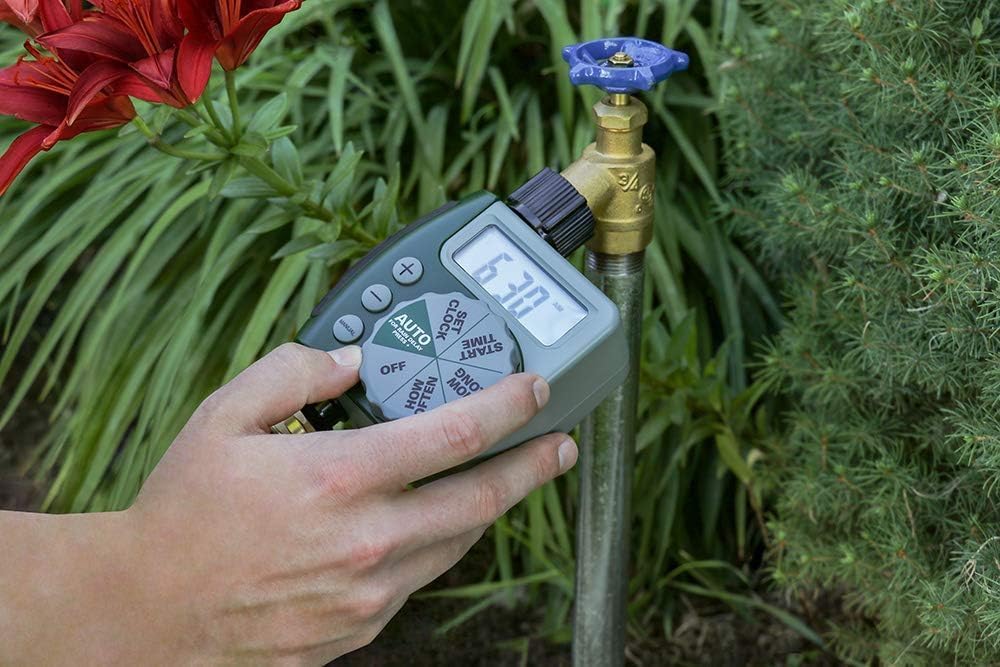
Image: A hand demonstrating the attachment of the Orbit 62061N timer to an outdoor garden faucet.

Сүрөт: жакын план view of the Orbit 62061N timer's swivel coupling, designed for easy and secure hose attachment.
Иштөө нускамалары
The Orbit 62061N timer features a large, intuitive dial and an LCD screen for easy programming.

Сүрөт: деталдуу view of the Orbit 62061N timer's large digital display and intuitive programming dial.
1. Саатты коюу
- Тергичти буруңуз СААТТЫ КОЮ.
- колдонуу + жана - buttons to set the current time. The time will advance in 15-minute increments.
- басыңыз КОЛ button to switch between AM and PM.
2. Setting Watering Programs
The timer allows you to set a start time, duration, and frequency for your watering cycles.
а. Баштоо убактысын коюу
- Тергичти буруңуз БАШТАЛГАН УБАКЫТ.
- колдонуу + жана - buttons to select your desired watering start time.
b. How Long (Watering Duration)
- Тергичти буруңуз КАНЧА УБАКЫТ.
- колдонуу + жана - Сугаруу узактыгын 1ден 240 мүнөткө чейин (4 саат) коюу үчүн баскычтарды басыңыз.

Image: The Orbit 62061N timer attached to a faucet, illustrating its capability for timed watering cycles.
c. How Often (Watering Frequency)
- Тергичти буруңуз КАЧАН.
- колдонуу + жана - buttons to select the watering frequency. Options include every 6 hours, every 12 hours, or once every 1 to 7 days.

Image: The Orbit 62061N timer displaying its watering interval settings, allowing for flexible scheduling.
3. Auto Mode
After setting your desired watering program, turn the dial to АВТОТаймер эми сиз программалаган графикке ылайык иштейт.
4. Кол менен сугаруу
To manually water without interrupting your programmed schedule:
- Тергичти буруңуз КОЛ.
- колдонуу + жана - баскычтарын басып, каалаган кол менен сугаруу узактыгын орнотуңуз.
- The timer will begin watering immediately for the set duration. Once complete, it will return to your programmed schedule.
5. Жамгыр кечигүү
The rain delay feature allows you to pause your watering schedule for a set period, conserving water after rainfall.
- While the dial is in the АВТО ордун басып, кармап туруңуз + баскычын 3 секунда басыңыз.
- The display will show '24h', indicating a 24-hour rain delay.
- басыңыз + button again to cycle through 48-hour and 72-hour delay options.
- Таймер тандалган кечиктирүү мезгилинен кийин автоматтык түрдө программаланган графигин улантат.
- To cancel a rain delay, press and hold the + дисплей учурдагы убакытка кайтып келгенге чейин баскычын басыңыз.

Image: The Orbit 62061N timer attached to a faucet, displaying the rain delay function, which helps save water by skipping cycles after rain.
6. Таймерди өчүрүү
To turn off all watering programs, turn the dial to ӨЧҮРҮҮ. This will stop all automatic and manual watering cycles.
Техникалык тейлөө
Батареяны алмаштыруу
When the battery indicator on the LCD screen is low, replace the batteries promptly to ensure continuous operation. Follow the battery installation steps outlined in the Setup section.
Кышка даярдоо жана сактоо
To prevent damage from freezing temperatures, remove the timer from the faucet and store it indoors in a location where the temperature remains above 32°F (0°C). Remove batteries before long-term storage.
Тазалоо
Periodically check the filter washer located in the swivel coupling for debris. Remove and rinse the filter under running water to clear any blockages. This helps maintain optimal water flow and prevents internal damage.
Проблемаларды чечүү
| Көйгөй | Мүмкүн себеп | Чечим |
|---|---|---|
| Таймердин дисплейи бош же күңүрт. | Төмөн же өлүп калган батарейкалар; туура эмес батарея орнотуу. | Replace with new AA alkaline batteries; ensure correct polarity. |
| Таймер белгиленген убакытта суу куйбайт. | Incorrect program settings; timer is in OFF mode; rain delay is active; low water pressure. | Verify program settings (Start Time, How Long, How Often); ensure dial is on AUTO; check for active rain delay; ensure faucet is fully open and water pressure is adequate. |
| Timer waters continuously. | Timer is in MANUAL mode; internal malfunction. | Turn dial to AUTO or OFF to stop manual watering; if problem persists, contact customer support. |
| Байланыштардан суу агып кетет. | Loose connections; worn washer; damaged threads. | Hand-tighten connections; check and replace rubber washer if worn; ensure threads are not cross-threaded. |
Техникалык шарттар
- Модель номери: 62061N
- Бренд: Орбита
- Түсү: Жашыл
- Продукциянын өлчөмдөрү: 4"D x 2"W x 2"H
- Кубат булагы: 2 x 1.5V AA щелочтуу батарейкалар (кошулган эмес)
- Максималдуу иштөө басымы: 100 PSI
- Иштөө температурасы: Do not operate at temperatures exceeding 120°F (49°C). Store above 32°F (0°C).
- UPC: 840041572216
- Өндүрүүчү: Орбита
Кепилдик маалымат
Orbit products are manufactured with quality materials and workmanship. For specific warranty details and terms, please refer to the warranty information provided with your product packaging or visit the official Orbit webсайт. Сатып алуу квитанциясын кепилдик дооматтары үчүн сатып алуунун далили катары сактаңыз.
Кардарларды колдоо
If you have any questions, require technical assistance, or need to troubleshoot issues not covered in this manual, please contact Orbit customer support:
- Webсайт: www.orbitonline.com
- Телефон: Refer to the Orbit webаймактык байланыш номерлери үчүн сайт.
Please have your model number (62061N) and purchase information ready when contacting support.


