
1. Киришүү
This manual provides comprehensive instructions for the BDJSN Multifunctional Electronic Cash Register C50. It covers product features, technical specifications, setup procedures, operational guidelines, maintenance tips, and troubleshooting information. Please read this manual carefully before operating the device to ensure proper use and to maximize its lifespan.
2. Продукт бүтүп калдыview жана өзгөчөлүктөрү
The BDJSN C50 is a versatile electronic cash register designed for various retail and hospitality environments. It features a dual LED display, an 81-key moisture-proof keyboard, a built-in thermal printer, and a banknote detector. Its robust design and comprehensive reporting functions make it suitable for supermarkets, restaurants, bars, and other shops.
Негизги өзгөчөлүктөрү:
- Туруктуу курулуш: Made from high-quality ABS material for extended service life.
- Кеңири байланыш: Connects to pricing scales, barcode readers, and other peripherals.
- Advanced Reporting: Offers daily, monthly, PLU, and sales detail reports.
- User-Friendly Keyboard: 81-key, four-color, moisture-proof keyboard with a detachable dust-proof cover.
- USB туташуу: Allows data transfer to computers for product information and sales records, supporting Excel file импорт/экспорт.
- Integrated Banknote Detector: Features a self-contained banknote verification function.

Figure 2.1: The BDJSN Multifunction Cash Register is designed for diverse applications including restaurants, supermarkets, milk tea shops, and convenience stores, highlighting its adaptability across various business types.

Figure 2.2: An illustration of the cash register's all-in-one design, labeling key components such as the receipt printer, LCD display, operation keys, keyboard surface, Ziguan money detector lamp, and cash drawer.
3. Product Parameters and Specifications
Below are the detailed technical specifications for the BDJSN C50 Electronic Cash Register:
| Параметр | Спецификация |
|---|---|
| Продукт аты | C50 Cash Register |
| Негизги экран | 128x64 LCD Display |
| Кардарларды көрсөтүү | 8-орундуу LED |
| Баскычтоп | 81 Ачкычтар |
| Электр камсыздоо | DC 8V 3A |
| Print Head | High-speed Thermal Print Head |
| Басып чыгаруу ылдамдыгы | 90мм/сек |
| Байланыш интерфейси | 2x RS232 |
| Принтер интерфейси | RS-485 |
| USB интерфейси | USB түрү-B |
| Окурман интерфейси | Standard RS232 Barcode Reader Interface, PS/2 Interface |
| Машинанын өлчөмү | 330 x 310 x 188 мм |
| Таза Салмагы (NW) | 2.94 кг |
| Жалпы салмагы (GW) | 4.02 KG (1 pc) |
| Пакеттин өлчөмү | 385 x 365 x 260 мм |

Figure 3.1: Visual representation of the cash register's dimensions (330mm width, 310mm depth, 188mm height) and a summary of key product parameters including weight, printing speed, display type, and power supply.

3.2-сүрөт: деталдуу view of the rear panel, illustrating the various communication interfaces including the customer display port, USB communication interface, scanner interface, KB port, power interface, cash drawer port, and external print port.
4. Орнотуу нускамалары
Follow these steps for the initial setup of your BDJSN C50 Cash Register:
4.1 Таңгактан чыгаруу жана текшерүү
- Carefully remove the cash register and all accessories from the packaging.
- Inspect the unit for any signs of damage during transit. If damage is found, contact your supplier immediately.
- Таңгактоо тизмесинде саналган бардык компоненттер бар экенин текшериңиз.
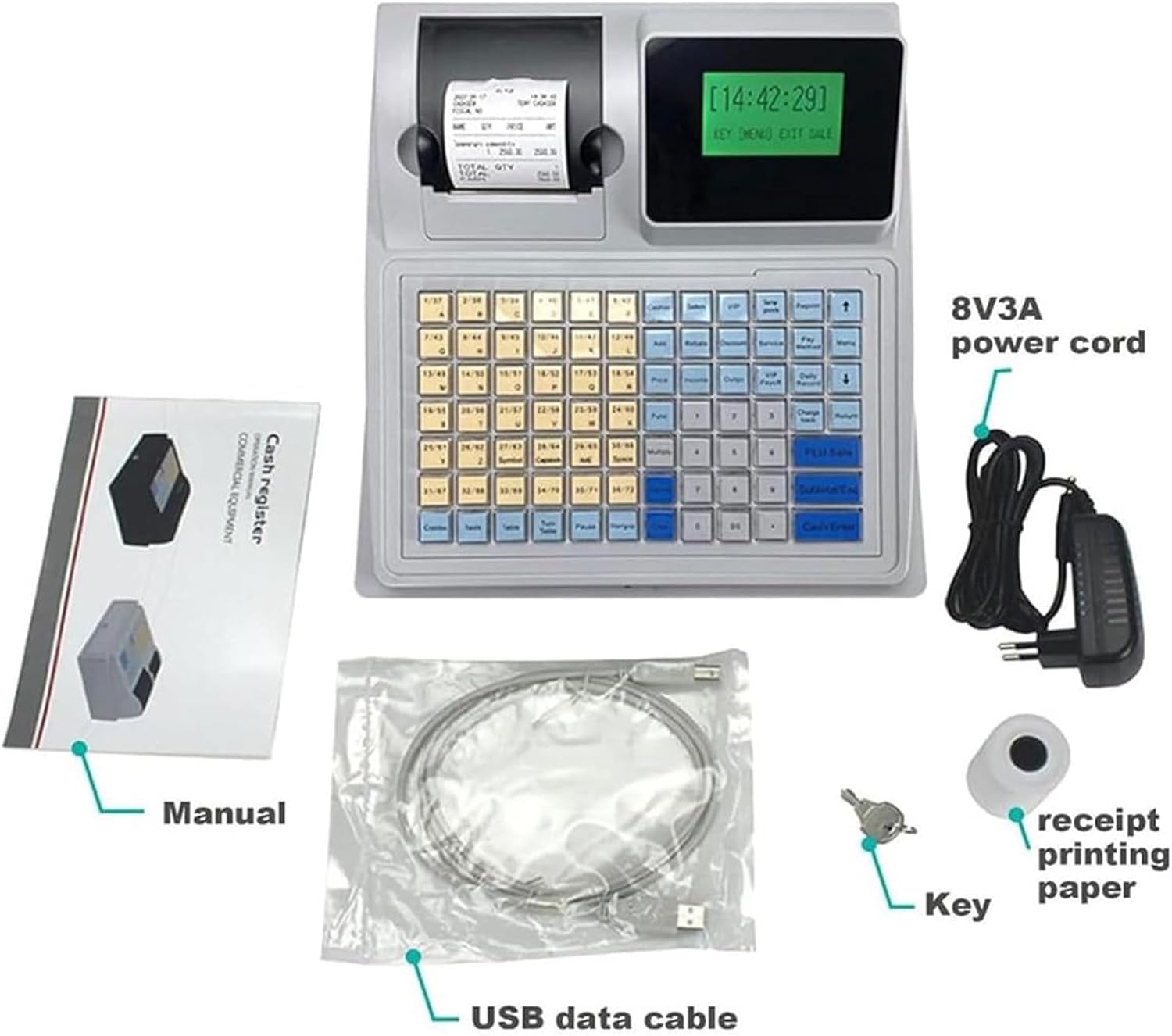
Figure 4.1: The image displays the accessories included with the cash register: the main unit, power cord (8V 3A), user manual, USB data cable, keys for the cash drawer, and a roll of receipt printing paper.
4.2 Кубатты туташтыруу
- Connect the provided DC 8V 3A power adapter to the power input port on the rear of the cash register.
- Кубат адаптерин ылайыктуу электр розеткасына сайыңыз.
4.3 Installing Receipt Paper
- Open the printer cover located on the top of the cash register.
- Insert a roll of thermal receipt paper into the compartment, ensuring the paper feeds correctly from the bottom.
- Pull a small length of paper out and close the printer cover firmly until it clicks into place.

Figure 4.2: This image demonstrates the process of loading receipt paper into the thermal printer. It shows the correct orientation for inserting the paper roll and how to close the printer cover.
4.4 Перифериялык түзүлүштөрдү туташтыруу (милдеттүү эмес)
If you are using external devices, connect them to the appropriate ports:
- Штрих-код окугуч: Connect to the Standard RS232 Barcode Reader Interface or PS/2 interface.
- Cash Drawer: Connect the cash drawer cable to the dedicated cash drawer port.
- Компьютер: Use the USB Type-B cable to connect the cash register to a computer for data management.
5. Иштөө нускамалары
This section outlines the basic operational procedures for the BDJSN C50 Cash Register.
5.1 Күйгүзүү/өчүрүү
- Күйгүзүү: Press the power button (location may vary, typically on the side or rear) to turn on the device. The LCD display will illuminate.
- Өчүрүү: Press and hold the power button until the device shuts down, or follow the menu option for a controlled shutdown if available.
5.2 Баскычтопту колдонуу
The 81-key keyboard is designed for efficient data entry and function access. Keys are color-coded for different functions:
- Сандык баскычтар: For entering prices, quantities, and other numerical data.
- PLU Keys: For direct access to programmed items (Price Look-Up).
- Функция баскычтары: For operations like discount, return, void, and report generation.
- Cash/Enter Key: To finalize transactions and open the cash drawer.
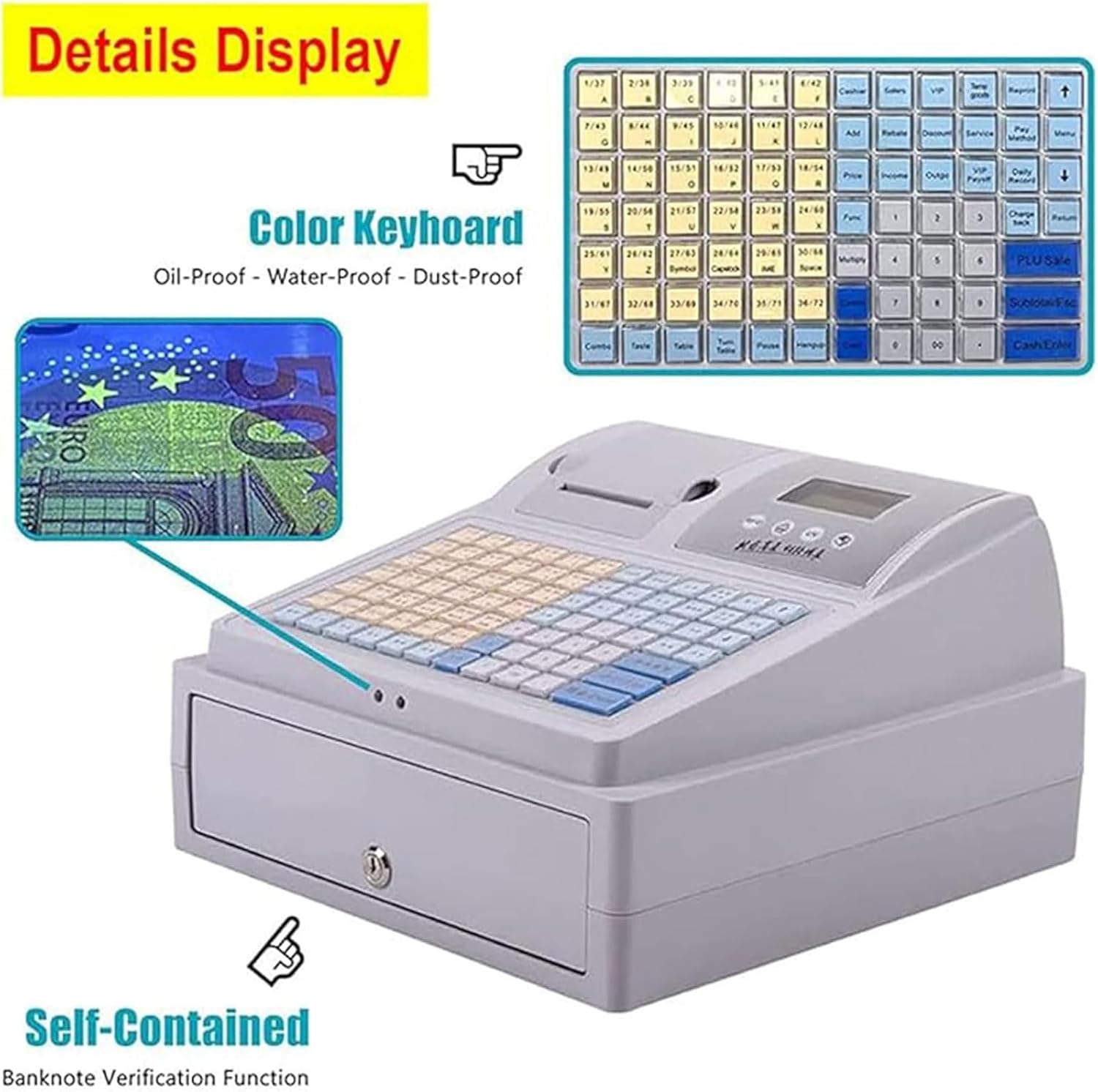
Figure 5.1: This image highlights the color-coded, oil-proof, water-proof, and dust-proof keyboard, showing various function keys. It also illustrates the integrated banknote verification function, demonstrating its use with a banknote.
5.3 Basic Sales Transaction
- Enter the item price using the numeric keys.
- Press the relevant PLU key or department key.
- Кошумча буюмдар үчүн кайталаңыз.
- Press the 'Cash' or 'Total' key to finalize the transaction. The receipt will print, and the cash drawer will open.
5.4 Banknote Detection
The cash register includes a built-in banknote detector. To use this feature, insert the banknote into the designated slot, and the system will verify its authenticity.
5.5 Отчетту түзүү
The cash register supports various reports:
- Daily Reports: Summarizes sales for the current day.
- Ай сайын берилүүчү отчеттор: Provides a summary of sales over a month.
- PLU Reports: Details sales for specific programmed items.
- Sales Details: Comprehensive breakdown of individual transactions.
Access these reports through the function keys or menu options on the display.
6. Техникалык тейлөө
Үзгүлтүксүз техникалык тейлөө кассалык аппаратыңыздын узак мөөнөттүү иштешин жана оптималдуу иштешин камсыз кылат.
6.1 Тазалоо
- Сырткы: Сырткы беттерин жумшак менен сүртүңүз, гamp кездеме. Абразивдүү тазалагычтардан же эриткичтерден качыңыз.
- Баскычтоп: The keyboard is moisture-proof and dust-proof. Use a soft brush or compressed air to remove debris from between keys. The detachable cover can be cleaned separately.
- Принтер башчысы: Periodically clean the thermal print head with a specialized thermal printer cleaning pen or isopropyl alcohol on a cotton swab. Ensure the device is powered off before cleaning.
6.2 Кагаз түрмөгүн алмаштыруу
Replace the receipt paper roll when it runs out, following the instructions in Section 4.3.
6.3 Программалык камсыздоо жаңыртуулары
Check with your supplier or the manufacturer's website for any available software updates to ensure your device has the latest features and bug fixes.
7. Кыйынчылыктарды
This section addresses common issues you might encounter with your BDJSN C50 Cash Register.
| Көйгөй | Мүмкүн себеп | Чечим |
|---|---|---|
| Cash Register does not power on. | No power supply; faulty power adapter or cable. | Электр кабелинин туташуусун текшерүү; розетка иштешин камсыз кылуу; бар болсо, башка кубат адаптерин колдонуп көрүңүз. |
| Printer is not printing. | No paper; paper jammed; printer head dirty; printer cover not closed properly. | Replace paper roll; clear any paper jams; clean printer head; ensure printer cover is securely closed. |
| Cash drawer does not open. | Not connected; transaction not finalized; key not used correctly. | Ensure cash drawer cable is connected; complete a transaction; use the provided key for manual opening if necessary. |
| Дисплей ката билдирүүсүн көрсөтөт. | System error; input error. | Refer to the specific error code in the full user manual (if provided separately); restart the device. |
| Banknote detector not working. | Sensor obstruction; incorrect banknote insertion. | Ensure the sensor area is clean; insert banknotes correctly and smoothly. |
Бул чечимдерди колдонуу аракетинен кийин көйгөй чечилбесе, кардарларды колдоо кызматына кайрылыңыз.
8. Кепилдик жана колдоо
For warranty information, please refer to the warranty card included with your product or contact your point of purchase. BDJSN provides customer support for technical assistance and service inquiries.
Өндүрүүчү: BDJSN
For further assistance, please contact the seller or manufacturer directly.