
1. Киришүү
This manual provides essential instructions for the safe assembly, operation, and maintenance of your isinwheel M10 Electric Bike. Please read this manual thoroughly before your first ride to ensure proper usage and to maximize the lifespan of your e-bike. Retain this manual for future reference.
Коопсуздук эскертүүсү: Always wear a helmet and appropriate safety gear when riding. Familiarize yourself with local traffic laws and regulations. Regular maintenance is crucial for safe operation.
2. Пакеттин мазмуну
Upon unpacking, verify that all components listed below are present and undamaged. If any items are missing or damaged, please contact customer support.
- isinwheel M10 Electric Bike Frame (partially assembled)
- Front Wheel
- Removable Lithium-Ion Battery (36V 10.4AH)
- 42V 2A Fast Charger
- Педаалдар (Сол жана Оң)
- Seat with Seatpost
- Алдыңкы фара
- Арткы чагылдыргыч
- Toolkit (including Allen wrenches and spanner)
- Тир Pump
- User Manual

Image: All components included in the isinwheel M10 Electric Bike package.
3. Орнотуу жана чогултуу
The isinwheel M10 Electric Bike comes 85% pre-assembled. Follow these steps to complete the assembly:
- Кутудан чыгаруу: Carefully remove all components from the packaging. Keep the packaging materials until assembly is complete and you are satisfied with the product.
- Рулду орнотуу: Attach the handlebar to the stem using the provided Allen wrenches. Ensure the handlebar is centered and tightened securely.
- Алдыңкы дөңгөлөктү орнотуу: Secure the front wheel to the front fork. Ensure the brake rotor aligns correctly with the caliper and the quick-release skewer is properly tightened.
- Фараны орнотуу: Mount the front headlight onto the designated bracket on the front fork or handlebar, and connect its cable.
- Педал орнотуу: Identify the left (L) and right (R) pedals. The left pedal tightens counter-clockwise, and the right pedal tightens clockwise. Use the spanner to secure them firmly.
- Орнотуу: Insert the seatpost into the frame's seat tube. Adjust the height for comfortable riding and secure it with the quick-release lever.
- Rear Reflector Installation: Attach the rear reflector to the seatpost or rear rack (if applicable) for increased visibility.
- Батарея орнотуу: Slide the battery into its designated slot on the frame and lock it with the key.
- Кабелдик башкаруу: Ensure all cables are neatly routed and secured, away from moving parts.

Image: Installing the handlebar.
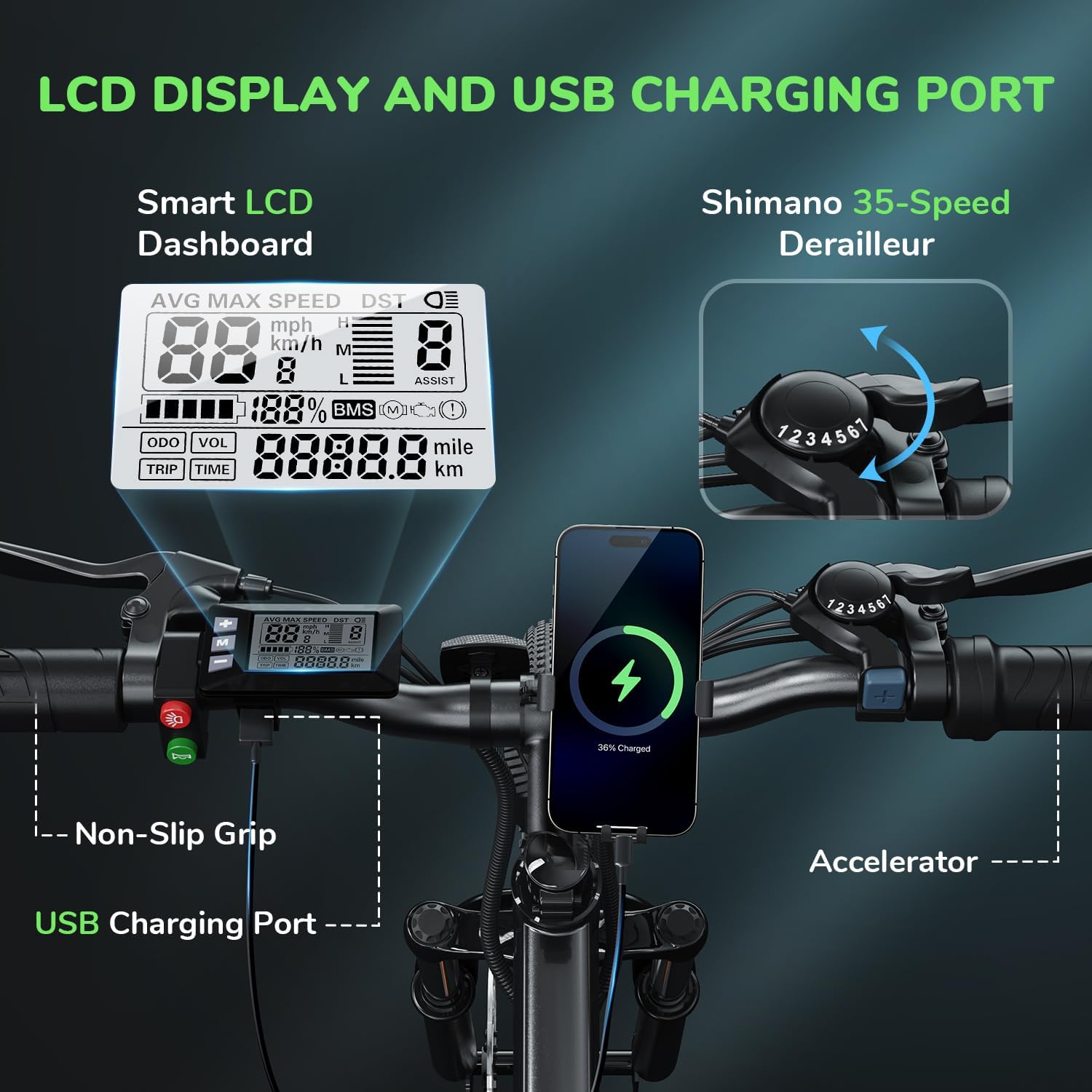
Image: Attaching the front wheel.

Image: Installing the pedals.

Image: Adjusting and securing the seat.

Image: Installing the removable battery.
Видеону чогултуу боюнча колдонмо
Video: A comprehensive guide demonstrating the assembly process of the isinwheel M10 Electric Bike, including handlebar, wheel, pedal, and battery installation.
4. Иштөө нускамалары
4.1 Күйгүзүү/өчүрүү
- To power on the bike, press and hold the power button on the LCD display for a few seconds until the screen illuminates.
- Өчүрүү үчүн кубат баскычын кайра басып, дисплей өчмөйүнчө кармап туруңуз.
4.2 Айдоо режимдери
The M10 Electric Bike offers multiple riding modes:
- Педальга жардам берүү режими (PAS): Provides motor assistance as you pedal. Adjust the assist level (1-5) using the '+' and '-' buttons on the control panel. Higher levels provide more assistance.
- Full Electric Mode (Throttle): Engage the throttle for motor power without pedaling. This mode is typically used for quick acceleration or when you need a break from pedaling.
- Кол режими: Ride the bike like a traditional bicycle without any motor assistance.
4.3 Shimano 7-Speed Gear System
The bike is equipped with a Shimano 7-speed transmission system. Use the gear shifter on the handlebar to change gears according to terrain and desired speed. Lower gears are for uphill climbing, and higher gears are for flat terrain or downhill riding.
4.4 ЖК дисплейдин функциялары
The smart LCD display provides real-time riding data:
- Ылдамдыгы: Current, average, and maximum speed.
- Айдоо убактысы: Duration of your ride.
- Пробег: Сапардын аралыгы жана жалпы одометр.
- Батарея деңгээли: Remaining battery charge.
- Жардам деңгээли: Current pedal assist level (1-5).
Power On Operation Video
Video: Demonstrates how to power on the isinwheel M10 Electric Bike and navigate the LCD display functions.
5. Батареяны башкаруу
5.1 Батареяны алып салуу жана орнотуу
The 36V 10.4AH Lithium-Ion battery is removable for convenient charging or storage.
- Алып салуу: Unlock the battery with the provided key, then slide it out from the frame.
- Орнотуу: Align the battery with the frame slot and slide it in until it clicks into place. Lock it with the key to secure.
5.2 Заряддоо боюнча нускамалар
Use only the provided 42V 2A Fast Charger.
- Велосипеддин өчүрүлгөнүн текшериңиз.
- Батареянын заряддоо портун табыңыз.
- Заряддагычты заряддоо портуна туташтырыңыз.
- Заряддагычты стандарттуу розеткага сайыңыз.
- The charger indicator light will show red during charging and turn green when fully charged.
- Адатта, толук заряддоо үчүн 3-4 саат талап кылынат.
- Заряддоо аяктагандан кийин заряддагычты ажыратыңыз.
Battery Removal and Charging Video
Video: Instructions for removing and installing the battery, and connecting the charger to the isinwheel M10 Electric Bike.
6. Техникалык тейлөө
Үзгүлтүксүз тейлөө электрондук велосипедиңиздин узак мөөнөттүү жана коопсуз иштешин камсыз кылат.
- Тазалоо: Велосипедди жарнама менен сүртүңүзamp кездеме. Жогорку басымда түздөн-түз электрдик тетиктерди жуубаңыз.
- Шина басымы: Check tire pressure before each ride. Maintain recommended pressure (usually indicated on the tire sidewall) using the included pump.
- Тормоздор: Regularly inspect brake pads and rotors for wear. Ensure brake levers engage smoothly and provide adequate stopping power. Adjust or replace as needed.
- чынжыр: Дат басуунун алдын алуу жана тиштүү дөңгөлөктөрдүн жылмакай алмашуусун камсыз кылуу үчүн чынжырды таза жана майланган абалда кармаңыз.
- бекиткичтер: Periodically check all bolts and nuts for tightness, especially on the handlebars, seatpost, and wheels.
- Батареяга кам көрүү: Батареяны салкын, кургак жерде сактаңыз. Эгер узак убакытка сактасаңыз, аны ар бир 2-3 ай сайын 50-70% га чейин кубаттаңыз.
Air Inflation Instructions Video
Video: Demonstrates how to properly inflate the tires of the isinwheel M10 Electric Bike using the provided pump.
7. Кыйынчылыктарды
If you encounter issues with your isinwheel M10 Electric Bike, refer to the following common problems and solutions:
| Көйгөй | Мүмкүн себеп | Чечим |
|---|---|---|
| Велосипед күйбөйт | Battery not installed correctly or discharged; loose electrical connection. | Ensure battery is fully inserted and locked. Check battery charge level and charge if necessary. Verify all visible electrical connections are secure. |
| Мотор жардам бербейт | Low battery; assist level set to 0; brake lever engaged; motor cable disconnected. | Charge battery. Increase assist level on the display. Release brake levers. Check motor cable connection. |
| Батарея заряддалбай жатат | Charger not connected properly; faulty charger/battery; power outlet issue. | Ensure charger is securely plugged into battery and outlet. Check if the outlet is working. Contact support if issues persist. |
| Тормоз алсыз сезилет | Эскирген тормоз колодкалары; бош тормоз тросу; гидравликалык системадагы аба (эгер бар болсо). | Inspect and replace worn brake pads. Adjust brake cable tension. For hydraulic brakes, professional service may be required. |
If you cannot resolve an issue using the troubleshooting guide, please contact isinwheel customer support for assistance.
8. Техникалык шарттар
Key technical specifications for the isinwheel M10 Electric Bike:
| Өзгөчөлүк | Спецификация |
|---|---|
| Модел | M10 |
| Мотор | 500W Peak Brushless Motor |
| Эң жогорку ылдамдык | 32 км/саатка чейин (20 миль/саат) |
| Батарея | 36V 10.4AH (375WH) Removable Li-ion, IPX5 waterproof |
| Заряддоо убактысы | 3-4 hours (with 42V 2A Fast Charger) |
| Электрдик диапазон (толук электрдик) | 39-43 miles (63-70 KM) |
| Диапазон (педаль жардамчысы) | 50-60 miles (80-96 KM) |
| Жугуу | Shimano 7-Speed |
| Frame Material | Алюминий эритмеси |
| Велосипед Салмагы | 21.3 KG (47 фунт) |
| Wheel Size | 26 дюйм |
| Токтотуу | Алдыңкы айрынын суспензиясы |
| Тормоздор | Front and Rear Mechanical Disc Brakes |
| Өзгөчөлүктөр | Digital LCD Display, Height Adjustable Seat, Lightweight & Portable |
| Сертификаттар | UL 2271 (Li-ion battery), UL 2789 (whole e-bike) |

Image: isinwheel M10 Electric Bike dimensions and rider height guide.
9. Кепилдик жана колдоо
The isinwheel M10 Electric Bike comes with a 12-month warranty from the date of purchase. This warranty covers manufacturing defects in materials and workmanship. It does not cover damage caused by misuse, accidents, unauthorized modifications, or normal wear and tear.
For warranty claims, technical support, or any questions regarding your e-bike, please contact isinwheel customer service. Provide your purchase details and a description of the issue for prompt assistance.
Байланыш маалыматы: Please refer to your purchase documentation or the official isinwheel webэң акыркы кардарларды колдоо байланыш маалыматтары үчүн сайт.