
1. Продукт бүтүп калдыview
The KUAIQU SPPS-K3010 is a high-precision variable DC power supply designed for laboratory, R&D, and industrial applications. It features a 5-digit TFT color display, offering both numerical and graphical (curve) representations of output voltage and current. This unit provides precise control over voltage (0-30V) and current (0-10A) with microampere-level resolution (0.01mA), ensuring accurate power delivery for sensitive electronic equipment.
Key features include advanced safety protections (Over-Voltage Protection - OVP, Over-Current Protection - OCP, Short-Circuit Protection - SCP), a memory function for storing and recalling up to four sets of parameters, and a user-friendly lock function to prevent accidental adjustments. It also incorporates USB-A and USB-C charging ports for convenience and an intelligent temperature-controlled cooling fan for stable, quiet operation.

Сүрөт 1.1: Алдыңкы view of the KUAIQU SPPS-K3010 DC Power Supply, showcasing анын компакт дизайн жана ачык дисплей.
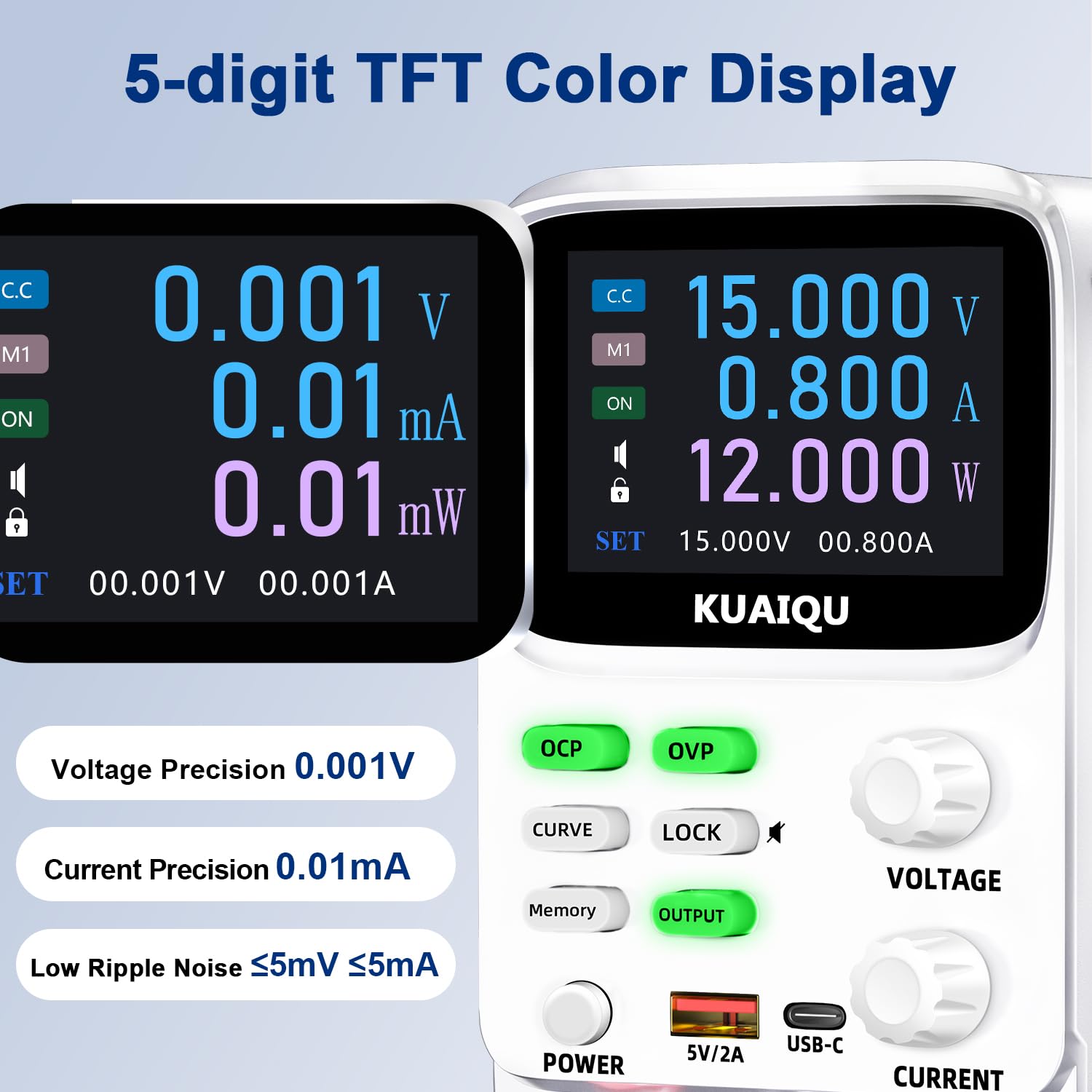
Figure 1.2: The 5-digit TFT color display provides high-precision readings, including 0.001V voltage precision and 0.01mA current precision.
2. Коопсуздук нускамалары
To ensure safe operation and prolong the lifespan of your device, please read and adhere to the following safety guidelines:
- Кубат булагын ар дайым жерге туташтырылган розеткага туташтырыңыз.
- Аппаратты нымдуу жерде иштетпеңиз же damp шарттар.
- Ашыкча ысып кетүүнүн алдын алуу үчүн аппараттын айланасында туура желдетүүнү камсыз кылыңыз. Вентиляция тешиктерин жаап албаңыз.
- Томду колдонуудан качыңызtage or current exceeding the specified maximum ratings.
- Before making any connections or disconnections, ensure the output is turned off and the power supply is disconnected from the main power source.
- в ачпагылаasinЭлектр менен камсыздоонун g бөлүгү. Ичинде колдонуучу тейлей турган тетиктер жок. Бардык тейлөө иштерин квалификациялуу адистерге тапшырыңыз.
- Түзмөктү тез күйүүчү материалдардан жана жарылуучу газдардан алыс кармаңыз.
- Use only the provided power cable and output cables.
3. Продукциянын компоненттери
Familiarize yourself with the various components and controls of your KUAIQU SPPS-K3010 DC Power Supply.

Сүрөт 3.1: Алдыңкы панелдин үстүндөview. This image displays the front panel of the power supply, highlighting the TFT display, control buttons (OCP, OVP, CURVE, LOCK, Memory, OUTPUT), rotary encoder knobs for Voltage and Current, Power button, USB-A and USB-C charging ports, and output terminals (+, -, GND).
3.1 Алдыңкы панелдин башкаруу элементтери жана көрсөткүчтөрү
- TFT түстүү дисплей: Көрсөтөт томtage, current, power, and curve displays.
- OCP баскычы: Over-Current Protection setting and activation.
- OVP баскычы: Ашык-томtage Protection setting and activation.
- CURVE Button: Toggles the real-time voltage and current curve display.
- LOCK баскычы: Кокус өзгөрүүлөрдү болтурбоо үчүн башкаруу панелин бекитет/кулпусун ачат.
- Эстутум баскычы: Accesses and saves preset voltage/current values (M1-M4).
- ЧЫГУУ баскычы: Enables or disables the power output.
- ТОМTAGE Knob: Rotary encoder for adjusting output voltage. Press to switch digit selection.
- CURRENT Knob: Rotary encoder for adjusting output current. Press to switch digit selection.
- КҮЧ баскычы: Агрегаттын негизги өчүргүч.
- USB-A / USB-C Ports: For charging external electronic devices.
- Output Terminals (+, -, GND): Connect positive, negative, and ground leads to the load.
3.2 Арткы панель
The rear panel typically includes the AC power input socket, a fuse holder, and the cooling fan exhaust.
4. Орнотуу
4.1 Таңгактан чыгаруу жана текшерүү
- Кубат менен камсыздоону жана бардык аксессуарларды таңгактан этияттык менен алып салыңыз.
- Verify that all items listed in the "What's in the Box" section are present: 1x DC power supply, 1x output power cord, 1x power cord, 1x user manual.
- Inspect the unit for any signs of physical damage. If damage is found, contact your supplier immediately.
4.2 Кубат туташтыруу
- Ensure the power supply's main power switch is in the OFF position.
- Connect the provided AC power cord to the power input socket on the rear panel of the power supply.
- Plug the other end of the AC power cord into a grounded electrical outlet (110V AC).
4.3 Жүктөмдү туташтыруу
- Ensure the power supply's output is OFF (the OUTPUT button LED should be off).
- Connect the red output cable to the positive (+) terminal and the black output cable to the negative (-) terminal on the front panel.
- Connect the other ends of the output cables to your load device, ensuring correct polarity. For safety, connect the green ground (GND) terminal to the chassis of your load if required.
5. Иштөө нускамалары
5.1 Күйгүзүү жана өчүрүү
- Күйгүзүү үчүн, басыңыз КҮЧ баскычын басыңыз. Дисплей күйөт.
- Өчүрүү үчүн, басыңыз КҮЧ кайра баскычын.
5.2 Adjusting Voltage жана Current

Figure 5.1: Precision adjustment using encoder knobs. This image illustrates how to use the rotary encoder knobs for precise voltage and current adjustments, showing the process of pressing the knob to select digits and rotating to change values.
- Select Parameter: айлантыңыз ТОМTAGE or УЧУРДА knob to highlight the desired parameter on the display.
- Select Digit: басыңыз ТОМTAGE or УЧУРДА knob to move the cursor to the digit you wish to adjust. Repeated presses cycle through the digits.
- Маани тууралоо: Rotate the knob to increase or decrease the value of the selected digit.
- Ырастоо: Once the desired value is set, stop rotating. The value will be applied.
5.3 Enabling/Disabling Output
Каалаган томду койгондон кийинtage and current, press the OUTPUT button to enable the power output to your load. The LED on the button will illuminate. Press it again to disable the output.
5.4 Memory Function (4 Groups of Storage)

Figure 5.2: Intelligent 4-group data storage. This image details the steps for using the memory function to store and recall up to four sets of voltage and current parameters (M1-M4).
- Орнотууларды киргизиңиз: басыңыз Эс баскычы.
- Select Memory Slot: айлантыңыз ТОМTAGE knob to select a memory slot (M1-M4).
- Set Values: көпкө басыңыз ТОМTAGE knob to enter setting mode. Short press and rotate the ТОМTAGE/УЧУРДА knobs to set the desired voltage and current values for the selected slot.
- Жөндөөлөрдү сактоо: көпкө басыңыз ТОМTAGE knob again to save the settings to the chosen memory slot.
- Recall Settings: To use a saved setting, rotate and short press the ТОМTAGE knob to select the desired memory group (M1-M4) and then short press it again to apply.
5.5 Curve Display and Battery Simulation

Figure 5.3: Curve display and battery simulation. This image shows the real-time voltage and current curve display, useful for observing output stability and for applications like battery simulation and testing standby power consumption.
басыңыз CURVE button to toggle the real-time voltage and current curve display. This feature allows for visual monitoring of output stability and transient behavior, which is particularly useful for tasks such as battery simulation and testing standby power consumption.
5.6 Intelligent A/mA Conversion
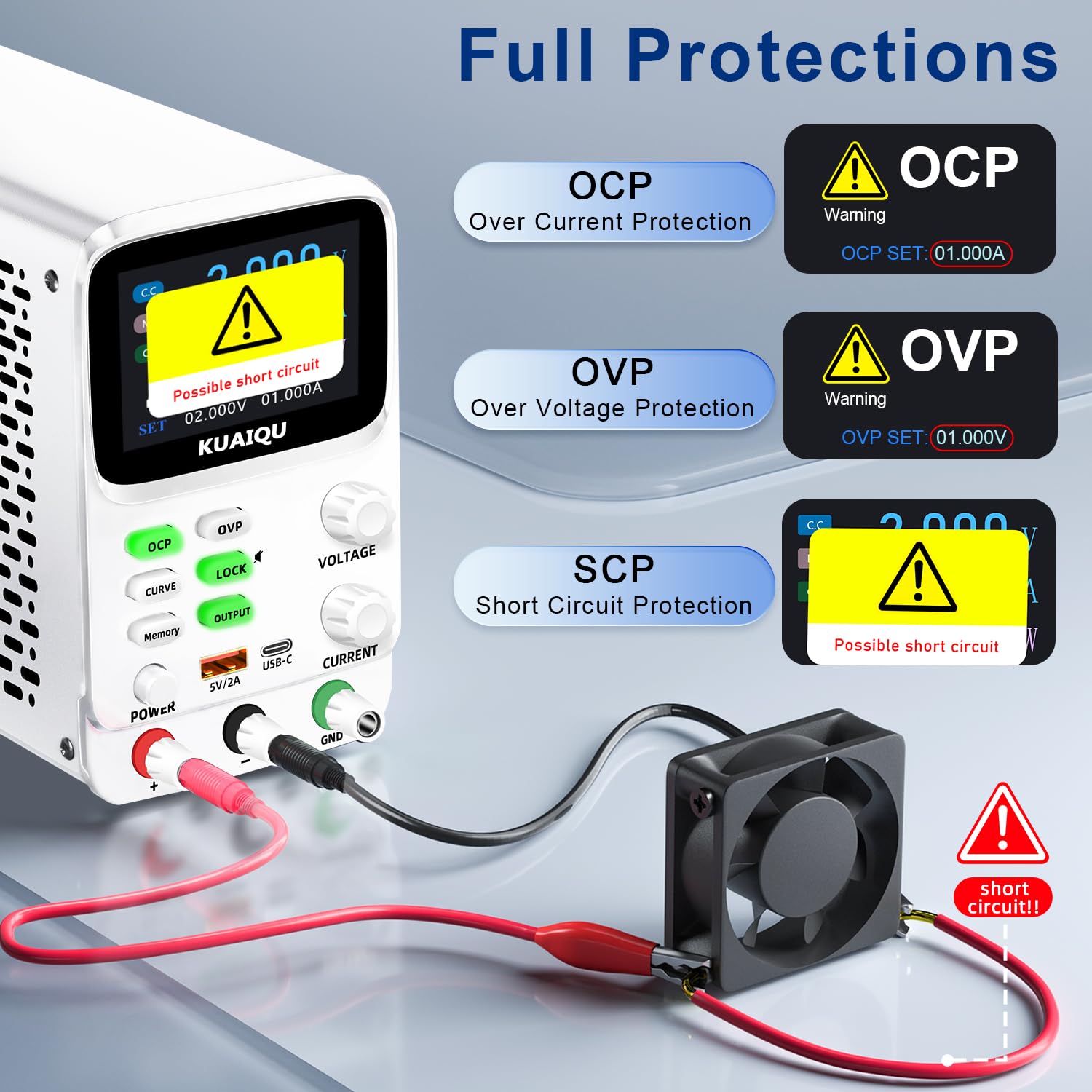
Figure 5.4: Intelligent A/mA Conversion. The display automatically switches to milliampere (mA) readings when the current value drops below 0.1A, providing enhanced precision for low-current applications.
The power supply automatically switches its current display from Amperes (A) to milliamperes (mA) when the output current drops below 0.1A. This intelligent conversion ensures optimal readability and precision for microampere-level measurements.
5.7 Protection Functions (OVP, OCP, SCP)
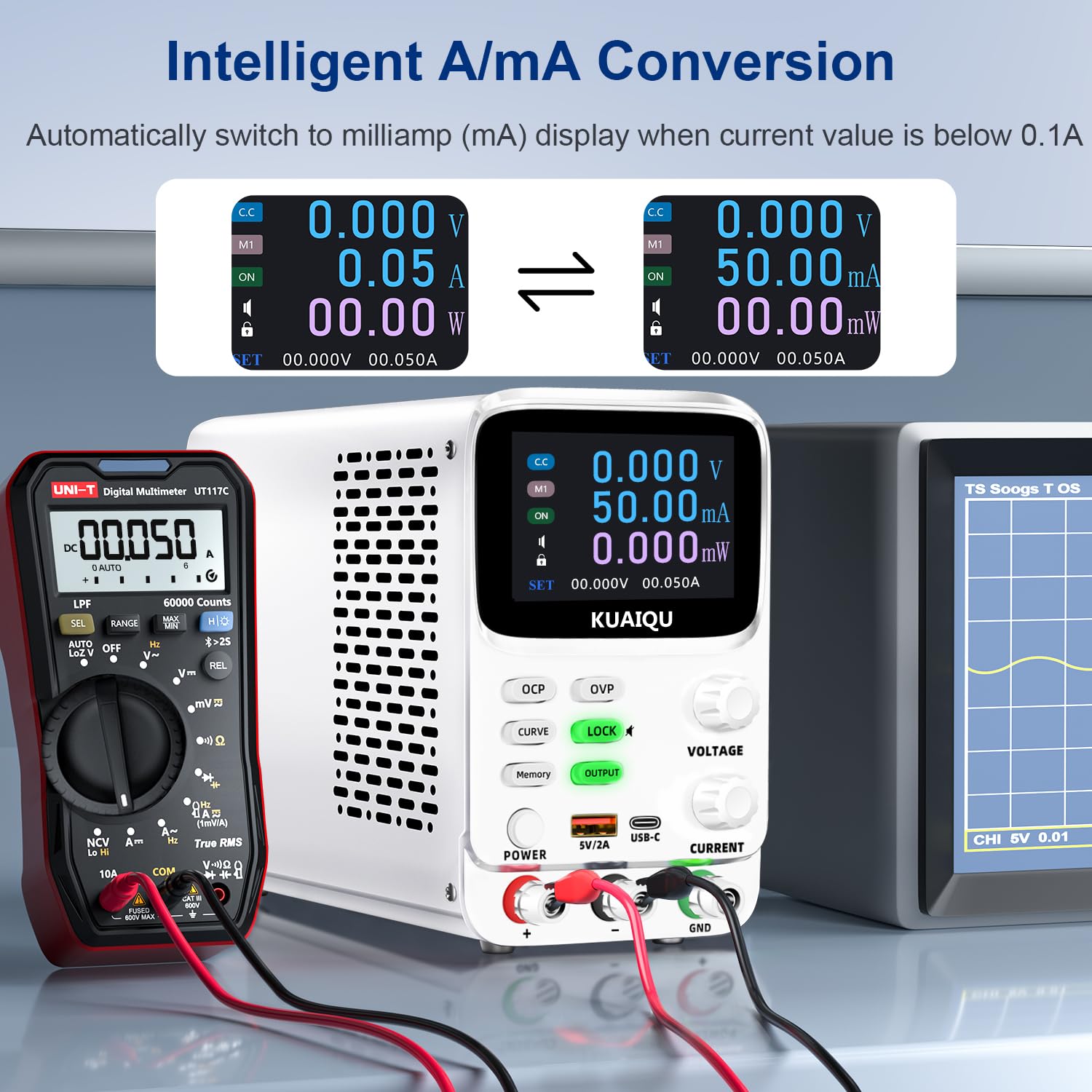
Figure 5.5: Full protection alarms. This image illustrates the Over-Current Protection (OCP), Over-Voltage Protection (OVP), and Short-Circuit Protection (SCP) features, showing how the device alerts and cuts off power when limits are exceeded or a short circuit is detected.
The power supply includes built-in protection mechanisms:
- Ашык-томtage Коргоо (OVP): Чыгуу көлөмүн алдын алатtage from exceeding a preset limit.
- Ашыкча ток коргоо (АЧК): Prevents output current from exceeding a preset limit.
- Short-Circuit Protection (SCP): Automatically cuts off output in case of a short circuit.
To set OVP/OCP limits:
- көпкө басыңыз OVP or OCP орнотуу режимине өтүү үчүн баскыч.
- колдонуу ТОМTAGE or УЧУРДА knob to adjust the protection limit.
- баскычын кыска басыңыз OVP or OCP орнотууну сактоо үчүн кайра басыңыз.
If a protection is triggered, the output will be cut off, and an alarm will be displayed (e.g., "OVP", "OCP", or "Possible short circuit"). Address the issue and then press the OUTPUT чыгарууну кайра иштетүү үчүн баскычты басыңыз.
5.8 Кулпу функциясы
басыңыз БУЛПОО button to lock the control panel, preventing accidental changes to settings. The lock icon will appear on the display. Press it again to unlock. Long pressing the БУЛПОО button will toggle the encoder knob adjustment beeping sound.
5.9 USB заряддоо порттору
The front panel includes USB-A and USB-C ports (5V/2A) for convenient charging of compatible electronic devices. These ports operate independently of the main power output settings.
6. Техникалык тейлөө
6.1 Тазалоо
- Before cleaning, ensure the power supply is turned off and disconnected from the main power source.
- Аппараттын сыртын сүртүү үчүн жумшак, кургак чүпүрөктү колдонуңуз.
- Абразивдүү тазалагычтарды, эриткичтерди же катуу химиялык заттарды колдонбоңуз.
- Periodically check the ventilation openings for dust accumulation and clean gently with a soft brush or compressed air.
6.2 Сактоо
- Store the power supply in a cool, dry environment, away from direct sunlight and extreme temperatures.
- Аны чаңдан жана нымдуулуктан алыс кармаңыз.
- If storing for an extended period, it is recommended to place it back in its original packaging.
7. Кыйынчылыктарды
Бул бөлүм сиз кабылышы мүмкүн болгон жалпы көйгөйлөрдү карайт. Эгер көйгөй чечилбесе, кардарларды колдоо менен байланышыңыз.
7.1 No Power / Display Off
- Электр кабелин текшерүү: AC кубат кабелинин кубат булагына жана розеткага бекем туташтырылганын текшериңиз.
- Дубал розеткасын текшериңиз: Розетканын иштеп жатканын башка түзмөктү сайып текшериңиз.
- Кубат өчүргүчтү текшерүү: Ensure the main КҮЧ button on the front panel is pressed.
- Сактагычты текшерүү: The fuse located on the rear panel might be blown. Replace it with a fuse of the same type and rating (refer to specifications).
7.2 No Output Voltage/Current
- Check OUTPUT Button: камсыз кылуу OUTPUT button is pressed and its LED is illuminated.
- Байланыштарды текшерүү: Verify that the output cables are correctly and securely connected to both the power supply and the load.
- Check OVP/OCP: If OVP or OCP is triggered, the output will be disabled. Check the display for "OVP" or "OCP" warnings. Adjust the voltage/current settings or protection limits as needed, then press OUTPUT to re-enable.
- Check Short Circuit: If "Possible short circuit" is displayed, disconnect the load and check for any short circuits in your circuit.
- Тtage/Current Settings: белгиленген томду камсыз кылууtage and current values are not zero.
7.3 Дисплей маселелери
- Дисплей жок: Refer to "No Power / Display Off" section.
- Туура эмес окуулар: Ensure proper connections and calibration. If readings are consistently inaccurate, contact support.
8. Техникалык шарттар
| Өзгөчөлүк | Спецификация |
|---|---|
| Модель аты | SPPS-K3010 |
| Бренд | КУАИКУ |
| Output Voltage Диапазон | 0-30V |
| Чыгуу токунун диапазону | 0-10A |
| Чыгуу Wattage | 300 Ватт |
| Тtage Resolution | 0.001V (1mV) |
| Учурдагы токтом | 0.01mA (10µA) |
| Дисплей | 2.8-inch TFT Color LCD (5-digit) |
| Коргоо өзгөчөлүктөрү | OVP (Ашыкча томtage Protection), OCP (Over-Current Protection), SCP (Short-Circuit Protection) |
| Memory Storage | 4 groups of editable parameters |
| USB заряддоо порттору | USB-A, USB-C (5V/2A) |
| Муздатуу ыкмасы | Intelligent temperature-controlled cooling fan |
| Продукциянын өлчөмдөрү (L x W x Y) | 7.6 x 3.4 x 5.5 дюйм |
| Элемент Салмагы | 2.5 фунт |
| UPC | 768351108799 |
9. Кепилдик жана Кардарларды колдоо
KUAIQU is committed to providing high-quality products and excellent customer service. This product undergoes thorough inspection before shipment to ensure its quality.
- Сапатты камсыздоо: All KUAIQU lab power supplies and accessories are inspected to ensure good quality upon receipt.
- Техникалык колдоо: If you have any questions regarding the operation, troubleshooting, or any other aspect of your KUAIQU SPPS-K3010 DC Power Supply, please do not hesitate to contact our customer service team.
- Байланыш маалыматы: Refer to the contact details provided with your purchase or visit the official KUAIQU webколдоо үчүн сайт.