
Monster S280
Monster S280 Bluetooth Speaker Колдонуучунун колдонмосу
Модели: S280 | Бренд: Monster
Introduction
Thank you for choosing the Monster S280 Bluetooth Speaker. This manual provides detailed instructions for setting up, operating, and maintaining your speaker to ensure optimal performance and longevity. The Monster S280 combines powerful stereo sound with dynamic 3D tunnel lighting, a mirror display, and convenient wireless charging, making it a versatile audio companion for any indoor space.

Сүрөт: алдыңкы view of the Monster S280 Bluetooth Speaker showcasing its unique 3D tunnel lighting effect.
Пакеттин мазмуну
Upon unboxing your Monster S280, please verify that all the following items are included:
- Monster S280 портативдик Bluetooth динамиги
- USB-C заряддоо кабели
- Аудио кабель (AUX)
- Ыкчам баштоо боюнча колдонмо
- Кепилдик картасы
Орнотуу жана баштапкы колдонуу
1. Баштапкы заряддоо
Before first use, fully charge the speaker using the provided USB-C charging cable. Connect the USB-C end to the speaker's charging port and the other end to a compatible USB power adapter (not included) or a computer USB port. The charging indicator will show the charging status.
2. Күйгүзүү / Өчүрүү
To power on the speaker, long press the Power button. To power off, long press the Power button again.
3. Bluetooth Жупташтыруу
The Monster S280 features Bluetooth 6.0 for fast and stable connections. Follow these steps to pair your device:
- Динамик күйгүзүлгөнүн жана Bluetooth жупташтыруу режиминде экенин текшериңиз (жаркылдаган LED менен көрсөтүлгөн).
- On your mobile device, navigate to Bluetooth settings and enable Bluetooth.
- Издөө "Monster S280" in the list of available devices.
- Select "Monster S280" to connect. Once connected, the speaker will provide an audible confirmation, and the LED indicator will become solid.

Image: A smartphone displaying music playback, wirelessly connected to the Monster S280 speaker, illustrating Bluetooth 6.0 connectivity.
Иштөө нускамалары
Familiarize yourself with the control buttons located on the top panel of the speaker:
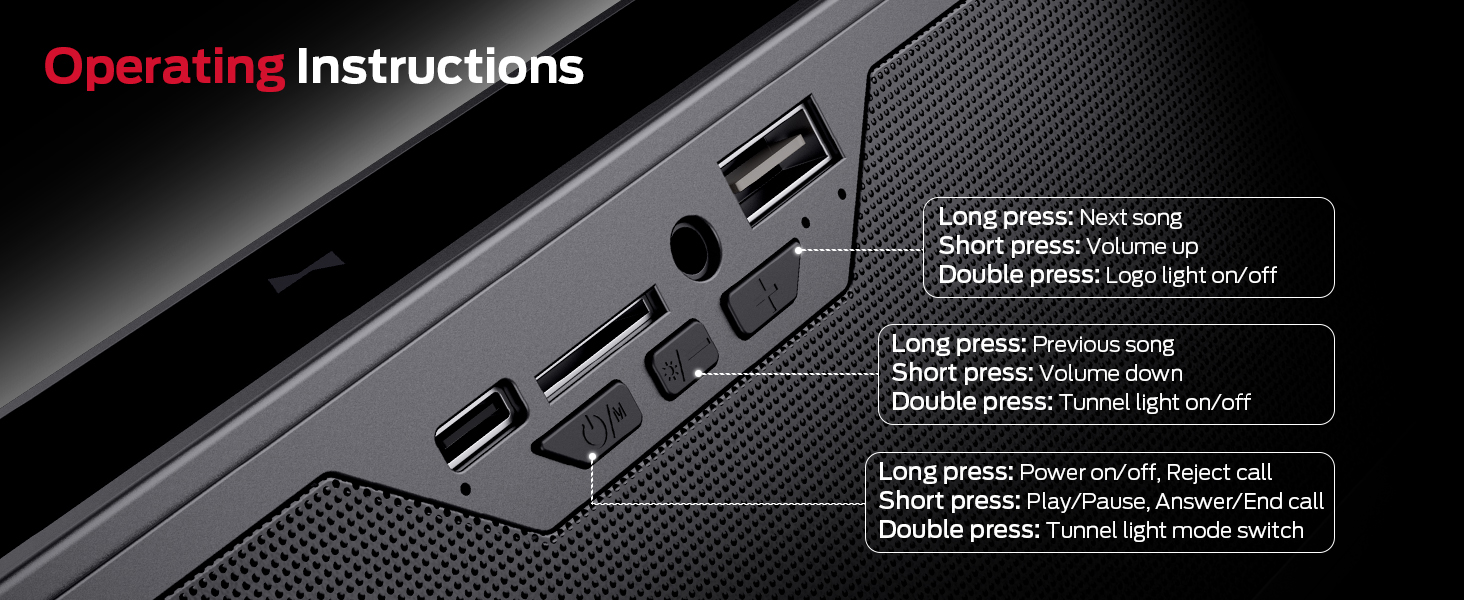
Сүрөт: деталдуу view динамиктин башкаруу баскычтарынын жана алардын тиешелүү функцияларынын.
- Power Button (ⓘ/M):
- Long press: Power on/off, Reject call
- Short press: Play/Pause, Answer/End call
- Double press: Tunnel light mode switch
- Volume Down / Previous Track Button (-/◀◀):
- Узак басуу: Мурунку ыр
- Кыска басуу: Үндү азайтуу
- Double press: Tunnel light on/off
- Volume Up / Next Track Button (+/▶▶):
- Узак басуу: Кийинки ыр
- Кыска басуу: Үнүн жогорулатуу
- Double press: Logo light on/off
Ар тараптуу байланыш параметрлери
Beyond Bluetooth, the Monster S280 offers multiple ways to enjoy your audio:
- AUX киргизүү: Connect external audio devices like MP3 players or computers using the provided 3.5mm audio cable.
- TF-Card Playback: Insert a TF (micro SD) card loaded with your favorite music files түз ойнотуу үчүн.
- USB (аудио) киргизүү: Connect a USB drive containing audio fileойнотуу үчүн.

Сүрөт: деталдуу view of the various input ports on the Monster S280 speaker, highlighting its versatile connectivity.
Dynamic Lighting Modes & Mirror Display
Enhance your audio experience with the S280's customizable lighting effects and unique mirror display:
- 6 динамикалык жарыктандыруу режимдери: Choose from Dark Green, Light Green, Blue, Purple, Breathing, and Circulate to match your mood or environment. Double press the Power button to cycle through modes.
- 3D Tunnel Lighting Effect: When the lights are on, enjoy a mesmerizing 3D tunnel effect that adds visual depth to your audio.
- Күзгү дисплейи: When all lights are turned off, the front panel transforms into a sleek, reflective mirror, adding a touch of elegance to your space.

Image: Visual representation of the six distinct lighting modes offered by the speaker.

Image: Side-by-side comparison illustrating the speaker's mirror effect when lights are off and the 3D tunnel lighting when lights are on.
Wireless Charging Pad Function
The Monster S280 doubles as a convenient wireless charging pad for compatible devices. To use this feature:
- Ensure the speaker is connected to a power source via the USB-C charging cable.
- Place your Qi-enabled smartphone, earbuds, or other compatible device on the designated wireless charging area on top of the speaker.
- The device should begin charging automatically. Note that wireless charging only functions when the speaker is plugged into power.

Image: The Monster S280 speaker with a smartphone placed on its top surface, actively charging wirelessly, demonstrating its multi-functional design.
Техникалык шарттар
| Өзгөчөлүк | Деталь |
|---|---|
| Бренд | Monster |
| Модель аты | S280 |
| Байланыш технологиясы | Зымсыз (Bluetooth 6.0) |
| Динамик түрү | Орнотулган, стерео |
| Динамик өлчөмү | Dual 45 mm drivers |
| Үн чыгаруу | 40W Stereo Sound with Rich Bass |
| Өзгөчөлүктөр | LED Light (6 modes), Wireless Charger, Mirror Display |
| Киргизүү параметрлери | Bluetooth, AUX, TF-Card, USB (Audio) |
| Продукциянын өлчөмдөрү | 8"D x 2"W x 3"H |
| Элемент Салмагы | 1.94 фунт |
| Түс | Кара |
| Сунушталган колдонуу | Ички/тышкы |
Техникалык тейлөө
To ensure the longevity and optimal performance of your Monster S280 speaker, follow these maintenance guidelines:
- Тазалоо: Use a soft, dry, lint-free cloth to clean the speaker's surface. Do not use abrasive cleaners, alcohol, benzene, or other chemicals, as these may damage the finish or internal components.
- Сактагыч: Узак мөөнөткө колдонулбаганда, динамикти күн тийбеген жана өтө температурадан алыс, салкын, кургак жерде сактаңыз.
- Суу таасири: Бул динамик суу өткөрбөйт. Аны сууга, жамгырга же ашыкча нымдуулукка тийгизбеңиз.
- Колдонуу: Динамикти этияттык менен кармаңыз. Аны түшүрүп албоодон же катуу соккуга дуушар кылбоодон алыс болуңуз.
Проблемаларды чечүү
If you encounter any issues with your Monster S280 speaker, please refer to the following common problems and solutions:
- Кубат жок:
- Динамик толугу менен кубатталганын текшериңиз.
- Verify the USB-C charging cable is securely connected to both the speaker and a working power source.
- Үн жок:
- Динамиктин үнү катуу коюлганын текшериңиз.
- Туташкан түзмөгүңүздүн үнү да катуу коюлганын текшериңиз.
- If using Bluetooth, ensure the speaker is properly paired and connected to your device. Try re-pairing.
- If using AUX/TF-Card/USB, ensure the cable/card/drive is properly inserted and the correct input mode is selected.
- Bluetooth жупташтыруу маселелери:
- Динамик жупташтыруу режиминде экенин текшериңиз (LED күйүп-өчүп турат).
- Ensure your device's Bluetooth is enabled and within range (typically 10 meters/33 feet).
- Түзмөгүңүздүн Bluetooth тизмесинен "Monster S280" түзмөгүн унутуп, кайра жупташтырып көрүңүз.
- Динамикти да, түзмөгүңүздү да өчүрүп жана күйгүзүңүз.
- Зымсыз кубаттоо иштебейт:
- Ensure the speaker is plugged into a power source. Wireless charging only works when the speaker is powered via its USB-C input.
- Verify your device is Qi-enabled and placed correctly on the charging pad.
- Кубаттоого тоскоол болушу мүмкүн болгон калың телефон каптарын алып салыңыз.
- Жарыктар иштебейт/өзгөрүлбөйт:
- Double press the appropriate buttons to turn lights on/off or cycle through modes as described in the "Operating Instructions" section.
Кепилдик жана колдоо
The Monster S280 portable Bluetooth speaker comes with a warranty card. Please refer to the warranty card for specific terms and conditions regarding your product's warranty coverage.
For any questions, technical assistance, or support inquiries, please refer to the contact information provided on your warranty card or visit the official Monster support website. We are committed to providing excellent customer service.
Сиз да зыярат кылсаңыз болот Amazonдагы Monster дүкөнү көбүрөөк маалымат жана продукт жаңыртуу үчүн.
Ask a question about this manual
Ask about setup, troubleshooting, compatibility, parts, safety, or missing instructions. Manuals+ will review the question and use this page’s manual context to help answer it.