
1. Киришүү
The CalDigit E5 Thunderbolt 5 Element 5 Hub is a compact and powerful connectivity solution designed to expand the capabilities of your computer. It provides multiple high-speed ports for data transfer, display connectivity, and power delivery, enhancing your workflow and desktop setup.
2. Кутуда эмне бар
- 1 x Element 5 Hub
- 1 x Thunderbolt 5 кабели (0.8 м)
- 4 x резина буттары тилкелери
- 1 x Кубат булагы (180 Вт)
- 1 х Кубат кабели
3. Орнотуу
3.1 Энергия менен жабдууну туташтыруу
Connect the provided 180W power supply to the DC In port (20V | 9A) on the rear of the Element 5 Hub. Plug the power cord into a wall outlet.
3.2 Хост компьютерге туташуу
Use the included Thunderbolt 5 cable to connect the Element 5 Hub to your computer's Thunderbolt 5, Thunderbolt 4, Thunderbolt 3, USB4, or USB-C port. The host port on the hub is located on the side and labeled 'Computer'.

Image: CalDigit E5 Thunderbolt 5 Element 5 Hub with various cables connected to its ports, showcasing its compact design and multiple connectivity options.
3.3 Перифериялык түзүлүштөрдү туташтыруу
Connect your USB-A, USB-C, and additional Thunderbolt devices to the available ports on the Element 5 Hub. The hub features 4x Thunderbolt 5/USB4 v2 ports, 3x USB-A 10Gb/s ports, and 2x USB-C 10Gb/s ports.

Image: The CalDigit E5 Hub connected to a laptop, with several cables extending to various peripherals, illustrating its role as a central connectivity point.
4. Иштөө
4.1 Port Overview
- 1 x Thunderbolt 5 Host Port: Up to 120Gb/s bandwidth.
- 3 x Thunderbolt 5/USB4 v2 Ports: 80Gb/s each, supporting 64Gb/s PCIe technology for ultra-fast SSDs (up to 6,200MB/s).
- 3 x USB-A порттору: 10Gb/s data transfer.
- 2 USB-C порттору: 10Gb/s data transfer.

Сүрөт: алдыңкы view of the CalDigit E5 Hub, highlighting the USB-C and USB-A data ports available for connecting various peripherals.

Сүрөт: Арткы view of the CalDigit E5 Hub, displaying the Thunderbolt 5 ports, an additional USB-A port, and the DC power input.
4.2 Performance and Bandwidth
The Element 5 Hub leverages Thunderbolt 5 technology to provide exceptional performance. It offers 80Gb/s bandwidth across its Thunderbolt 5 ports. When connecting bandwidth-intensive displays, the hub can enable Өткөрүү жөндөмдүүлүгүн жогорулатуу, allocating up to 120Gb/s for displays while reserving 40Gb/s for other devices. This feature requires a compatible Thunderbolt 5 Mac or PC.
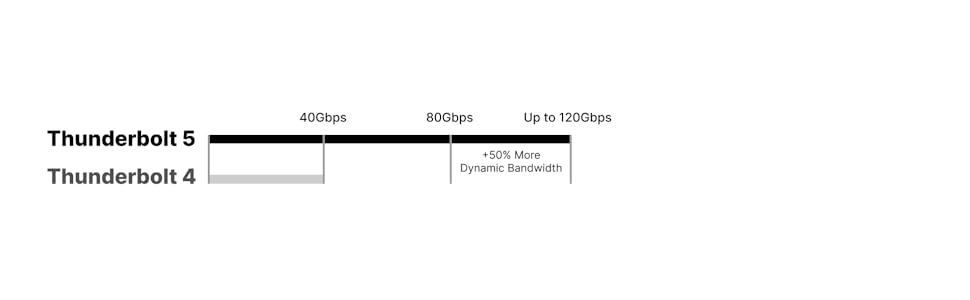
Image: A diagram illustrating the bandwidth capabilities of Thunderbolt 5 (up to 120Gbps with Boost Mode) compared to Thunderbolt 4 (40Gbps).
4.3 Дисплейди колдоо
The Element 5 Hub supports various display configurations depending on your host computer's capabilities:
- MacOS: Connect up to dual 6K@60Hz or 8K@60Hz displays, or dual 4K@240Hz displays on Macs that support these resolutions. Note: Base M1-M3 Macs do not support dual external displays.
- Windows: Connect up to three 4K@144Hz displays on compatible Windows Thunderbolt 5 host computers. Triple displays are not supported on macOS, Thunderbolt 4/3, or USB-C PCs.

Image: A MacBook connected to the CalDigit E5 Hub, driving two external displays, demonstrating dual display support on macOS.

Image: A Windows laptop connected to the CalDigit E5 Hub, driving three external displays, illustrating triple display support on compatible Windows systems.

Image: A detailed chart outlining display compatibility, resolutions, and refresh rates for the CalDigit E5 Hub across different Mac (M1-M4) and Windows (Thunderbolt 4/5) computer models.
4.4 Электр энергиясын жеткирүү
The Element 5 Hub provides up to 90W of sustained power delivery to your host laptop, tablet, or phone. Each downstream Thunderbolt 5/USB4 v2 port provides 15W (5V/3A), and each USB-A/USB-C port provides 7.5W (5V/1.5A). The hub also supports Offline Charging, allowing you to charge devices even when not connected to a host computer.

Image: A diagram showing the power distribution from the CalDigit E5 Hub to various connected devices, including a laptop, iPad, iPhone, and other USB accessories.
4.5 Шайкештик
The Element 5 Hub is compatible with a wide range of devices:
- macOS 15 же андан кийинкиси
- Windows 11 же андан кийинкиси
- iPadOS
- Chrome OS
- Thunderbolt 5, 4, and 3 (Mac) computers
- USB-C (USB4, USB4 v2) computers, tablets, and phones
- Thunderbolt/USB4 iPads
- USB-C Chromebooks
*Thunderbolt 5 or USB4 v2 is required for unrestricted functionality of the Element 5 Hub.

Image: The CalDigit E5 Hub connected to an iPad Pro, demonstrating its compatibility with tablets for expanded connectivity.
5. Техникалык тейлөө
To ensure optimal performance and longevity of your CalDigit E5 Hub, keep it in a well-ventilated area to prevent overheating. Regularly check for firmware updates from the official CalDigit website to maintain compatibility and performance.
6. Кыйынчылыктарды
If you experience issues with device connectivity or power delivery, try the following:
- Бардык кабелдер коопсуз туташтырылганын текшериңиз.
- Restart your host computer and the Element 5 Hub.
- Verify that your computer's drivers for Thunderbolt/USB are up to date.
- Check the CalDigit support website for specific troubleshooting guides or FAQs.
7. Техникалык шарттар
| Өзгөчөлүк | Спецификация |
|---|---|
| Продукциянын өлчөмдөрү | 4.5 x 2.75 x 1.12 дюйм (114 x 70 x 28.5 мм) |
| Элемент Салмагы | 8.9 унция (0.25 кг) |
| Порттардын саны | 9 (1x Host Thunderbolt 5, 3x Downstream Thunderbolt 5/USB4 v2, 3x USB-A 10Gb/s, 2x USB-C 10Gb/s) |
| Хост заряддоо | 90 Вт чейин |
| Downstream Thunderbolt 5/USB4 v2 Port Power | 15W (5V/3A) each |
| USB-A/USB-C Port Power | 7.5W (5V/1.5A) each |
| Электр камсыздоо | 180W (20V | 9A) |
| Аппараттык интерфейс | Thunderbolt 5, Thunderbolt 4, Thunderbolt 3, USB4, USB 3.1 Type A, USB 3.1 Type C, USB 3.2 Gen 2 |
| Түс | Space Gray |
8. Расмий продукт Videos
CalDigit Element 5 Thunderbolt Hub Review: Ports & Features
Видео: Ар тараптуу карооview of the CalDigit Element 5 Thunderbolt Hub, detailing its various ports, features, and overall functionality. This video provides an in-depth look at how the hub can enhance your computing experience.
Caldigit Element 5 Ports & Features
Видео: Кыскачаview of the CalDigit Element 5 Hub's ports and key features, ideal for a quick understanding of its capabilities and connectivity options.
Caldigit Thunderbolt 5 Docking Station Compared: TS5 E5 TS5+
Video: A comparative analysis of CalDigit's Thunderbolt 5 docking stations, including the E5, TS5, and TS5+, helping users understand the differences and choose the best option for their needs.
9. Кепилдик жана колдоо
For warranty information and technical support, please refer to the official CalDigit webсайтка же түздөн-түз кардарларды тейлөөгө кайрылыңыз. Кепилдик дооматтар үчүн сатып алуу дүмүрчөгүңүздү сактаңыз.


