
1. Коопсуздук нускамалары
Please read these safety instructions carefully before using your Audizio Toledo turntable. Keep this manual for future reference.
- Кубат булагы: Connect the turntable only to a power supply of the type described in this manual or on the unit.
- Суу жана ным: Бул аппаратты суунун жанында же сууда колдонбоңузamp чөйрөлөр.
- Тазалоо: Кургак чүпүрөк менен гана тазалаңыз.
- Вентиляция: Эч кандай желдетүүчү тешиктерди жаап албаңыз. Өндүрүүчүнүн көрсөтмөлөрүнө ылайык орнотуу.
- Жылуулук: Радиаторлор, жылуулук регистрлери, мештер же башка аппараттар (анын ичинде) сыяктуу жылуулук булактарынын жанына орнотпоңуз ampкөтөргүчтөр) жылуулукту пайда кылуучу.
- Электр кабелин коргоо: Электр шнурунун басылып кетүүсүнөн же кысып калуудан сактаңыз, өзгөчө сайгычтарда, розеткаларда жана алар аппараттан чыга турган жеринде.
- Тейлөө: Бардык тейлөөлөрдү квалификациялуу тейлөө кызматкерлерине тапшырыңыз. Аппарат кандайдыр бир зыянга учураганда, мисалы, кубат берүүчү шнур же сайгыч бузулганда, суюктук төгүлгөндө же аппараттын ичине нерселер түшкөндө, аппарат жамгырга же нымдуулукка дуушар болгондо, нормалдуу иштебей калганда тейлөө талап кылынат. , же түшүрүлгөн.
2. Пакеттин мазмуну
Бардык буюмдар кутуда бар экенин текшериңиз:
- Audizio Toledo Turntable Unit
- Чаң капкагы
- Платтер
- Fet Mat
- Каршы салмак
- 45 RPM адаптери
- Кубаттуу адаптер
- RCA кабели
- Колдонуучунун Колдонмосу (бул документ)
- Audio Technica Cartridge (pre-installed)
3. Орнотуу
3.1. Жайгаштыруу
Place the turntable on a firm, level surface away from direct sunlight, heat sources, and excessive vibration.
3.2. Табакты жана Drive Белди орнотуу
The Audizio Toledo turntable features a belt-drive system for stable rotation.
- Carefully place the platter onto the center spindle.
- Locate the drive belt, which is usually pre-installed around the inner rim of the platter.
- Using the red ribbon (if provided), gently pull the belt over the motor pulley. Ensure the belt is not twisted.
- Remove the red ribbon once the belt is correctly positioned.
- Табактын үстүнө кийиз килемди коюңуз.
Видео: Belt Installation Guidelines. This video demonstrates the correct procedure for installing the platter and drive belt on a turntable, ensuring proper function and preventing belt twisting.
Видео: Step-By-Step Installation Guide. This video provides a general guide for turntable setup, including platter and belt installation, and counterweight adjustment.
3.3. Counterweight Installation and Adjustment
The adjustable counterweight ensures optimal tracking force for the Audio Technica cartridge.
- Slide the counterweight onto the rear of the tonearm.
- With the stylus guard removed, carefully balance the tonearm so it floats freely and horizontally.
- Once balanced, hold the counterweight steady and rotate the numbered ring to '0' (zero).
- Rotate the entire counterweight (including the numbered ring) to the recommended tracking force for the Audio Technica cartridge (typically 3.5 grams for the ATN3600L stylus).
3.4. Чаң капкагын орнотуу
Carefully place the dust cover onto the hinges at the rear of the turntable unit.

Сүрөт: The Audizio Toledo turntable with its protective dust cover open, showcasing the platter and tonearm. The dust cover helps protect the unit from dust and debris when not in use.
3.5. Байланыштар
The Audizio Toledo offers versatile connectivity options.
- Күч: Connect the power adapter to the DC IN 12V port on the rear of the turntable and then to a wall outlet.
- RCA чыгаруу: For wired connection to an amplifier or powered speakers, connect the RCA cable to the AUDIO OUT (R/L) ports on the rear of the turntable. Use the PHONO/LINE switch to select the appropriate output level for your ampөмүрлүү.
- Негиздөө: If experiencing hum, connect a grounding wire from the GND terminal on the turntable to the grounding terminal on your ampөмүрлүү.
- Bluetooth чыгаруу: To connect wirelessly to Bluetooth headphones or speakers, ensure the Bluetooth switch on the rear is set to 'ON'.
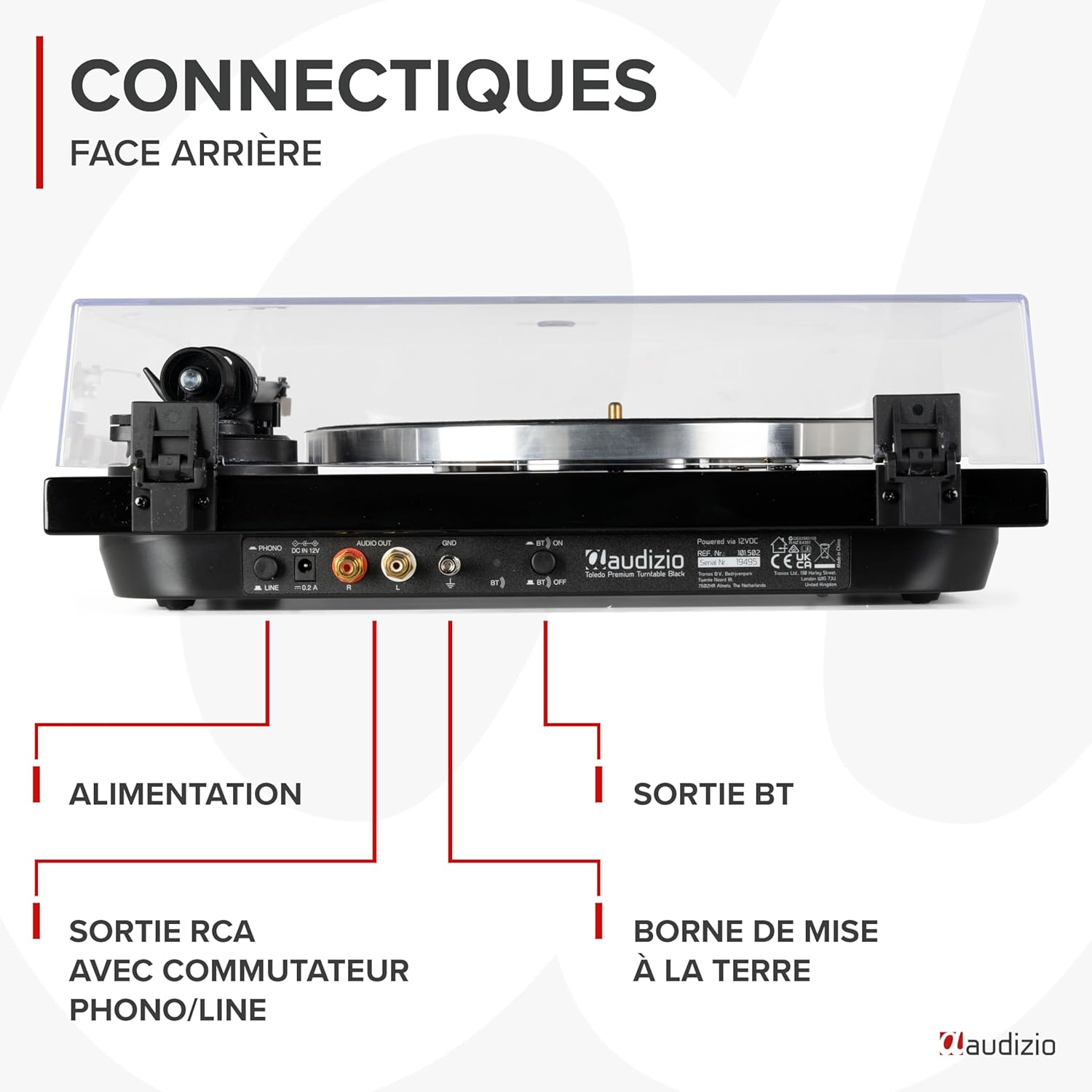
Сүрөт: А деталдуу view of the rear panel of the Audizio Toledo turntable, highlighting the power input, RCA audio outputs (R/L), grounding terminal (GND), and the Bluetooth ON/OFF switch. This panel allows for both wired and wireless audio connections.
4. Иштөө
4.1. Жазууну ойнотуу
- Винил пластинканы тарелкадагы кийизден жасалган төшөккө коюңуз.
- Select the appropriate speed (33 or 45 RPM) using the speed selector switch. For 45 RPM records with a large center hole, use the included 45 RPM adapter.
- Tonearm cl бошотууamp.
- Коюу рычагын колдонуп, колду акырын көтөрүңүз.
- Тонер рычагын жаздыруудагы каалаган тректин үстүнө коюңуз.
- Lower the cueing lever to slowly drop the stylus onto the record.
- At the end of the record, the turntable may feature an auto-stop function. Manually lift the tonearm and return it to its rest position.

Сүрөт: Жогортон ылдый view of the Audizio Toledo turntable with a vinyl record spinning on the platter. The tonearm is positioned on the record, indicating active playback. The speed selector and pitch control knobs are visible on the right side of the unit.

Сүрөт: Жогортон ылдый view of the Audizio Toledo turntable illustrating compatibility with 7", 10", and 12" records. The image also highlights the two available speeds (33 and 45 RPM) and the pitch control for fine-tuning playback speed.
4.2. Bluetooth Output
Аудиону зымсыз агылтуу үчүн:
- Ensure the Bluetooth switch on the rear panel is set to 'ON'.
- Activate Bluetooth pairing mode on your headphones or speaker.
- The turntable will automatically search for and connect to the nearest Bluetooth device.

Сүрөт: The Audizio Toledo turntable wirelessly connected to a pair of Bluetooth headphones, demonstrating its Bluetooth OUT capability. This feature allows users to enjoy their vinyl collection through wireless audio devices.
4.3. RCA чыгаруу
For a wired connection to an external audio system:
- Connect the RCA cable from the turntable's AUDIO OUT ports to the corresponding input on your ampкөтөргүч же кубаттуу динамиктер.
- Set the PHONO/LINE switch on the turntable's rear panel according to your amplifier's input type. Use 'PHONO' if your amplifier has a dedicated phono input, or 'LINE' if it has a standard auxiliary input.
5. Техникалык тейлөө
5.1. Тазалоо
- Turntable Unit: Агрегатты жумшак, кургак чүпүрөк менен сүртүңүз. Абразивдүү тазалагычтарды же эриткичтерди колдонбоңуз.
- Калем: Стилус менен тазалоо үчүн атайын жасалган жумшак щетканы колдонуңуз, аны арттан алдыга карай акырын щетка менен тазалаңыз.
- Чаң капкагы: жумшак менен тазалоо, гamp cloth. Avoid harsh chemicals that may scratch or cloud the plastic.
5.2. Стилусту алмаштыруу
The Audizio Toledo uses a replaceable Audio Technica cartridge. A worn stylus can damage your records and degrade sound quality. Replace the stylus after approximately 300-500 hours of playback.
- Gently grasp the front of the cartridge and pull the old stylus assembly downwards and forwards to remove it.
- Align the new stylus assembly with the cartridge body and push it upwards and backwards until it clicks into place.

Сүрөт: Жакын план view of the Audio Technica cartridge and stylus on the tonearm of the Audizio Toledo turntable. This image highlights the precision component responsible for reading the grooves of a vinyl record, ensuring high-quality audio reproduction.
6. Кыйынчылыктарды
| Көйгөй | Мүмкүн себеп | Чечим |
|---|---|---|
| Күч жок | Кубат адаптери туташкан эмес же туура эмес. | Электр кубатына туташууларды текшериңиз. Башка розетканы колдонуп көрүңүз. |
| No sound via RCA | RCA cables not connected correctly; PHONO/LINE switch incorrect; amplifier input incorrect. | Ensure RCA cables are firmly connected. Set PHONO/LINE switch correctly. Select correct input on ampөмүрлүү. |
| No sound via Bluetooth | Bluetooth not enabled; device not paired. | Ensure Bluetooth switch is ON. Put Bluetooth headphones/speaker into pairing mode. |
| Үндү өткөрүп жиберүү же бурмалоо | Dust on record/stylus; incorrect tracking force; turntable not level. | Clean record and stylus. Re-adjust counterweight. Ensure turntable is on a level surface. |
| Ылдамдык көйгөйлөрү (өтө тез/жай) | Incorrect speed selected; pitch control misadjusted. | Select correct 33/45 RPM speed. Adjust pitch control knob. |
7. Техникалык шарттар
| Өзгөчөлүк | Спецификация |
|---|---|
| Бренд | Аудизио |
| Модель аты | Толедо |
| Түс | Кара |
| Материал | Жыгач |
| Элемент Салмагы | 5.5 килограмм |
| Максималдуу айлануу ылдамдыгы | 45 RPM (supports 33 and 45 RPM) |
| Байланыштар | Bluetooth, RCA (Phono/Line switchable) |
| Өзгөчөлүктөр | Automatic belt-drive design, Audio Technica Cartridge, Adjustable Tonearm, Anti-vibration feet |
| Шайкеш түзмөктөр | Bluetooth speakers, headphones, external speakers |
| Заряддалуучу батарея | Жок |

Сүрөт: The Audizio Toledo turntable with its dimensions indicated: 43cm (length), 33cm (width), and 14cm (height). This provides a clear visual reference for the physical size of the unit.
8. Кепилдик жана колдоо
The Audizio Toledo turntable comes with a 2 жылдык өндүрүүчү кепилдик. For technical support, troubleshooting beyond this manual, or warranty claims, please contact your retailer or the official Audizio support channels.
Запастык бөлүктөрү 2 жылга жеткиликтүү.