
Introduction
The GROPOW Automatic Solar Powered Chicken Coop Door is designed to provide a safe and convenient solution for managing your poultry. This door features programmable timer and light sensor modes, an LCD display for easy programming, and solar charging capabilities. It ensures your chickens, hens, and ducks are secured at night and released in the morning without manual intervention, saving you time and providing peace of mind.
Негизги өзгөчөлүктөрү:
- Күн энергиясы: Equipped with a high-capacity rechargeable battery and an efficient solar panel for continuous charging. USB charging option is also available.
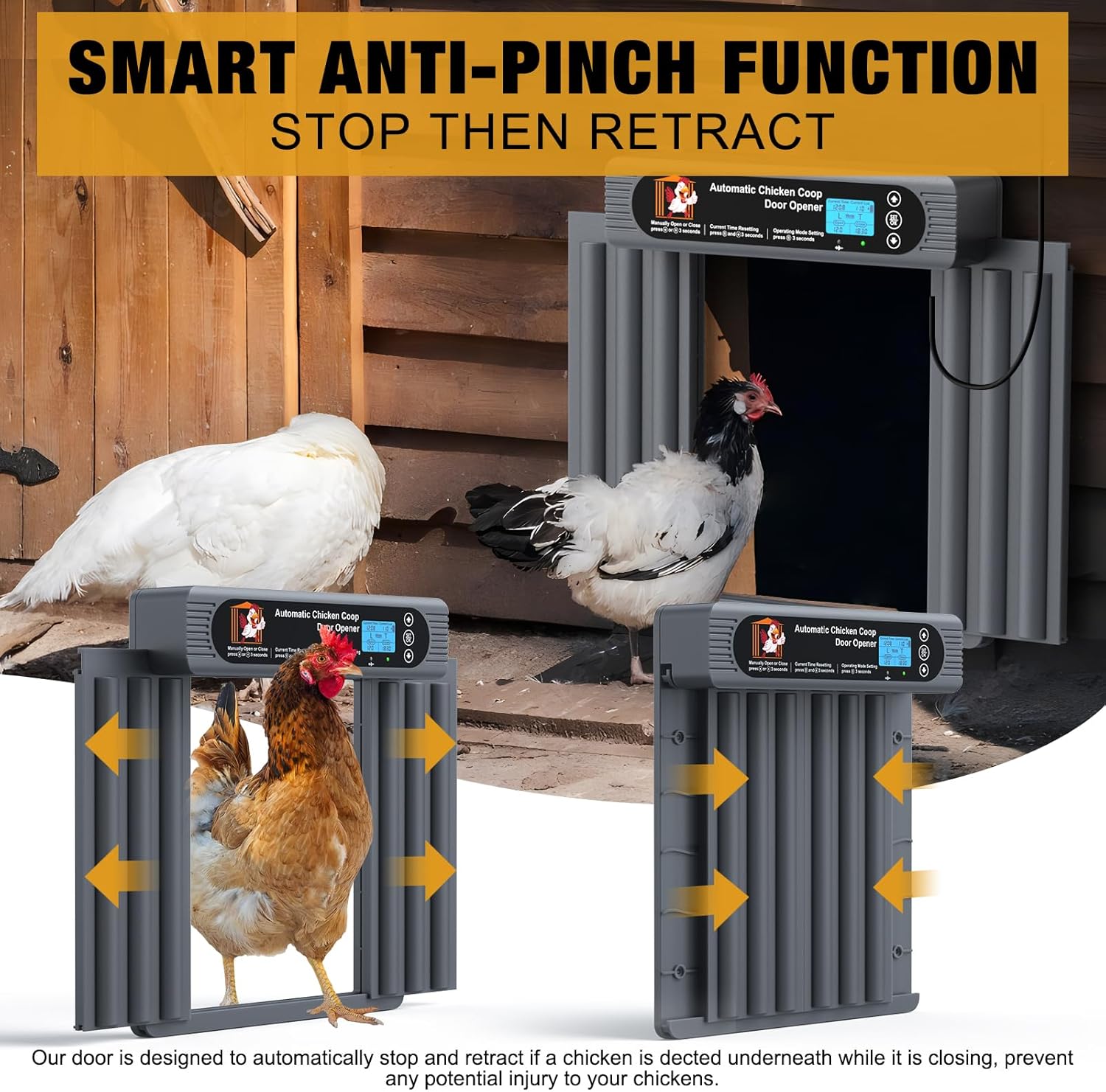
- Anti-Pinch Safety: The door immediately stops and retracts if an obstruction is detected during closing, preventing injury to your poultry.
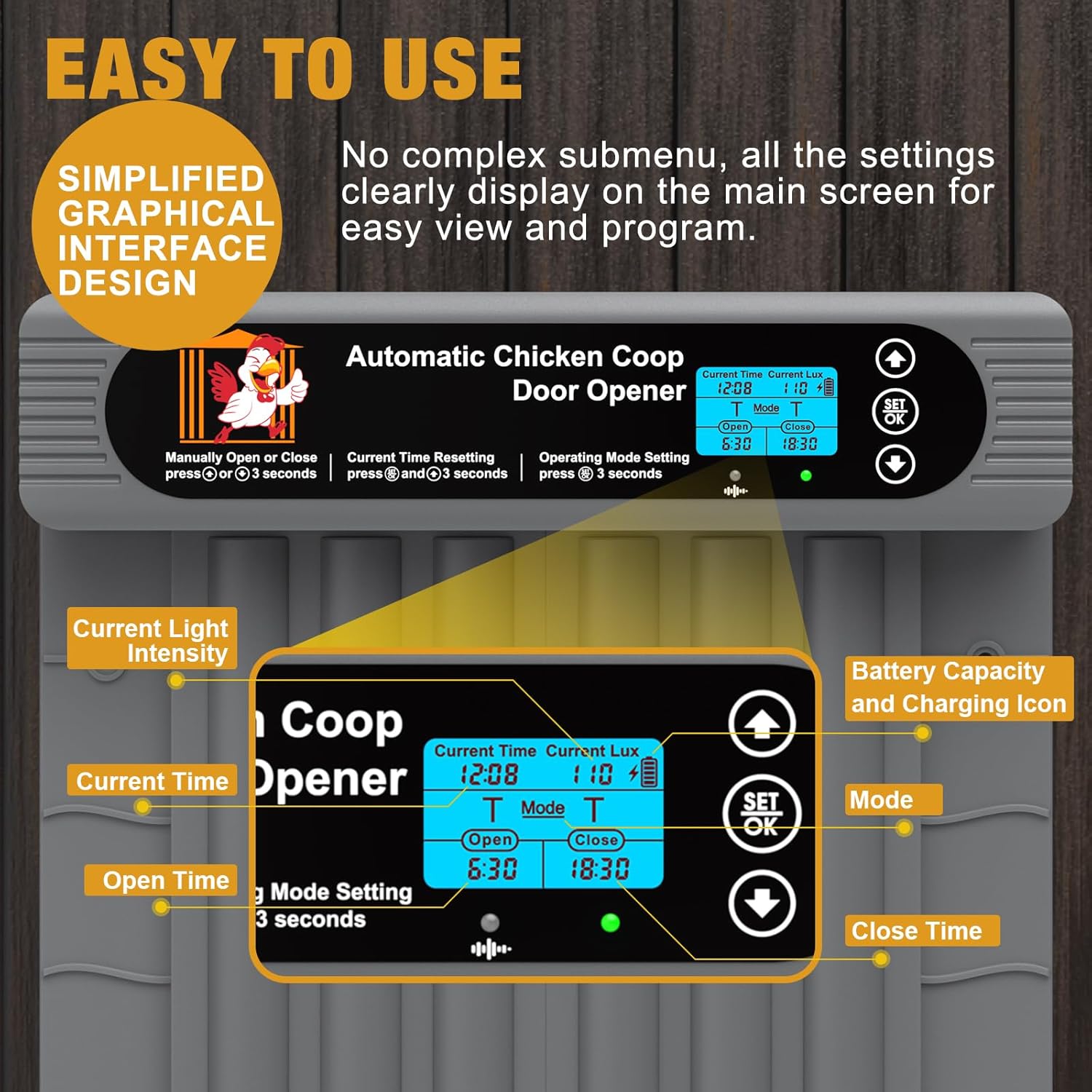
- Чоң LCD дисплей: Features a simplified graphical interface for clear display of settings and easy programming of working modes.
- Бир нече иштөө режимдери: Supports Timer, Light Sensor, Manual, and Remote Control modes to suit various needs.
- Extreme Weather Durability: Constructed from high-quality materials to withstand temperatures from -40℉ to 185℉ (-40℃ to 85℃), including snow, rain, and dust.
- Алыстан башкаруу: Allows manual opening and closing of the door from a distance of up to 50-100 meters without obstacles.
- Оңой орнотуу: Quick and simple installation with included accessories, requiring no complicated wiring.
Коопсуздук маалыматы
Always ensure the installation area is clear of debris and obstructions. The door is equipped with an anti-pinch safety mechanism that will stop and retract if it detects an animal during closing. However, regular checks are recommended to ensure proper function and prevent any potential hazards. Keep the solar panel clean for optimal charging efficiency. Do not attempt to force the door open or closed manually when it is in an automated mode, as this may damage the motor.
Орнотуу жана орнотуу
The GROPOW Automatic Chicken Coop Door is designed for quick and easy installation. Follow these general steps:
- Ачылышын даярдоо: Ensure your coop opening is suitable for the door dimensions (approximately 10.5 inches wide and 13.8 inches high for the door panel, with overall unit dimensions of 11.8 inches wide and 13.8 inches high).
- Негизги блокту орнотуу: Securely attach the main door unit to the exterior of your chicken coop using the provided hardware. Ensure it is level and the door can move freely.
- Күн панелин орнотуу: The solar panel can be installed in two ways: staked into the ground or mounted directly to the coop wall. Choose a location that receives maximum direct sunlight throughout the day for optimal charging. Connect the solar panel cable to the main unit.
- Баштапкы кубаттоо: Once installed, power on the unit. The LCD display will activate, allowing you to configure settings.


Video 1: This video demonstrates the installation process of the solar-powered automatic chicken coop door, including mounting the main unit and setting up the solar panel.
Иштөө нускамалары
The door offers several operating modes for flexible control:
- Таймер режими: Set specific opening and closing times. The door will operate according to your programmed schedule.
- Жарык сенсор режими: Эшик айланадагы жарыктын деңгээлине жараша таң атканда автоматтык түрдө ачылып, күүгүм киргенде жабылат.
- Кол режими: Use the control panel buttons to manually open or close the door as needed.
- Алыстан башкаруу режими: Utilize the included remote control to open and close the door from a distance.

APP Control (Optional)
For enhanced control and monitoring, this chicken coop door may support an optional mobile application. If available, you can download the 'Smart Coop' app from your device's app store. The app allows you to register an account, connect to your device, and manage the door's settings remotely, including scheduling and real-time status updates.
Video 2: This video provides instructions on how to install the 'Smart Coop' mobile application and register an account for remote control functionality.
Video 3: This video demonstrates the features of the automatic chicken coop door with WiFi connectivity, showcasing its smart capabilities.
Техникалык тейлөө
To ensure the longevity and optimal performance of your GROPOW Automatic Chicken Coop Door, regular maintenance is recommended:
- Тазалоо: Periodically clean the door tracks and the main unit to prevent dirt, dust, or debris from obstructing movement. Use a soft, damp кездеме.
- Күн панели: Keep the solar panel free from dirt, leaves, or snow to ensure efficient charging.
- Батареяны текшерүү: Monitor the battery level via the LCD display. While solar-powered, prolonged cloudy weather may require occasional USB charging.
- Аба ырайын коргоо: The door is designed for extreme weather, but ensure all connections are secure and the unit is properly sealed against moisture.

Проблемаларды чечүү
If you encounter issues with your chicken coop door, refer to the following common problems and solutions:
- Door not opening/closing at correct times in Light Sensor mode: The door may open or close multiple times under 'L' mode if the light intensity at the installation location changes significantly (e.g., due to shadows or intermittent sunlight). Ensure the light sensor is not obstructed and is in a consistent light environment.
- Door not responding: Check the battery level on the LCD display. If low, ensure the solar panel is receiving adequate sunlight or charge via USB. Verify all connections are secure.
- Door getting stuck: Inspect the door tracks for any debris, dirt, or ice that might be impeding movement. Ensure no animals are obstructing the door's path. The anti-pinch feature should prevent serious issues, but clearing obstructions is important.
- Пульт иштебей жатат: Check the remote control's battery. Ensure there are no significant obstacles between the remote and the door unit.
Техникалык шарттар
| Өзгөчөлүк | Деталь |
|---|---|
| Бренд | GROPOW |
| Модель номери | GP-CD-G01-TE |
| Продукциянын өлчөмдөрү | 42.93 x 20.32 x 35.05 cm; 2.06 kg (16.9L x 8.0W x 13.8H inches; 4.54 lbs) |
| Материал | Акрилонитрил бутадиен стирол (ABS) |
| Power Source | Solar Powered (rechargeable battery), USB Charging |
| Иштөө температурасы | -40℉ден 185℉ге чейин (-40℃ден 85℃ге чейин) |
| Өзгөчөлүктөр | Anti-Pinch Protection, Heavy Duty, Programmable Timer & Light Sensor Modes, Solar Powered, Waterproof, Weather Resistant, Remote Control |
Кепилдик жана колдоо
This product comes with a manufacturer's warranty. For detailed warranty information, product support, or assistance with troubleshooting, please refer to the contact information provided in your product packaging or visit the official GROPOW webсайт. Кепилдик дооматтары үчүн сатып алуу дүмүрчөгүңүздү сактаңыз.