
1. Киришүү
This manual provides essential information for the safe and efficient operation of your BLACK+DECKER EM044K6CF-BK 1.7 cu. ft. Over-the-Range Microwave Oven. Please read all instructions carefully before use and retain this manual for future reference.
The BLACK+DECKER EM044K6CF-BK is a 1000-watt microwave oven designed for over-the-range installation, featuring a spacious 1.7 cubic feet interior and a 12.4-inch turntable. It includes a 300 CFM vent fan with integrated lighting to enhance your cooking experience.

Сүрөт: алдыңкы view of the BLACK+DECKER EM044K6CF-BK Over-the-Range Microwave Oven.
2. Маанилүү коопсуздук нускамалары
Шайманды колдонууда өрт чыгуу, электр тогуна урунуу, адамдардын жаракат алуу же ашыкча микротолкундуу энергияга дуушар болуу коркунучун азайтуу үчүн, төмөнкүлөрдү камтыган негизги коопсуздук чараларын аткарыңыз:
- Шайманды колдонуудан мурун бардык нускамаларды окуп чыгыңыз.
- Эшик же эшик пломбалары бузулуп калса, мешти иштетпеңиз.
- Суюктуктарды же башка тамактарды жабык идиштерде ысытпаңыз, анткени алар жарылып кетиши мүмкүн.
- аракет кылбаampэшикти, башкаруу панелин, коопсуздук кулпу өчүргүчтөрүн же духовканын башка бөлүгүн жөндөңүз же оңдоңуз, же болбосо эшикти, башкаруу панелин, коопсуздук кулпу өчүргүчтөрүн же башка бөлүктөрүн тууралаңыз же оңдоңуз.
- Шайманды балдар же анын жанында колдонгондо катуу көзөмөл керек.
- Микротолкундуу мештерде колдонууга ылайыктуу идиштерди гана колдонуңуз.
- Бул шаймандын ичинде жегич химиялык заттарды же бууларды колдонбоңуз.
- Иш учурунда туура желдетүүнү камсыз кылыңыз.
3. Продукциянын өзгөчөлүктөрү
- Чоң сыйымдуулугу: The microwave features a spacious 1.7 cubic feet interior, measuring 15.4"D x 29.9"W x 16.4"H, and includes a 12.4-inch turntable.
- 10 Cooking Levels: With a 1000-watt output, this oven offers 6 quick menus for daily meals, including Popcorn, Beverage, Melt/Soften, Reheat, and Defrost.
- Тез бышыруу: For quick action, press numbers 1, 2, or 3 to initiate 1-3 minutes of cooking at 100% power level.
- Multi-stage Бышыруу: Save time by programming sequential cooking stages, such as 10 minutes at 90% microwave power followed by 5 minutes at 50% power in a single setting.
- 300 CFM Vent Fan with Light: A 2-speed strong suction vent fan effectively removes fumes and odors, while an integrated light provides focused illumination over your cooking surface.
- Балдардын коопсуздук кулпусу: The control panel can be disabled to prevent accidental operation, enhancing safety in homes with children.
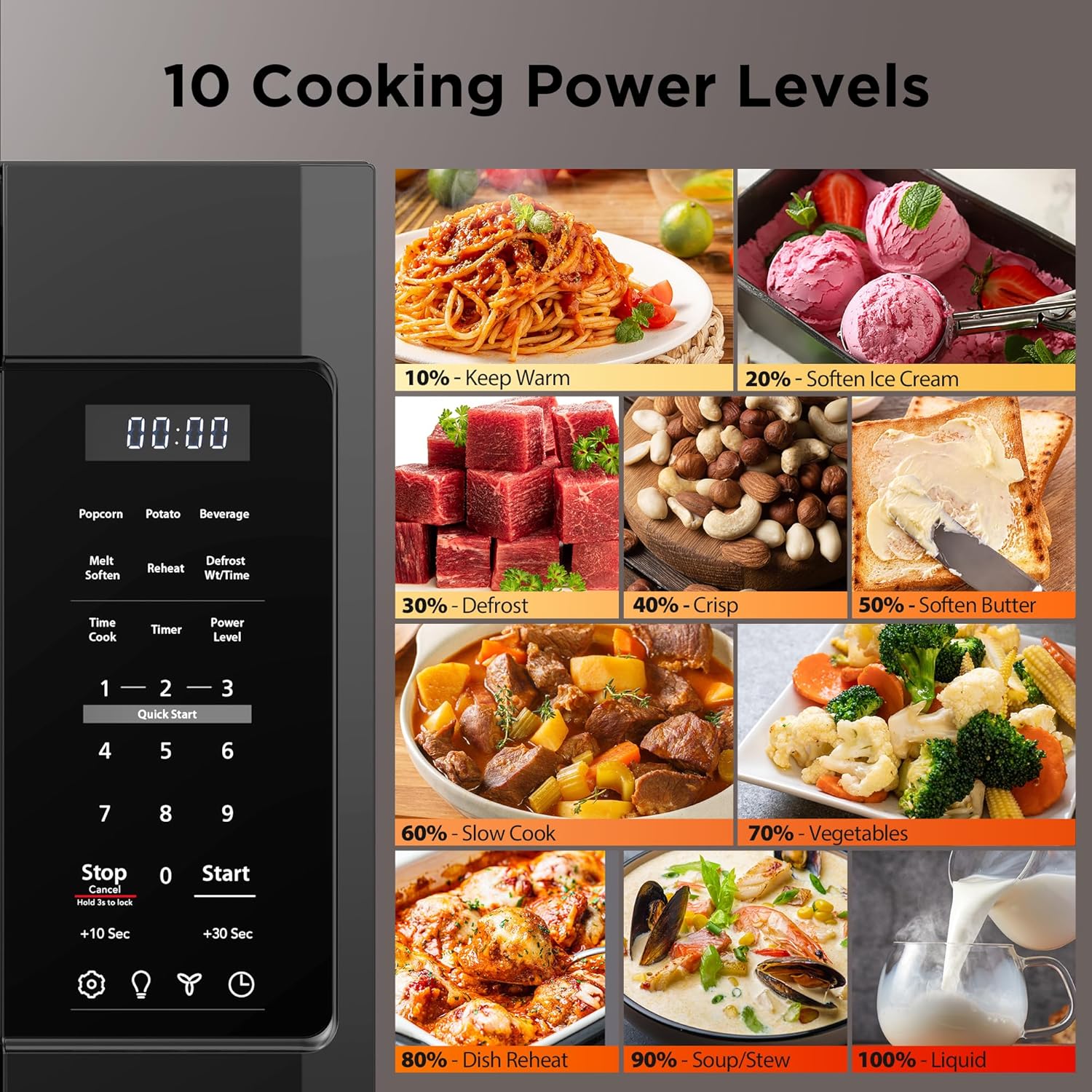
Image: Control panel illustrating 10 cooking power levels.

Image: Quick Start buttons for speedy cooking.

Image: Microwave with 300 CFM Vent Fan and Light.

Image: Multi-stage cooking illustration.

Image: Child Safety Lock feature.

Сүрөт: орнотуу пландаштыруу үчүн продукт өлчөмдөрү.
4. Орнотуу жана орнотуу
Proper installation is crucial for the safe and efficient operation of your over-the-range microwave. It is recommended to have two people for installation due to the weight and size of the unit.
4.1 Монтаждык кронштейнди орнотуу
The microwave comes with a mounting bracket that needs to be securely attached to the wall studs above your stove. Use the provided templates to mark drill points accurately.
4.2 Ventilation Setup
Determine if your installation requires top or rear ventilation. The microwave's internal fan motor may need to be reoriented to match your home's ducting. Follow the detailed instructions in the installation guide for proper fan motor adjustment and dampорнотуу.
4.3 Securing the Microwave
Once the mounting bracket is in place and ventilation is configured, lift the microwave onto the bracket, ensuring it hooks securely. Then, secure the top of the microwave to the cabinet above using the provided screws and any necessary spacer blocks to ensure a flush and stable fit.
Video: General guide for over-the-range microwave installation, including bracket mounting and ventilation setup. While this video features a different brand, the installation principles for over-the-range microwaves are broadly similar.
5. Иштөө нускамалары
5.1 Негизги операция
- Бышыруу убактысын коюу: Сандык тактаны колдонуп, каалаган бышыруу убактысын киргизиңиз.
- Кубаттын деңгээлин орнотуу: Press the 'Power Level' button, then use the number pad to select a power level from 1 (lowest) to 10 (highest).
- Баштоо/Токтоо: Press 'Start' to begin cooking. Press 'Stop/Cancel' to pause or end a cooking cycle.
5.2 Quick Menus
The microwave features 6 pre-programmed quick menus for common food items:
- Popcorn: Select the appropriate bag size.
- Картошка: Select the number of potatoes.
- Суусундук: Select the number of cups.
- Эритүү/Жумшактоо: For melting butter, chocolate, or softening ice cream/cream cheese.
- Кайра жылытуу: For reheating various food quantities.
- Эритүү: Choose between defrost by weight or by time.
5.3 Тез бышыруу
For quick heating, simply press the '1', '2', or '3' button to instantly start cooking for 1, 2, or 3 minutes respectively at 100% power.
5.4 Multi-stage Тамак жасоо
This feature allows you to program two consecutive cooking stages with different power levels and times. For example, you can set the microwave to defrost at 90% power for 10 minutes, then automatically switch to cook at 50% power for 5 minutes.
5.5 Vent Fan & Light
- Желдетүүчү желдеткич: Press the 'Vent' button to cycle through 2 fan speeds (High, Low) or turn it off.
- Жарык: Press the 'Light' button to turn the integrated light on or off.
5.6 Балдардын коопсуздук кулпусу
To activate the child safety lock, press and hold the 'Stop/Cancel' button for 3 seconds. The display will indicate that the lock is active. To deactivate, press and hold the 'Stop/Cancel' button again for 3 seconds.
6. Техникалык тейлөө жана тазалоо
Үзгүлтүксүз тазалоо жана тейлөө микротолкундуу мешиңиздин узак иштөөсүн жана оптималдуу иштешин камсыздайт.
- Ички иштер: Духовканын көңдөйүн ар бир колдонгондон кийин тазалап туруңузamp cloth and mild detergent. For stubborn stains, boil a cup of water with lemon juice inside the microwave for a few minutes to loosen residue.
- Сырткы: Сырткы беттерин жумшак менен сүртүңүз, гamp кездеме. Абразивдүү тазалагычтардан алыс болуңуз.
- Айлануучу стол: The glass turntable and its support ring can be removed for cleaning. Wash them in warm, soapy water or in the dishwasher.
- Vent Filters: The grease filters for the vent fan should be cleaned regularly. Refer to the full product manual for instructions on how to remove and clean these filters.
7. Кыйынчылыктарды
Микротолкундуу мешиңизде кандайдыр бир көйгөйгө туш болсоңуз, көйгөйлөрдү чечүү боюнча төмөнкү жалпы кеңештерди караңыз:
- Микротолкундуу меш иштебей жатат: Ensure the power cord is securely plugged into a grounded outlet. Check your household fuse or circuit breaker. Make sure the door is closed securely.
- Жылытпаган тамактар: Verify that the cook time and power level are set correctly. Ensure the door is fully closed.
- Айланма табак айланбай жатат: Check that the turntable is correctly placed on its support ring and that the ring is properly seated. Ensure there is no obstruction.
- Ашыкча ызы-чуу: This may occur during fan operation, especially at higher speeds. Ensure the microwave is installed level and securely.
- Дисплей иштебейт: Unplug the microwave for a few minutes, then plug it back in to reset the control panel.
For more complex issues or if troubleshooting steps do not resolve the problem, please contact BLACK+DECKER customer support.
8. Техникалык шарттар
| Өзгөчөлүк | Спецификация |
|---|---|
| Бренд | BLACK+DECKER |
| Модель номери | EM044K6CF-BK |
| Продукциянын өлчөмдөрү (D x W x Y) | 15.4" x 29.9" x 16.4" |
| Элемент Салмагы | 55.9 фунт |
| Кубаттуулугу | 1.7 куб фут |
| Ватtage | 1000 ватт |
| Тtage | 120 вольт |
| Түс | Кара |
| Материал | Дат баспаган болот |
| Орнотуу түрү | Чектелген |
| Өзгөчө өзгөчөлүк | Auto Cook |
9. Кепилдик жана колдоо
For warranty information, product registration, or technical support, please refer to the documentation included with your product or visit the official BLACK+DECKER webсайт. Сатып алуу квитанциясын кепилдик дооматтары үчүн сатып алуунун далили катары сактаңыз.