
Introduction
This manual provides detailed instructions for the setup, programming, and operation of your RESTMO Sprinkler Timer, Model O-HT-1AW. Please read this manual thoroughly before use to ensure proper function and longevity of the device.
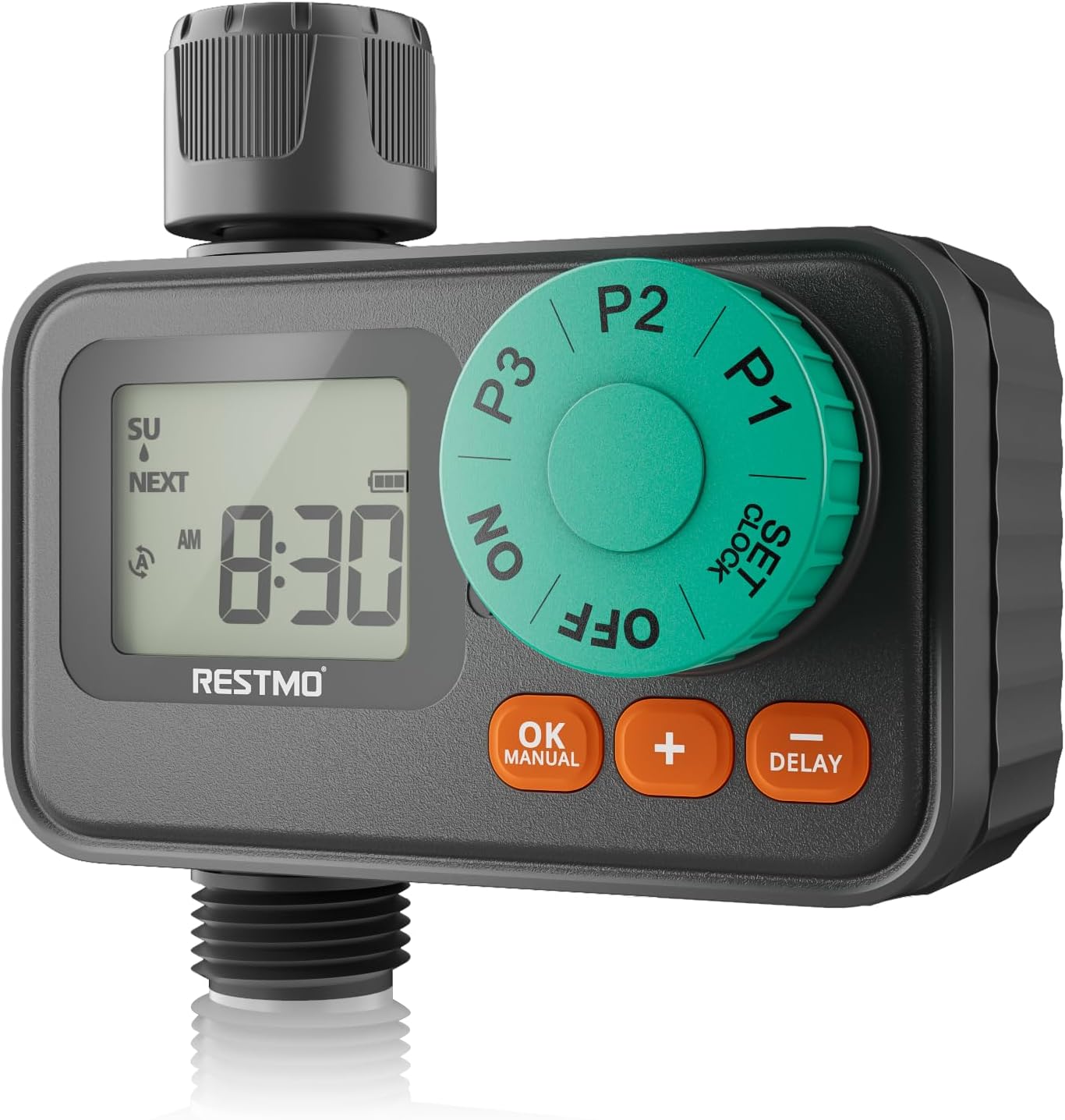
Image: RESTMO Sprinkler Timer, Model O-HT-1AW, connected to a garden faucet and hose, ready for use.
Негизги өзгөчөлүктөрү
- 3 Independent Programs: Customize start times, durations (1 min - 4 hrs 59 mins), and frequencies (specific days) for diverse watering needs.
- Weekly Schedule Mode: Set exact days and times for irrigation, ideal for specific plant care or local watering regulations.
- Upgraded Waterproof & Durability: Seamless embedded screen prevents water ingress, and a rugged textured panel ensures longevity. IP55 waterproof protection.
- Жаан кечиктирүү режими: Suspend watering for 24, 48, or 72 hours without losing programmed settings.
- Кол менен сугаруу режими: Initiate immediate watering from 1 minute to 299 minutes.
- Оңой орнотуу: Oversized dial and large LCD screen for intuitive programming and monitoring.
- Шайкештик: Single outlet with solenoid valve, fitting for 3/4" hose and faucet. Operates with 8-120 psi water pressure.

Image: Visual representation of the timer's main features, including timed watering, manual control, rain delay, and waterproof design.
Орнотуу колдонмосу
1. Батареяны орнотуу
The timer requires 2 x AAA Alkaline Batteries (not included). Ensure your hands are dry when handling batteries and the battery compartment to prevent moisture ingress.
- Open the waterproof battery compartment cover located on the back of the timer.
- Insert two fresh AAA alkaline batteries, observing the correct polarity (+/-).
- Securely close the battery compartment cover to maintain its waterproof seal.
Video: Official guide demonstrating battery installation and initial setup steps for the RESTMO Sprinkler Timer.
2. Таймерди туташтыруу
Connect the timer to your outdoor faucet and garden hose.
- Screw the timer's inlet (top connection) onto a standard 3/4" outdoor faucet. Ensure the built-in metal filter is in place to prevent debris from entering the timer.
- Screw your garden hose onto the timer's outlet (bottom connection).
- Tighten all connections by hand to prevent leaks. Do not overtighten.

Image: The sprinkler timer installed on a faucet with hoses attached, illustrating proper connection.
3. Саатты коюу
- Тергичти буруңуз СААТТЫ КОЮ.
- колдонуу + / - buttons to set the current time (hour and minute).
- басыңыз OK саат жана мүнөттү коюунун ортосунда которулуу үчүн баскычты басыңыз.
- Turn the dial to another position (e.g., ON) to save the changes.
Сугаруу графигин программалоо
The timer features three independent programs (P1, P2, P3). Each program can be set with a unique start time, duration, and watering days.
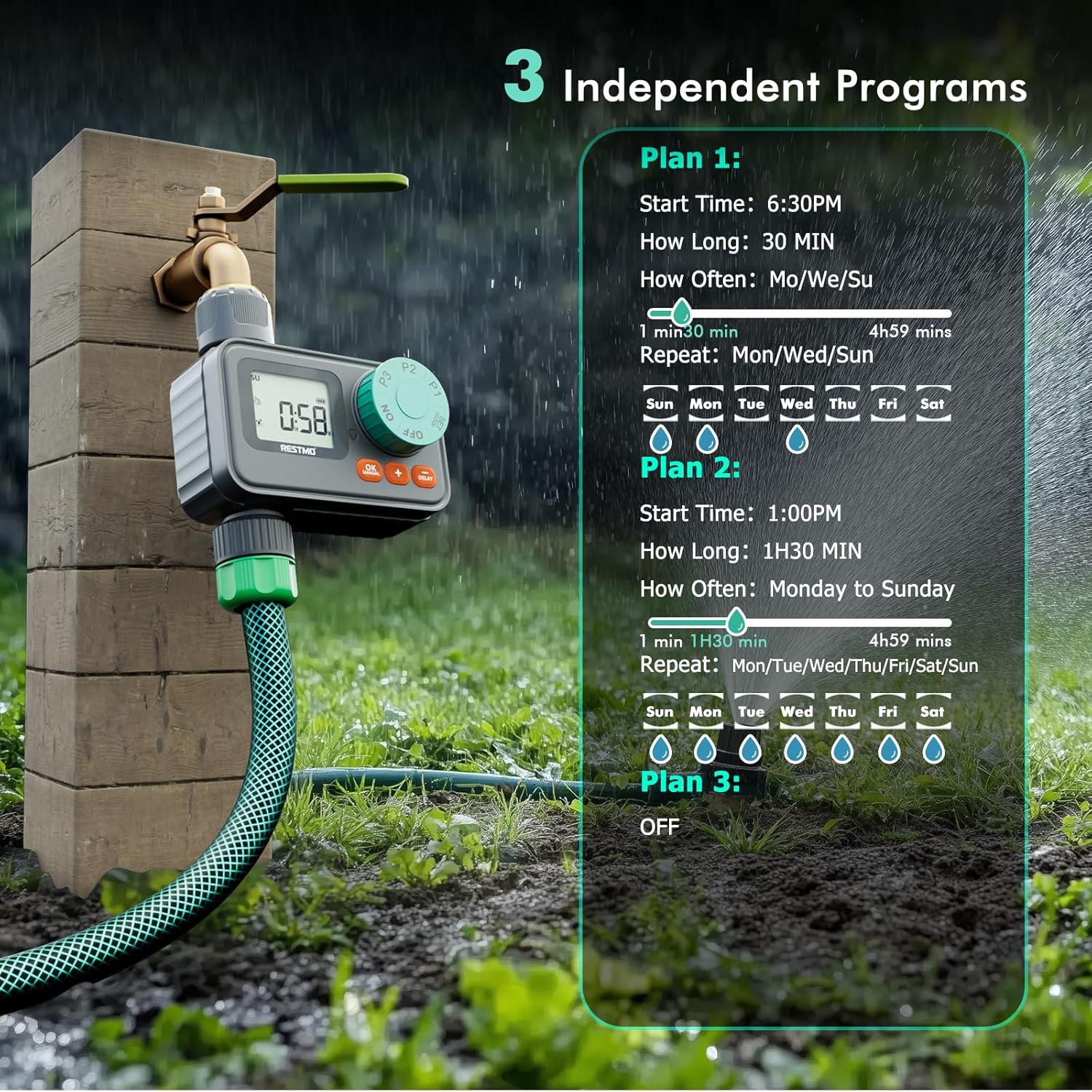
Сүрөт: An overview of the three independent programming options (P1, P2, P3) and their customizable settings.
Setting Program 1 (P1)
- Тергичти буруңуз P1.
- колдонуу + / - орнотуу үчүн баскычтар БАШТАЛГАН УБАКЫТ. Басыңыз OK to confirm and move to КАНЧА УБАКЫТ.
- колдонуу + / - buttons to set the watering КАНЧА УБАКЫТ (duration). Press OK to confirm and move to WATER DAY.
- колдонуу + button to select desired watering days and the - button to unselect days.
- Turn the dial to another position (e.g., ON) to save the changes.
Setting Program 2 (P2)
Follow the same steps as Program 1, but turn the dial to P2 to set its independent schedule.
Setting Program 3 (P3)
Follow the same steps as Program 1, but turn the dial to P3 to set its independent schedule. To turn P3 off, keep pressing the - button until 'OFF' is displayed for the watering days.
Иштөө режимдери
Автоматтык сугаруу
Once programs are set, turn the dial to ON to activate automatic watering. The LCD screen will flash between the next watering start time and the current time when watering is OFF. When watering is ON, the LCD screen displays the remaining time of the current watering program.
Кол менен сугаруу
Кол менен сугарууну баштоо үчүн:
- With the dial at ON and the timer not actively watering, long press the OK MANUAL баскычын 3 секунда басыңыз.
- колдонуу + / - buttons to select the desired watering duration (1 min to 299 mins).
- басыңыз OK button to start manual watering.
- To cancel manual watering, turn the dial to ӨЧҮРҮҮ анан кайра ON.
Жамгырдын кечигип сугарылышы
Жаан-чачынга байланыштуу сугарууну убактылуу токтотуу үчүн:
- With the dial at ON and the timer not actively watering, long press the КЕЧИКТИРҮҮ баскычын 3 секунда басыңыз.
- колдонуу + / - 24, 48 же 72 сааттык кечиктирүүнү тандоо үчүн баскычтарды басыңыз.
- басыңыз OK button or wait for 3 seconds for the rain delay to start automatically.
- To cancel rain delay, turn the dial to ӨЧҮРҮҮ анан кайра ON.

Image: The timer's display showing the rain delay function, allowing selection of 24, 48, or 72-hour delays.
Техникалык тейлөө
Cleaning the Filter Washer
The timer includes a built-in metal filter to prevent debris from entering the system. Periodically check and clean this filter to ensure optimal water flow and prevent blockages.
- Кранга суу берүүнү өчүрүү.
- Таймерди крандан бурап чыгарыңыз.
- Remove the filter washer from the inlet.
- Топтолгон калдыктарды кетирүү үчүн чыпканы агын суунун астында чайкаңыз.
- Reinsert the clean filter washer and reattach the timer to the faucet.
Кышкы сактоо
Тоңгон температурада, муздун кеңейишинен улам зыян келтирбөө үчүн, таймерди крандан алып чыгып, үйдүн ичинде сактаңыз.
Проблемаларды чечүү
- Суу агымы жок: Check if the faucet is fully open. Ensure the filter washer is clean and not blocked. Verify that the timer is set to ON and a program is active or manual watering is engaged.
- Timer not turning on/off: Check battery levels and replace if necessary. Ensure the battery compartment is securely closed. Verify that programs are correctly set and the dial is on ON.
- Байланыштардан агып кетүүлөр: Ensure all connections are hand-tightened. Check if rubber washers are properly seated and not damaged. Replace washers if worn.
- Дисплей көйгөйлөрү: If the LCD screen is dim or unresponsive, replace batteries. If water intrusion is suspected, ensure the battery compartment is sealed and the screen is not damaged.
Техникалык шарттар
| Модель номери | O-HT-1AW |
| Бренд | Restmo |
| Материал | Пластик |
| Продукциянын өлчөмдөрү | 5"D x 3"W x 5"H |
| Элемент Салмагы | 0.27 килограмм |
| Сугаруу узактыгы | 1-299 мүнөт |
| Сугаруу жыштыгы | Monday to Sunday (7-day programmable) |
| Суу өткөрбөйт рейтинги | IP55 |
| Иштөө басымы | 8-120 PSI (0.5-8.0 Бар) |
| Inlet Thread | 3/4" NH |
| Макс. Flow Rate | 10 GPM (35 L/Min) |
| Температура диапазону | 38…120°F (3…50°C) |

Image: Detailed diagram illustrating the timer's dimensions and key technical specifications.
Кепилдик жана колдоо
For warranty information or technical support, please refer to the contact details provided with your product packaging or visit the official Restmo webсайт. Кепилдик дооматтары үчүн сатып алуу дүмүрчөгүңүздү сактаңыз.