
Introduction
Thank you for choosing the TELE System TS9019HEVC Satellite Decoder. This device is designed to provide stable and seamless reception of Tivùsat digital satellite channels, including over 70 free HD channels. This manual will guide you through the setup, operation, and maintenance of your new decoder to ensure an optimal viewтажрыйбасы.
Пакеттин мазмуну
Төмөндө тизмеленген нерселердин баары пакетиңизге камтылганын текшериңиз:
- TELE System TS9019HEVC Satellite Decoder
- Tivùsat HD Smartcard (Merlin)
- Тышкы энергия менен камсыздоо
- Алыстан башкаруу
- 2x AAA батареялары
- HDMI кабели

Image: The TELE System TS9019HEVC decoder, its remote control, and the included Tivùsat Smartcard.
Жайгашуу
1. Connecting the Decoder
- Satellite Antenna Connection: Connect your satellite dish cable to the "RF IN" port on the back of the decoder.
- HDMI туташуу: Connect one end of the supplied HDMI cable to the "HDMI" port on the decoder and the other end to an available HDMI input on your television.
- Кубат туташуу: Connect the external power supply to the "12V DC" port on the decoder, then plug the power adapter into a wall outlet.
- Optional AV Connection: If your TV does not have an HDMI input, you can use an AV cable (not included) to connect to the "AV" port.
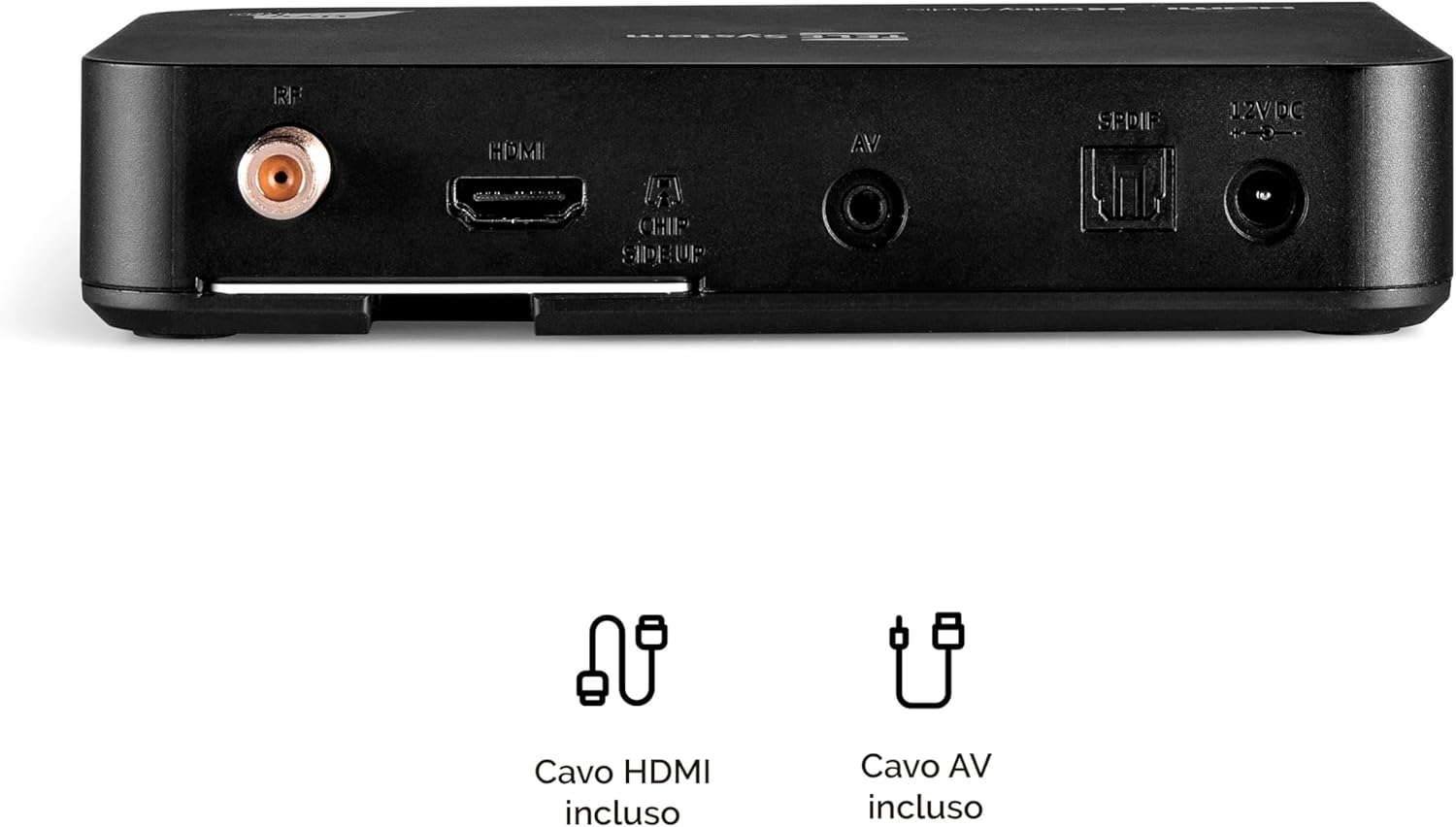
Image: Rear panel connections of the decoder, including RF IN, HDMI, AV, SPDIF, and 12V DC power input.
2. Inserting the Tivùsat Smartcard
The Tivùsat Smartcard is essential for accessing encrypted channels. Ensure it is inserted correctly:
- Locate the smartcard slot on the side of the decoder.
- Insert the Tivùsat Smartcard with the chip facing upwards and the arrow pointing into the slot. Push it gently until it clicks into place.
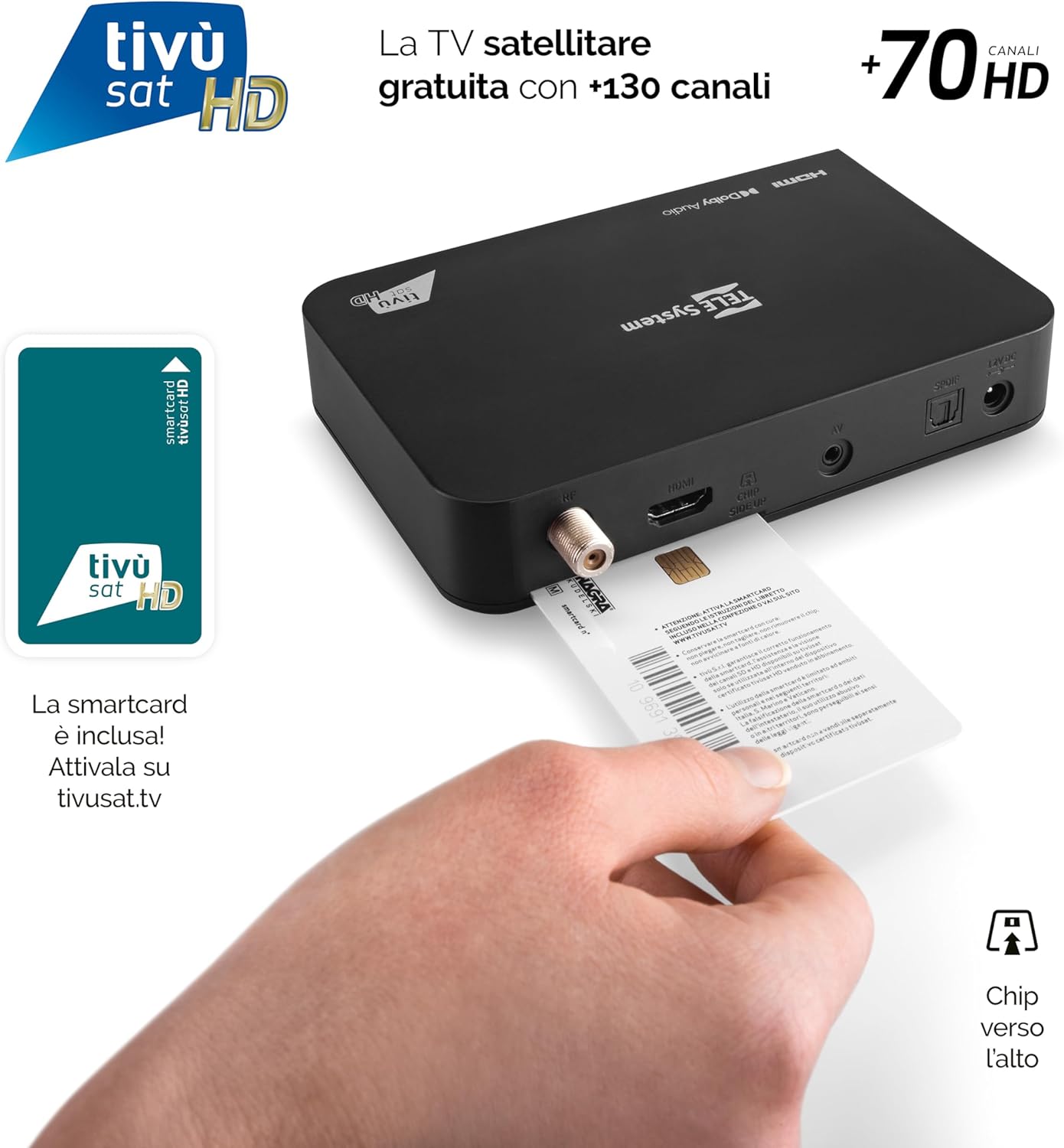
Image: Proper insertion of the Tivùsat Smartcard into the decoder's side slot.
3. Баштапкы орнотуу устасы
After connecting all cables and inserting the smartcard, turn on your TV and select the correct HDMI input. Power on the decoder. The initial setup wizard will guide you through:
- Тил тандоо
- Satellite dish configuration
- Automatic channel scan (EASY HD)
4. Activating the Tivùsat Smartcard
To access all Tivùsat channels, your smartcard must be activated. You can activate it easily on the official Tivùsat webсайт (www.tivusat.tv). Follow the instructions provided on the website for activation. Note that older Tivùsat Tiger smartcards may be obsolete and require replacement with a Merlin card.
Иштөө нускамалары
Негизги функциялар
- Күйгүзүү/өчүрүү: колдонуу КҮЧ button on the remote control or the front panel of the decoder.
- Канал тандоо: колдонуу P+ / P- каналдарды ырааттуу өзгөртүү үчүн баскычтарды басыңыз же сандык баскычтоп аркылуу каналдын номерин түз киргизиңиз.
- Үндү көзөмөлдөө: колдонуу VOL + / VOL- үнүн тууралоо үчүн баскычтар.
- Меню: басыңыз МЕНЮ button to access the main menu for settings and features.
- OK баскычы: Confirms selections in menus or displays the channel list during live TV.
- Чыгуу/Артка: Мурунку экранга кайтат же менюдан чыгат.

Image: The remote control for the TELE System TS9019HEVC decoder, highlighting key function buttons.
Advanced Features
- Электрондук программалык колдонмо (EPG): басыңыз EPG пульттагы баскычты view алдыдагы берүүлөрдүн программалык графиги.
- Favorite Lists: Create and manage personalized lists of your preferred channels for quick access. Refer to the on-screen menu for instructions.
- TV Pause (Timeshift): Connect a USB storage device (not included) to the USB port on the decoder. This feature allows you to pause live TV and resume viewкийинчерээк.
- Automatic Channel Update: The decoder automatically updates Tivùsat channels, ensuring you always have access to the latest channel lineup.
- Таймер функциясы: Set timers to automatically switch to a specific channel at a scheduled time.

Сүрөт: Мисample of the channel list interface, displaying various Tivùsat channels.
Техникалык тейлөө
Программалык камсыздоо жаңыртуулары
To ensure your decoder always has the latest features, improvements, and security updates, regularly check for software updates. Updates can be performed via:
- Over-The-Air (OTA): The decoder may receive updates automatically via satellite. You will be prompted on-screen if an update is available.
- USB: Download the latest firmware from the TELE System official website to a USB stick and follow the instructions provided with the firmware file for a manual update.
Always ensure the decoder remains powered on during a software update to prevent damage.
Жалпы кам көрүү
- Keep the decoder in a well-ventilated area to prevent overheating.
- Сыртын жумшак, кургак чүпүрөк менен тазалаңыз. Суюк тазалагычтарды же абразивдүү материалдарды колдонбоңуз.
- Avoid exposing the decoder to direct sunlight, high temperatures, or humidity.
Проблемаларды чечүү
| Көйгөй | Мүмкүн себеп | Чечим |
|---|---|---|
| Сигнал жок / Кара экран | Incorrect HDMI input selected on TV; Satellite cable disconnected; Dish misalignment. |
|
| "Smartcard Error" Message | Smartcard incorrectly inserted; Smartcard not activated; Obsolete smartcard. |
|
| Үн жок | TV or decoder volume muted; Incorrect audio settings. |
|
| Пульт иштебейт | Dead batteries; Obstruction between remote and decoder; Remote not paired (if applicable). |
|
Техникалык шарттар
| Өзгөчөлүк | Деталь |
|---|---|
| Бренд | TELE системасы |
| Модель номери | 58010100 |
| Түс | Кара |
| Байланыш технологиясы | USB |
| Аудио чыгаруу режими | Стерео |
| Жалпы HDMI порттору | 1 |
| Шайкеш түзмөктөр | Телевидение |
| Колдоого алынган аудио форматтары | Dolby Digital, DTS, AAC, MP3, PCM |
| Satellite Service Description | Tivùsat HD Classic and DAZN |
| Total Video Output Ports | 1 |
| Video Output токтому | 1080p |
| Колдоого алынган стандарттар | DVB-S, H.264, MP2, MP3, AAC, HD |
| Экран форматы | 16:9 |
| Келип чыккан өлкө | Кытай |
Кепилдик маалымат
The TELE System TS9019HEVC Satellite Decoder comes with a Продукцияга 2 жылдык кепилдик from the date of purchase. This warranty covers manufacturing defects and malfunctions under normal use. Please retain your proof of purchase for warranty claims. For detailed terms and conditions, please refer to the warranty card included in your package or visit the official TELE System webсайт.
Колдоо
For further assistance, technical support, or frequently asked questions, please visit:
- TELE System Official Webсайт: www.telesystem.it
- Tivùsat Support: For smartcard activation and Tivùsat specific inquiries, visit www.tivusat.tv
Колдоо кызматына кайрылуудан мурун, сураныч, сизде бар экенин текшериңизviewed the troubleshooting section of this manual.