
1. Киришүү
Thank you for choosing the JUNJIEUNVO Q16 Wireless Translation Earbuds. These open-ear design earbuds offer a comfortable listening experience, advanced Bluetooth 5.4 connectivity, IPX5 waterproof rating, and support for real-time language translation across over 100 countries. This manual provides detailed instructions on how to set up, operate, and maintain your earbuds to ensure optimal performance.
2. Пакеттин мазмуну
Сураныч, пакетте төмөнкү нерселерди текшериңиз:
- JUNJIEUNVO Q16 Wireless Translation Earbuds (Left and Right)
- Заряддоо кутусу
- User Manual
- Charging Cable (USB-C, not always included, please check packaging)
3. Продукт бүтүп калдыview
The Q16 earbuds feature an open-ear design for comfort and situational awareness, housed in a compact charging case. The case includes a digital display for battery status.

3.1-сүрөт: Q16 Earbuds in their charging case, showing the left (L) and right (R) indicators along with the digital battery display.

3.2-сүрөт: The open-ear design of the Q16 earbuds, emphasizing comfort and awareness of surroundings.

3.3-сүрөт: Diagram illustrating the directional sound transmission technology, designed to protect privacy and reduce sound leakage.
4. Орнотуу
4.1 Кулакчындарды жана кутучаны заряддоо
Before first use, fully charge the earbuds and the charging case. The charging case has a 500mAh battery, and each earbud has a 40mAh battery. A full charge takes approximately 1.5 hours.
- Connect the charging cable (typically USB-C) to the charging port on the case and to a USB power source.
- The digital display on the charging case will show the charging progress.
- Place the earbuds into the charging case. Ensure they are correctly seated; the case will indicate if they are charging.
4.2 Bluetooth жупташтыруу
The Q16 earbuds use Bluetooth 5.4 for a stable and efficient connection. The pairing process is automatic upon opening the case.
- Ensure your smartphone or device's Bluetooth is turned on.
- Заряддоо кутусунун капкагын ачыңыз. Кулакчындар жупташтыруу режимине автоматтык түрдө кирет.
- On your device, search for Bluetooth devices and select "Q16" from the list.
- Туташкандан кийин, сиз ырастоо үнүн угасыз жана кулакчындар колдонууга даяр болот.
- For subsequent connections, simply open the charging case, and the earbuds will automatically reconnect to the last paired device.
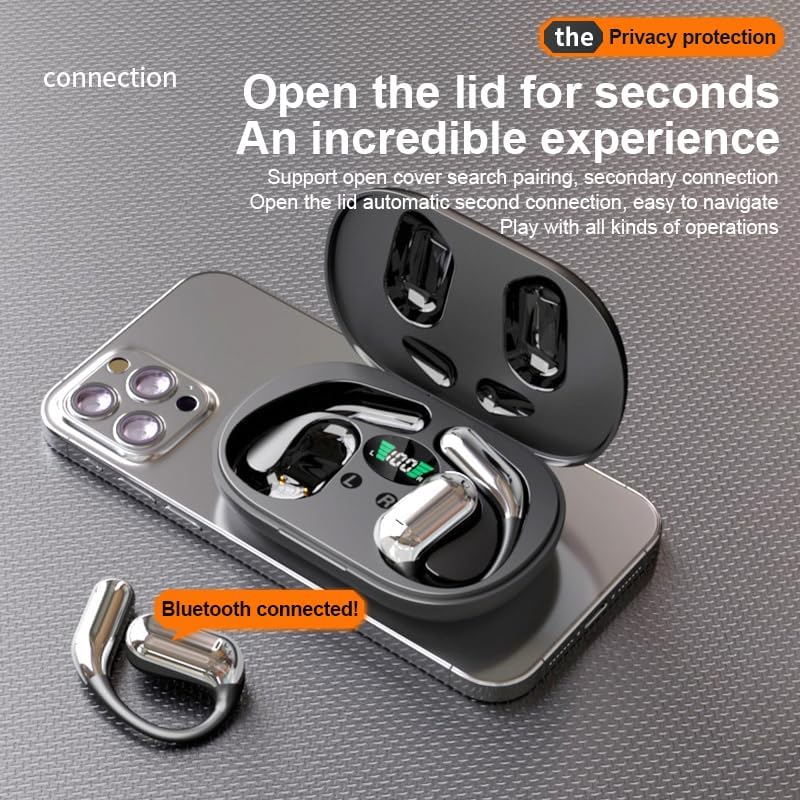
4.1-сүрөт: The Q16 earbuds connected to a smartphone, indicating successful Bluetooth pairing.
5. Иштөө нускамалары
5.1 Күйгүзүү/өчүрүү
- Күйгүзүү: Заряддоо кутусунун капкагын ачсаңыз, кулакчындар автоматтык түрдө күйөт.
- Өчүрүү: Кулакчындарды кайра заряддоо кутусуна салып, капкагын жабыңыз. Алар автоматтык түрдө өчүп, кубаттай башташат.
5.2 Музыканы ойнотуу
(Specific touch controls are not detailed in the provided product data. The following are common gestures; refer to the manufacturer's official app or website for precise controls.)
- Ойнотуу/тындыруу: Кулакчындарды бир жолу таптаңыз.
- Кийинки трек: Оң кулакчынды эки жолу таптаңыз.
- Мурунку трек: Сол кулакчынга эки жолу басыңыз.
- Үндү көзөмөлдөө: (Typically a long press or triple tap, specific action not provided. Adjust via your connected device if not available on earbuds.)

5.1-сүрөт: Illustration of the panoramic stereo surround sound feature, enhancing the audio experience.
5.3 Чалууларды башкаруу
- Чалууга жооп берүү/аяктоо: Кулакчындарды бир жолу таптаңыз.
- Чакырууну четке кагуу: Кулакчындын бирин 2 секунд басып туруңуз.
5.4 Language Translation Function
The Q16 earbuds support real-time translation for over 100 languages. This feature typically requires a dedicated translation application on your paired smartphone.
- Download and install the recommended translation app (refer to product packaging or manufacturer's website for app details) on your smartphone.
- Ensure the earbuds are connected to your smartphone via Bluetooth.
- Open the translation app and follow its instructions to initiate real-time translation. The earbuds will act as your audio input/output device for the translation.
5.5 IPX5 суу өткөрбөйт рейтинги
The earbuds are rated IPX5 waterproof, meaning they are resistant to splashing water from any direction. This makes them suitable for sports and outdoor activities. Note: The charging case is not waterproof. Avoid exposing the charging case to water.
6. Техникалык тейлөө жана кам көрүү
- Тазалоо: Кулакчындарды жана кубаттагыч кутучаны жумшак, кургак, мамыксыз чүпүрөк менен акырын сүртүңүз. Катуу химиялык заттарды же абразивдүү материалдарды колдонбоңуз.
- Сактагыч: Колдонулбаганда, кулакчындарды коргоо жана кубаттоо үчүн кубаттоочу кутучага сактаңыз. Салкын, кургак жерде, экстремалдык температурадан алыс сактаңыз.
- Суудан качуу: While the earbuds are IPX5 waterproof, avoid submerging them in water. The charging case is not waterproof.
- Батареяга кам көрүү: Батареянын иштөө мөөнөтүн узартуу үчүн, кулакчындарды жана кубаттоочу кутуну бат-баттан толук кубаттап турбаңыз. Аларды дайыма колдонууда болбосо да, үзгүлтүксүз заряддаңыз.
7. Кыйынчылыктарды
| Көйгөй | Чечим |
|---|---|
| Кулакчындар түзмөк менен жупташкан жок. |
|
| Кулакчындардан үн чыкпайт. |
|
| Кулакчындар заряддалбай жатат. |
|
| Котормо функциясы иштебей жатат. |
|
8. Техникалык шарттар
| Өзгөчөлүк | Деталь |
|---|---|
| Модель аты | YYK-Q16 |
| Bluetooth версиясы | V5.4+EDR |
| Чип | Blue Flood |
| Колдоого алынган протоколдор | AVRCP V1.6, A2DP V1.3, HFP V1.7 (Simultaneous LE and BR / EDR) |
| Usage/Playback Time | Болжол менен 8 саат (80% көлөмдө) |
| Күтүү убактысы | 80 саат |
| Заряддоо убактысы | Болжол менен 1.5 саат |
| Зымсыз аралык | 10 метр |
| Кулакчындын батареянын кубаттуулугу | 40 мАч (ар бири) |
| Заряддоо корпусунун батареясынын сыйымдуулугу | 500mAh |
| Суу өткөрбөйт рейтинги | IPX5 (наушнактар гана) |
| Translation Support | 100дөн ашык тил |
| Кулак жайгаштыруу | On Ear (Open-ear design) |
| Импеданс | 32 Ом |
| Таза Салмак | 84 г (жалпысынан) |
9. Кепилдик жана колдоо
For warranty information and customer support, please refer to the documentation included with your purchase or visit the official JUNJIEUNVO webсайт. Эгерде сиз бул колдонмодо камтылбаган кандайдыр бир көйгөйлөргө туш болсоңуз, жардам алуу үчүн биздин кардарларды тейлөө тобуна кайрылыңыз.
Өндүрүүчү: БУУнун Волонтёрдук Комитети
Бренд: JUNJIEUNVO