Introduction
This manual provides detailed instructions for the installation, operation, and maintenance of your BT12 Wireless Helmet Bluetooth Headset. Please read this manual thoroughly before using the product to ensure proper function and safety.
The BT12 headset features super signal transmission, ultra-low power consumption, and is compatible with all Bluetooth devices. It supports automatic answer functionality for calls, high sound fidelity, and simple operation for various functions including volume control, track navigation, and call management.
Продукт бүттүview

Image: The BT12 Wireless Helmet Bluetooth Headset shown in use, integrated with a motorcycle helmet, demonstrating its compact design and placement for communication while riding.
The BT12 Wireless Helmet Bluetooth Headset is designed for seamless integration into motorcycle helmets, providing hands-free communication and audio playback. Key features include:
- Strong signal transmission for reliable connectivity.
- Ultra-low power consumption for extended standby time.
- Compatibility with all Bluetooth-enabled smartphones and devices.
- Automatic call answering function for safety and convenience.
- Built-in high-quality anti-interference microphone.
- High sound fidelity for clear audio.
- Intuitive button controls for volume, track navigation, and call management.
Кутуда эмне бар
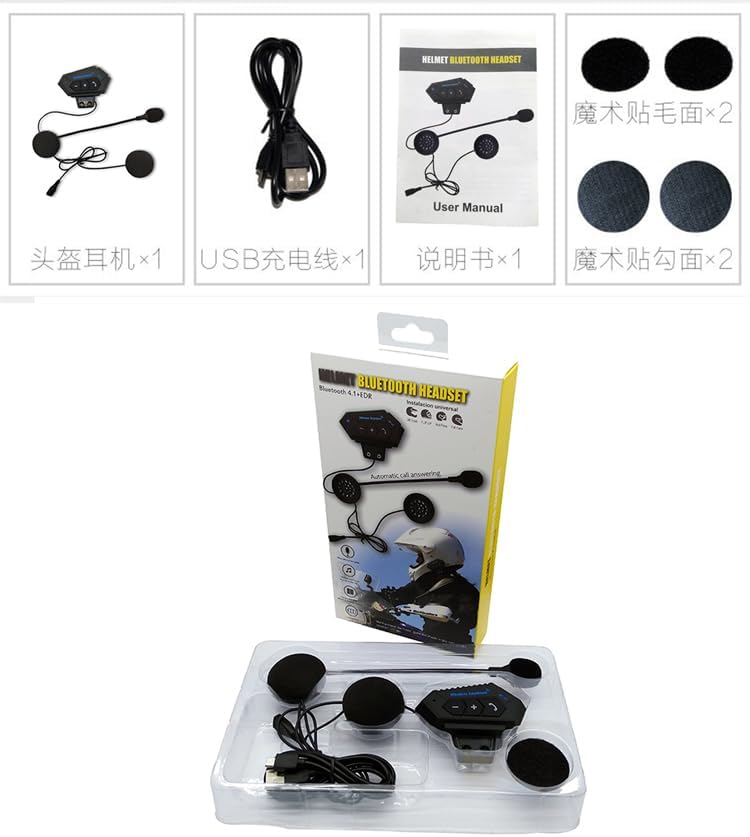
Сүрөт: ачык view of all items included in the BT12 Helmet Bluetooth Headset package, typically showing the headset unit, charging cable, and user manual.
Пакетти ачканда, төмөнкү компоненттердин бардыгы бар экенин текшериңиз:
- BT12 Wireless Helmet Bluetooth Headset Unit
- USB заряддоо кабели
- User Manual
- Velcro Pads for Speaker Mounting (x2)
- Velcro Pads for Main Unit Mounting (x2)
Жайгашуу
1. Гарнитураны заряддоо
Before first use, fully charge the headset. Connect the provided USB charging cable to the charging port on the headset and plug the other end into a USB power source (e.g., computer USB port, USB wall adapter). The indicator light will show charging status and turn off when fully charged.
2. Installing the Headset in Your Helmet

Image: The rear side of the BT12 headset, highlighting the integrated mounting clip designed for secure attachment to a helmet's edge or interior.
- Негизги блокту орнотуу: Identify a suitable flat surface on the side of your helmet, near the bottom edge, where the main unit can be securely attached. Use the provided Velcro pads to affix the main unit to the helmet. Ensure the buttons are easily accessible.
- Динамиктерди жайгаштыруу: Carefully place the two speakers inside the helmet's ear pockets. Use the provided Velcro pads to secure them. Ensure the speakers are positioned directly over your ears for optimal sound quality.
- Микрофонду жайгаштыруу: Route the microphone arm towards your mouth. The flexible arm allows for precise positioning to ensure clear voice pickup while minimizing wind noise.
- Кабелдик башкаруу: Tuck all excess cables neatly within the helmet's padding to prevent interference and ensure comfort.

Сүрөт: Мисamples of the BT12 headset successfully installed on various types of motorcycle helmets, demonstrating its adaptability and discreet integration.
3. Смартфонуңуз менен жупташуу
- Гарнитура өчүрүлгөнүн текшериңиз.
- Press and hold the Power/Multi-function button until the indicator light flashes red and blue alternately, indicating pairing mode.
- Смартфонуңуздан Bluetooth жөндөөлөрүнө өтүп, Bluetooth'ду иштетиңиз.
- Издөө available devices. Select "BT12" from the list.
- Once paired, the indicator light on the headset will flash blue slowly, and you will hear a confirmation tone.
Иштөө нускамалары

Сүрөт: деталдуу view of the BT12 headset's main unit, clearly showing the control buttons for volume, track control, and call management, along with the attached microphone.
Күйгүзүү/өчүрүү
- Күйгүзүү: Press and hold the Power/Multi-function button for approximately 3 seconds until you hear a power-on tone and the blue indicator light flashes.
- Өчүрүү: Press and hold the Power/Multi-function button for approximately 3 seconds until you hear a power-off tone and the red indicator light flashes briefly before turning off.
Чалууларды башкаруу
- Чакырууга жооп берүү: When an incoming call rings, the headset will automatically answer after 5 seconds. Alternatively, short press the Phone button to answer immediately.
- Чакырууну аяктоо: Чалуу учурунда телефон баскычын кыска басыңыз.
- Чакырууну четке кагуу: Press and hold the Phone button for 2 seconds when an incoming call rings.
- Акыркы номерди кайра терүү: Double-press the Phone button when the headset is idle.
Музыканы ойнотуу
- Ойнотуу/тындыруу: Күйгүзүү/Көп функциялуу баскычты кыска басыңыз.
- Кийинки трек: "+" баскычын кыска басыңыз.
- Мурунку трек: "-" баскычын кыска басыңыз.
- Көлөмү: "+" баскычын басып, кармап туруңуз.
- Үнүн азайтуу: "-" баскычын басып, кармап туруңуз.
Техникалык тейлөө
- Тазалоо: Гарнитураны тазалоо үчүн жумшак, кургак чүпүрөктү колдонуңуз. Абразивдүү тазалагычтарды же эриткичтерди колдонбоңуз.
- Сактагыч: When not in use for extended periods, store the headset in a cool, dry place away from direct sunlight and extreme temperatures.
- Батареяга кам көрүү: To prolong battery life, avoid fully discharging the battery frequently. Charge the headset regularly, even if not in use.
- Суу каршылык: The headset is designed for outdoor use but is not fully waterproof. Avoid exposing it to heavy rain or submerging it in water.
Проблемаларды чечүү
- Гарнитура күйбөй жатат:
- Ensure the battery is charged. Connect the headset to a power source using the USB cable and allow it to charge for at least 30 minutes before attempting to power on again.
- Смартфон менен жупташуу мүмкүн эмес:
- Ensure the headset is in pairing mode (red and blue indicator lights flashing alternately).
- Смартфонуңузда Bluetooth иштетилгенин текшериңиз.
- Move the headset closer to your smartphone.
- Try restarting both the headset and your smartphone.
- Clear previous Bluetooth connections on your phone if you have too many.
- Үн жок же үнү төмөн:
- Check the volume level on both the headset and your smartphone.
- Гарнитура туура жупташтырылганын жана туташтырылганын текшериңиз.
- Verify that the speakers are correctly positioned over your ears inside the helmet.
- Микрофон иштебей жатат:
- Ensure the microphone is properly connected to the main unit.
- Check that the microphone is positioned correctly near your mouth.
- Мүмкүн болсо, микрофонду башка колдонмо же түзмөк менен сынап көрүңүз.
Техникалык шарттар
| Өзгөчөлүк | Деталь |
|---|---|
| Модель аты | BT-12 зымсыз наушник |
| Байланыш технологиясы | Зымсыз (Bluetooth) |
| Frequency Response | 2.4 ГГц |
| Сезимталдуулук | 80 дБ |
| Импеданс | 32 Ом |
| Башкаруу түрү | Control Button |
| Материал | Пластик |
| Сунушталган колдонуу | Мотоцикл |
| Күтүү убактысы | Up to 240 hours (as per product description) |
Кепилдик жана колдоо
Кепилдик жөнүндө маалымат жана техникалык колдоо алуу үчүн, сатуучуңуз же өндүрүүчүнүн расмий өкүлү тарабынан берилген байланыш маалыматтарына кайрылыңыз. webсайт. Сатып алуу квитанциясын кепилдик дооматтары үчүн сатып алуунун далили катары сактаңыз.
This product is designed for durability and performance. Should you encounter any issues not covered in the troubleshooting section, please contact customer support for assistance.


