
Introduction
The BAKON BK701D is a versatile 2-in-1 hot air rework and soldering station designed for precision electronic work. This manual provides essential information for the safe and effective operation, maintenance, and troubleshooting of your device. It is suitable for desoldering and welding various components, including SOIC, CHIP, QEP, PLCC, BGA, and SMD, and can also be used for tasks such as heat shrinking, drying, and glue welding.
Коопсуздук маалыматы
Маанилүү коопсуздук чаралары:
- Do not operate the machine near flammable materials such as gas or paper.
- Ensure the unit is properly grounded before use to prevent electrical hazards.
- When replacing heating elements, ensure the model number matches the original, and follow the reverse process of disassembly for installation.
- Always turn off the power and allow components to cool to room temperature before replacing any parts.
- Avoid physical impact or dropping the main unit or handle.
- Do not disassemble or modify the main unit or handle. Use only original BAKON replacement parts.
- Машинаны нымдуу кол менен иштетпеңиз.
- Ensure adequate ventilation in your workspace during operation.
- Be aware that the soldering iron tip temperature can reach 212℉-896℉ (100℃-480℃) and the hot air nozzle temperature can reach 212℉-932℉ (100℃-500℃). Handle with extreme care to prevent burns.
Продукт өзгөчөлүктөрү
- 2-ин-1 Функциясы: Combines a hot air rework station and a soldering station for independent or simultaneous use.
- Натыйжалуу жылытуу: Features a C1321 plug-in heating core for convenient replacement and a long-life heating body made from imported temperature-resistant materials.
- Air Pump Air Supply: Provides rapid warming and stable air volume for precise hot air applications.
- Жөнгө салынуучу башкаруу каражаттары: Independent knob-type controls for adjusting temperature and air volume for both hot air and soldering iron functions.
- PID Температураны көзөмөлдөө: Advanced PID technology ensures stable and accurate temperature regulation, cycling every 20 milliseconds for precise adjustments.
- Temperature Calibration & Compensation: Functions to calibrate and compensate for temperature variations, ensuring consistent performance.
- ℃/℉ Конверсия: Easily switch between Celsius and Fahrenheit temperature displays.
- Automatic Cooling System: The hot air gun features an automatic cooling system that activates when the heating switch is turned off, preventing overheating and extending heating element lifespan.
- LED санарип дисплей: Clear LED displays for precise temperature and air volume readings.

Image: The BAKON BK701D station showcasing its dual functionality with separate controls and LED displays for rework and soldering.
Пакеттин мазмуну
The BAKON BK701D kit includes the following components:
- BAKON BK701D Main Unit (Hot Air Rework and Soldering Station)
- Ысык аба мылтыгынын туткасы
- Паяных темир туткасы
- Soldering Iron Stand with Cleaning Sponge and Brass Cotton
- Soldering Wire (10g)
- 5 Soldering Tips (I/B/K/3.2D/3C)
- Solder Suction Tape
- Созуучу насос
- 1 Pair of Tweezers
- 2 Hot Air Nozzles

Сүрөт: комплекстүү view of the accessories included with the BAKON BK701D kit.
Жайгашуу
- Пакеттен чыгаруу: Бардык компоненттерди таңгактан кылдаттык менен алып салыңыз.
- Ташуу бурамаларын алып салыңыз: Before initial use, locate and remove the two shipping screws on the bottom of the main unit. These screws secure the internal air pump during transit and must be removed for proper operation.
- Ысык аба мылтыгына туташуу: Plug the hot air gun handle into its designated socket on the main unit.
- Ширетүүчү темирди туташтыруу: Plug the soldering iron handle into its designated socket on the main unit.
- Place Soldering Iron: Position the soldering iron in its stand. Ensure the stand is stable and the cleaning sponge is moistened.
- Кубат туташуу: Connect the power cord to the main unit and then to a 110V US specification power outlet.
Video: Demonstrates the initial setup of the BAKON BK701D, including connecting the hot air gun and soldering iron, and powering on the unit.
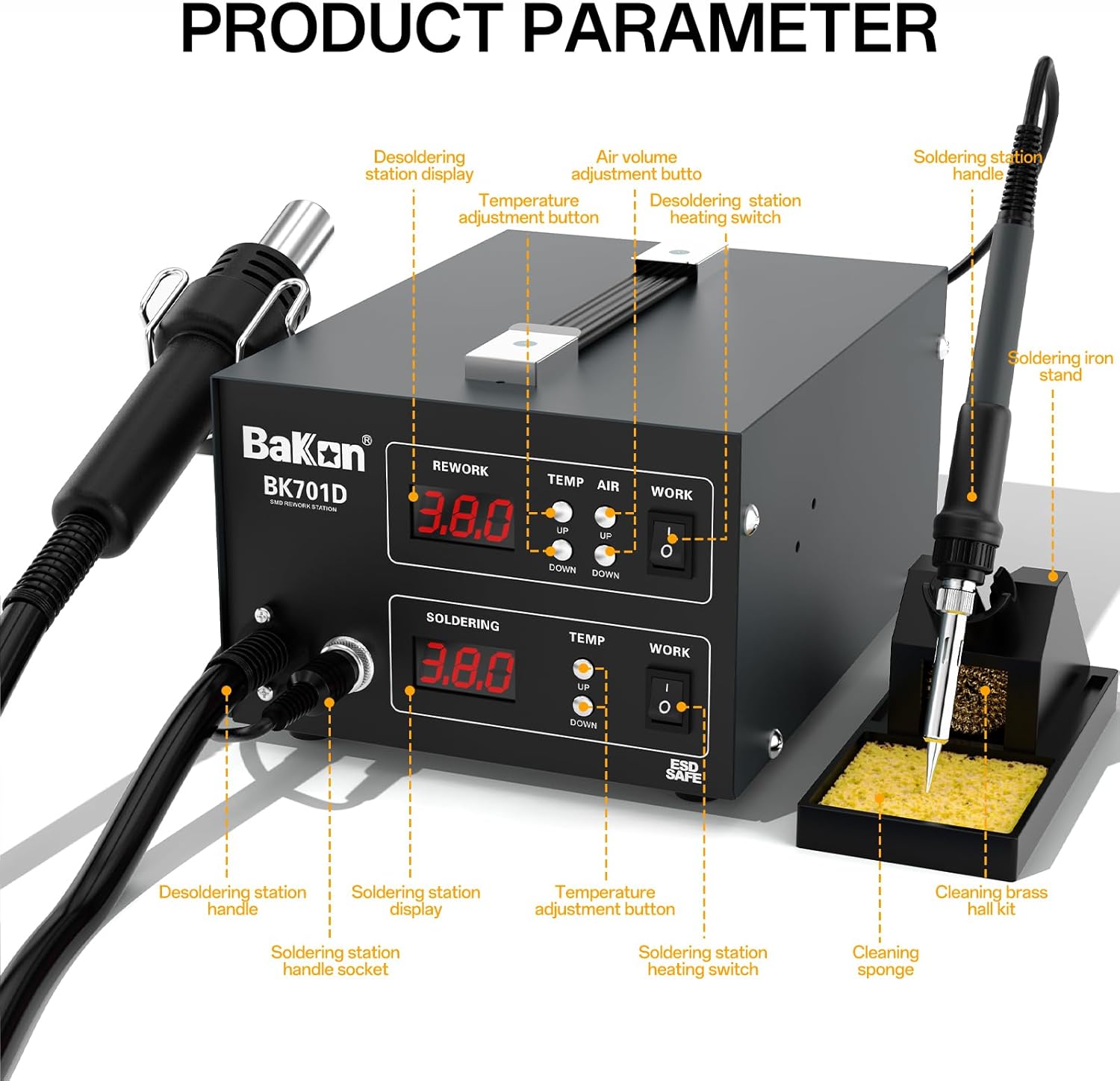
Image: Detailed diagram illustrating the components and controls of the BAKON BK701D station.
Video: Shows the operation of the BAKON BK701D, including hot air desoldering and soldering iron use, highlighting independent control and temperature settings.
Иштөө нускамалары
Ысык аба кайра иштетүү станциясы
- Күйгүзүү: Flip the "WORK" switch for the Rework section to the ON position. The LED display will show the current temperature.
- Температураны жөндөө: Use the "TEMP UP" and "TEMP DOWN" buttons to set the desired hot air temperature (range: 212℉-932℉ / 100℃-500℃).
- Абанын көлөмүн тууралоо: Use the "AIR UP" and "AIR DOWN" buttons to set the desired air volume.
- Операция: Direct the hot air nozzle towards the component to be desoldered or reworked. Maintain a safe distance to avoid damaging surrounding components.
- Автоматтык муздатуу: When you finish using the hot air gun, turn off its "WORK" switch. The automatic cooling system will activate, blowing cool air until the handle reaches a safe temperature, then it will shut off. This prolongs the life of the heating element.

Image: The hot air gun in operation, demonstrating its temperature range and automatic cooling function.
Ledering Station
- Күйгүзүү: Flip the "WORK" switch for the Soldering section to the ON position. The LED display will show the current temperature.
- Температураны жөндөө: Use the "TEMP UP" and "TEMP DOWN" buttons to set the desired soldering iron temperature (range: 212℉-896℉ / 100℃-480℃).
- Кеңешти калайлоо: Before first use and periodically during operation, tin the soldering iron tip by applying a small amount of solder. This helps with heat transfer and prevents oxidation.
- ширетүү: Apply the heated tip to the joint, then feed solder onto the joint, not directly onto the iron tip. Allow the solder to flow evenly.
- Дезот: Use the desoldering pump or solder suction tape to remove excess solder.
- Температураны компенсациялоо: The soldering iron features temperature compensation to maintain stable tip temperature during use.
- ℃/℉ Конверсия: Press and hold the temperature adjustment buttons to switch between Celsius and Fahrenheit.

Image: The soldering iron in operation, illustrating its temperature range, compensation, and unit conversion capabilities.
Техникалык тейлөө
Ширетүүчү темирдин учтарын тейлөө
- Тазалоо: Regularly clean the soldering iron tip using the brass cotton tip cleaner or a damp sponge (ensure it's not dripping wet). This removes oxidation and old solder, improving heat transfer.
- Калайылоо: Always tin the tip with a fresh layer of solder after cleaning and before storing to prevent oxidation.
- Алмаштыруу: The kit includes 5 different soldering tips. To replace a tip, ensure the iron is cool, unscrew the retaining nut, remove the old tip, insert the new tip, and re-secure the nut.

Сүрөт: жарылды view of the soldering iron handle, detailing its components and how the heating element and tip are assembled.
Heating Core Replacement
The BAKON BK701D uses a C1321 plug-in heating core. If replacement is necessary, ensure the unit is powered off and cooled. Follow the reverse process of disassembly to replace the heating core, ensuring the new core is the correct model (C1321).
Проблемаларды чечүү
- "H-E" Error During Calibration: If you encounter an "H-E" (heating element) error during temperature calibration, it is likely because the heating element was not pre-heated. Ensure the unit is warmed up before attempting calibration.
- No Heat/Unstable Temperature:
- Бардык кабелдик байланыштарды текшерип, алардын коопсуз экенин текшериңиз.
- Verify the power switch is ON for the respective tool (hot air or soldering iron).
- Ensure the heating core is correctly installed and not damaged.
- Эгер көйгөй чечилбесе, кардарларды колдоо менен байланышыңыз.
- Low Air Volume (Hot Air Gun):
- Check if the air volume setting is too low.
- Ensure the hot air gun nozzle is not obstructed.
- Verify that the shipping screws on the bottom of the unit have been removed.
Техникалык шарттар
| Өзгөчөлүк | Спецификация |
|---|---|
| Бренд | BAKON |
| Модель аты | BK701D |
| Тtage | 110 вольт |
| Ватtage | 700 ватт |
| Дисплей түрү | LED |
| Temperature Stability (Hot Air) | 212 to 932 degrees Fahrenheit (100℃-500℃) |
| Temperature Stability (Soldering Iron) | 212 to 896 degrees Fahrenheit (100℃-480℃) |
| Каналдардын саны | 2 (Hot Air & Soldering Iron) |
| Пакет Салмагы | 4.44 килограмм |
Кепилдик жана колдоо
The BAKON BK701D Hot Air Rework and Soldering Station is covered by an exclusive 1-year product warranty in the U.S.A. If you encounter any problems or require technical assistance, please contact BAKON customer support. Our technical support team is available to provide 24-hour support and consultation.
Өндүрүүчүнүн Байланыш маалыматы: BAKON