Introduction
This manual provides essential information for the proper use and maintenance of your replacement remote control for Richmat Adjustable Bed Bases. Please read this manual thoroughly before operation to ensure correct setup and functionality.
This remote control is specifically designed for Richmat control boxes with model numbers such as NL200U 127780C180169 Item No.: HJC18 жана HJC25Z-0-0 NLP200 127780C250059. It is not a universal remote. It is crucial that your existing remote is identical in appearance and button layout, and your control box matches the specified models for compatibility. If you are unsure, it is recommended to send your control box to the seller for verification before purchase.
Продукт бүттүview


The remote features dedicated buttons for adjusting the head and foot sections of the adjustable bed, a memory preset button ('M'), and a 'FLAT' button to return the bed to a flat position. It requires 2 AAA batteries (not included).
Орнотуу жана жупташтыруу боюнча көрсөтмөлөр
Батарея орнотуу
- Пульттун артындагы батарея отсегин табыңыз.
- Батареянын капкагын ачуу үчүн ылдый жылдырыңыз.
- Insert 2 AAA batteries, ensuring correct polarity (+ жана -).
- Батареянын капкагын бекем чыккыча ордуна жылдырыңыз.
Алыстан башкарууну жупташтыруу
This remote control must be paired with your Richmat adjustable bed base's control box. Follow these steps carefully:
- Step 1: Power Cycle the Bed. Unplug the adjustable bed from the power outlet. Wait for 5 seconds, then plug it back in.
- Step 2: Locate Control Box Reset Button. Find the control box under your bed. Locate the "Reset" or "Learn" button on the control box. Some models may require you to double-click the reset button.
- Step 3: Initiate Pairing on Remote. Пульттагы баскычты басып, кармап туруңуз "Head Up" баскычы жана "Foot Up" баскычын бир убакта 10 секунда басыңыз.
- Step 4: Activate Pairing on Control Box. While still holding the "Head Up" and "Foot Up" buttons on the remote, quickly press and release the "Reset" or "Learn" button on the control box. Do not press and hold the side button; just press and release.
- 5-кадам: Ырастоо. Once you hear beeps from the control box, this indicates that the remote is successfully synced.


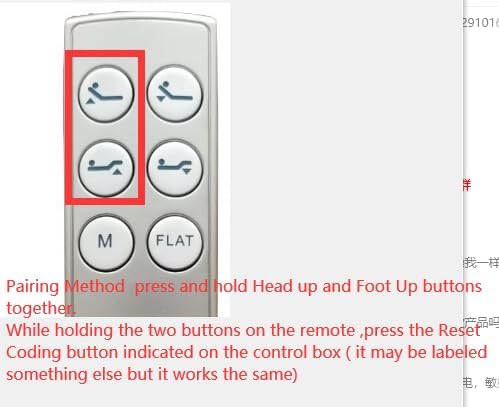
Маанилүү жупташтыруу эскертүүлөрү:
- Pairing must be completed within 15 seconds of activating the control box's pairing mode.
- If 15 seconds pass without successful pairing, you must unplug the bed's power again and restart the process from Step 1.
- Ensure the indicator light on the control box is on when attempting to pair, as it may turn off after 15 seconds if not paired.
Иштөө нускамалары
Once paired, your remote control can operate the adjustable bed base. The buttons are intuitive:
- Башты өйдө/ылдый: Төшөктүн баш бөлүгүн тууралайт.
- Бутту өйдө/ылдый: Төшөктүн бут бөлүгүн тууралайт.
- M (эстутум): Activates a pre-set memory position. (Refer to your bed base manual for setting memory positions, if applicable).
- FLAT: Төшөктү толугу менен тегиз абалга кайтарат.
Техникалык тейлөө
- Тазалоо: Пультту жумшак, кургак чүпүрөк менен сүртүңүз. Суюк тазалагычтарды же абразивдүү материалдарды колдонбоңуз.
- Батареяны алмаштыруу: Replace batteries when the remote's response becomes sluggish or stops working. Always use 2 new AAA batteries.
- Сактагыч: Пультту кургак жерде, күн нуру түз тийген жерлерден жана өтө жогорку температурадан алыс сактаңыз.
Проблемаларды чечүү
| Көйгөй | Мүмкүн себеп | Чечим |
|---|---|---|
| Пульт жооп бербей жатат. | Өлүк же туура эмес орнотулган батарейкалар. | Туура полярдуулукту камсыз кылуу менен батарейкаларды жаңы AAA батарейкалары менен алмаштырыңыз. |
| Remote not paired with bed. | Pairing process not completed correctly or interrupted. | Repeat the "Pairing the Remote Control" steps carefully. Ensure power cycle and timing are correct. |
| Алыстан башкаруу үзгүлтүксүз иштейт. | Low battery power; interference; remote too far from control box. | Replace batteries. Ensure no obstructions between remote and bed. Move closer to the bed. |
| Bed does not move after pairing. | Bed not plugged in; control box issue; motor issue. | Check power connection to the bed. If issues persist, contact the bed base manufacturer for support. |
If troubleshooting steps do not resolve the issue, please refer to the original bed base manual or contact the manufacturer of your Richmat adjustable bed base for further assistance.
Техникалык шарттар
- Продукт түрү: Алыстан башкарууну алмаштыруу
- Шайкештик: Specifically designed for Richmat Adjustable Bed Base Control Boxes (e.g., NL200U 127780C180169 Item No.: HJC18, HJC25Z-0-0 NLP200 127780C250059). Not universal.
- Кубат булагы: 2 x AAA Батареялар (киргизилген эмес)
- Түсү: White/Silver (as per product images)
- Өндүрүүчү: СЖКХХД
Кепилдик жана колдоо
This product is a replacement part. For specific warranty information, please refer to the seller's return policy or contact the seller directly. The product description states: "Remote is Not Universal, Send Control box under the bed to us first." This implies a need for verification or potential service before purchase or for troubleshooting.
For technical support related to your Richmat adjustable bed base, please consult the original bed base manufacturer's documentation or their customer service channels.
Сатуучу: СЖКХХД


