
1. Киришүү
This manual provides detailed instructions for the installation, operation, and maintenance of your PGST A107F-EU-A Wireless Home Alarm System. This intelligent security system offers comprehensive protection for your home or property, featuring 4G connectivity, Tuya App integration, and compatibility with smart assistants like Alexa and Google Assistant. Please read this manual thoroughly before using the system to ensure proper functionality and safety.
2. Пакеттин мазмуну
Carefully unpack the box and verify that all the following components are included:
- 1 x PGST A107F Main Control Panel
- 1 x Кубат адаптери (5V 2A)
- 2 x Алыстан башкаруу
- 2 x RFID Tags
- 1 x Зымсыз эшик/терезе сенсору
- 1 x Зымсыз PIR кыймыл сенсору
- 1 x Зымсыз сирена
- Монтаждоочу жабдуулар (буроолор, анкерлер)
- Колдонуучунун Колдонмосу (бул документ)
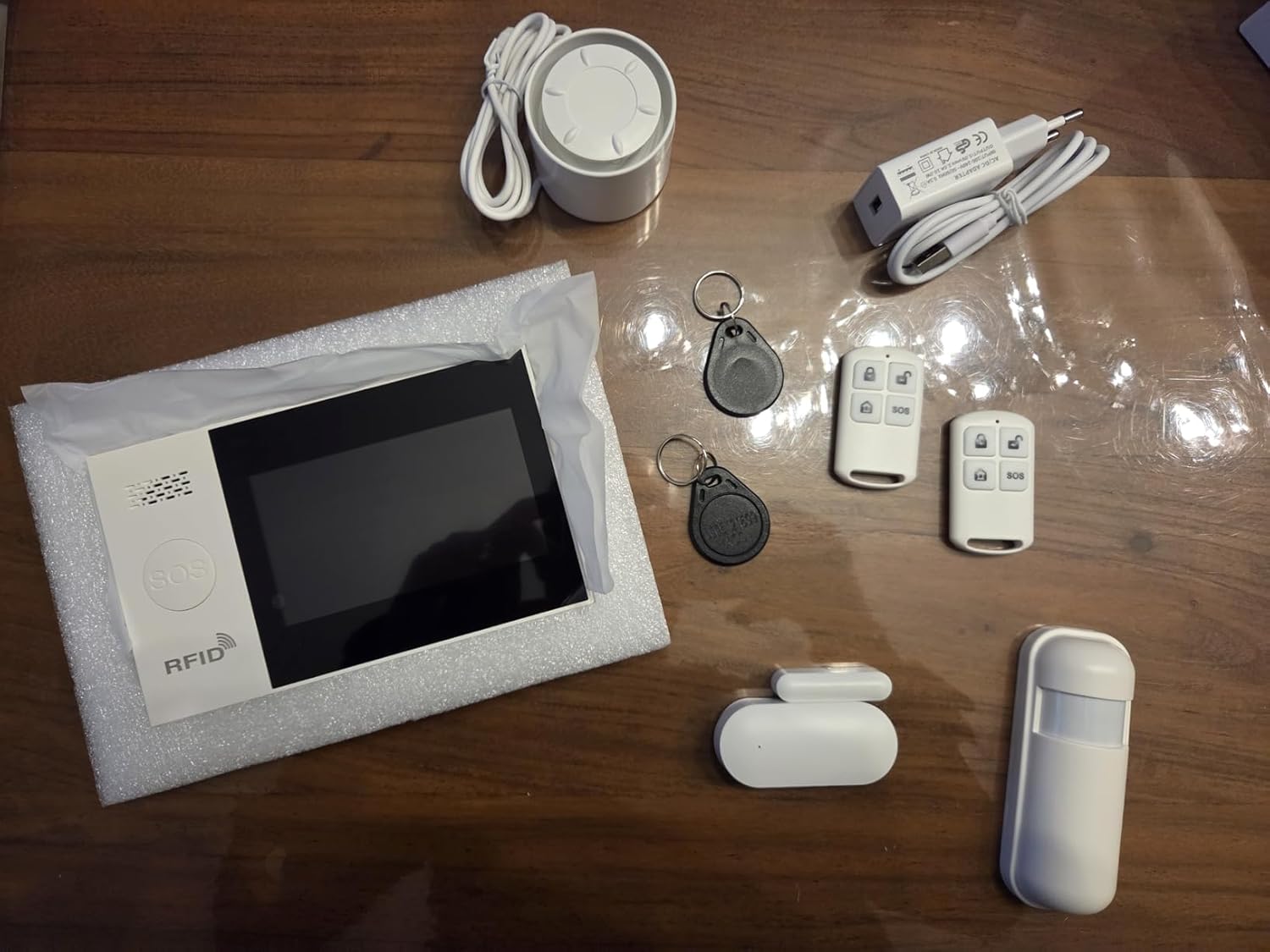
Сүрөт 2.1: Бүттүview of the PGST A107F-EU-A Wireless Home Alarm System components, including the main panel, remote controls, RFID tags, siren, power adapter, door/window sensor, and motion sensor.
3. Продукт бүтүп калдыview
The PGST A107F-EU-A system consists of a central control panel and various wireless sensors and accessories. The main panel acts as the brain of the system, processing signals from sensors and communicating alerts via 4G, SMS, or the Tuya App.
3.1 Негизги башкаруу панели
The main control panel features a display, touch keypad, SOS button, and RFID reader. It houses the SIM card slot for 4G communication and connects to your home Wi-Fi network for app control.

Сүрөт 3.1: Алдыңкы view of the PGST A107F-EU-A Main Control Panel, showing the display, keypad, SOS button, and RFID reader.

Сүрөт 3.2: Каптал view of the PGST A107F-EU-A Main Control Panel, illustrating its slim profile.
3.2 SIM Card Slot and Connections
The back of the main panel provides access to the SIM card slot and power input. Ensure the SIM card is inserted correctly for 4G functionality.

Сүрөт 3.3: Артка view of the PGST A107F-EU-A Main Control Panel with the cover removed, showing the SIM card slot and internal components. The IMEI number is visible: 863957076386736.
4. Орнотуу
4.1 Алгачкы кубаттуулук
- Connect the provided power adapter to the main control panel and plug it into a power outlet.
- The panel will power on and initiate its startup sequence.
4.2 SIM картаны орнотуу (4G функциясы үчүн)
- Негизги панелдин өчүрүлгөнүн текшериңиз.
- Locate the SIM card slot on the back of the main panel (refer to Image 3.3).
- Insert a standard 4G SIM card into the slot, ensuring correct orientation.
- Replace the cover and power on the panel. The system will attempt to connect to the 4G network.
4.3 Tuya тиркемесинин интеграциясы
- Смартфонуңуздун колдонмолор дүкөнүнөн (iOS же Android) "Tuya Smart" же "Smart Life" тиркемесин жүктөп алыңыз.
- Жаңы аккаунтка катталыңыз же сизде мурунтан эле бар болсо кириңиз.
- On the app, tap "Add Device" or the "+" icon.
- Select "Security & Video Surveillance" > "Alarm (Wi-Fi)" or search for "Alarm System".
- Follow the on-screen instructions to connect the alarm panel to your home Wi-Fi network. This typically involves putting the panel into pairing mode (refer to the panel's display for instructions) and entering your Wi-Fi credentials in the app.
4.4 Сенсорду жупташтыруу
The system comes with pre-paired sensors. If you need to add new sensors or re-pair existing ones:
- On the main panel, navigate to the "Sensor Management" or "Add Sensor" menu.
- Select the type of sensor you wish to add (e.g., Door Sensor, Motion Sensor).
- Activate the sensor (e.g., separate the two parts of a door sensor, or trigger a motion sensor). The panel will detect the sensor and prompt you to confirm pairing.
- Assign the sensor to a specific zone (e.g., "Main Door," "Living Room").
4.5 Алыстан башкаруу жана RFID Tag Жупташуу
Алыстан башкаруу элементтери жана RFID tags are typically pre-paired. To add new ones:
- On the main panel, navigate to the "Remote Control Management" or "RFID Tag Management" menu.
- Панелди жупташтыруу режимине коюу үчүн экрандагы көрсөтмөлөрдү аткарыңыз.
- Алыстан башкаруу пульту үчүн, пульттагы каалаган баскычты басыңыз. RFID үчүн tags, басыңыз tag against the RFID reader on the main panel.
- Confirm the pairing on the panel.
5. Системаны иштетүү
5.1 Куралдануу жана куралсыздандыруу
The system can be armed or disarmed using the main panel, remote controls, RFID tags, or the Tuya App.
- Кол (Алыскы режим): Activates all sensors. Any triggered sensor will set off the alarm.
- Үйдө калуу режими (Калуу режими): Периметрдик сенсорлорду (мисалы, эшик/терезе сенсорлорун) иштетип, ошол эле учурда имараттын ичинде эркин кыймылдоого мүмкүндүк берет (мисалы, кыймыл сенсорлору өчүрүлөт).
- Куралсыздандыруу: Deactivates all sensors, allowing free entry and exit without triggering the alarm.
5.2 SOS функциясы
In an emergency, press the SOS button on the main panel or the remote control. The system will immediately trigger the alarm and send emergency notifications to pre-configured contacts via 4G call, SMS, and Tuya App alerts.
5.3 Аймактарды башкаруу
Each sensor is assigned to a zone. You can customize zone types (e.g., 24-hour zone, delay zone, home arm zone) through the main panel settings or the Tuya App to suit your security needs.
5.4 Voice Control with Alexa & Google Assistant
After integrating the Tuya App with Amazon Alexa or Google Assistant, you can use voice commands to control your alarm system. Examples камтыйт:
- "Alexa, arm the alarm."
- "Hey Google, disarm the alarm."
- "Alexa, what is the status of the alarm?"
Refer to the Tuya App's integration guide for specific voice commands and setup instructions.
5.5 Тез кабарлоо
Upon an alarm trigger, the system will send instant alerts:
- 4G Call: Dials pre-set emergency numbers.
- SMS: Sends text messages to pre-set numbers.
- Tuya App: Pushes real-time notifications to your smartphone.
6. Техникалык тейлөө
6.1 Батареяны алмаштыруу
Wireless sensors (door/window, motion) are powered by batteries. The main panel will indicate low battery status for individual sensors. Replace batteries promptly to ensure continuous protection.
- Сенсордун батареянын иштөө мөөнөтү: Approximately 2 years (varies with usage).
- Refer to the specific sensor's compartment for battery type (e.g., CR2032 for small sensors, AA/AAA for larger ones).
6.2 Тазалоо
Wipe the main panel and sensors with a soft, dry cloth. Avoid using abrasive cleaners or solvents, as they may damage the surfaces.
7. Кыйынчылыктарды
- Система иштебей жатат: Ensure the power adapter is securely connected to both the panel and a working power outlet.
- No 4G signal: Check if the SIM card is correctly inserted and activated. Verify that your area has 4G coverage.
- Сенсорлор сигнализацияны иштетпейт: Check sensor battery levels. Ensure sensors are within range of the main panel and correctly paired. Verify zone settings in the app or on the panel.
- Tuya App connection issues: Ensure the main panel is connected to your Wi-Fi network. Check your Wi-Fi signal strength. Restart the app and the main panel.
- Жалган сигналдар: Check sensor placement to avoid environmental triggers (e.g., direct sunlight on motion sensors, loose doors/windows). Adjust sensor sensitivity if applicable.
8. Техникалык шарттар
| Өзгөчөлүк | Спецификация |
|---|---|
| Модель номери | A107F |
| Бренд | PGST |
| Байланыш технологиясы | Wireless, 4G, Wi-Fi |
| Шайкеш түзмөктөр | Smartphone (Tuya App), Alexa, Google Assistant |
| Power Source (Main Panel) | AC Power Adapter (5V 2A) |
| Элементтин өлчөмдөрү (LxWxH) | 22 x 15 x 10 см |
| Ойготкуч түрү | Кирүү |
| Average Battery Life (Sensors) | 2 жыл |
| Орнотуу ыкмасы | буратуу |
| UPC / GTIN | 704444493779 |
9. Кепилдик жана колдоо
9.1 Өндүрүүчүнүн кепилдиги
The PGST A107F-EU-A Wireless Home Alarm System is covered by a 1 жылдык өндүрүүчүнүн кепилдиги сатып алынган күндөн тартып. Бул кепилдик нормалдуу колдонуудагы материалдардагы жана жасалгадагы кемчиликтерди камтыйт.
9.2 Кардарларды колдоо
For any questions, technical assistance, or warranty claims, please contact PGST customer support. Refer to the product packaging or the PGST official webбайланыш маалыматы үчүн сайт.