
Introduction
This manual provides comprehensive instructions for the installation, operation, and maintenance of the FTVOGUE CHLT-715 Adjustable Over Current Protector. Please read this manual thoroughly before installation and use to ensure safe and efficient operation of the device. This protector is designed to safeguard electrical circuits by automatically disconnecting power during overcurrent conditions and self-resetting when normal conditions resume.
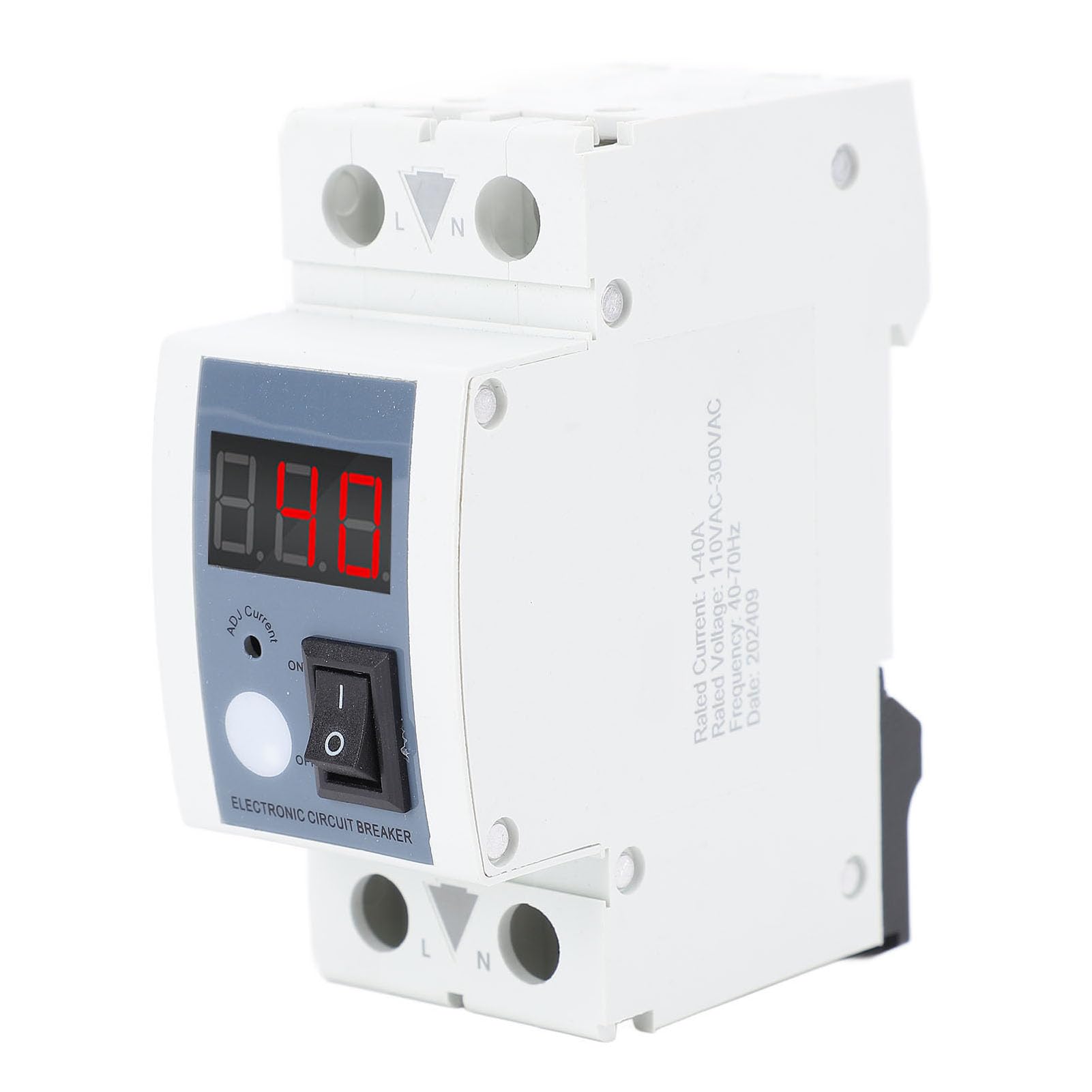
1-сүрөт: The FTVOGUE CHLT-715 Adjustable Over Current Protector.
Коопсуздук маалыматы
Always observe the following safety precautions to prevent injury or damage to the device and connected equipment:
- Орнотуу жергиликтүү электр эрежелерине жана эрежелерине ылайык квалификациялуу электрик тарабынан аткарылышы керек.
- Ensure the main power supply is disconnected before installing or performing any maintenance on the device.
- Do not operate the device if it appears damaged or has been exposed to moisture.
- Бааланган том экенин текшериңизtage and current of the protector match your application requirements.
- The device housing is made of PA66 flame retardant material, providing protection against impact, heat, and low temperatures.

2-сүрөт: The protector's PA66 flame retardant material and adjustable current range.
Продукт спецификациялары
| Элемент түрү: | Adjustable Over Current Protector |
| Материал: | PA66, Silver |
| Модел: | CHLT-715 |
| Полюс: | 1P+N |
| Rated Voltage: | 110-300VAC |
| Power On Delay Time: | 5s |
| Overcurrent Adjustment Range: | 0.1A - 40A |
| Overcurrent Count Setting: | OFF (Setting: 1-20-OFF) |
| Automatic Reconnection Delay Time: | 5 Seconds (Setting: 1-300 Seconds) |
| Жыштыгы: | 40-70 Гц |
| Энергияны керектөө: | ≤2W |
| Орнотуу: | 35mm Standard DIN Rail |
Пакеттин мазмуну
Пакет төмөнкү нерселерди камтыйт:
- 1 x Adjustable Over Current Protector (CHLT-715)
- 1 х Колдонуучунун колдонмосу (Бул документ)
Орнотуу жана орнотуу
The FTVOGUE CHLT-715 is designed for 35mm standard DIN rail installation. Ensure all power is disconnected before proceeding with installation.
Зымдар диаграммасы
Connect the device according to the following diagram. The 'L' terminal indicates the incoming live line, and 'N' indicates the incoming neutral line. The output terminals are for the protected circuit.
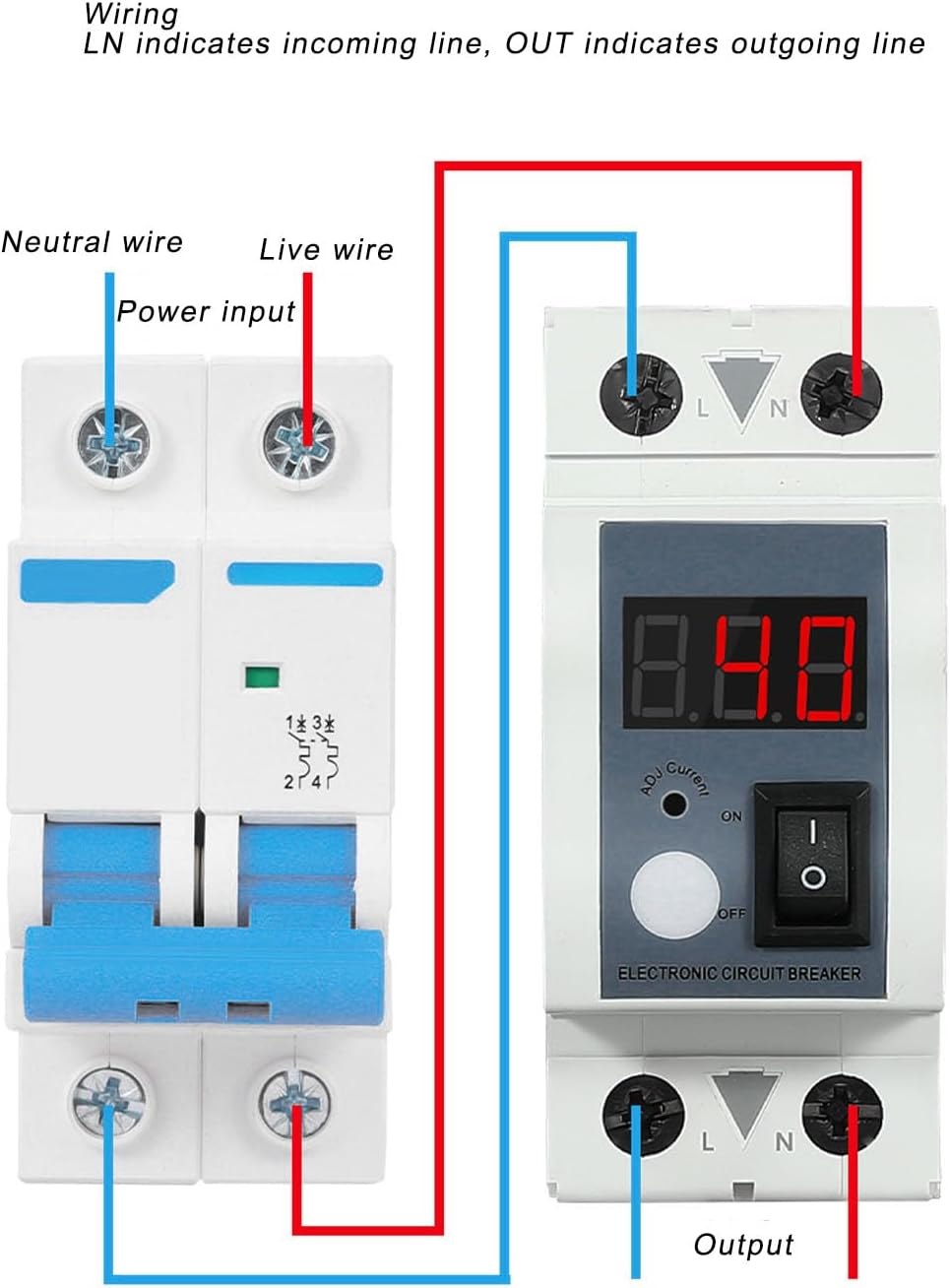
3-сүрөт: Wiring connections for the Adjustable Over Current Protector. The diagram illustrates how to connect the live (red) and neutral (blue) wires from the power input to the device, and then to the output for the protected circuit.
Маанилүү: Ensure all connections are secure and properly insulated. Incorrect wiring can lead to device malfunction or electrical hazards.
Монтаждоо
Snap the device onto a standard 35mm DIN rail. Ensure it is firmly seated and does not wobble.
Иштөө нускамалары
The CHLT-715 features real-time monitoring and adjustable settings for optimal circuit protection.
Күйгүзүү/өчүрүү

4-сүрөт: Device controls including the current display, adjustment button, and ON/OFF rocker switch.
Use the rocker switch labeled "ELECTRONIC CIRCUIT BREAKER" to turn the device ON or OFF. When ON, the LCD screen will display the working current.
Adjusting Overcurrent Limit

5-сүрөт: Setting the overcurrent limit using the adjustment button.
To set the overcurrent limit (adjustment range 0.1A to 40A):
- Press the "ADJ Current" button (the white circular button) to enter adjustment mode.
- The display will flash, indicating the current setting.
- Use short presses of the "ADJ Current" button to cycle through the desired current values.
- Stop pressing the button, and after a few seconds, the device will automatically save the setting and return to real-time current display.
The device features an intelligent control chip that automatically disconnects when the current exceeds the set limit.
Overcurrent Protection and Auto-Reset

6-сүрөт: Overcurrent guard value control and automatic reconnection.
When an overcurrent condition is detected, the protector will automatically disconnect the circuit. After the overcurrent condition is resolved and the current returns to normal, the device will automatically reconnect the power supply after a delay of 5 seconds (adjustable from 1-300 seconds).
Overcurrent Count Setting
The device allows setting an overcurrent count (1-20-OFF). This feature determines how many times an overcurrent event can occur before the device requires manual reset or enters a specific state. To adjust this setting, long press the "ADJ Current" button for 15 seconds. Follow the on-screen prompts to select the desired count or OFF for continuous auto-reset.
Automatic Reconnection Delay Time Setting
The default automatic reconnection delay time is 5 seconds. To adjust this setting (1-300 seconds), long press the "ADJ Current" button for 5 seconds. Follow the on-screen prompts to set the desired delay.
Техникалык тейлөө
The FTVOGUE CHLT-715 is designed for minimal maintenance. However, regular checks can ensure its longevity and reliable operation:
- Тазалоо: Periodically wipe the exterior of the device with a dry, soft cloth. Do not use abrasive cleaners or solvents.
- Туташуу текшерүү: Annually, with power disconnected, check all wiring connections to ensure they are tight and free from corrosion.
- Экологиялык шарттар: Ensure the device is operating within its specified temperature and humidity ranges. Avoid exposure to direct sunlight or excessive moisture.
Проблемаларды чечүү
If you encounter issues with your FTVOGUE CHLT-715, refer to the following common problems and solutions:
| Көйгөй | Мүмкүн себеп | Чечим |
|---|---|---|
| Түзмөк күйбөйт. | No input power; Incorrect wiring; Faulty device. | Check main power supply. Verify wiring according to the diagram. If issues persist, contact support. |
| Түзмөк тез-тез бузулуп калат. | Overcurrent limit set too low; Actual load exceeds limit; Faulty appliance. | Increase the overcurrent limit if appropriate for your circuit. Reduce the load on the circuit. Inspect connected appliances for faults. |
| Device does not auto-reset. | Overcurrent condition still present; Auto-reconnection delay set to OFF or very long; Device fault. | Ensure the overcurrent condition has cleared. Check the auto-reconnection delay setting. If the problem persists, contact support. |
| Display is blank or erratic. | Электр энергиясы көйгөйү; Түзмөктүн иштебей калышы. | Check power supply. Cycle power to the device. If the display remains erratic, contact support. |
Кепилдик жана колдоо
FTVOGUE products are manufactured to high-quality standards. For warranty information or technical support, please refer to the warranty card included with your purchase or visit the official FTVOGUE website. Please have your model number (CHLT-715) and purchase details ready when contacting support.
FTVOGUE Store Link: Visit the FTVOGUE Store on Amazon