
1. Продукт бүтүп калдыview
The BoxWave miniSync is a versatile USB-A to USB Type-C retractable cable designed for convenient charging and data synchronization. Its innovative retractable mechanism helps prevent tangles and knots, making it ideal for portability and organized use. The cable offers multiple pre-set lengths to suit various needs and supports high-speed data transfers.
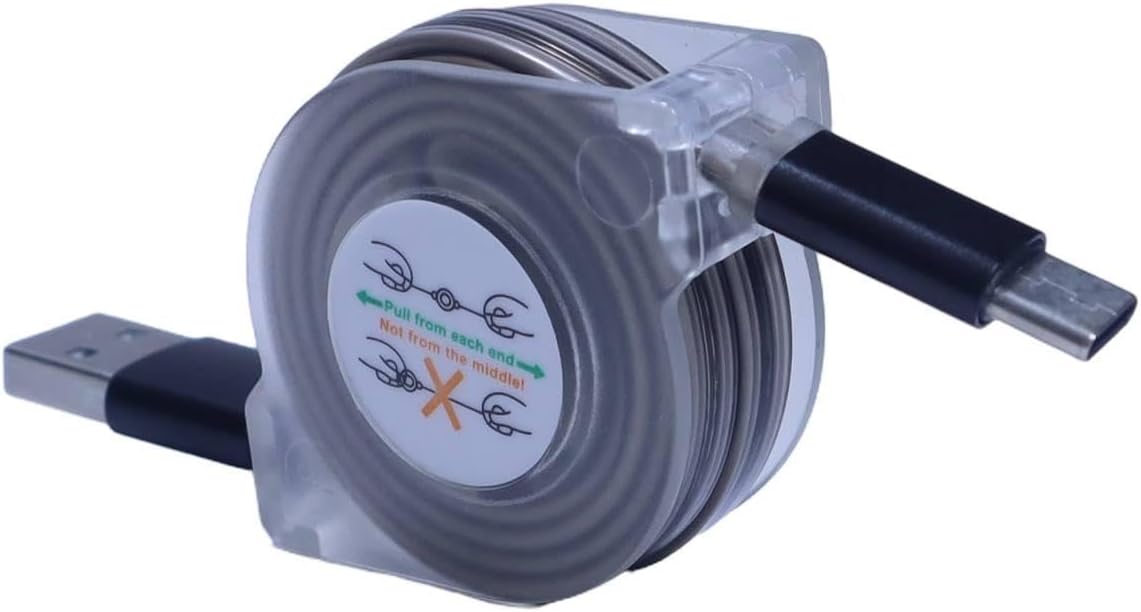
Image 1.1: The BoxWave miniSync Retractable Cable in its compact form, showing the USB-A and USB Type-C connectors.
Негизги өзгөчөлүктөрү:
- Тартылуучу дизайн: Keeps the cable organized and tangle-free.
- Жөнгө салынуучу узундуктар: Features 5 pre-set lengths for optimal use.
- Жогорку ылдамдыктагы маалыматтарды өткөрүп берүү: Supports USB 2.0 for efficient data synchronization.
- Туруктуу курулуш: Made from high-quality polycarbonate and heavy-duty ribbon-style cable.
- Компакт жана көчмө: Retracts to 4 inches (10 cm) and extends up to 37 inches (93 cm).
2. Setup and Extension
The miniSync cable is designed for easy extension and retraction. Follow these steps to adjust the cable length:
- Узартуу үчүн: Gently pull both ends of the cable simultaneously until it reaches your desired length. The cable will lock into one of the 5 pre-set positions. Avoid pulling only one end, as this can cause the retraction mechanism to jam.
- Баш тартуу үчүн: Gently pull both ends of the cable again until it unlocks from its current position. The cable will then retract automatically back into its compact housing.

Image 2.1: Illustration demonstrating how to extend the miniSync cable by pulling both ends, with five pre-set lengths from 4 inches to 37 inches.
The cable can extend up to 37 inches (93 cm) and retracts to a compact 4 inches (10 cm) for easy storage.
3. Иштөө нускамалары
3.1 Аппаратыңызды заряддоо
- Connect the USB-A end of the miniSync cable to a standard USB power adapter, computer USB port, or power bank.
- Connect the USB Type-C end of the miniSync cable to your compatible device (e.g., Hantek HTM208C, smartphone, tablet).
- Эки туташуунун тең коопсуз экенин текшериңиз. Түзмөгүңүз кубаттала башташы керек.
The miniSync cable supports fast charging up to 15W, depending on the power source and device capabilities.

Image 3.1: Close-up of the USB Type-C connector of the miniSync cable, indicating fast charging capability.
3.2 Маалыматтарды синхрондоштуруу
- Connect the USB-A end of the miniSync cable to a USB port on your computer.
- Connect the USB Type-C end of the miniSync cable to your compatible device.
- Once connected, your computer should recognize the device. You can then transfer files, back up data, or perform other synchronization tasks as supported by your device and operating system.
The cable supports USB 2.0 data transfer speeds, allowing for efficient file башкаруу.
4. Кароо жана тейлөө
- Proper Retraction: Always pull both ends of the cable simultaneously when extending or retracting to prevent damage to the internal mechanism.
- Тазалоо: Кабелди жана туташтыргычтарды тазалоо үчүн жумшак, кургак чүпүрөктү колдонуңуз. Катуу химиялык заттарды же абразивдүү материалдарды колдонуудан алыс болуңуз.
- Сактагыч: Store the cable in its fully retracted position when not in use to protect it from damage and keep it tangle-free.
- Стресстен качуу: Do not bend the cable sharply or apply excessive force to the connectors. The cable features reinforced strain relief to enhance durability.

Сүрөт 4.1: Детальдуу view of the reinforced strain relief on the miniSync cable, designed to prevent cable damage near the connector.
5. Кыйынчылыктарды
| Көйгөй | Мүмкүн себеп | Чечим |
|---|---|---|
| Cable does not extend or retract smoothly. | Only one end was pulled, causing the internal mechanism to jam. | Gently pull both ends of the cable simultaneously until it releases, then try again. Avoid forcing the mechanism. |
| Түзмөк кубатталбай жатат. | Loose connection, faulty power source, or incompatible device. |
|
| Маалыматтарды өткөрүү иштебей жатат. | Loose connection, driver issues on computer, or device settings. |
|
6. Техникалык шарттар
- Модель аты: miniSync
- Туташтыргыч түрү: USB-Aдан USB Type-Cге
- Маалыматтарды өткөрүү ылдамдыгы: USB 2.0 (480 Мбит/сек чейин)
- Заряддоо чыгышы: Up to 15W (depending on power source)
- Тартылган узундук: Болжол менен 4 дюйм (10 см)
- Узундугу: 37 дюймга чейин (93 см)
- Жөнгө салынуучу узундуктар: 5 pre-set lengths
- Материал: Durable polycarbonate housing, heavy-duty ribbon-style cable
- Элемент Салмагы: 1.2 унция (34 грамм)
- Өндүрүүчү: BoxWave
7. Колдоо жана байланыш маалыматы
For technical assistance or inquiries regarding your BoxWave miniSync cable, please contact BoxWave customer support. Refer to the product packaging or the official BoxWave webакыркы байланыш маалыматы үчүн сайт.
Note: Limited third-party tech support for your device (up to 3 inquiries via messaging) is mentioned in some product descriptions. This support is not affiliated with or endorsed by Hantek.