Introduction
This manual provides detailed instructions for the proper use and maintenance of your 82Ms-A Scientific Calculator. Designed for students and professionals, this calculator features a 2-line display, multi-function keys, and supports up to 240 functions, including trigonometric calculations. Please read this manual thoroughly to ensure optimal performance and longevity of your device.
Кутуда эмне бар

Image: The 82Ms-A Scientific Calculator as packaged, indicating one unit is included.
- 82Ms-A Scientific Calculator (1 unit)
- Колдонуучунун Колдонмосу (бул документ)
Жайгашуу
Батарея орнотуу

Сүрөт: деталдуу view showing the open battery compartment of the calculator, revealing two AAA batteries.
The 82Ms-A Scientific Calculator is powered by a long-lasting battery. To install or replace batteries:
- Калькулятордун бурулганын текшериңиз ӨЧҮРҮҮ.
- Калькулятордун артындагы батарея бөлүкчөсүнүн капкагын табыңыз.
- Капкакты жебе менен көрсөтүлгөн багытта жылдырыңыз (эгерде бар болсо).
- Insert new batteries, ensuring correct polarity (+/-) as marked inside the compartment.
- Батарея бөлүкчөсүнүн капкагын бекем чыккыча ордуна коюңуз.
Иштөө нускамалары
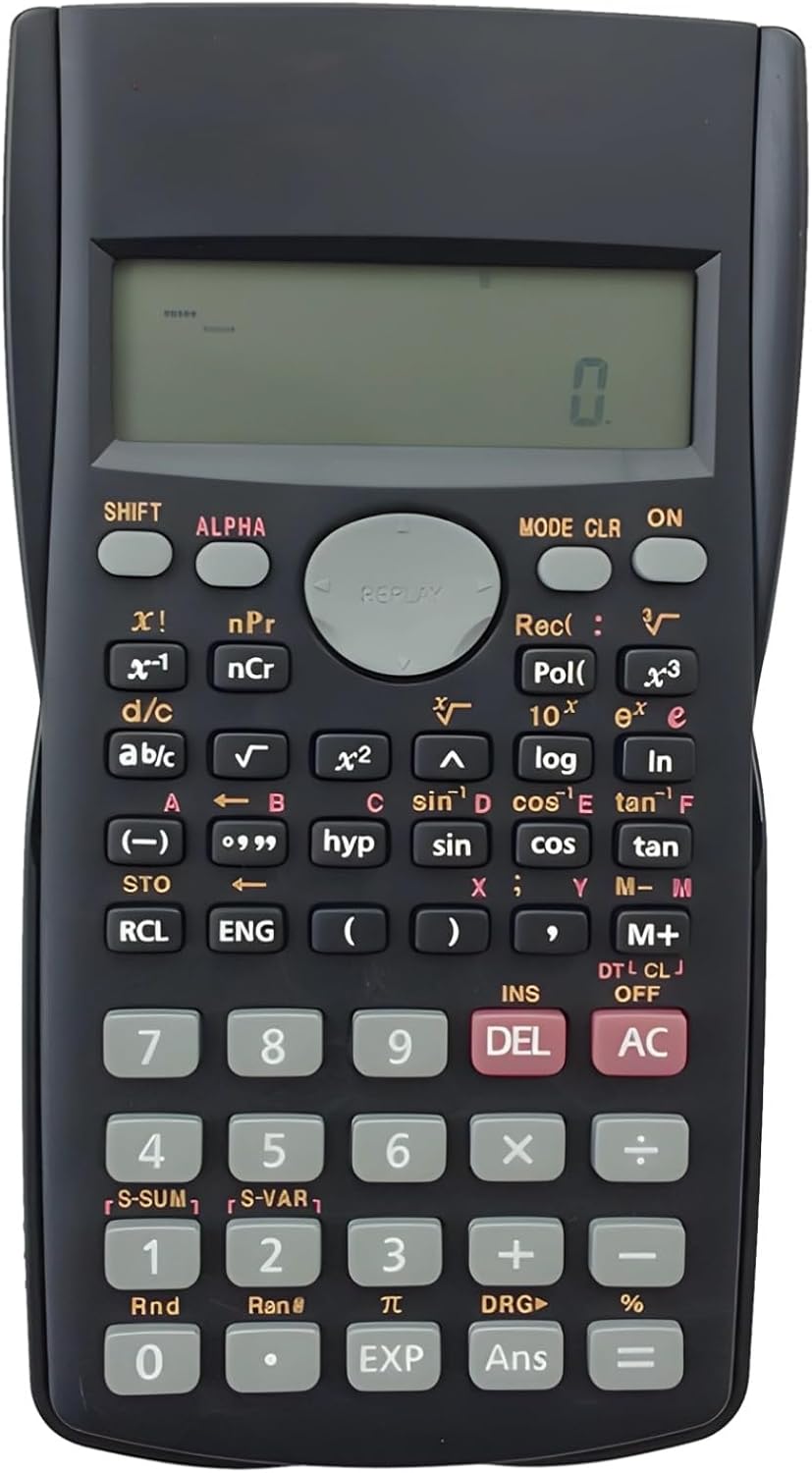
Image: The full layout of the 82Ms-A Scientific Calculator, highlighting its 2-line display and various function keys.
Күйгүзүү/өчүрүү
- Күйгүзүү үчүн: баскычын басыңыз ON ачкыч.
- To turn off: Press SHIFT анда AC (ӨЧҮК).
Негизги эсептөөлөр
Enter numbers using the numeric keypad. Use the +, -, ×, жана ÷ keys for standard arithmetic operations. Press = натыйжаны көрсөтүү үчүн.
Multi-Function Keys and 2-Line Display
The calculator features a 2-line display, showing both the input expression and the result simultaneously. Many keys have multiple functions, indicated by colored labels above or below them. These functions are accessed using the SHIFT жана ALPHA ачкычтар.
- SHIFT: Activates the yellow-labeled functions. Press SHIFT, then the desired key.
- ALPHA: Activates the red-labeled functions (variables, constants). Press ALPHA, then the desired key.
- РЕЖИМ: Changes the calculator's mode (e.g., COMP, STAT, EQN). Press РЕЖИМ repeatedly to cycle through options.
- CLR: Clears specific data or settings. Press SHIFT анда CLR to access clear options.
- DEL: Deletes the character at the cursor position.
- AC: Clears all input and returns to the initial state.
Өркүндөтүлгөн функциялар
The 82Ms-A supports 240 functions, including trigonometric (sin, cos, tan), logarithmic (log, ln), power (x², x³), roots (√, ³√), fractions (a b/c), and statistical calculations. Refer to the specific key labels and their SHIFT/ALPHA functions for detailed usage.
- Тригонометриялык функциялар: Колдонуу күнөө, cos, тан keys. For inverse functions (sin⁻¹, cos⁻¹, tan⁻¹), use SHIFT with these keys.
- Logarithmic Functions: Колдонуу журнал (10-база) жана ln (натуралдык логарифм) ачкычтары.
- Кубат жана тамыр функциялары: Колдонуу x² квадраттоо үчүн, SHIFT анда x² for square root (√). For other powers and roots, use x³ or SHIFT анда x³ (³√).
- Бөлчөктөр: колдонуңуз ab/c key to input and convert fractions.
Техникалык тейлөө
Тазалоо
Калькуляторду тазалоо үчүн жумшак, кургак чүпүрөктү колдонуңуз. Өтө кир болсо, бир аз сүртүңүз.ampen the cloth with water or a mild, non-abrasive cleaner. Do not use strong solvents, alcohol, or abrasive cleaners, as these can damage the casing жана дисплей.
Сактагыч
Store the calculator in a cool, dry place away from direct sunlight and extreme temperatures. If storing for an extended period, it is recommended to remove the batteries to prevent leakage.
Проблемаларды чечүү
| Көйгөй | Мүмкүн себеп | Чечим |
|---|---|---|
| Калькулятор күйбөйт. | Өлүк же туура эмес орнотулган батарейкалар. | Туура полярдуулукту камсыз кылуу менен батарейкаларды жаңысына алмаштырыңыз. |
| Дисплей күңүрт же бош. | Батареянын кубаттуулугу төмөн. | Батареяларды алмаштырыңыз. |
| Туура эмес эсептөө натыйжалары. | Incorrect mode setting or previous calculation error. | Басыңыз AC to clear. Check the current mode using the РЕЖИМ key and adjust if necessary. |
| Ачкычтар жооп бербейт. | ачкычтардын астындагы чаң же таштанды; ички бузулуу. | Ачкычтардын айланасын акырын тазалаңыз. Эгер көйгөй чечилбесе, колдоо бөлүмүнө кайрылыңыз. |
Техникалык шарттар

Image: The 82Ms-A Scientific Calculator with its length, width, and thickness measurements indicated.
| Өзгөчөлүк | Деталь |
|---|---|
| Модель номери | 71T71524TQPRRJC1J26SKQF |
| Дисплей түрү | 2-Line дисплей |
| Функциялардын саны | 240 функцияга чейин |
| Power Source | Батарея менен иштейт |
| Өлчөмдөрү (L x W x Y) | 6.1 x 3.27 x 0.39 дюйм |
| Элемент Салмагы | 5.3 унция |
| Түс | Кара |
| Материал | Пластик |
Кепилдик жана колдоо
Specific warranty information for this product is not provided within this manual. For warranty details, technical support, or service inquiries, please refer to the product packaging or contact the retailer from whom the product was purchased. Keep your purchase receipt as proof of purchase.


