
1. Киришүү
Welcome to the Noise ColorFit Pulse 4 Pro Smartwatch user manual. This guide provides essential information for setting up, operating, and maintaining your new smartwatch. Please read this manual thoroughly to ensure proper use and to maximize your device's features.
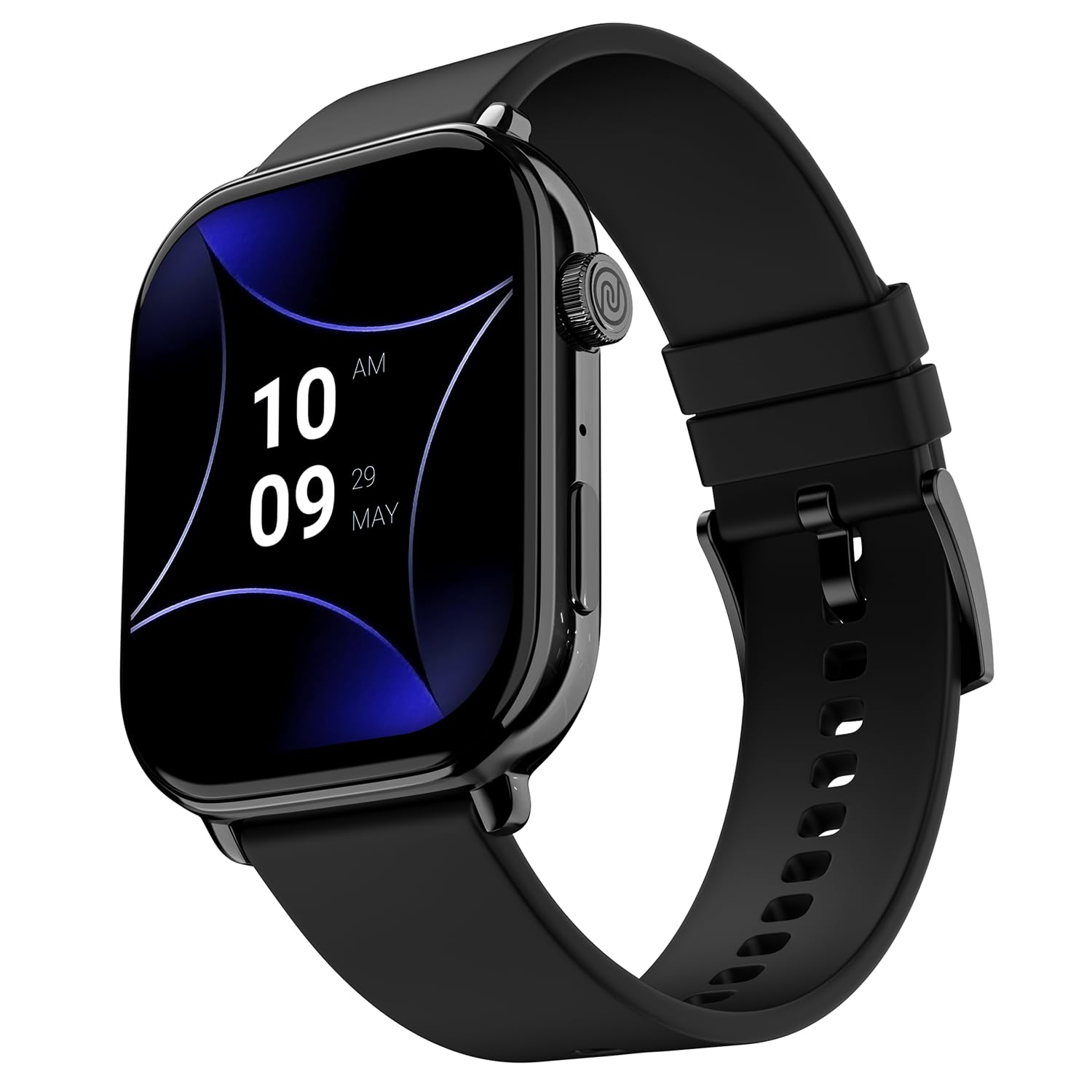
Image 1.1: The Noise ColorFit Pulse 4 Pro Smartwatch in Jet Black.
2. Кутуда эмне бар
Upon unboxing your Noise ColorFit Pulse 4 Pro Smartwatch, please verify that all the following items are included:
- Noise ColorFit Pulse 4 Pro Smartwatch
- Магниттик кубаттагыч
- Колдонуучунун Колдонмосу (бул документ)
- Кепилдик картасы
Видео 2.1: Бүттүview of the Noise ColorFit Pulse 4 Pro Smartwatch and its contents, including the watch, color options, and items found in the box.
3. Орнотуу
3.1 Алгачкы заряддоо
Before first use, fully charge your smartwatch. Connect the magnetic charger to the charging pins on the back of the watch and plug the USB end into a power adapter (not included) or a computer's USB port. The watch display will indicate charging status.
3.2 Колдонмону жүктөп алуу жана жупташтыруу
Акылдуу саатыңыздын толук мүмкүнчүлүктөрүн ачуу үчүн, жүктөп алыңыз NoiseFit смартфонуңуздагы колдонмо. Колдонмо Android жана iOS түзмөктөрүнө да шайкеш келет.
- Scan the QR code below or search for 'NoiseFit' in your smartphone's app store.
- Install and open the NoiseFit app.
- Аккаунт түзүү жана акылдуу саатыңызды Bluetooth аркылуу жупташтыруу үчүн колдонмодогу экрандагы көрсөтмөлөрдү аткарыңыз. Смартфонуңузда Bluetooth иштетилгенин текшериңиз.
- Смартфонуңузда да, акылдуу саатыңызда да жупташтыруу өтүнүчүн ырастаңыз.

Image 3.1: The smartwatch display showing a QR code for payments, which can also be used to illustrate app download. For app download, please refer to the official NoiseFit app store page or бул шилтеме.
4. Иштөө нускамалары
4.1 Күйгүзүү/өчүрүү
- Күйгүзүү: Press and hold the functional crown button on the side of the watch until the Noise logo appears.
- Өчүрүү: Swipe down from the watch face, tap the settings icon, then select 'Power Off'. Alternatively, press and hold the functional crown button and select 'Power Off' when prompted.
4.2 Навигация
The Noise ColorFit Pulse 4 Pro features a responsive touchscreen and a functional crown for intuitive navigation.
- Сенсордук экран: Swipe left, right, up, or down to access different menus, notifications, and widgets. Tap to select items.
- Functional Crown: Rotate the crown to scroll through lists and menus. Press the crown to return to the watch face or to confirm a selection.

Сүрөт 4.1: Детальдуу view of the functional crown on the Noise ColorFit Pulse 4 Pro Smartwatch, used for navigation.
4.3 Дисплей
The smartwatch features a 1.96-inch AMOLED display with Always-on Display functionality for clear visibility and quick access to information.

Image 4.2: The smartwatch display highlighting its 1.96-inch AMOLED screen with Always-on Display capabilities.
5. Ден соолуктун мониторинги
The Noise ColorFit Pulse 4 Pro integrates the Noise Health Suite™ to help you monitor various aspects of your well-being. Access these features via the watch menu or the NoiseFit app.
- 24*7 Heart Rate Monitor: Күн бою жүрөктүн кагышын үзгүлтүксүз көзөмөлдөйт.
- SpO2 Measure: Сиздин кандын кычкылтек менен каныккандыгын өлчөйт.
- Стресс мониторинги: Стресс деңгээлиңиз боюнча түшүнүктөрдү берет.
- Уйку монитору: Tracks your sleep patterns, including awake, REM, and deep sleep stages.
- Breathe Practice: Эс алууга жардам берүү үчүн дем алуу көнүгүүлөрүн жасаңыз.
- Аялдардын велосипед трекери: Менструалдык циклди көзөмөлдөөгө жана алдын ала айтууга жардам берет.

Image 5.1: An illustration of the Noise Health Suite™ features available on the smartwatch.
6. Smart Features
6.1 Bluetooth чалуу
Stay connected directly from your wrist. The Noise ColorFit Pulse 4 Pro supports Bluetooth calling, allowing you to make and receive calls without reaching for your phone.
- Терүү тактасы: Use the on-screen dial pad to initiate calls.
- Сүйүктүү байланыштар: Save up to 10 favorite contacts for quick dialing.
- In-built Speaker: Listen to calls directly from the watch.

Image 6.1: The smartwatch interface displaying Bluetooth calling options.
6.2 AI Voice Assistance
Control your smartwatch and connected devices using voice commands. Simply activate the AI Voice Assistant and speak your commands.

Image 6.2: The smartwatch displaying the AI Voice Assistance feature, ready for voice commands.
6.3 QR Code Payments
Facilitate quick and convenient payments directly from your wrist by displaying your UPI QR code on the smartwatch screen.
6.4 Security and Convenience Features
- Scheduled DND: Set specific time windows during which notifications will be silenced.
- Сырсөздү коргоо: Secure your smartwatch with a password to prevent unauthorized access.

Image 6.3: Smartwatch screens illustrating the Scheduled DND and Password Protection functionalities.
7. Техникалык тейлөө
7.1 Акылдуу саатыңызды тазалоо
Regular cleaning helps maintain the performance and appearance of your device.
- Экранды жана денени жумшак, түксүз чүпүрөк менен сүртүңүз.
- өжөр кир үчүн, бир аз гampчүпүрөктү суу менен. Катуу химиялык заттарды же абразивдүү материалдарды колдонуудан алыс болуңуз.
- Ensure the charging pins are clean and dry before charging.
7.2 Сууга туруктуулук
The Noise ColorFit Pulse 4 Pro is rated IP68 for water resistance, meaning it can withstand immersion in water up to 1.5 meters for a limited time. It is suitable for daily use, such as hand washing or light rain. However, it is not recommended for swimming, diving, or high-pressure water activities.
7.3 Заряддоо боюнча көрсөтмөлөр
Use only the provided magnetic charger. Do not attempt to charge the watch if it or the charger is wet. Avoid exposing the charger to extreme temperatures.
8. Кыйынчылыктарды
If you encounter issues with your Noise ColorFit Pulse 4 Pro Smartwatch, refer to the following common solutions:
- Күйгүзүлбөй жаткан саат: Сааттын толук заряддалганын текшериңиз. Аны магниттик кубаттагычка туташтырып, кайра күйгүзүүдөн мурун бир нече мүнөт күтө туруңуз.
- Смартфон менен жупташуу мүмкүн эмес: Make sure Bluetooth is enabled on your phone and the watch is within range. Restart both devices and try pairing again through the NoiseFit app.
- Туура эмес ден соолук маалыматтары: Саат өтө тар же өтө бош эмес, билегиңизге бекем тагылганын текшериңиз. Сааттын артындагы сенсорлорду тазалаңыз.
- Эскертмелер көрүнбөй жатат: Check notification settings in the NoiseFit app and on your smartphone. Ensure the app has necessary permissions.
- Батарейканын кыска мөөнөтү: Reduce screen brightness, disable unnecessary features like Always-on Display, and limit background app refresh.
For persistent issues, consult the NoiseFit app's help section or contact customer support.
9. Техникалык шарттар
Key technical specifications for the Noise ColorFit Pulse 4 Pro Smartwatch:
| Дисплей түрү | AMOLED |
| Screen Size | 1.96 дюйм |
| Топтун материалы | Силикон |
| Иштин материалы | Цинк эритмеси |
| Элемент Салмагы | 45 грамм |
| Байланыш технологиясы | Bluetooth |
| Сууга туруктуулук рейтинги | IP68 (1.5 Metres) |
| Операция системасы | Android (шайкеш келет) |
| Шайкеш түзмөктөр | Laptop, Smartphone, Tablet (Android, iOS) |
| Metrics Measured | Calories Burned, Distance, Heart Rate, Step Count |
| Өзгөчөлүктөр | Activity Tracker, Alarm Clock, Lightweight, Notifications, Touchscreen, Voice Call |
10. Кепилдик жана колдоо
10.1 Кепилдик маалыматы
The Noise ColorFit Pulse 4 Pro Smartwatch comes with a 1 жылдык чектелген кепилдик сатып алынган күндөн тартып өндүрүүчү тарабынан берилген. Кепилдик боюнча дооматтар үчүн сатып алуу дүмүрчөгүңүздү жана кепилдик картаңызды сактап коюңуз.
10.2 Кардарларды колдоо
Техникалык жардам, кепилдик боюнча дооматтар же башка суроолор боюнча Noise кардарларды колдоо кызматына кайрылыңыз:
- Телефон: 02268056289
- Электрондук почта: help@nexxbase.com
- Өндүрүүчү: Nexxbase Marketing Pvt. Ltd, Khasra No-146/25/2/1, Jail Road Badshahpur, Gurugram Haryana-122101