
Продукт бүттүview
The GOBOULT Y1 Pro Wireless Earbuds are designed to provide a high-quality audio experience with features like extended playtime, clear calling, and low-latency gaming. This manual provides detailed instructions for setting up, operating, and maintaining your earbuds.

Сүрөт: Коллаж көрсөтүүasing key features of the GOBOULT Y1 Pro Earbuds, including 60 hours playtime, Zen Quad Mic ENC, 45ms low latency gaming, 13mm bass drivers, Type-C fast charging, and Bluetooth 5.3.
Пакеттин мазмуну
- GOBOULT Y1 Pro Wireless Earbuds
- Заряддоо кутусу
- USB Type-C кубаттоочу кабель
- Кулак жаздыктары (ар кандай өлчөмдөгү)
- Наушниктер (ар кандай өлчөмдөгү)
- Кепилдик картасы
Жайгашуу
1. Кулакчындарды жана кутуну кубаттоо
Before initial use, ensure both the earbuds and the charging case are fully charged. This optimizes battery life and performance.
- Connect the provided USB Type-C charging cable to the charging port on the case and to a compatible USB power adapter (not included).
- Кубаттоо абалын көрсөтүү үчүн кубаттоо кутучасындагы LED индикатору күйөт.
- A full charge typically takes a few hours. A quick 10-minute charge can provide approximately 120 minutes of playtime.

Image: The GOBOULT Y1 Pro earbuds and charging case, illustrating the Type-C fast charging capability, where 10 minutes of charge provides 120 minutes of playtime.
2. Баштапкы жупташтыруу
Кулакчындарды түзмөгүңүз менен биринчи жолу жупташтыруу үчүн төмөнкү кадамдарды аткарыңыз:
- Remove any protective film from the charging contacts on the earbuds.
- Place both earbuds into the charging case and close the lid for a few seconds.
- Open the charging case lid. The earbuds will automatically power on and enter pairing mode, indicated by flashing LED lights.
- Смартфонуңузда же башка Bluetooth иштетилген түзмөгүңүздө Bluetooth жөндөөлөрүнө өтүңүз.
- Издөө жеткиликтүү түзмөктөрдү тандап, "GOBOULT Y1 Pro" тизмеден.
- Туташкандан кийин үн билдирүүсү ийгиликтүү жупташтырууну ырастайт.

Image: A diagram illustrating the initial setup steps, including removing protective film and opening the case, along with a detailed guide to the touch controls for both left and right earbuds.
3. Автоматтык кайра туташуу
Баштапкы жупташтыруудан кийин, кубаттоочу кутудан чыгарылганда жана түзмөктө Bluetooth күйгүзүлгөндө, кулакчындар автоматтык түрдө акыркы жупташтырылган түзмөккө туташат.

Image: GOBOULT Y1 Pro earbuds and charging case, demonstrating Bluetooth 5.3 for stable, efficient, and fast pairing with a connected smartphone.
Иштөө нускамалары
Күйгүзүү/өчүрүү
- Күйгүзүү: Open the charging case lid. The earbuds will power on automatically. Alternatively, if outside the case, long press the touch area on both earbuds for 3 seconds.
- Өчүрүү: Place both earbuds back into the charging case and close the lid. They will power off automatically. Alternatively, long press the touch area on both earbuds for 5 seconds.
Touch Controls
The GOBOULT Y1 Pro earbuds feature intuitive touch controls for managing music, calls, and other functions. Refer to the diagram below and the following list for specific actions:
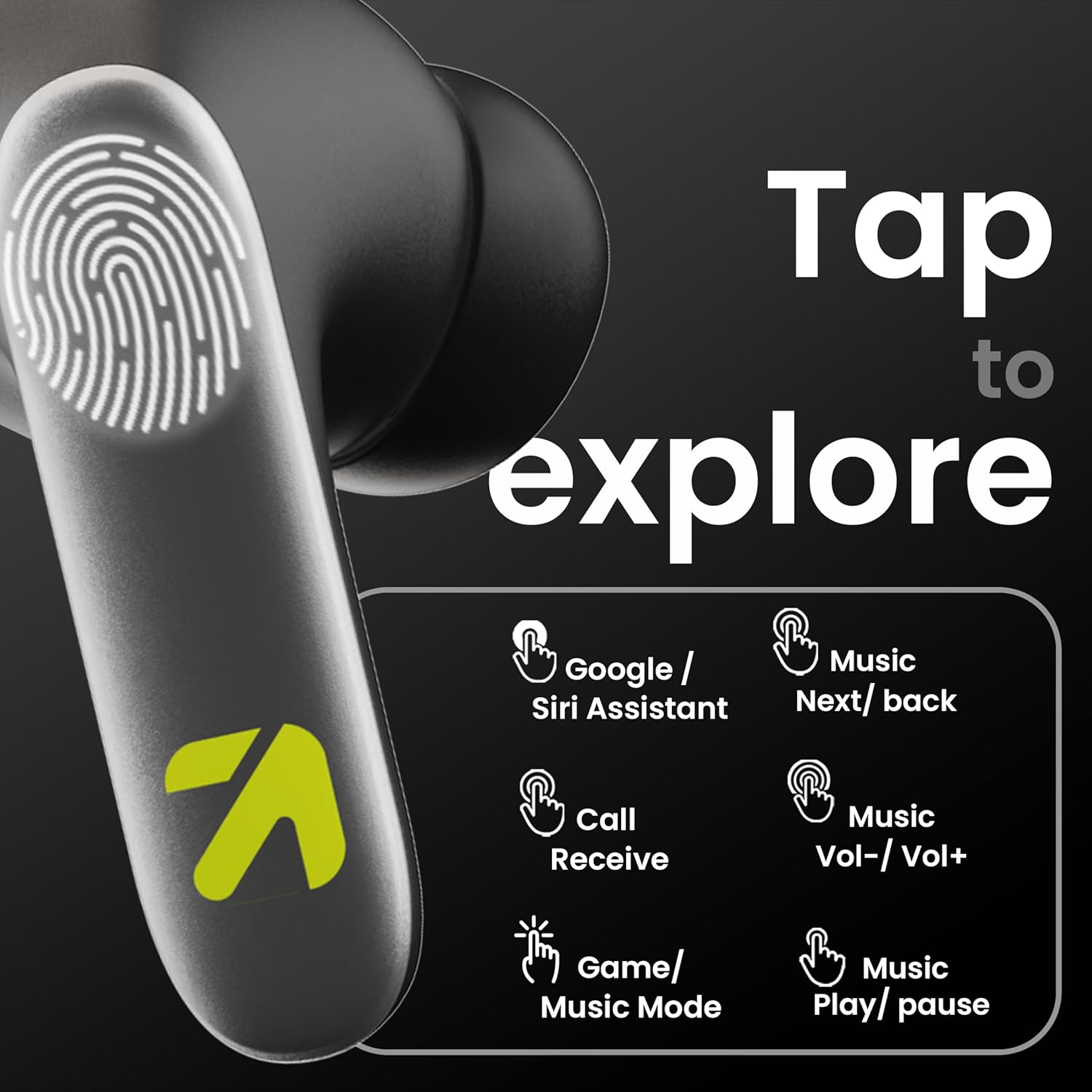
Image: A visual guide to the touch controls on the GOBOULT Y1 Pro earbuds, detailing actions for Google/Siri Assistant, music navigation, call management, volume control, and game/music mode switching.
- Бир жолу басуу (Сол/Оң): Музыканы ойнотуу/тындыруу, Чалууга жооп берүү/аяктоо.
- Эки жолу таптаңыз (Сол кулакчын): Мурунку ыр.
- Эки жолу таптаңыз (оң кулакчын): Кийинки ыр.
- Сол кулакчын (үч жолу таптоо): Үндү төмөндөтүү.
- Оң кулакчын үчүн үч жолу таптоо: Үндү көтөрүү.
- Long Press (2 seconds, Left/Right): Reject incoming call, Activate Voice Assistant (Google/Siri).
- Four Taps (Left/Right): Activate/Deactivate Gaming Mode.
Оюн режими
For an enhanced gaming experience, activate the ultra-low latency Gaming Mode:
- Жандандыруу: Tap the touch area four times on either earbud.
- Өчүрүү: Tap the touch area four times again.

Image: GOBOULT Y1 Pro earbuds and charging case, highlighting the 45ms low latency gaming mode for real-time audio synchronization, activated by four taps.
Үн жардамчысы
Quickly access your device's voice assistant (Siri or Google Assistant) for hands-free control:
- Жандандыруу: Perform a long tap on the touch area of either earbud.

Image: Illustration showing how to access Siri or Google Assistant with a long tap on the earbud's touch sensor.
Экологиялык ызы -чууну жокко чыгаруу (ENC)
The GOBOULT Y1 Pro features Zen Quad Mic ENC technology, ensuring crystal-clear calls by effectively filtering out ambient noise from your surroundings.

Image: A diagram explaining how Environmental Noise Cancellation (ENC) works by isolating your voice from environmental noise, ensuring clear communication during calls.
Техникалык тейлөө
Тазалоо
- Кулакчындарды жана заряддоо кутусун жумшак, кургак, түксүз чүпүрөк менен дайыма тазалап туруңуз.
- Ensure the charging contacts on both the earbuds and inside the case are free from dust and debris to maintain proper charging.
- Do not use abrasive cleaners, solvents, or harsh chemicals, as these may damage the product.
Суу каршылык
The GOBOULT Y1 Pro earbuds are rated IPX5 water-resistant. This means they are protected against low-pressure water jets from any direction, making them suitable for workouts and light splashes.
- Кулакчындарды сууга салбаңыз.
- Avoid exposing them to heavy rain or extreme moisture.
- Кулакчындардын бузулуп калбашы үчүн, аларды кайра заряддоо кутусуна коюудан мурун кургатылганын текшериңиз.

Image: GOBOULT Y1 Pro earbuds with water droplets, illustrating their IPX5 water resistance, providing protection against sweat and splashes.
Проблемаларды чечүү
If you encounter any issues with your GOBOULT Y1 Pro earbuds, refer to the following common troubleshooting steps:
Кулакчындар жупташтырылбай же туташпай жатат
- Ensure both earbuds and the charging case have sufficient battery.
- Turn off Bluetooth on your device, wait 5 seconds, then turn it back on.
- On your device, "Forget" or "Unpair" "GOBOULT Y1 Pro" from the Bluetooth list, then attempt the pairing process again.
- Place both earbuds back into the charging case, close the lid, wait 10 seconds, then open the lid to re-enter pairing mode.
Бир гана кулакчын иштейт
- Эки кулакчындын тең кубатталганын текшериңиз.
- Эки гарнитураны тең заряддоо кутусуна салып, капкагын жаап, кайра ачыңыз. Бул көп учурда аларды кайра шайкештештирет.
- Эгер маселе чечилбесе, кулакчындарды баштапкы абалга келтирип көрүңүз (өндүрүүчүнүн нускасын караңыз web(эгер бул жерде кеңири маалымат берилбесе, баштапкы абалга келтирүү боюнча конкреттүү көрсөтмөлөрдү бул жерден таба аласыз).
Үн сапаты начар же үнү төмөн
- Ensure the earbuds are properly seated in your ears to create a good seal. Try different sized eartips.
- Кулакчындын торлорундагы калдыктарды тазалаңыз.
- Аудио булак түзмөгүнүн үн деңгээлин жана үн жөндөөлөрүн текшериңиз.
- Сигналдын кийлигишүүсүн болтурбоо үчүн туташкан түзмөгүңүзгө жакыныраак жылыңыз.
Заряддоо маселелери
- Заряддоо кабели корпуска да, кубат булагына да бекем туташтырылганын текшериңиз.
- Try a different USB Type-C charging cable or power adapter.
- Кулакчындардагы жана корпустун ичиндеги заряддоо контакттарын кургак кебез менен тазалаңыз.
Техникалык шарттар
| Өзгөчөлүк | Деталь |
|---|---|
| Бренд | GOBOULT |
| Модель аты | AirBass |
| Bluetooth версиясы | 5.3 |
| Кулак жайгаштыруу | Кулакта |
| Noise Control | Экологиялык ызы -чууну жокко чыгаруу (ENC) |
| Аудио драйверинин өлчөмү | 13 миллиметр |
| Жалпы ойноо убактысы | 60 саатка чейин (заряддоо кутусу менен) |
| Төмөн күтүү | 45 мс (Оюн режими) |
| Заряддоо түрү | Type-C тез заряддоо |
| Суу каршылык | IPX5 |
| Башкаруу ыкмасы | тийүү |
| Шайкеш түзмөктөр | Смартфондор, планшеттер, ноутбуктар, стол үстүндөгү компьютерлер, акылдуу динамиктер |
| Элемент Салмагы | 50 грамм |
| Келип чыккан өлкө | Кытай |
Кепилдик маалымат
The GOBOULT Y1 Pro Wireless Earbuds are covered by a 1 жылдык Өндүрүүчүнүн Кепилдиги сатып алынган күндөн тартып.
This warranty covers manufacturing defects. Please retain your proof of purchase for any warranty claims. The warranty does not cover damage caused by misuse, accidents, unauthorized modifications, or normal wear and tear.
Колдоо
For further assistance, technical support, or warranty inquiries, please contact:
- Өндүрүүчү: Exotic Mile Private Limited, B-67 Wazirpur Industrial Area, New Delhi 110052
- Импорттоочу: Exotic Mile Pvt. Ltd. , B67 Wazirpur Industrial Area , New Delhi 110052
- For customer service contact details, please refer to the GOBOULT official webпродуктту сатып алган сайт же платформа.