
MRSCOZ TCR
MRSCOZ Toddlers Sleep Training Clock
Model: TCR
Колдонуучунун инструкциясы
1. Киришүү
The MRSCOZ Toddlers Sleep Training Clock is a multifunctional device designed to assist children with sleep training, provide alarm clock functionality, act as a Bluetooth music player, and offer various night light and sound machine features. Its intuitive design and multiple settings aim to create a comfortable and consistent sleep environment for toddlers and kids.

Image: The MRSCOZ Sleep Training Clock displaying different light colors, highlighting its versatile illumination options.
2. Коопсуздук маалыматы
- Бул продукт оюнчук эмес. Кичинекей балдарды чоңдордун көзөмөлүндө кармоо сунушталат.
- Keep the device away from water and excessive moisture to prevent electrical hazards.
- Use only the provided USB-C cable for charging. Do not use damaged cables or chargers.
- Аппаратты өз алдынча бөлүүгө же оңдоого аракет кылбаңыз. Жардам алуу үчүн кардарларды колдоо бөлүмүнө кайрылыңыз.
- Ensure the clock is placed on a stable, flat surface to prevent it from falling.
3. Пакеттин мазмуну
Пакеттин мазмунун ачканда текшериңиз:
- MRSCOZ Toddlers Sleep Training Clock (White)
- USB-C заряддоо кабели
- Колдонуучунун Колдонмосу (бул документ)
4. Продукт бүтүп калдыview
Familiarize yourself with the clock's components and controls.

Image: The multifunctional MRSCOZ Sleep Training Clock highlighting its use as an alarm clock, night light, Bluetooth music player, and sound machine.
Башкаруу каражаттары жана көрсөткүчтөр:
| Баскыч/Көрсөткүч | Функция |
|---|---|
| Time Setting Button (Clock icon) | Убакытты орнотуу режимине өтүү үчүн басыңыз. |
| Alarm Setting Button (Bell icon) | Press to set or adjust alarms. |
| Night Light Button (Sun icon) | Short press to change light color. Long press to adjust brightness. |
| Music/Sound Button (Music note icon) | Press to cycle through sleep sounds. |
| Bluetooth Button (M icon) | Bluetooth жупташтыруу режимине кирүү үчүн көпкө басыңыз. |
| Volume Up/Down Buttons (+/-) | Adjust volume for sounds and music. |
| Экранды көрсөтүү | Shows time, AM/PM, sleep/wake icons, and other indicators. |
| USB-C Port (Rear) | Аппаратты заряддоо үчүн. |
5. Орнотуу
5.1 Аппаратты заряддоо
Before first use, fully charge the sleep training clock. Connect the provided USB-C cable to the charging port on the back of the clock and plug the other end into a compatible USB power adapter (not included).

Image: The sleep training clock connected to a USB-C charging cable, indicating its portable night light feature.
5.2 Баштапкы күйгүзүү
The clock will automatically power on when connected to power or if it has sufficient battery charge. The display will light up.
5.3 Time Synchronization via Bluetooth
When connected to a smartphone via Bluetooth, the clock will automatically synchronize with your phone's time, simplifying initial setup.
6. Иштөө нускамалары
6.1 Убакытты коюу
Убакытты кол менен коюу үчүн:
- басыңыз Убакытты орнотуу баскычы (Clock icon) to enter time setting mode.
- колдонуу +/- баскычтар саатты тууралоо үчүн.
- басыңыз Убакытты орнотуу баскычы again to move to minute adjustment.
- колдонуу +/- баскычтар мүнөтүн тууралоо үчүн.
- басыңыз Убакытты орнотуу баскычы one more time to confirm and exit setting mode.
For a visual guide on setting up the time, please refer to the video below:
Video: A short demonstration on how to set up the time on the MRSCOZ Sleep Training Clock.
6.2 Sleep Training Function
The clock uses visual cues to help children understand when it's time to sleep and wake up:
- Time to Sleep: The clock displays a closed-eye icon and emits a blue light, indicating it's bedtime.
- Time to Wake Up: The clock displays an open-eye icon and emits a yellow light, signaling it's okay to wake up.
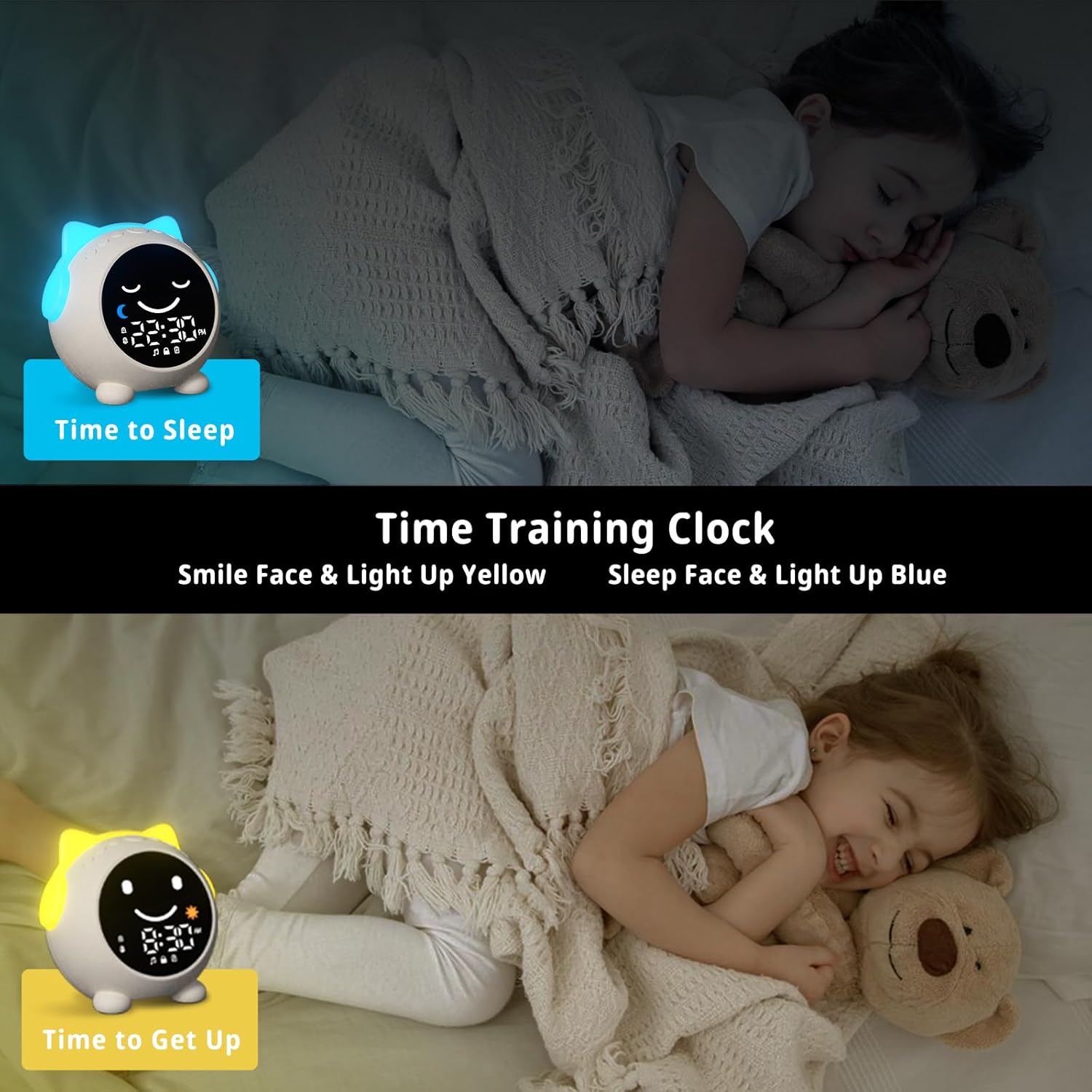
Image: The sleep training clock illustrating the "Time to Sleep" (blue light, closed eyes) and "Time to Get Up" (yellow light, open eyes) features.
6.3 Ойготкучтун Орнотуулары
The clock features dual alarms and a snooze function:
- басыңыз Ойготкучту жөндөө баскычы (Bell icon) to select Alarm 1 or Alarm 2.
- колдонуу +/- баскычтар каалаган ойготкуч убактысын коюуга.
- басыңыз Ойготкучту жөндөө баскычы ырастоо үчүн дагы.
- To activate the snooze function, simply touch the clock when the alarm sounds. It will ring again after 10 minutes, up to 3 times.
- To stop the alarm, press any button on the clock.
Видео: Бүттүview of the Toddlers Sleep Training Clock and its alarm features, including snooze functionality.
6.4 Night Light Operation
The clock offers 9 light colors and 2 brightness levels:
- Түстөрдү өзгөртүү: баскычын кыска басыңыз Түнкү жарык баскычы (Sun icon) to cycle through the 9 available colors.
- Жарыктыкты жөндөө: көпкө басыңыз Түнкү жарык баскычы to switch between the 2 brightness levels.

Image: The sleep training clock demonstrating its 9 distinct night light colors and two brightness settings.
6.5 Sleep Sound Machine
Choose from 7 soothing sleep sounds to help your child relax:
- басыңыз Музыка/Үн баскычы (Music note icon) to cycle through the available sounds: Ocean Wave, Rain, Campfire, Summer Night, Bird Songs, Wind Bell, and Fan.
- колдонуу +/- баскычтар to adjust the volume of the selected sound.

Image: The sleep training clock illustrating its 7 white noise options, including natural sounds like ocean waves and rain.
6.6 Bluetooth Music Player
Connect your smartphone or other Bluetooth-enabled device to play music through the clock's speaker:
- көпкө басыңыз Bluetooth баскычы (M icon) to enter Bluetooth pairing mode. The display will show a Bluetooth icon.
- On your device, enable Bluetooth and search for "C1" (or similar device name).
- Select "C1" to pair. Once connected, the clock will synchronize its time with your phone.
- You can now play music from your device through the clock. Use the +/- баскычтар үнүн жөндөө
7. Техникалык тейлөө
- Саатты жумшак, кургак чүпүрөк менен тазалаңыз. Абразивдүү тазалагычтарды же эриткичтерди колдонбоңуз.
- Аппаратты экстремалдык температурага же түз күн нуруна узак убакытка калтыруудан сактаңыз.
- Store the clock in a cool, dry place when not in use for extended periods.
8. Кыйынчылыктарды
| Көйгөй | Мүмкүн чечим |
|---|---|
| Clock display is blank or unresponsive. | Ensure the clock is charged. Connect it to a power source using the USB-C cable. If the issue persists, try resetting the device (if a reset button is available, otherwise let it fully discharge and recharge). |
| Ойготкуч угулбайт. | Check if the alarm is enabled and the volume is not set to zero. Verify the alarm time is correctly set. |
| Bluetooth аркылуу туташуу мүмкүн эмес. | Ensure the clock is in Bluetooth pairing mode (long press M button). Make sure Bluetooth is enabled on your device and it's within range. Try forgetting the device on your phone and re-pairing. |
| Time format stuck in 24-hour mode. | Refer to the time setting instructions. Some models may automatically switch based on phone sync, or require specific button combinations (e.g., long press time button) not explicitly detailed in general instructions. |
| Night light not changing colors/brightness. | Ensure you are using short presses for color change and long presses for brightness adjustment on the Night Light button. |
9. Техникалык шарттар
| Өзгөчөлүк | Деталь |
|---|---|
| Бренд | MRSCOZ |
| Модель номери | TCR |
| Түс | Ак |
| Дисплей түрү | Санарип |
| Продукциянын өлчөмдөрү | 3.8"W x 3.9"H |
| Power Source | Зымдуу электрдик (кайра заряддалуучу батарея) |
| Материал | Акрилонитрил бутадиен стирол (ABS) |
| Өзгөчөлүктөр | Bluetooth, Timer, Adjustable Brightness, LED Display, Adjustable Volume, Sleep Training, Night Light, Sound Machine |
| Батареялардын саны | 1 12V battery required (internal) |
| Элемент Салмагы | 9.6 унция |
10. Кепилдик жана колдоо
This MRSCOZ product comes with a limited warranty. For detailed warranty information, product support, or to report any issues, please contact MRSCOZ customer service through the retailer's platform or the official brand webсайт. Кепилдик дооматтары үчүн сатып алганыңыздын далилин сактап коюңуз.
Ask a question about this manual
Ask about setup, troubleshooting, compatibility, parts, safety, or missing instructions. Manuals+ will review the question and use this page’s manual context to help answer it.