
Introduction
This manual provides detailed instructions for the installation, operation, and maintenance of your HBEZON Medicine Cabinet with LED Lights and Mirror. This product features a 48 x 32 inch design, suitable for both surface and recessed mounting, and includes a defogger, memory function, 3-color lighting modes, integrated outlet and USB ports, dimming capability, and adjustable storage shelves. Please read this manual thoroughly before installation and use to ensure proper function and safety.
Коопсуздук маалыматы
ЭСКЕРТҮҮ: Electrical installation should be performed by a qualified electrician. Ensure power is disconnected at the circuit breaker before any installation or maintenance.
- Do not expose the cabinet to excessive moisture or direct water spray.
- Айнек тетиктерин сындырып албаш үчүн кылдаттык менен кармаңыз.
- Ensure the mounting surface is structurally sound and can support the weight of the cabinet.
- Балдарды орнотуу аянтынан алыс кармаңыз.
- Do not attempt to repair or modify the electrical components yourself. Contact qualified personnel.
Продукт бүттүview
The HBEZON Medicine Cabinet is designed to enhance your bathroom with both functionality and modern aesthetics. Key features include:
- LED жарыктандыруу: Integrated LED strips with 3 color modes (warm, natural, cold white) and dimmable brightness.
- Түзүүчү: Built-in anti-fog function for clear reflections.
- Эстутум функциясы: Акыркы жарык жөндөөңүздү эстейт.
- Электр розеткалары жана USB порттору: Convenient charging for devices inside the cabinet.
- Жөнгө салынуучу текчелер: Tempered glass shelves for flexible storage.
- Жумшак жабылуучу илниктер: DTC rustproof hinges for quiet and smooth door operation.
- Монтаждоо параметрлери: Үстүнө орнотулган же дубалдын ичине салынышы мүмкүн.

Сүрөт: алдыңкы view of the HBEZON Medicine Cabinet, highlighting its illuminated mirror and modern appearance.
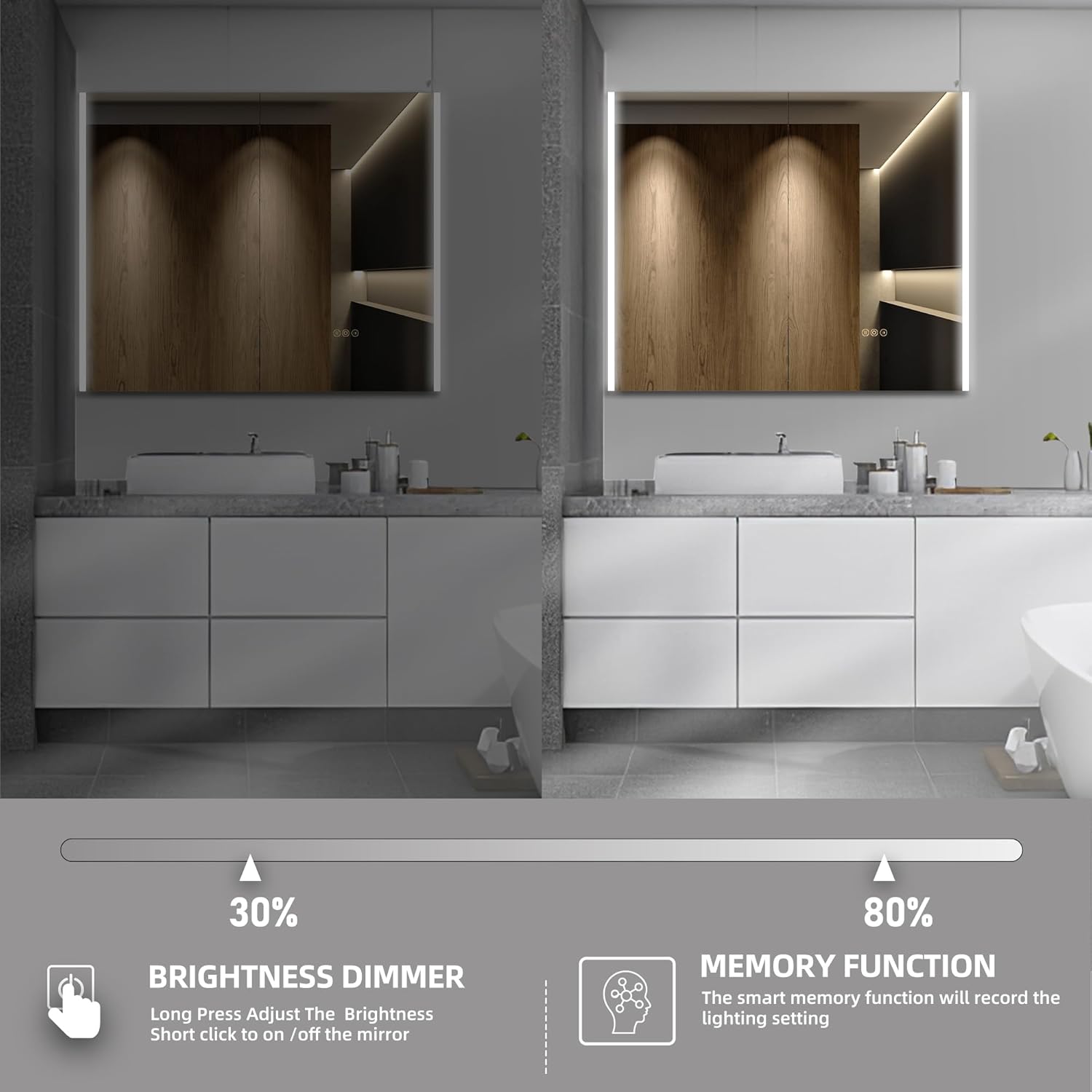
Image: Visual representation of the cabinet's main features, including lighting controls, anti-fog, and power options.
Орнотуу жана орнотуу
The HBEZON Medicine Cabinet offers both surface and recessed mounting options. Ensure you have the necessary tools and assistance before beginning installation.
Dimensions and Cutout (for Recessed Mounting)
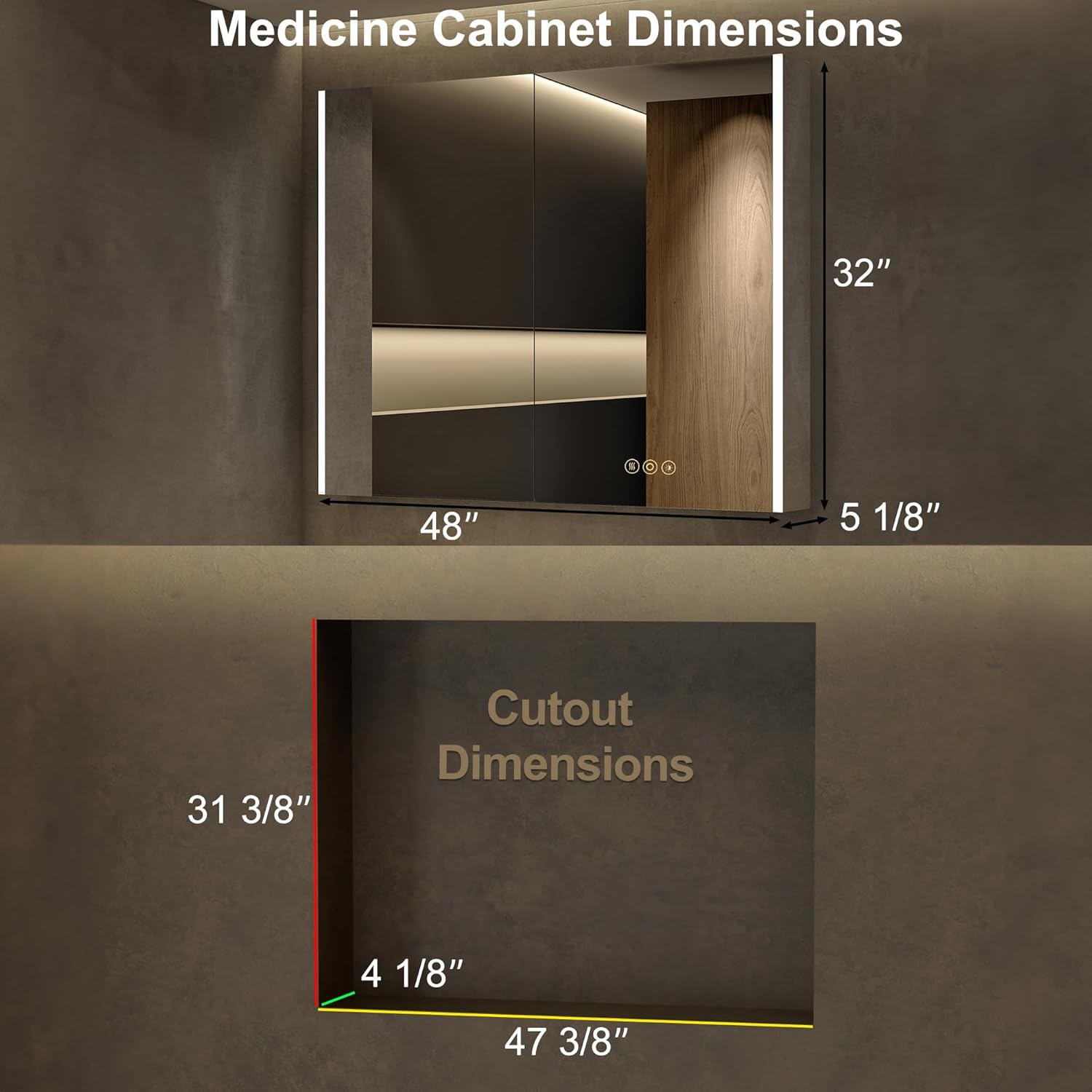
Image: Detailed dimensions for the cabinet and the required wall cutout for recessed installation.
Монтаждоо параметрлери

Image: Visual comparison of recessed mounting versus surface (wall) mounting.
Жалпы орнотуу кадамдары:
- Даярдоо: Turn off power at the main circuit breaker. Identify the desired mounting location and ensure it is free of pipes or electrical wires.
- Белгилөө: Mark the mounting points on the wall according to the cabinet's dimensions and mounting hardware.
- Монтаждоочу аппаратура: Install the provided mounting hardware securely into the wall. For recessed mounting, create the appropriate cutout in the wall.
- Зымдар: Connect the cabinet's electrical wiring to your home's electrical system. This step should be performed by a qualified electrician. Ensure all connections are secure and insulated.
- Mounting the Cabinet: Carefully lift and secure the cabinet onto the installed mounting hardware. Ensure it is level and firmly attached.
- Текчелерди тууралоо: Place the adjustable glass shelves inside the cabinet at your desired heights.
- Күйгүзүү: Орнотуу аяктагандан жана бардык туташуулар коопсуз болгондон кийин, өчүргүчтөгү кубатту калыбына келтириңиз.
Иштөө нускамалары
LED жарык башкаруу

Image: Demonstrates how to change the LED light color temperature using the touch control.
- Күйгүзүү/өчүрүү: Short press the power icon on the mirror to turn the lights on or off.
- Түс температурасын жөндөө: Short press the light icon to cycle through the three color modes: Warm (3000K), Natural (4000K), and Cold White (6000K).
- Жарыктыкты азайтуучу: Long press the light icon to adjust the brightness from 0% to 100%. Release when the desired brightness is reached.
- Эстутум функциясы: The cabinet will remember your last light setting (color mode and brightness) when turned off and on again.
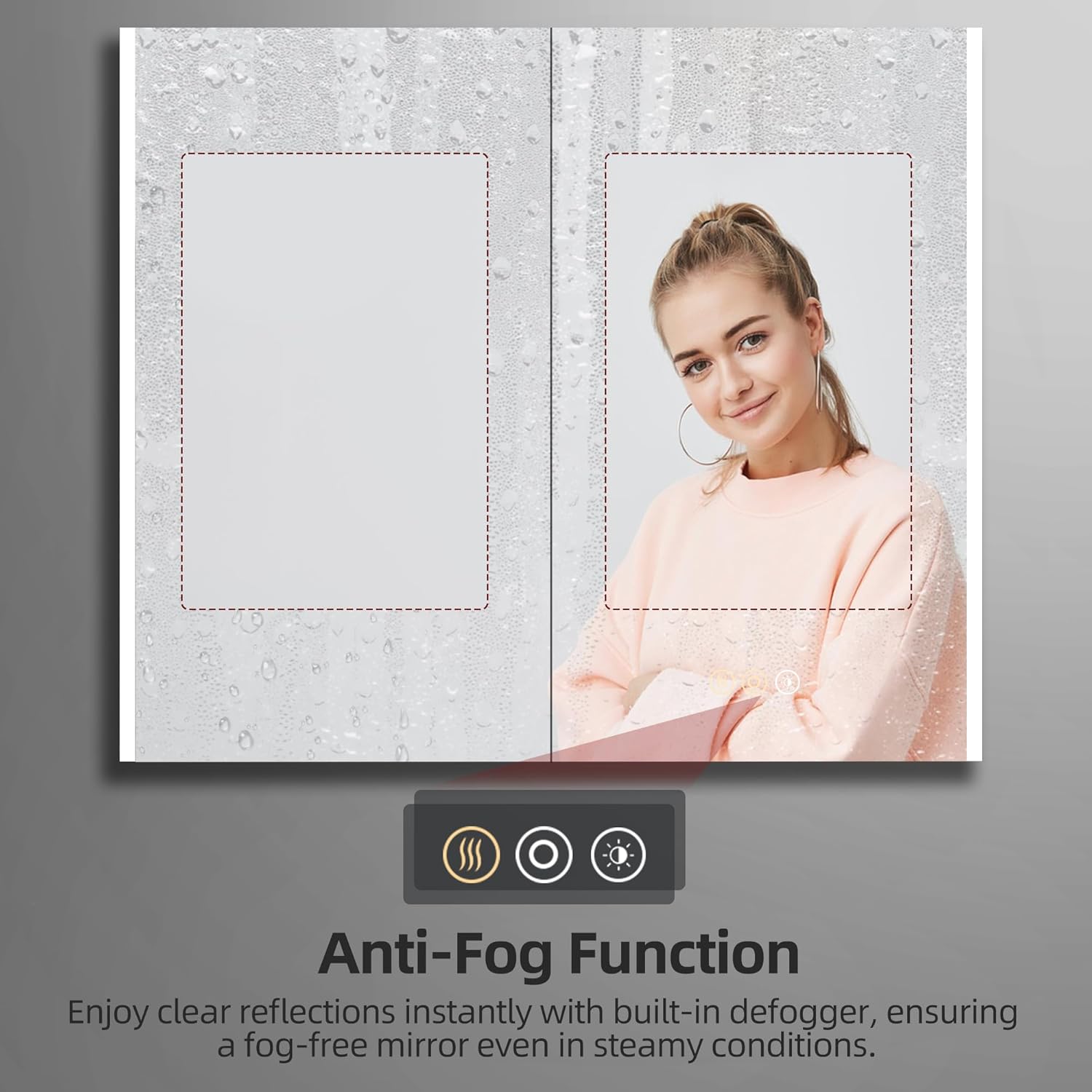
Image: Illustrates the dimming capability and the memory function of the LED lighting.
Туманга каршы функция

Image: Shows the effectiveness of the anti-fog function, keeping the mirror clear in steamy conditions.
- Дефоггерди иштетүү: Short press the defogger icon (looks like steam) on the mirror to activate the anti-fog function.
- Дефектти кетирүүчү каражатты өчүрүү: Press the defogger icon again to turn it off. It is recommended to turn off the defogger when not needed for energy efficiency.
Using Electrical Outlets and USB Ports

Сүрөт: Жакын план view of the integrated electrical outlet and USB ports within the cabinet.
- The internal electrical outlets and USB ports are active when the cabinet is connected to power.
- Use these ports to conveniently charge small electronic devices like electric toothbrushes, shavers, or smartphones.
- Do not overload the outlets. Refer to the specifications for maximum power output.
Техникалык тейлөө
- Күзгү тазалоо: Use a soft, lint-free cloth and a non-abrasive glass cleaner. Spray the cleaner onto the cloth, not directly onto the mirror, to avoid liquid seeping into electrical components.
- Кабинеттин ичин тазалоо: Wipe down interior surfaces and shelves with a damp кездеме жана жумшак жуугуч. кылдат кургатуу.
- Топчуга кам көрүү: The DTC soft-close hinges are designed for durability. Avoid applying excessive force when opening or closing the doors. No special lubrication is typically required.
- Электр компоненттери: Ensure the cabinet is disconnected from power before cleaning near electrical outlets or wiring. Do not use wet cloths directly on electrical components.
Проблемаларды чечүү
| Көйгөй | Мүмкүн себеп | Чечим |
|---|---|---|
| LED жарыктары күйбөйт. | No power supply; loose wiring; faulty touch sensor. | Check circuit breaker. Ensure all electrical connections are secure. Contact customer support if issue persists. |
| Туманга каршы функция иштебейт. | Defogger not activated; power issue. | Ensure the defogger icon is pressed. Check power supply. |
| Outlets/USB ports not working. | No power supply; internal wiring issue. | Verify main power to the cabinet. Avoid overloading. |
| Doors do not close smoothly. | Hinges misaligned or damaged. | Check hinge alignment. If damaged, contact customer support for replacement parts. |
Техникалык шарттар
| Өзгөчөлүк | Деталь |
|---|---|
| Бренд | HBEZON |
| Модель аты | AURA (Model 4832) |
| Продукциянын өлчөмдөрү | 5"D x 48"W x 32"H |
| Түс | Silver |
| Монтаж түрү | Wall Mount or Recessed Mount |
| Өзгөчөлүктөр | Smart Touch Control, Lighting Memory Function, Dimmable, 3 Color Lighting Modes, Defogger, Space-saving, Soft-close Hinges, Electrical Outlet & USB Port, Adjustable Shelves |
| Текчелердин саны | 3 (Жөнгө салынуучу чыңалган айнек) |
| Frame Material | Алюминий |
| Салмагы Limit | 60 фунт |
| Элемент Салмагы | 51 фунт |
| Камтылган компоненттер | Medicine cabinet with mirror, Mounting Hardware, Shelves |
Кепилдик жана колдоо
For warranty information or technical support, please refer to the documentation included with your purchase or contact HBEZON customer service. You can also visit the official HBEZON store on Amazon for more details and contact options.
HBEZON Store: https://www.amazon.com/stores/HBEZON/page/8EF5340D-4FAE-42F2-92D1-7037F531B1CC
Колдонуучунун колдонмосу (PDF): https://manuals.plus/m/4cf1acaebfca3c9bdf07a18cfd87af63f19a9e62aa17364159a58723dd512d7d