1. Киришүү
Thank you for choosing the Generic Life Smart Digital Door Lock M2. This advanced smart lock offers multiple secure access methods and remote management capabilities, designed to enhance the security and convenience of your home or office. Please read this manual carefully before installation and operation to ensure proper use and optimal performance.

Image 1.1: Generic Life Smart Digital Door Lock M2 Overview
This image displays the complete Generic Life Smart Digital Door Lock M2. On the right is the exterior unit, featuring a numeric keypad, a fingerprint sensor at the top, and an IC card reader symbol. On the left is the interior unit, which houses the battery compartment and the manual lock/unlock knob.
2. Негизги өзгөчөлүктөрү
- Five Access Methods: Unlock your door using fingerprint recognition, custom passcodes, IC cards, mechanical backup keys, or remotely via a smart home assistant (Wi-Fi connectivity required).
- Fully Automatic Latch: Equipped with an aluminum alloy deadbolt and a fully automatic motor for secure locking.
- Манжа изин тез таануу: Advanced sensor provides 0.3-second fingerprint recognition with up to 100 fingerprint capacity.
- Алыстан башкаруу: Manage access control from anywhere via the associated mobile application (Android/iOS), including creating temporary or scheduled codes for guests.
- Low Battery Alarm & Emergency Power: Features a low battery alarm indicator and a USB emergency power port for temporary power supply.
- Туруктуу курулуш: Made from aluminum material with a matt black, powder-coated finish.
3. Орнотуу жана орнотуу
3.1 Пакеттин мазмуну
Орнотууну баштоодон мурун, бардык компоненттердин бар экендигин текшериңиз:
- Exterior Lock Unit
- Interior Lock Unit
- Mortise/Latch Assembly
- Орнотуу боюнча колдонмо
- IC карталары (саны ар кандай болушу мүмкүн)
- Mechanical Keys (quantity may vary)
- Assembling Kits (screws, spindle, etc.)
3.2 Батареяны орнотуу
The lock requires 4x AAA batteries (not included). Ensure you use high-quality alkaline batteries for optimal performance and longevity.
- Locate the battery compartment on the interior lock unit.
- Slide or lift the battery cover to open it.
- Insert 4x AAA batteries, observing the correct polarity (+/-) as indicated inside the compartment.
- Батареянын капкагын бекем жабыңыз.

Image 3.1: Battery Installation
This image illustrates the process of installing four AAA batteries into the interior unit of the smart lock. The battery compartment is clearly visible with the cover removed, showing the correct orientation for battery placement.
3.3 Физикалык орнотуу
Refer to the included 'Installation Guide' for detailed, step-by-step instructions on physically installing the lock on your door. This process typically involves:
- Preparing the door (drilling holes if necessary).
- Installing the mortise/latch assembly.
- Mounting the exterior and interior lock units.
- Connecting internal cables.
- Testing the mechanical operation.
3.4 App Pairing and Initial Setup
To utilize the smart features, download the compatible mobile application (available for Android and iOS devices). The lock supports Bluetooth, Wi-Fi, Zigbee, and Matter connectivity protocols.
- Download the recommended smart lock application from your device's app store.
- Каттоо эсебин түзүп, кириңиз.
- Follow the in-app instructions to add a new device. This usually involves activating Bluetooth on your phone and bringing it close to the lock.
- Once paired via Bluetooth, configure Wi-Fi settings within the app to enable remote access.
- Set up an administrator passcode and register initial fingerprints/IC cards as prompted by the app.
4. Иштөө нускамалары
4.1 Манжа изи менен ачуу
The lock can store up to 100 unique fingerprints.
- To register fingerprints: Access the 'Fingerprint Management' section in the mobile app or follow the administrator menu instructions on the lock's keypad.
- To unlock: Place your registered finger flat on the fingerprint sensor. The lock will unlock in approximately 0.3 seconds if the fingerprint is recognized.

Image 4.1: Fingerprint Unlock
This image demonstrates the fingerprint unlock feature. A finger is shown interacting with the circular fingerprint sensor at the top of the exterior lock unit. Accompanying text highlights the speed, accuracy, and capacity of the fingerprint recognition system.
4.2 Passcode Unlock
You can set up multiple user passcodes, including a virtual password feature for enhanced security.
- To set passcodes: Use the mobile app or the lock's administrator menu to create and manage passcodes.
- To unlock: Enter your registered passcode on the keypad, followed by the '#' key.
- Virtual Passcode: To prevent others from guessing your code, you can enter random digits before or after your actual passcode. For example, if your passcode is '123456', you can enter '987123456098#' to unlock.

Image 4.2: Virtual Passcode Unlock
This image illustrates the virtual password feature. The smart lock's keypad is shown with a sequence of numbers being entered. A green box highlights the correct password '865677' embedded within a longer string of digits, demonstrating how random numbers can be added before and after the actual code for security.
4.3 IC Card Unlock
The lock supports unlocking with registered IC cards.
- To register IC cards: Use the mobile app or the lock's administrator menu to add new IC cards.
- To unlock: Present a registered IC card to the card reader area on the lock's keypad.
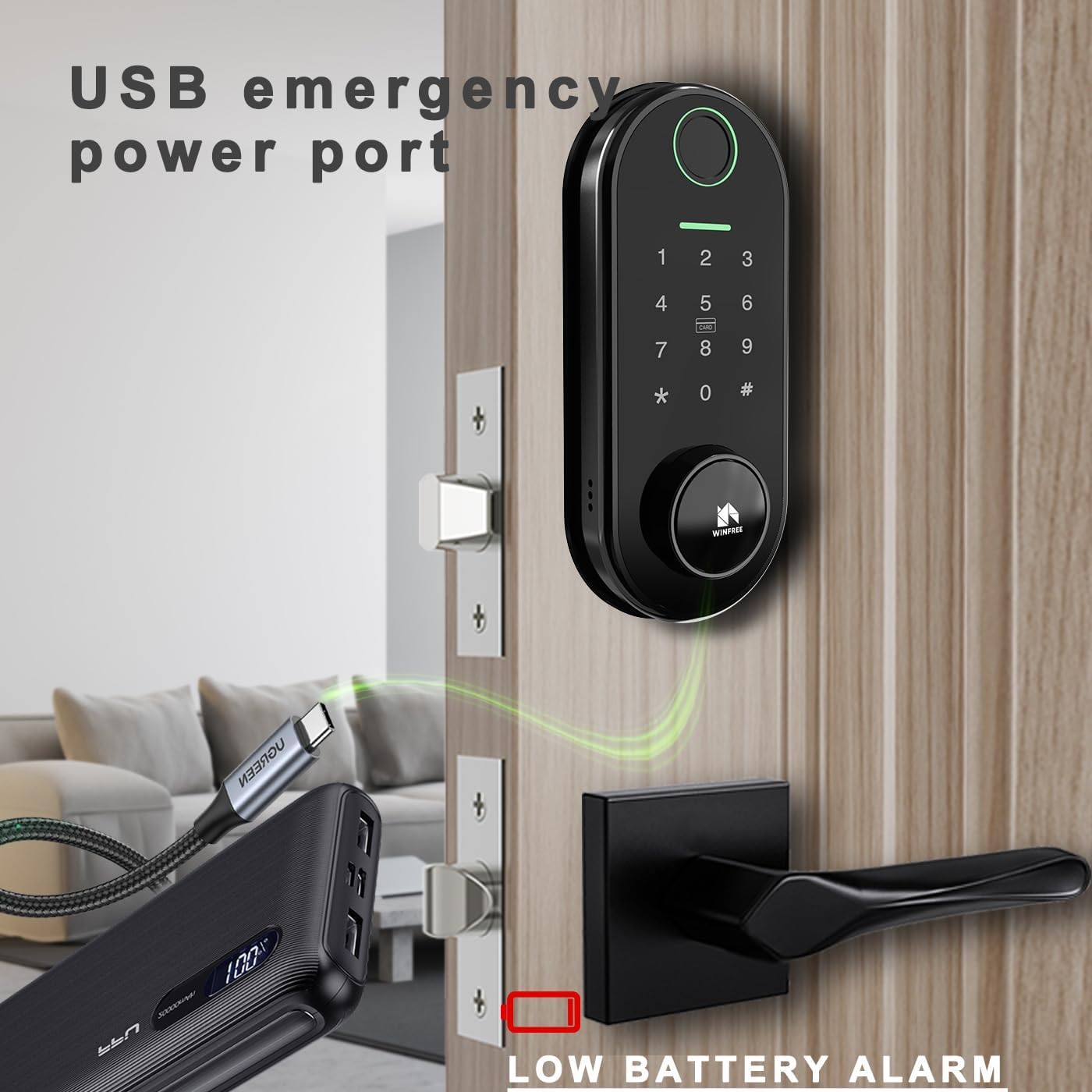
Image 4.3: IC Card Unlock
This image shows a hand holding a small, rectangular IC card labeled 'SMART LOCK' near the keypad of the smart door lock. The card is positioned over the area marked 'CARD', demonstrating the method for unlocking the door using an IC card.
4.4 Mobile App Unlock & Management
The mobile application provides comprehensive control and monitoring features.
- Алыстан кулпуну ачуу: Unlock the door from anywhere with an internet connection (requires Wi-Fi gateway setup).
- Убактылуу сырсөздөр: Коноктор же кызмат көрсөтүүчүлөр үчүн бир жолку же убакыт чектелген өткөрүүчү коддорду жаратыңыз.
- Unlock History: View a log of all lock and unlock events, including method and user.
- Колдонуучуну башкаруу: Add, modify, or delete users, fingerprints, passcodes, and IC cards.
- Access Schedules: Set specific times or days when certain users can access the lock.
4.5 Mechanical Key Unlock
In case of battery depletion or electronic malfunction, mechanical keys provide emergency access.
- Locate the keyhole, typically concealed on the exterior unit.
- Insert the mechanical key and turn to unlock the door.

Image 4.4: Mechanical Key and USB Emergency Power
This image shows two emergency access methods for the smart lock. A mechanical key is inserted into a discreet keyhole on the bottom of the exterior unit, providing a traditional unlock option. Additionally, a USB cable is connected to the emergency power port, indicating a way to temporarily power the lock if batteries are depleted.
5. Техникалык тейлөө
5.1 Батареяны алмаштыруу
The lock will provide a low battery alarm when power is critically low. Replace all four AAA batteries promptly to ensure continuous operation. Refer to Section 3.2 for battery installation instructions. The typical battery life is approximately 9 months under normal usage.
5.2 Тазалоо
Кулпуңуздун көрүнүшүн жана функционалдуулугун сактоо үчүн:
- Сырткы беттерди жумшак, кургак чүпүрөк менен сүртүңүз.
- Абразивдүү тазалагычтарды, эриткичтерди же катуу химиялык заттарды колдонуудан алыс болуңуз, анткени алар финишке жана электрондук компоненттерге зыян келтириши мүмкүн.
- Оптималдуу иштеши үчүн манжа изинин сенсору менен клавиатураны таза жана таштандылардан тазалаңыз.
6. Кыйынчылыктарды
| Көйгөй | Мүмкүн себеп | Чечим |
|---|---|---|
| Кулпу жооп бербейт. | Батареялар түгөнүп калган. | Replace batteries (Section 3.2) or use USB emergency power (Section 4.5). |
| Манжа изи таанылган жок. | Finger is dirty/wet, sensor is dirty, or fingerprint not properly registered. | Ensure finger and sensor are clean and dry. Re-register fingerprint if necessary. |
| Өткөрүүчү код иштебей жатат. | Incorrect passcode entered, or passcode expired (for temporary codes). | Verify the passcode. Check app for temporary code validity. |
| Алыстан ачуу иштебей жатат. | No Wi-Fi connection, or Wi-Fi gateway not properly configured. | Check Wi-Fi router and gateway connection. Ensure lock is connected to Wi-Fi in the app. |
| Кулпу адаттан тыш үндөрдү чыгарат. | Obstruction in the door frame or latch mechanism. | Inspect the door frame and latch for any obstructions. Ensure proper alignment during installation. |
7. Техникалык шарттар
- Бренд: Жалпы
- Модель аты: LIFE_M2
- Материал: Алюминий
- Түсү: Мэтт Блэк
- Бүткөн түрү: Powder капталган
- Кулпу түрү: Combination Lock, Latch
- Элементтин өлчөмдөрү (L x W x Y): 6.8 x 2.5 x 1 дюйм
- Элемент Салмагы: 4.4 фунт
- Кубат булагы: 4x AAA батарейкалар (киргизилген эмес)
- Туташуу протоколдору: Bluetooth, Wi-Fi, Zigbee, Matter
- Контролдоо ыкмалары: App, Remote, Touchpad
- Контроллердин түрү: Android, iOS
- Өзгөчөлүктөр: Auto-Lock, Fingerprint Unlock, Passcode Unlock, IC Card Unlock, Mechanical Key Unlock, Low Battery Alarm, USB Emergency Power Port, Remote Access Control.
- Сунушталган колдонуулар: Hotel room door lock, Service apartment door lock, Residential and Commercial office door lock.
8. Кепилдик жана колдоо
Кепилдик маалыматы жана техникалык колдоо үчүн, сатып алуу учурунда берилген документтерди караңыз же сатуучу менен түз байланышыңыз. Сатып алганыңыздын далили катары сатып алуу дүмүрчөгүңүздү сактаңыз.