
1. Киришүү
Welcome to the realme 14 Pro 5G Smartphone user manual. This guide provides essential information to help you get started with your new device, understand its features, and ensure optimal performance. The realme 14 Pro 5G combines advanced technology with a unique design, offering a powerful and reliable mobile experience.
Key features of your realme 14 Pro 5G include:
- Sony IMX882 OIS Camera: 50MP Ultra-Clear OIS camera with AI Clarity for stunning photos and a triple MagicGlow flash.
- Dimensity 7300 Energy 5G Chipset: An ultra-fast and energy-efficient 4nm processor for smooth daily use.
- AI Ultra Clarity 2.0: Enhances every shot with advanced AI for natural lighting, improved night noise reduction, and ultra-clear zoom.
- Maximum Water Resistance: IP69, IP68, and IP66 ratings ensure durability against water and dust.
- Уникалдуу дизайн: A pearl-inspired design with cold-sensitive fusion fibers that allow for a color-changing effect.
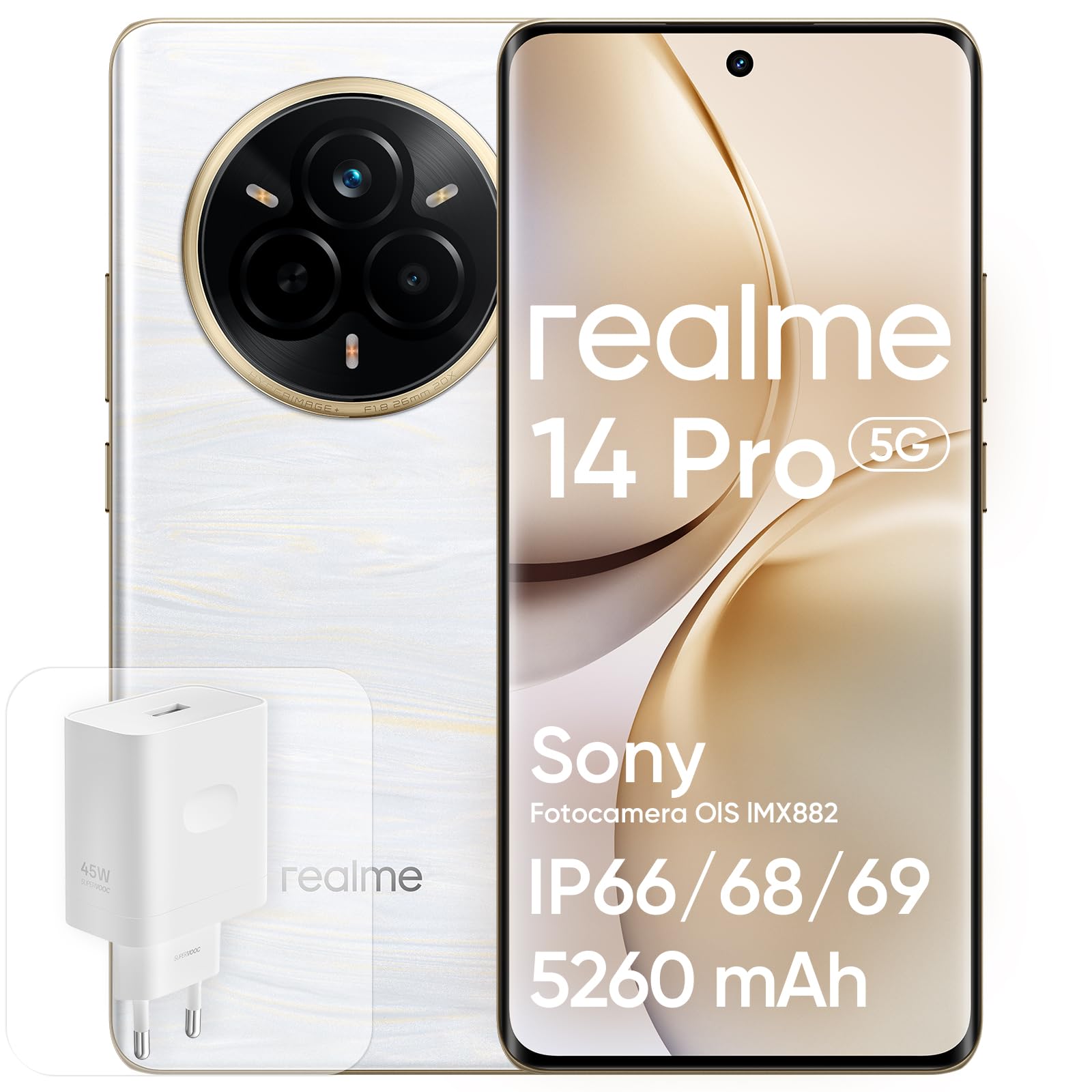
Figure 1: realme 14 Pro 5G Smartphone. This image shows the elegant design of the device, highlighting its display and camera module.
2. Орнотуу
2.1 Кутудан чыгаруу жана алгачкы текшерүү
Пакетти ачкандан кийин, бардык компоненттери бар экенин жана бузулбаганын текшериңиз. Куту төмөнкүлөрдү камтышы керек:
- realme 14 Pro 5G смартфону
- USB кабели
- Телефон корпусу
- Коргоочу пленка (алдын ала колдонулган же өзүнчө)
- Charging Head (Adapter)

2-сүрөт: Арткы view of the realme 14 Pro 5G, showcasing its camera array and unique back panel design.
2.2 SIM картаны салуу
- Түзмөгүңүздүн капталындагы SIM карта салгычын табыңыз.
- Салгычты ачуу үчүн берилген SIM чыгаруучу куралды колдонуңуз.
- Place your Nano SIM card into the tray, ensuring the gold contacts face downwards and the card is correctly oriented.
- Телефондун корпусу менен бирдей болгуча, лотокту акырын уячага түртүңүз.
2.3 Баштапкы күйгүзүү жана негизги орнотуу
- realme логотиби пайда болгонго чейин Кубат баскычын басып, кармап туруңуз.
- Тилди, аймакты тандоо жана Wi-Fi тармагына туташуу үчүн экрандагы көрсөтмөлөрдү аткарыңыз.
- Sign in with your Google account or create a new one to access Android services and the Google Play Store.
- Set up your screen lock method, such as PIN, pattern, or password.
2.4 Манжа изин таанууну орнотуу
Your realme 14 Pro 5G features an in-display fingerprint sensor for secure and quick unlocking.
- багыттоо Settings > Security & privacy > Fingerprint.
- Follow the on-screen instructions to register your fingerprint. Ensure your finger covers the sensor completely during the process.
- Ыңгайлуулук үчүн бир нече манжа издерин каттай аласыз.
2.5 Аппаратты заряддоо
Before first use, it is recommended to fully charge your device. Use the provided 45W SUPERVOOC charging head and USB cable for optimal charging speed.
- Connect the USB cable to the charging head and then to a power outlet.
- Plug the other end of the USB cable into the USB-C port at the bottom of your phone.
- Экранда заряддоо индикатору пайда болот.

Figure 3: Visual representation of the 5260mAh battery and 45W SUPERVOOC charging technology.
Видео 1: Бүттүview of the realme 14 Pro 5G Smartphone, demonstrating its design and user interface. This video provides a visual guide to the phone's features and initial interaction.
3. Operating Your realme 14 Pro 5G
3.1 Дисплейдин өзгөчөлүктөрү
The realme 14 Pro 5G features a 6.77-inch 120Hz 3D Curved Vision OLED Display with a resolution of 2392x1080 pixels. This display offers vibrant colors, deep blacks, and smooth scrolling for an immersive visual experience.
- 120Hz жаңыртуу ылдамдыгы: Provides fluid animations and a responsive touch experience.
- 3D Curved Vision: Чөмүлүүнү жакшыртат жана ыңгайлуу кармоону камсыз кылат.
- OLED технологиясы: Delivers excellent contrast and color accuracy.

Figure 4: The 6.77-inch 120Hz 3D Curved Vision Display in action, showcasing its vibrant colors and immersive viewтажрыйбасы.
3.2 Камераны колдонуу
Your device is equipped with a powerful Sony IMX882 OIS 50MP Ultra-Clear camera system, designed to capture stunning photos and videos in various conditions.
- 50MP Негизги камера: Captures high-resolution images with optical image stabilization (OIS).
- AI Ultra Clarity 2.0: Automatically enhances photo quality, especially in low light, by reducing noise and improving detail.
- MagicGlow үч эселенген жаркылдоосу: Provides enhanced illumination for portraits and close-up shots.
- 50MP алдыңкы камера: Жогорку сапаттагы селфи жана видео чалуулар үчүн.
To open the camera, tap the camera icon on your home screen or swipe left from the lock screen. Explore various modes like Photo, Portrait, Night, and Video.

Figure 5: Demonstrates the 50MP+16MP camera capabilities, including night portraits, underwater mode, and Livephoto features.
3.3 Ишти аткаруу жана байланыш
Powered by the Dimensity 7300 Energy 5G chipset, your realme 14 Pro 5G delivers robust performance for multitasking, gaming, and demanding applications. With 12GB of RAM and 512GB of internal storage, you have ample space and speed for all your needs.
- 5G байланышы: Enjoy ultra-fast download and upload speeds, and low latency for streaming and online gaming.
- Wi-Fi жана Bluetooth: Standard wireless connectivity for internet access and connecting accessories.

Figure 6: The realme 14 Pro Series, highlighting its powerful performance and AI capabilities.
4. Техникалык тейлөө
4.1 Суу жана чаңга туруктуулук
The realme 14 Pro 5G boasts IP69, IP68, and IP66 ratings, providing excellent resistance against dust and water. This means your phone can withstand high-pressure, high-temperature water jets (IP69), continuous immersion in water (IP68), and powerful water jets (IP66).
- While highly resistant, avoid intentional submersion in harsh conditions or prolonged exposure to water.
- Ensure all ports are dry before charging to prevent damage.

Figure 7: The realme 14 Pro 5G submerged in water, illustrating its robust IP69, IP68, and IP66 water resistance ratings.
4.2 Аппаратыңызды тазалоо
To keep your phone clean and extend its lifespan:
- Экранды жана корпусту сүртүү үчүн жумшак, түксүз чүпүрөктү колдонуңуз.
- Катуу химиялык заттарды, абразивдүү материалдарды же аэрозолдук спрейлерди колдонуудан алыс болуңуз.
- өжөр тактар үчүн, бир аз гampчүпүрөккө суу же электроника үчүн арналган экран тазалагыч.
4.3 Батареяга кам көрүү
The 5260mAh battery provides extended usage. To maintain battery health:
- Ашыкча температурадан, ысыктан да, муздактан да алыс болуңуз.
- Аспабыңыз менен келген оригиналдуу заряддагычты жана кабелди гана колдонуңуз.
- Узак мөөнөттүү сактоо үчүн, батарейканы болжол менен 50% кубаттап, аппаратты өчүрүңүз.
5. Кыйынчылыктарды
This section addresses common issues you might encounter with your realme 14 Pro 5G.
5.1 Түзмөк күйбөй жатат
- Батареяны текшерүү: Ensure the device has sufficient charge. Connect it to the charger for at least 15-30 minutes.
- Мажбурлап кайра иштетүү: Press and hold the Power button and Volume Down button simultaneously for about 10-15 seconds until the realme logo appears.
5.2 Screen Freezing or Unresponsive
- Мажбурлап кайра иштетүү: Perform a force restart as described above.
- Колдонмолорду жабуу: If the screen is partially responsive, try closing recent applications.
- Программалык камсыздоону жаңыртуу: Ensure your device's software is up to date via Орнотуулар > Түзмөк жөнүндө > realme UI версиясы.
5.3 Camera Not Opening or Functioning
- Түзмөктү кайра иштетүү: Жөнөкөй кайра күйгүзүү көп учурда убактылуу программалык мүчүлүштүктөрдү чечет.
- Clear Camera App Cache: барыңыз Settings > Apps > Camera > Storage usage > Clear cache and Clear data. Note: This will reset camera settings.
- Уруксаттарды текшерүү: Ensure the camera app has necessary permissions via Settings > Apps > Camera > Permissions.
5.4 Байланыш маселелери (Wi-Fi, Bluetooth, 5G)
- Күйгүзүү/өчүрүү: Turn Wi-Fi, Bluetooth, or Mobile Data off and then back on.
- Маршрутизаторду/модемди кайра иштетүү: For Wi-Fi issues, restart your router.
- Тармак жөндөөлөрүн баштапкы абалга келтирүү: барыңыз Орнотуулар > Тутум орнотуулары > Камдык көчүрмөнү сактоо жана баштапкы абалга келтирүү > Телефонду баштапкы абалга келтирүү > Тармак жөндөөлөрүн баштапкы абалга келтирүү. This will reset Wi-Fi, Bluetooth, and mobile network settings.
6. Техникалык шарттар
Here are the detailed technical specifications for the realme 14 Pro 5G Smartphone:
| Өзгөчөлүк | Спецификация |
|---|---|
| Бренд | realme |
| Модел | 14 Pro 5G |
| CPU ылдамдыгы | 2.5 ГГц |
| Эстутумдун сыйымдуулугу (RAM) | 12 GB (as per product title, though not explicitly in specs list) |
| Storage Capacity (ROM) | 512 ГБ |
| Screen Size | 6.77 дюйм |
| Резолюция | 2392x1080 |
| Жаңыртуу ылдамдыгы | 120 Гц |
| Уюлдук технология | 5G |
| Байланыш технологиясы | 5G |
| Түс | Ак (Бианко) |
| SIM карта уячалары | Single SIM (Nano SIM) |
| биометрикалык аныктоо | Манжа изин таануу |
| Сууга туруктуулук деңгээли | Waterproof (IP69, IP68, IP66) |
| Наушник уясы | Жок |
| Алдыңкы камеранын чечилиши | 50 депутат |
| Арткы камеранын чечилиши | 50 MP (Dual Rear Cameras) |
| Батарея сыйымдуулугу | 5260 миллионamper-hour (mAh) |
| Элементтин өлчөмдөрү | 16.3 x 7.5 x 0.8 см |
| Talk Time | 20 саат |
| GPS Функционалдуулугу | Туура |
| Дисплей түрү | OLED |
| Display Pixel Density | 386 Pixels per inch (PPI) |
| Видео тартуунун резолюциясы | 1080 кадр/секунда 120p |
| Видео кадр ылдамдыгы | 60 кадр/сек |
7. Кепилдик жана колдоо
7.1 Продукциянын кепилдиги
realme products come with a бир жылдык кепилдик. We adhere to strict standards in every phase, from design to production, to ensure that every product meets our commitment to quality. This warranty covers manufacturing defects and ensures that your product performs as expected under normal use.

Figure 8: Details regarding realme's one-year warranty and commitment to quality.
7.2 Кардарларды колдоо
We are committed to providing high-quality goods and services to ensure a worry-free shopping experience. If you have any questions or require assistance, please do not hesitate to contact us. We will respond within 24 hours.
- Тез жооп: Support available with a response within 24 hours.
- Free Returns & Exchanges: Сатып алгандан кийин 30 күндүн ичинде.
- Сатуудан кийинки колдоо: One year of dedicated after-sales support.
For further assistance, please visit the official realme support webсайтка же сатуучуга кайрылыңыз.

Figure 9: realme's promise of service, including 24-hour response, 30-day returns, and 1-year after-sales support.