
Introduction
Thank you for choosing the CHUWI Wireless Mouse S1. This 2.4GHz USB computer mouse is designed for comfort and efficiency, featuring a 1600 DPI optical sensor with 3-level adjustable DPI settings, long battery life, and broad compatibility with various devices. This manual provides essential information for setting up, operating, maintaining, and troubleshooting your new wireless mouse.
Пакеттин мазмуну
Пакетиңизде бардык буюмдар бар экенин текшериңиз:
- CHUWI Wireless Mouse
- USB кабыл алгыч
- Колдонуучунун документтери
- 1 AA Батарея (алдын ала орнотулган же өзүнчө камтылган)
Орнотуу колдонмосу
Follow these steps to set up your CHUWI Wireless Mouse S1:
- USB кабыл алгычты табыңыз: Gently remove the bottom cover of the mouse by sliding it downward. The USB receiver and the battery compartment are located inside.
- Батареяны орнотуу: Insert the provided AA battery into the battery compartment, ensuring correct polarity.
- USB кабыл алгычты алыңыз: Take out the small USB receiver from its storage slot.
- Түзмөгүңүзгө туташуу: Plug the USB receiver into an available USB port on your computer, laptop, or tablet.
- Мукабаны жабуу: Replace the bottom cover of the mouse.
- Күйгүзүү: Slide the power switch at the bottom of the mouse to the "on" position. The mouse should now be ready for use.

Figure 1: Locating the USB receiver and installing the AA battery.
Иштөө нускамалары
Чычканды туташтыруу
The CHUWI Wireless Mouse S1 uses 2.4G wireless technology for a stable connection up to 33 feet (10 meters). Once the USB receiver is plugged into your device and the mouse is powered on, it will automatically establish a connection. No complex pairing is required.

Figure 2: Establishing a 2.4G wireless connection.
DPI тууралоо
The mouse features three adjustable DPI (Dots Per Inch) settings: 800, 1200, and 1600. To switch between DPI levels, simply press the DPI button located below the scroll wheel. Each press cycles through the available settings, allowing you to adjust cursor sensitivity for different tasks such as general browsing, office work, graphic design, or gaming.

Figure 3: Adjusting DPI settings with the dedicated button.
Чабыттоо баскычтары
The mouse is equipped with convenient forward and back buttons on the side. These buttons allow for quick navigation through web pages, documents, and folders, enhancing your workflow efficiency.
Үнсүз чыкылдатуу функциясы
The CHUWI Wireless Mouse S1 is designed with silent click buttons, making it suitable for quiet environments such as libraries, offices, or late-night use. This feature minimizes click noise without compromising tactile feedback.

Figure 4: The silent click feature for quiet operation.
Эргономикалык дизайн
The mouse features an ergonomic design that conforms to the natural curve of your hand, providing a comfortable grip for extended use. Its compact and lightweight build, along with rubber-coated side grips, helps reduce hand fatigue. The design is ambidextrous, accommodating both left-handed and right-handed users.

Figure 5: Ergonomic design for comfortable use.
Батарея маалыматы
The CHUWI Wireless Mouse S1 is powered by a single AA battery, offering an approximate battery life of 12-15 months. The mouse is designed for convenience with no on/off switch; simply pick it up and start using it. This design eliminates the need for frequent charging, providing hassle-free use for mobile work and daily tasks.
Техникалык тейлөө
To ensure optimal performance and longevity of your CHUWI Wireless Mouse S1:
- Тазалоо: Чычкандын бетин сүртүү үчүн жумшак, кургак чүпүрөктү колдонуңуз. өжөр кир үчүн, бир аз гampчүпүрөктү суу же жумшак тазалоо эритмеси менен жууп салыңыз. Катуу химиялык заттарды же абразивдүү материалдарды колдонуудан алыс болуңуз.
- Сенсорду тейлөө: Periodically clean the optical sensor area at the bottom of the mouse with a cotton swab to prevent dust buildup, which can affect tracking performance.
- Сактагыч: When not in use for extended periods, consider removing the AA battery to prevent potential leakage. Store the USB receiver in its designated slot within the mouse to prevent loss.
- Курчап турган чөйрөнү коргоо: The mouse features a splash-proof and dust-proof design, contributing to its durability. However, avoid exposing it to excessive moisture or dust.
Проблемаларды чечүү
If you encounter issues with your CHUWI Wireless Mouse S1, refer to the following common solutions:
- Чычкан жооп бербейт:
- AA батареясы туура орнотулганын жана жетиштүү заряддалганын текшериңиз. Зарыл болсо, батареяны алмаштырыңыз.
- USB кабыл алгыч компьютериңиздеги иштеп жаткан USB портуна бекем сайылганын текшериңиз. Башка USB портун колдонуп көрүңүз.
- Make sure the mouse's power switch (if present, though this model is designed to be always on when battery is inserted) is in the 'on' position.
- Компьютериңизди өчүрүп күйгүзүңүз.
- Курсордун туруксуз кыймылы:
- Чычкандын түбүндөгү оптикалык сенсорду тазалаңыз.
- Чычканды ылайыктуу бетте колдонуп жатканыңызды текшериңиз. Өтө жарык чагылдыруучу же тунук беттер көзөмөлдөөгө таасир этиши мүмкүн. Чычкандын жаздыкчасы сунушталат.
- Check for interference from other wireless devices. Move the mouse closer to the USB receiver.
- Туташуу маселелери:
- If the connection is unstable, try plugging the USB receiver into a different USB port, preferably one closer to the mouse.
- Чычкан менен кабыл алгычтын ортосунда сигналды тосуп кала турган чоң металл буюмдар жок экенин текшериңиз.
- Баскычтар иштебейт:
- Check if the mouse is properly connected and powered on.
- Көйгөй чычкандын өзүндө же компьютердин жөндөөлөрүндө экенин аныктоо үчүн чычканды башка компьютерде сынап көрүңүз.
Техникалык шарттар
Detailed specifications for the CHUWI Wireless Mouse S1:
| Продукциянын өлчөмдөрү | 3.89 x 2.36 x 0.04 дюйм |
| Элемент Салмагы | 1.76 унция |
| Элемент моделинин номери | CHUWI Wireless Mouse S1 |
| Батареялар | 1 AA батарейка (кошулган) |
| Байланыш технологиясы | 2.4G зымсыз (USB кабыл алуучу) |
| Кыймылды аныктоо технологиясы | Оптикалык |
| DPI орнотуулары | 800, 1200, 1600 (Жөнгө салынуучу) |
| Buttons | 4 (Left, Right, Scroll Wheel/Middle, DPI, Forward, Back) |
| Түс | Кара |
| Шайкештик | PC, Mac, Laptop, Windows Tablets (Universal USB interface) |
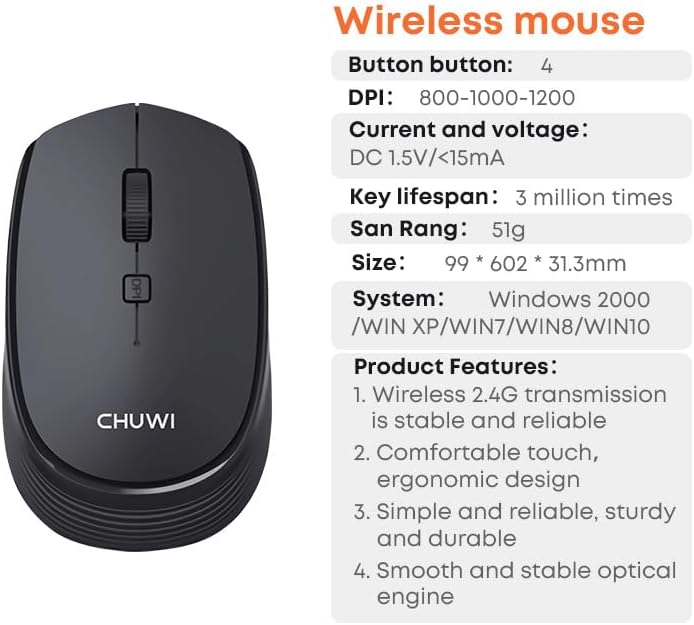
Figure 6: CHUWI Wireless Mouse S1 and its key specifications.
Кепилдик жана колдоо
CHUWI is committed to providing high-quality products and excellent customer service. While specific warranty details for this mouse are not provided, CHUWI generally offers professional support for its products.
- Кесиптик колдоо: CHUWI offers lifetime factory professional support.
- Онлайн колдоо: 24 hours of online support is available to assist with any issues or questions you may have.
For further assistance, please visit the official CHUWI webсайтка же түздөн-түз кардарларды тейлөөгө кайрылыңыз.