
1. Киришүү
TP-Link Deco X20-OUTDOOR – бул сиздин Deco торчолуу Wi-Fi тармагыңызды сырткы аймактарга кеңейтүү үчүн иштелип чыккан AX1800 кош тилкелүү Wi-Fi 6 сырткы торчо кеңейткичи. Ал 2,200 чарчы футка чейин ишенимдүү Wi-Fi камтуусун камсыз кылат жана 150дөн ашык түзмөктөрдү колдойт, бул ар кандай сырткы иш-чаралар үчүн үзгүлтүксүз туташууну камсыз кылат. Түзмөк IP65 аба ырайына туруктуу дизайнга ээ, бул аны катаал сырткы шарттарга ылайыктуу кылат.
Кутуда эмне бар
- 1 × Deco X20-Сырткы блок
- 1 × AC кубат шнуру
- 1 × RJ45 Ethernet кабели
- Дубалга/мамыга орнотуу комплекти (мамыга орнотуучу боо, пластик дубал анкерлери, өзү бурама бурамалар)
- Орнотуу боюнча колдонмо

Сүрөт 1.1: TP-Link Deco X20-OUTDOOR блогу.
2. Орнотуу жана орнотуу
Deco X20-OUTDOOR түзмөгүңүздү орнотуу жана аны учурдагы Deco тор тармагыңызга интеграциялоо үчүн төмөнкү кадамдарды аткарыңыз.
2.1 Аппаратты кубаттоо
Deco X20-OUTDOOR эки кубаттуулук вариантын колдойт:
- Power over Ethernet (PoE+): PoE+ иштетилген коммутатордон же инжектордон Ethernet кабелин Deco блогундагы Гигабиттик Ethernet портторунун бирине туташтырыңыз. Бул кубаттуулукту жана маалыматтарды туташтырууну камсыз кылат.
- AC электр менен камсыздоо: Deco блогун стандарттуу электр розеткасына туташтыруу үчүн комплекттеги AC кубат шнурун колдонуңуз.

Сүрөт 2.1: Төмөнкү view Deco X20-OUTDOOR блогунун 2x PoE гигабит портторун жана AC кубат булагынын киргизүүсүн баса белгилеп.
2.2 Монтаждоо параметрлери
Deco X20-OUTDOOR ар кандай чөйрөлөр үчүн ийкемдүү орнотуу варианттарын сунуштайт:
- Уюлга орнотуу: Түзмөктү мамыга бекитүү үчүн берилген мамыга бекитүүчү боону колдонуңуз.
- Дубалга орнотуу: Пластик дубал анкерлерин жана өз алдынча бурамаларды колдонуп, түзмөктү дубалга бекитиңиз.
- Стол үстү: Жабдууну имараттын ичинде же сыртында колдонуу үчүн тегиз жерге коюңуз.

Сүрөт 2.2: Deco X20-OUTDOOR үчүн көп жайгаштыруу параметрлери, анын ичинде мамы, дубал жана үстөл үстүндөгү орнотуулар.
2.3 Deco колдонмосу менен баштапкы конфигурация
Deco колдонмосу сизге орнотуу процессинде жардам берет. Негизги Deco түзмөгүңүз мурунтан эле орнотулганын жана иштеп жатканын текшериңиз.
- Туташуу: Deco X20-OUTDOOR түзмөгүн күйгүзүп, аны модемиңизге же зымдуу кайра туташтыруу ыкмасын колдонуп жатсаңыз, Ethernet аркылуу бар болгон Deco түзмөгүнө туташтырыңыз.
- Жүктөп алуу: TP-Link Deco колдонмосун App Store (iOS) же Google Play Дүкөнүнөн (Android) жүктөп алыңыз.
- Тарамдоо: Deco колдонмосун ачыңыз, кириңиз же TP-Link ID түзүңүз жана жаңы Deco X20-OUTDOOR түзмөгүңүздү торчо тармагыңызга кошуу үчүн колдонмодогу көрсөтмөлөрдү аткарыңыз. Колдонмо жаңы түзмөктү аныктап, аны интеграциялоо боюнча сизге жетекчилик кылат.

Сүрөт 2.3: Deco колдонмосун орнотуу процесси боюнча байланыш, колдонмону жүктөп алуу жана конфигурациялоо кадамдарын көрсөткөн визуалдык көрсөтмө.
3. Иштөө нускамалары
Deco X20-OUTDOOR түзмөгүңүздүн негизги өзгөчөлүктөрүн жана функцияларын түшүнүңүз.
3.1 Wi-Fi 6 AX1800 иштөөсү
Deco X20-OUTDOOR жогорку ылдамдыктагы кош диапазондуу байланышты камсыз кылуу үчүн Wi-Fi 6 технологиясын колдонот:
- 5 ГГц диапазону: Агымдуу оюндар жана оюндар сыяктуу татаал тапшырмалар үчүн 1201 Мбит/сек чейин.
- 2.4 ГГц диапазону: Жалпы серептөө жана акылдуу үй түзмөктөрү үчүн 574 Мбит/сек чейин.
Бул сиздин тармагыңыздагы маалыматтарды натыйжалуу өткөрүп берүүнү жана кечигүүнү азайтууну камсыз кылат.
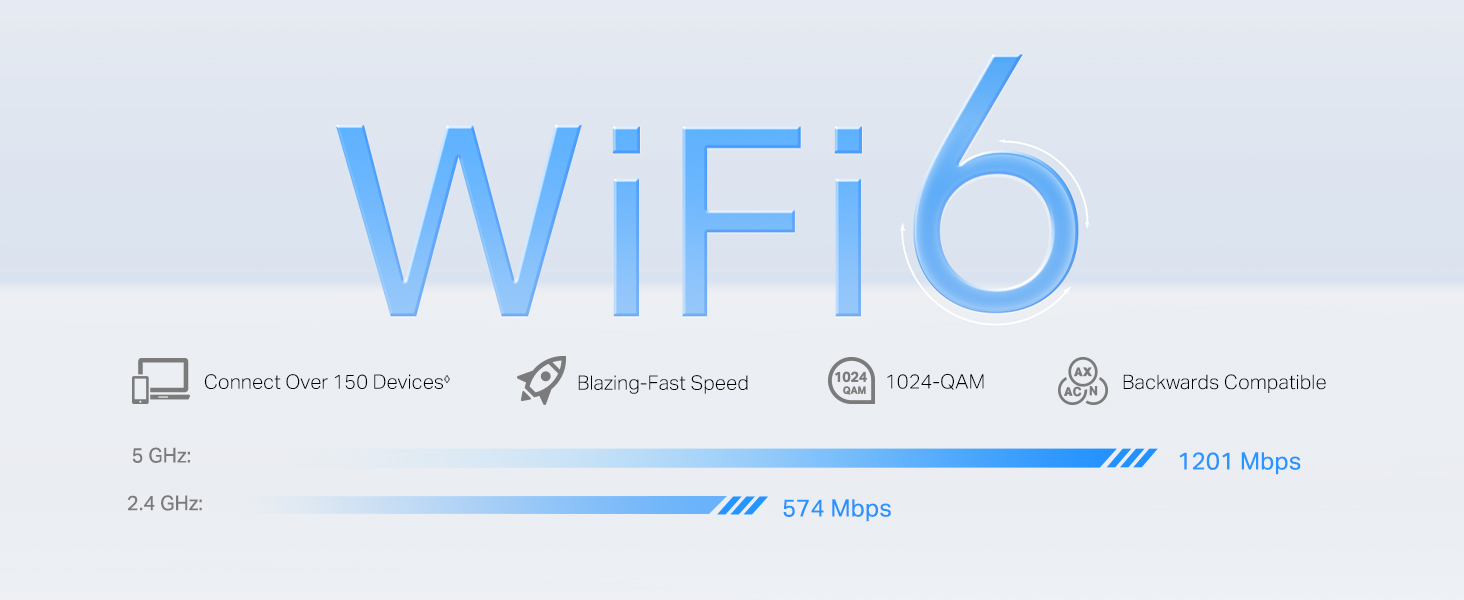
3.1-сүрөт: Wi-Fi 6 ылдамдыктагы мүмкүнчүлүктөрү, 5 ГГц жана 2.4 ГГц диапазондору үчүн максималдуу теориялык ылдамдыктарды көрсөтөт.
3.2 Үзгүлтүксүз роуминг жана жасалма интеллект менен башкарылуучу тор
Deco тор системасы бирдиктүү Wi-Fi аталышы менен бирдиктүү тармакты түзөт. Сиз имараттын ичиндеги жана сырткы мейкиндиктердин ортосунда жылып жатканда, түзмөктөрүңүз автоматтык түрдө Deco блогуна туташып, эң күчтүү сигналды камсыз кылат, бул үзгүлтүксүз агым жана серептөөнү камсыз кылат. Жасалма интеллектке негизделген Mesh технологиясы оптималдуу иштөө үчүн тармак чөйрөңүзгө тынымсыз үйрөнөт жана ыңгайлашат.

3.2-сүрөт: Үйдүн ичинде да, сыртында да үзгүлтүксүз Wi-Fi камтуусун чагылдырган үзгүлтүксүз роуминг функциясы.
3.3 HomeShield коопсуздугу
TP-Link HomeShield тармакты коргоонун жана башкаруунун комплекстүү функцияларын камсыз кылат:
- Тармакты коргоо: DoS коргоосу жана SPI брандмауэри сыяктуу функциялары менен кибер коркунучтардан коргойт.
- Күчтүү ата-энелик көзөмөл: Интернетке кирүүнү башкарыңыз, мазмунду чыпкалаңыз жана үй-бүлө мүчөлөрү үчүн убакыт чектөөлөрүн коюңуз.
- Кызматтын сапаты (QoS): Маанилүү тиркемелердин оптималдуу иштешин камсыз кылуу үчүн түзмөктөргө же иш-аракеттерге артыкчылык бериңиз.
- Комплекстүү отчеттор: Тармакты колдонууну жана коопсуздук окуяларын көзөмөлдөңүз.
Тармакты коргоо

Ата-энелик көзөмөл
Кызматтын сапаты (QoS)
Комплекстүү отчеттор
4. Техникалык тейлөө
Туура техникалык тейлөө Deco X20-OUTDOOR түзмөгүңүздүн узак мөөнөттүү иштешин жана оптималдуу иштешин камсыз кылат.
4.1 IP65 Аба ырайына туруктуу дизайн
Deco X20-OUTDOOR IP65 рейтингине ээ, бул анын чаңдын киришине туруктуулугун жана каалаган багыттан келген суу агымдарынан корголгондугун көрсөтөт. Бул дизайн түзмөккө жамгыр жана чаң сыяктуу ар кандай сырткы аба ырайынын шарттарында ишенимдүү иштөөгө мүмкүндүк берет.

Сүрөт 4.1: Чаңга жана сууга туруктуулугун көрсөткөн сырткы чөйрө үчүн IP65 аба ырайына туруктуу корпус.
4.2 Тазалоо жана кам көрүү
- Аппаратты жумшак, кургак чүпүрөк менен сүртүңүз. Суюк тазалоочу каражаттарды же аэрозоль чачыраткычтарын колдонбоңуз.
- Бардык порттордун, айрыкча, түзмөк чаңдуу чөйрөдө болсо, таштандылардан тазаланганын текшериңиз.
- Сырткы абалына карабастан, түзмөктү жылуулук булактарынын жанына же күндүн түз тийген жерине узак убакытка коюудан алыс болуңуз.
4.3 Микропрограмма жаңыртуулары
Deco колдонмосу аркылуу микропрограмма жаңыртууларын үзгүлтүксүз текшерип жана орнотуп туруңуз. Микропрограмма жаңыртуулары иштин натыйжалуулугун жакшыртууларды, жаңы функцияларды жана коопсуздукту жакшыртууларды камсыз кылат.
5. Кыйынчылыктарды
Эгерде сиз Deco X20-OUTDOOR түзмөгүңүздө көйгөйлөргө туш болсоңуз, төмөнкү көйгөйлөрдү чечүү кадамдарын карап көрүңүз:
- Интернет байланышы жок: Негизги Deco түзмөгүңүздө интернет байланышы бар экенин текшериңиз. Бардык Ethernet кабелдеринин туташууларын текшериңиз. Модемиңизди, негизги Deco түзмөгүңүздү жана тышкы түзмөгүңүздү өчүрүп-күйгүзүңүз.
- Wi-Fi сигналы начар: Сырткы блок сиздин учурдагы Deco тармагыңыздын натыйжалуу диапазонуна жайгаштырылганын текшериңиз. Тоскоолдуктарды азайтуу үчүн анын абалын тууралаңыз.
- Түзмөк туташпай жатат: Wi-Fi сырсөзү туура экенин ырастаңыз. Туташтырууга аракет кылып жаткан түзмөктү өчүрүп-күйгүзүп көрүңүз. Бөгөттөлгөн түзмөктөрдү Deco колдонмосунан текшериңиз.
- Deco колдонмосундагы көйгөйлөр: Deco колдонмоңуздун эң акыркы версиясына жаңыртылганын текшериңиз. Колдонмону мажбурлап жаап, кайра ачып көрүңүз.
- LED көрсөткүч абалы: Көйгөйлөрдү аныктоого жардам бере турган ар кандай LED индикаторунун түстөрүнүн жана үлгүлөрүнүн түшүндүрмөлөрүн алуу үчүн Deco колдонмосуна же продуктунун онлайн колдоо барагына кайрылыңыз.
Көбүрөөк жардам алуу үчүн TP-Link колдоо кызматына кайрылыңыз webсайтка же кардарларды тейлөөгө кайрылыңыз.
6. Техникалык шарттар
| Продукциянын өлчөмдөрү | 4.8 x 4.3 x 8.5 дюйм |
| Элемент Салмагы | 1.98 фунт |
| Модель аты | AX1800 Сырткы/Ички тор Wi-Fi 6 бирдиги |
| Өзгөчөлүктөр | Кирүү чекитинин режими, Alexa менен шайкеш, Конок режими, Ата-энелик көзөмөл, QoS |
| Жыштык тилкесинин классы | Кош тилкелүү |
| Зымсыз байланыш стандарты | 802.11ac, 802.11ax, 802.11b, 802.11g, 802.11n |
| Шайкеш түзмөктөр | Жеке компьютер, коопсуздук камерасы, акылдуу телевизор, смартфон, планшет |
| Байланыш технологиясы | Ethernet, Wi-Fi |
| Түс | Ак |
| Өндүрүүчү | TP-Link |
| Иштөө температурасы | -22°F – 104°F (-30°C – 40°C) |
| Иштөө нымдуулугу | 10% дан 90% RH, конденсацияланбайт |
7. Кепилдик жана колдоо
TP-Link өнүмдөрү чектелген кепилдик менен келет. Кепилдик, өнүмдөрдү колдоо жана техникалык жардам боюнча толук маалымат алуу үчүн, расмий TP-Link веб-сайтына кириңиз. webсайтка же сатып алууда камтылган документтерди караңыз.
Сиз ошондой эле кошумча ресурстарды жана көп берилүүчү суроолорду таба аласыз TP-Link Amazon дүкөнү.
8. Коопсуздук боюнча маанилүү маалымат
Орнотуу боюнча колдонмодо берилген бардык коопсуздук көрсөтмөлөрүн окуп чыгып, аткарыңыз. Төмөнкү юридикалык эскертүү колдонулат:
◈ Зымсыз сигналдын максималдуу ылдамдыгы - бул IEEE Standard 802.11 спецификацияларынан алынган физикалык ылдамдыктар. Зымсыз маалыматтардын чыныгы өткөрүү жөндөмдүүлүгү жана зымсыз камтуу, ошондой эле туташкан түзмөктөрдүн саны кепилденбейт жана тармактын шарттарына, кардардын чектөөлөрүнө жана курулуш материалдары, тоскоолдуктар, трафиктин көлөмү жана тыгыздыгы, ошондой эле кардардын жайгашкан жери сыяктуу экологиялык факторлордун натыйжасында өзгөрүп турат. Кардарлар 802.11k/v/r колдоосу керек жана кошумча орнотууну талап кылышы мүмкүн. Иштөө көрсөткүчү кардардын түзмөгүнө жараша өзгөрүшү мүмкүн. ☃Чагылгандан жана электростатикалык разряддан коргоого продуктуну туура орнотуу, жерге туташтыруу жана кабелди коргоо аркылуу жетишүүгө болот. Бул продуктуну орнотууга жардам берүү үчүн колдонмону карап чыгыңыз жана IT адисине кайрылыңыз. *HomeShield акысыз негизги планды камтыйт. Pro планы үчүн төлөмдөр колдонулат. Көбүрөөк маалымат алуу үчүн tp-link.com/homeshield сайтына кириңиз. Айрым функциялар иштелип чыгууда жана кийинки программалык камсыздоо жаңыртуулары менен колдоого алынат. ▲WiFi муундары IEEE 802.11 a/b/g/n/ac/ax/be зымсыз стандартын билдирет. Колдонуучулар интернетке кирүү үчүн интернет провайдери менен шайкеш келген кошумча модем түзмөгүн талап кылышы мүмкүн. Тармактын чыныгы ылдамдыгы продуктунун Ethernet WAN же LAN портунун ылдамдыгы, тармак кабели тарабынан колдоого алынган ылдамдык, интернет провайдеринин факторлору жана башка айлана-чөйрөнүн шарттары менен чектелиши мүмкүн. Бул Deco IEEE 802.11ax спецификациясында бекитилген бардык милдеттүү функцияларды колдобошу мүмкүн. Функциялардын жеткиликтүүлүгү үчүн программалык камсыздоону андан ары жаңыртуу талап кылынышы мүмкүн.