1. Киришүү
This manual provides detailed instructions for the installation, setup, operation, and maintenance of the Q57H-AD Motherboard. Please read this manual thoroughly before beginning installation to ensure proper functionality and to prevent damage to the components.
The Q57H-AD Motherboard is designed for LGA 1156 processors and supports DDR3 memory, offering a robust foundation for various computing needs.
2. Продукт бүтүп калдыview
The Q57H-AD Motherboard features a standard form factor and includes essential ports and slots for a complete system build.
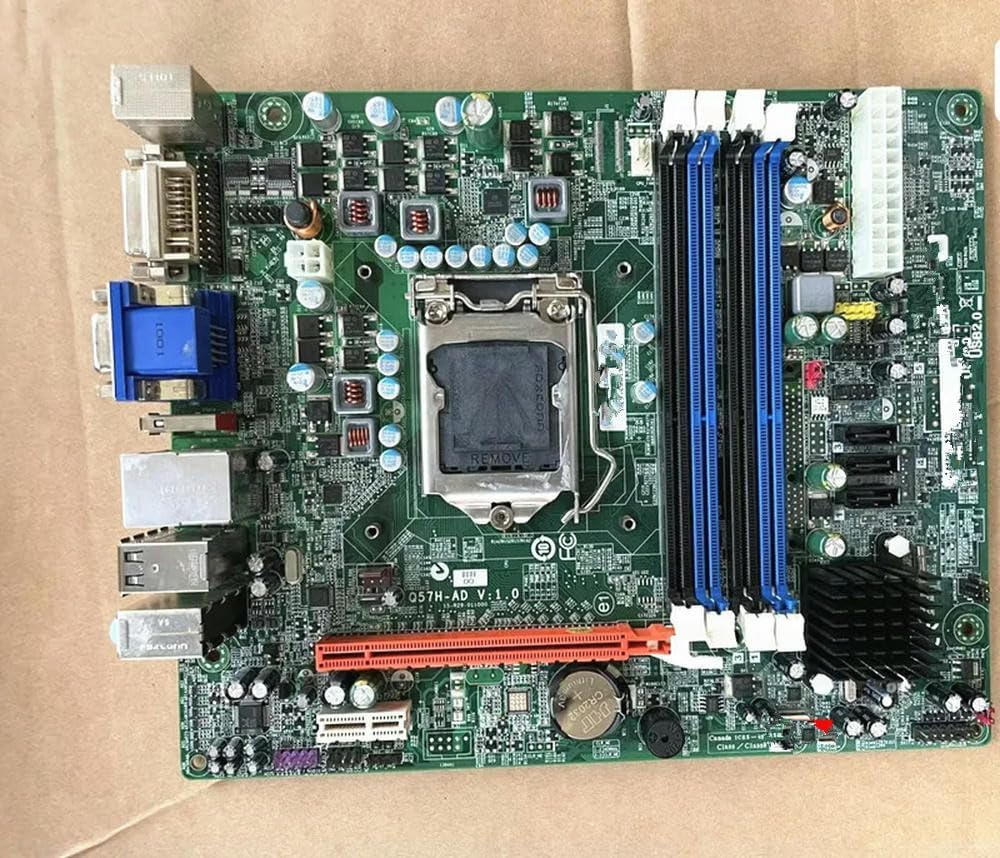
2.1-сүрөт: Q57H-AD Motherboard Layout. This image displays the full layout of the Q57H-AD motherboard, highlighting the central LGA 1156 CPU socket, four DDR3 RAM slots (two blue, two black), multiple PCIe expansion slots, and various I/O ports including VGA, DVI, USB, and Ethernet. Key components like the chipset heatsink and power connectors are also visible.
2.1 Негизги компоненттер
- LGA 1156 CPU розеткасы: For Intel Core i3/i5/i7 (1st Gen) and Xeon 3400 series processors.
- DDR3 DIMM Slots: Four slots supporting dual-channel DDR3 memory.
- PCIe Slots: Various Peripheral Component Interconnect Express slots for graphics cards and other expansion cards.
- SATA порттору: HDD жана SSD сыяктуу сактагыч түзмөктөрүн туташтыруу үчүн.
- I/O панели: Includes USB ports, audio jacks, Ethernet port, and video outputs (VGA, DVI).
- CMOS батареясы: A CR2032 battery for maintaining BIOS settings and system time.
3. Орнотуу жана орнотуу
Before installation, ensure your system is powered off and unplugged. Wear an anti-static wrist strap to prevent electrostatic discharge (ESD) damage.
3.1 CPU орнотуу
- LGA 1156 CPU розеткасын энелик платадан табыңыз.
- Gently push down the load lever and pull it sideways to open the CPU socket retention frame.
- CPUдагы үч бурчтук белгини розеткадагы тиешелүү белги менен тууралаңыз. Процессорду мажбурлабастан розеткага этияттык менен салыңыз.
- Кармап турган алкакты жаап, жүктөө рычагын кайра ордуна түртүп бекитиңиз.
- Процессордун үстү жагына жука, тегиз термикалык пастаны сүйкөңүз.
- CPU муздаткычын өндүрүүчүнүн көрсөтмөлөрүнө ылайык орнотуңуз.
3.1-сүрөт: CPU Socket Area. This detailed view focuses on the LGA 1156 CPU socket, showing the
тиешелүү документтер жок