
1. Киришүү
This manual provides detailed instructions for the proper setup, operation, and maintenance of your Daakro AK45 Home Audio Amplifier. Please read this manual thoroughly before using the device to ensure optimal performance and safety. The AK45 is a 2-channel stereo amplifier designed for passive speakers, featuring Bluetooth 5.4 connectivity, multiple input options, and adjustable audio controls.

Figure 1: Daakro AK45 Home Audio Ampкөтөргүч жана пульт
2. Продукт бүтүп калдыview
2.1 Алдыңкы панелдин башкаруу элементтери

2-сүрөт: алдыңкы панелдин макети
- Кубат которгучу: Күйгүзөт ampөмүрдү күйгүзүү же өчүрүү.
- USB/SD киргизүү: Ports for connecting USB flash drives or SD cards for media playback.
- Үч ыргак башкаруу: Adjusts the high-frequency audio output (±12dB).
- Басс башкаруу: Adjusts the low-frequency audio output (±12dB).
- Микрофондун үнүн башкаруу: Adjusts the volume level for connected microphones.
- Микрофон киргизүүлөрү (MIC1, MIC2): Two 1/4" (6.5mm) jacks for connecting microphones.
- Мастердин үнүн көзөмөлдөө: Adjusts the overall output volume (0-32dB).
- Режим баскычы: Cycles through input sources (Bluetooth, RCA, USB, SD, FM).
- Ойнотуу башкаруулары: Buttons for previous track, play/pause, next track.
- LED дисплей: Shows current mode, volume level, and track information.
2.2 Арткы панелдин туташуулары
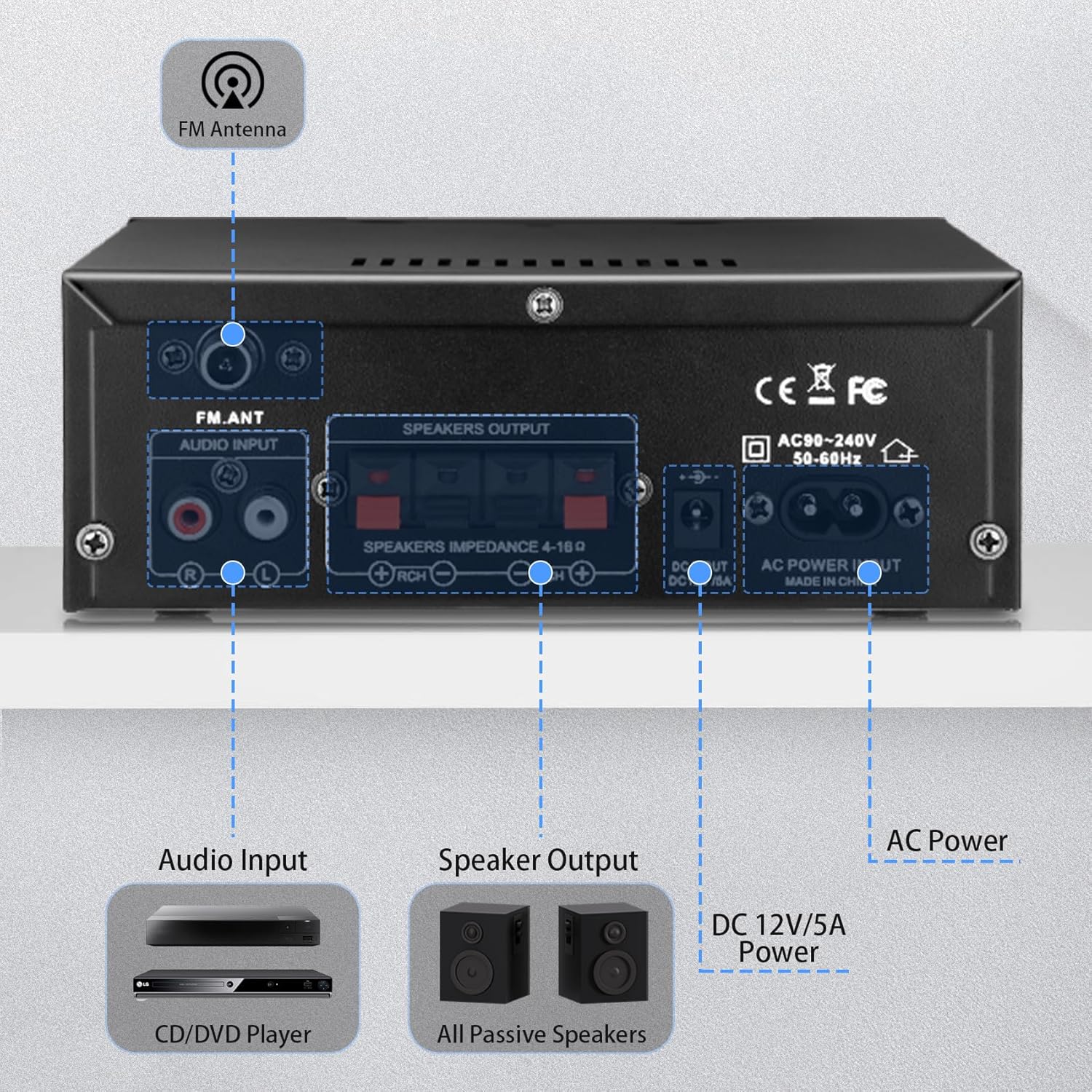
Сүрөт 3: Арткы панелдик байланыштар
- FM антенна киргизүү: Connects the included FM antenna for radio reception.
- Аудио киргизүү (RCA): Red and white RCA jacks for connecting external audio sources like CD players or tape decks.
- Динамиктин чыгышы: Terminals for connecting passive speakers (4-16Ω impedance). Ensure correct polarity (+ to + and - to -).
- DC 12V/5A кубат киргизүү: Connects to a 12V/5A DC power adapter (not included).
- AC кубаттуулугун киргизүү: Connects the included AC power cable (AC90-240V, 50-60Hz).
2.3 Алыстан башкаруу
Киргизилген алыстан башкаруу пульту ыңгайлуу иштөөгө мүмкүндүк берет amplifier from a distance. Functions include power on/off, mode selection, volume adjustment, track control, and EQ settings (if available).
4-сүрөт: Алыстан башкаруу
Эскертүү: Remove the isolation plastic sheet from the battery compartment of the remote control before first use.
3. Орнотуу
- Динамиктерди туташтыруу: Connect your passive speakers to the 'SPEAKERS OUTPUT' terminals on the rear panel. Ensure the positive (+) terminal of the amplifier connects to the positive (+) terminal of the speaker, and the negative (-) terminal connects to the negative (-). The ampкөтөргүч 4-16Ω импедансы бар динамиктерди колдойт.
- Аудио булактарын туташтыруу:
- RCA киргизүү: Use an RCA cable to connect devices like CD players or tape decks to the 'AUDIO INPUT' jacks.
- USB/SD карта: Insert a USB flash drive or SD card into the respective slots on the front panel.
- Bluetooth: For Bluetooth connection, ensure the amplifier is powered on and in Bluetooth mode.
- FM антеннасын туташтыруу: Attach the included FM antenna to the 'FM_ANT' connector on the rear panel for improved radio reception.
- Микрофондорду туташтыруу: If using microphones, plug them into the 'MIC1' or 'MIC2' 1/4" jacks on the front panel.
- Кубат туташуу: Connect the AC power cable to the 'AC POWER INPUT' on the rear panel and then to a wall outlet. Alternatively, if using a DC power source, connect a 12V/5A DC adapter to the 'DC 12V/5A' input.
4. Иштөө нускамалары
4.1 Күйгүзүү/өчүрүү
Press the 'POWER' switch on the front panel to turn the ampкөтөргүчтү күйгүзүңүз же өчүрүңүз. Түзмөк күйгүзүлгөндө LED дисплей күйөт.
4.2 Киргизүү режимин тандоо
Press the 'MODE' button on the front panel or remote control to cycle through the available input sources: Bluetooth (BLUE), RCA (AUX), USB, SD, and FM radio.
4.3 Bluetooth жупташтыруу
- которуштуруу amplifier to Bluetooth mode using the 'MODE' button. The LED display will show 'BLUE'.
- Түзмөгүңүздө (смартфон, планшет, компьютер) Bluetooth иштетип, жеткиликтүү түзмөктөрдү издеңиз.
- Select 'AK45' from the list of devices to pair. A confirmation sound will indicate successful pairing.
Эскертүү: Maintain a distance of within 30ft/10m between the device and amplifier without obstructions for optimal Bluetooth performance. For TV or PC connections, keep the distance within 15ft/5m.

5-сүрөт: Bluetooth 5.4 туташуусу
4.4 Аудио деңгээлин тууралоо
- Негизги том: Rotate the large 'VOLUME' knob on the front panel or use the volume buttons on the remote control to adjust the overall sound level.
- Жогорку/бас: Use the 'TREBLE' and 'BASS' knobs to fine-tune the high and low frequencies according to your preference.
- Микрофондун үнү: Adjust the 'MIC/VOL' knob to control the volume of connected microphones.
4.5 USB/SD картаны ойнотуу
When a USB drive or SD card is inserted, the amplifier автоматтык түрдө USB/SD режимине которулат жана туура келген аудиону ойното баштайт files. Use the playback controls (previous, play/pause, next) on the front panel or remote to manage your music.
4.6 Микрофонду колдонуу
Connect up to two microphones to the 'MIC1' and 'MIC2' inputs. Adjust the 'MIC/VOL' knob to control microphone volume. This feature is suitable for home karaoke or public address applications.
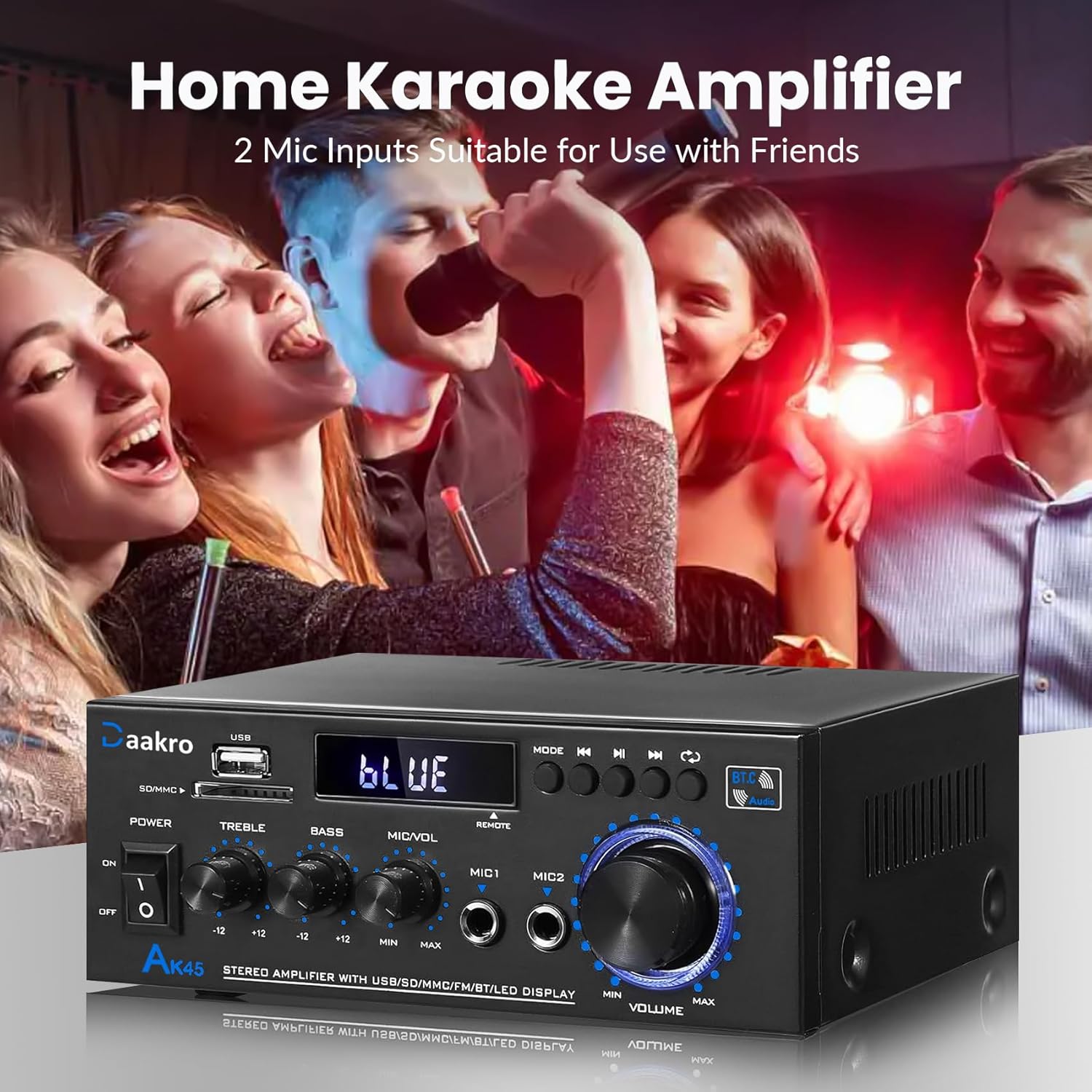
Figure 6: Home Karaoke Application
5. Техникалык тейлөө
- Тазалоо: Сыртын тазалоо үчүн жумшак, кургак чүпүрөктү колдонуңуз amplifier. Avoid using liquid cleaners or solvents, as they may damage the finish or internal components.
- Вентиляция: камсыз кылуу ampкөтөргүч жетиштүү желдетүүгө ээ. Түзмөктүн үстүнкү же каптал жагындагы желдетүү тешиктерин жаппаңыз.
- Сактагыч: Узак мөөнөткө колдонулбаганда, сактаңыз ampтүз күндүн нурунан жана экстремалдык температурадан алыс салкын, кургак жерде liifier.
- Электр энергиясын өчүрүү: Always disconnect the power cable from the wall outlet before performing any cleaning or maintenance.
6. Кыйынчылыктарды
- Кубат жок:
- Электр кабелинин экөөнө тең бекем туташтырылганын текшериңиз ampкөтөргүч жана розетка.
- Алдыңкы панелдеги кубат которгучу "ON" абалында экенин текшериңиз.
- Башка аспапка сайып, розетка иштеп жатканын текшериңиз.
- Үн жок:
- Confirm that speakers are correctly connected to the 'SPEAKERS OUTPUT' terminals with correct polarity.
- Check that the correct input mode is selected (Bluetooth, RCA, USB, SD, FM).
- Increase the 'MASTER VOLUME' knob and ensure it is not at minimum.
- Verify that the audio source device is playing and its volume is turned up.
- Ensure passive speakers are used, as the AK45 is not compatible with active speakers.
- Bluetooth туташуу маселелери:
- камсыз кылуу amplifier is in Bluetooth mode ('BLUE' on display).
- Delete 'AK45' from your device's Bluetooth list and attempt to re-pair.
- Reduce the distance between your device and the amplifier, and remove any obstructions.
- Экөөнү тең кайра иштетиңиз ampкөтөргүч жана Bluetooth түзмөгүңүз.
- Начар үн сапаты (бурмалоо, төмөн үн):
- Check speaker connections for loose wires or incorrect polarity.
- Adjust 'TREBLE' and 'BASS' controls.
- Аудио булактын таза сигнал берип жатканын текшериңиз.
- Verify that the speaker impedance is within the supported 4-16Ω range.
- The amplifier uses an upgraded TPA3116 chip for clear audio.

Figure 7: TPA3116D2 Chip for Enhanced Audio Performance
- USB/SD карта окубай жатат:
- Ensure the USB drive or SD card is inserted correctly.
- экендигин текшериңиз files on the USB/SD card are in a compatible audio format.
- Башка USB дискти же SD картаны колдонуп көрүңүз.
- Алыстан башкаруу иштебейт:
- Ensure the isolation plastic sheet has been removed from the battery compartment.
- Пульттун батареясын алмаштырыңыз.
- Пультту түз эле ampкөтөргүчтүн алдыңкы панелинин сенсору.
7. Техникалык шарттар
- Модел: AK45
- Чыгуу күчү: 50W + 50W (Theoretical, at 24V/5A, 4-8Ω impedance)
- Ampкөтөргүч чип: TPA3116
- Bluetooth версиясы: 5.4 (QCC3040 core)
- Киргизүү интерфейстери: 1x RCA, 2x 1/4" Microphone, 1x USB, 1x SD Card Slot, Bluetooth 5.4, FM Radio
- Динамик Импеданс: 4-16Ω (Passive Speakers Only)
- Жыштык жообу: 20Гц - 20кГц
- Тон көзөмөлү: Treble ±12dB, Bass ±12dB
- Электр камсыздоо: AC90-240V, 50-60Hz (or DC 12V/5A)
- Өлчөмдөрү: 8.78 x 8.31 x 3.7 дюйм
- Элемент Салмагы: 1.94 фунт
7.1 Output Power vs. Power Supply and Impedance

Figure 8: Power Output Table
| Электр камсыздоо | Динамик импедансы | Максималдуу чыгаруу күчү |
|---|---|---|
| 9V | 4Ω | 15 Вт |
| 6Ω | 12 Вт | |
| 8Ω | 10 Вт | |
| 12V | 4Ω | 20 Вт |
| 6Ω | 15 Вт | |
| 8Ω | 12 Вт | |
| 18V | 4Ω | 30 Вт |
| 6Ω | 20 Вт | |
| 8Ω | 15 Вт | |
| 22V | 4Ω | 40 Вт |
| 6Ω | 30 Вт | |
| 8Ω | 20 Вт | |
| 24V | 4Ω | 50 Вт |
| 6Ω | 40 Вт | |
| 8Ω | 30 Вт |
8. Кутуда эмне бар
Upon opening your Daakro AK45 Home Audio Amplifier package, you should find the following items:
- 1x Daakro AK45 Home Audio Ampкөтөргүч бирдиги
- 1x Remote контроллер
- 1x AC Кубат кабели
- 1x FM антенна
- 1x Instruction Manual (бул документ)
9-сүрөт: Пакеттин мазмуну
9. Кепилдик жана колдоо
Daakro is committed to providing high-quality audio equipment and customer satisfaction.
- Кепилдик: Бул продукт сатып алынган күндөн тартып 30 күндүк кепилдик менен келет.
- Кардарларды тейлөө: We offer 24-hour online customer service to assist with any inquiries or issues you may encounter.
- канааттануу кепилдиги: We strive for 100% customer satisfaction.
For support, please refer to the contact information provided with your purchase or visit the official Daakro store on Amazon.