
Introduction
Thank you for choosing the BONTEC Mobile TV Stand FN611-FBA. This manual provides detailed instructions for the safe assembly, operation, and maintenance of your new TV stand. Please read all instructions carefully before beginning assembly and retain this manual for future reference.
This mobile TV stand is designed to securely hold flat and curved LED, LCD, and OLED televisions ranging from 32 to 85 inches, with VESA patterns from 50x50mm to 600x400mm, and a maximum weight capacity of 121 lbs (55 kg). It features a height-adjustable design, a 15-degree tilt function, a media shelf, and lockable wheels for easy mobility.
Коопсуздук маалыматы
- Салмак сыйымдуулугу: Do not exceed the maximum weight capacity of 121 lbs (55 kg) for the TV mount and 22 lbs (10 kg) for the media shelf. Overloading can result in serious injury or property damage.
- TV өлчөмү: Телевизоруңуздун сунушталган өлчөмү 32-85 дюйм чегинде экенин текшериңиз.
- VESA шайкештиги: Телевизоруңуздун VESA орнотуу үлгүсү 50x50 мм жана 600x400 мм ортосунда экенин текшериңиз.
- Ассамблея: Assemble the stand according to the instructions. Incorrect assembly may cause instability.
- Кыймыл: Always unlock the wheels before moving the stand. Lock the wheels when the stand is in its desired position to prevent accidental movement.
- Туруктуулук: Do not hang or climb on the TV stand. Ensure the stand is on a level surface.
- Балдар: Keep children away from the stand during assembly and ensure they do not play with or climb on the assembled stand.
Пакеттин мазмуну
Before assembly, please check that all parts are present and undamaged. If any parts are missing or defective, contact BONTEC customer service.
(Note: Specific part list not provided in source data. Refer to the included physical instruction manual for a detailed list of components.)
Орнотуу жана чогултуу
Assembly typically requires two people. Lay out all components on a soft, clean surface to prevent scratches.
1-кадам: Базаны чогултуу
- Attach the four locking wheels to the X-shaped base components. Ensure they are securely tightened.
- Connect the base components together using the provided hardware, forming a stable X-shaped structure.

Image: The stable X-shaped base of the TV stand, highlighting the reinforced screw points for enhanced stability.
Step 2: Attach the Upright Columns
- Secure the two upright columns to the assembled base using the designated bolts and washers.
- Ensure the columns are aligned and firmly attached.
Step 3: Install the TV Mounting Plate
- Slide the TV mounting plate onto the top of the upright columns.
- Adjust the height of the mounting plate to your desired viewing level. The stand offers 8 height options for the mounting plate.
- Secure the mounting plate at the chosen height using the locking mechanisms or screws.
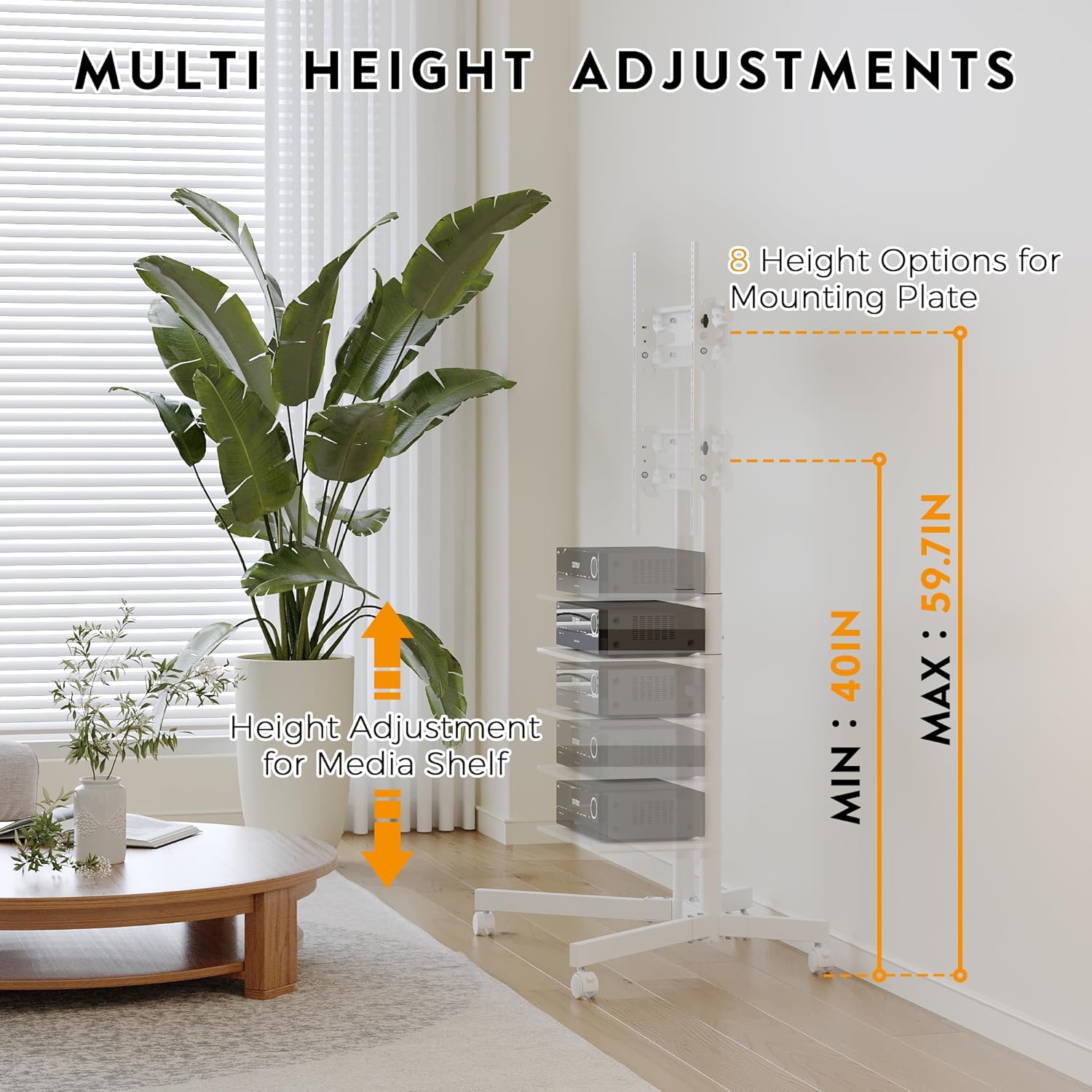
Image: Diagram illustrating the multiple height adjustment options for both the TV mounting plate (40 to 59.7 inches) and the media shelf.
Step 4: Attach TV Brackets to Your Television
- Телевизоруңузду жумшак, таза бетке этияттык менен ылдый каратып коюңуз.
- Сыналгыңыздын артындагы VESA орнотуу тешиктерин аныктаңыз.
- Берилген аппараттык топтомдон телевизоруңуздун VESA үлгүсүнө туура келген тиешелүү бурамаларды, шайбаларды жана аралыктарды тандаңыз.
- Attach the two vertical TV brackets to the back of your television. Ensure they are level and securely fastened.

Image: A diagram showing the VESA mounting holes on the back of a television, indicating compatibility from 50-600mm horizontally and 50-400mm vertically.

Image: A graphic indicating the TV stand's compatibility with televisions ranging from 32 to 85 inches diagonally.

Image: An icon indicating the maximum TV weight capacity of 121 lbs (55 kg) for the stand.
5-кадам: Телевизорду стендге орнотуңуз
- With assistance, carefully lift the TV and hook the attached brackets onto the TV mounting plate on the stand.
- Сыналгы борбордо жана түз экенин текшериңиз.
- Secure the TV to the mounting plate using the safety screws or locking mechanisms provided.
6-кадам: Медиа текчесин орнотуңуз
- Attach the media shelf to the upright columns at your desired height using the provided hardware.
- Ensure the shelf is level and securely fastened.

Image: An icon indicating the maximum media shelf weight capacity of 22 lbs (10 kg).
7-кадам: Кабель башкаруу
Utilize the integrated cable management system to route and conceal TV and device cables. This helps maintain a tidy appearance and prevents tripping hazards.

Image: Comparison showing the difference between unmanaged cables and cables neatly routed through the integrated cable management system of the stand.
Иштөө нускамалары
Телевизордун стендин жылдыруу
- To move the stand, ensure all four wheels are in the unlocked position.
- Gently push or pull the stand to its desired location.
- Once in position, press down on the locking levers of all four wheels to secure the stand and prevent accidental movement.
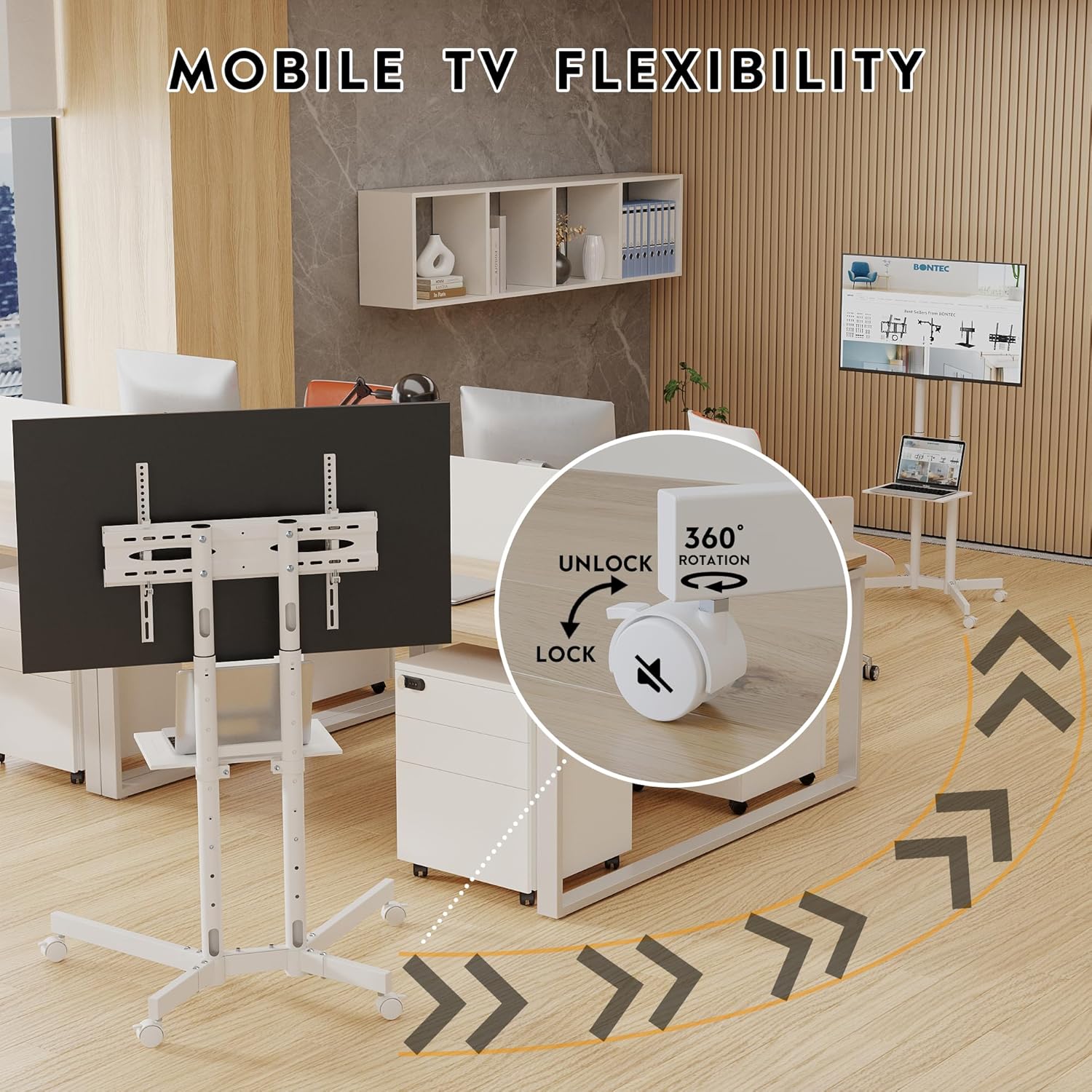
Image: A close-up of the 360-degree rotating, lockable caster wheel, showing the 'LOCK' and 'UNLOCK' positions for mobility control.
Сыналгы бийиктигин тууралоо
- The TV mounting plate can be adjusted vertically along the upright columns.
- To adjust, loosen the securing mechanisms on the mounting plate, carefully raise or lower the TV to the desired height, and then re-tighten the mechanisms securely.
Using the Tilt Function
- The TV mount allows for a tilt of up to 15 degrees.
- To tilt the TV, gently push the top or bottom edge of the TV forward or backward until the desired angle is achieved. The friction-based mechanism will hold the tilt in place.

Image: A visual representation of the TV stand's tilt function, showing a television tilted by approximately 15 degrees for optimal viewing.
Adjusting Media Shelf Height
- The media shelf can be repositioned vertically along the upright columns.
- To adjust, remove any items from the shelf, loosen its securing hardware, move it to the new desired height, and then re-tighten the hardware.
Техникалык тейлөө
- Тазалоо: Стендди жумшак менен сүртүңүз, гamp кездеме. Абразивдүү тазалагычтарды же финишке зыян келтирүүчү катаал химиялык заттарды колдонуудан алыс болуңуз.
- бекиткичтер: Мезгил-мезгили менен бардык бурамалар менен болтторду текшерип туруңуз, алар бекем бойдон калууда. Туруктуулукту сактоо үчүн зарыл болсо, кайра тартыңыз.
- Дөңгөлөктөр: Жылмакай кыймылды камсыз кылуу үчүн дөңгөлөктөрдү таштандылардан таза кармаңыз.
Проблемаларды чечүү
Issue: Stand is unstable or wobbles.
- Чечим: Ensure all assembly screws and bolts are fully tightened. Verify the stand is on a flat, level surface. Check that the TV weight does not exceed the maximum capacity.
Issue: Wheels do not roll smoothly or lock properly.
- Чечим: Check for any debris (hair, carpet fibers) caught in the wheels and remove them. Ensure the locking mechanism is fully engaged or disengaged as intended.
Issue: TV does not fit the mounting plate.
- Чечим: Verify your TV's VESA mounting pattern (horizontal x vertical distance between mounting holes) is within the stand's supported range (50x50mm to 600x400mm). Ensure you are using the correct screws and spacers for your TV model.
Техникалык шарттар
| Өзгөчөлүк | Спецификация |
|---|---|
| Модель номери | FN611-FBA |
| Туура келген сыналгы өлчөмдөрү | 32 - 85 дюйм |
| VESA шайкештиги | 50x50ммден 600x400ммге чейин |
| Телевизордун максималдуу салмагы | 121 фунт (55 кг) |
| Maximum Media Shelf Weight Capacity | 22 фунт (10 кг) |
| Height Adjustment (TV) | 40 - 59 inches (from floor to center of TV) |
| Тилтүү функциясы | ±15 градус |
| Мобилдүүлүк | 4 x 360° Lockable Casters |
| Материал | Металл |
| Түс | Ак |
| Продукциянын өлчөмдөрү (жыйылган) | Approx. 33.7" (W) x 26.5" (D) x 40-59.7" (H) (Refer to dimension image for details) |
| Элемент Салмагы | 28.4 фунт (12.9 кг) |
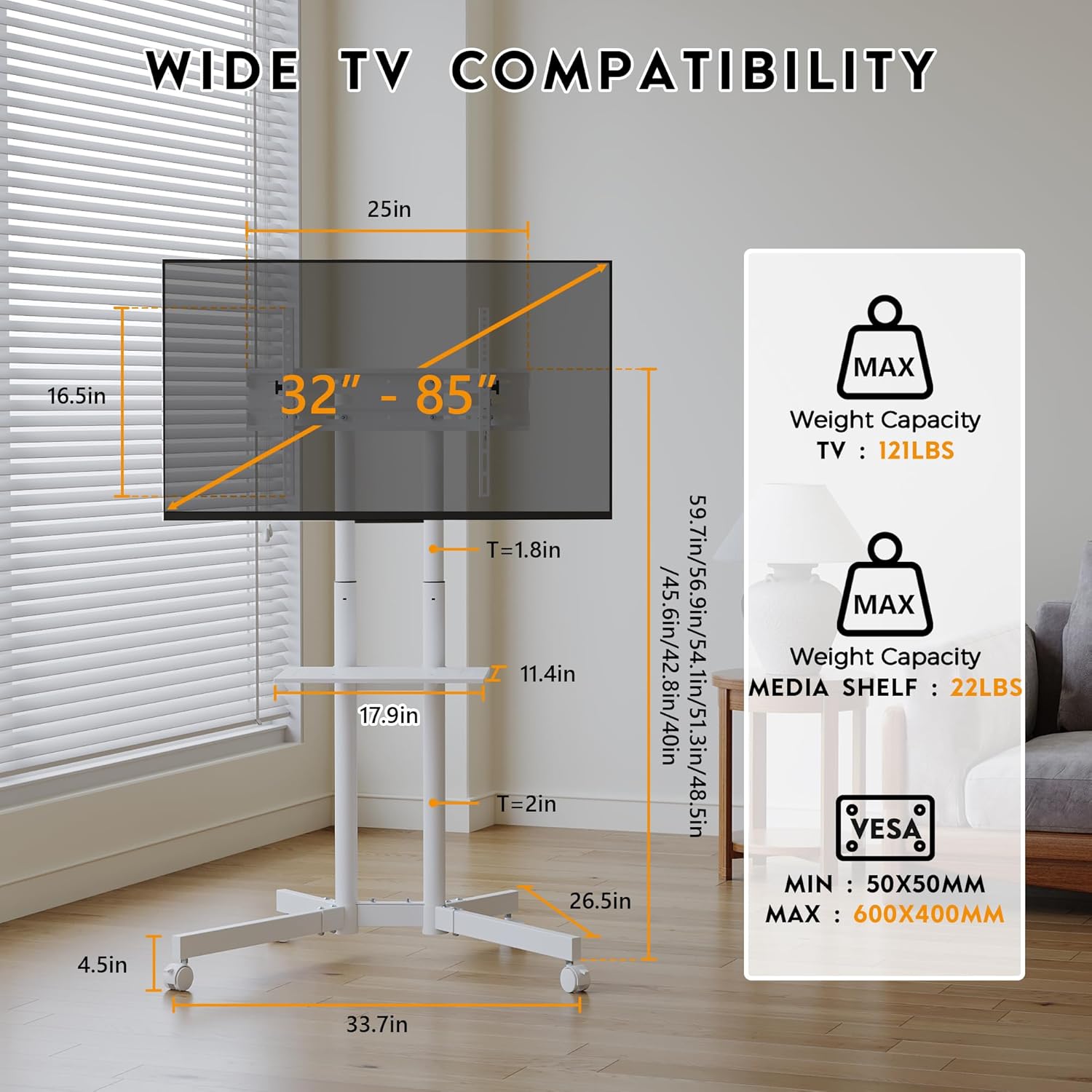
Image: A comprehensive diagram detailing the dimensions of the TV stand, including width, depth, height range, and the weight capacities for both the TV and the media shelf, along with VESA compatibility.
Кепилдик жана колдоо
BONTEC products are designed for durability and performance. For warranty information or technical support, please contact BONTEC customer service through the retailer where you purchased the product or visit the official BONTEC webсайт.
Please have your model number (FN611-FBA) and purchase details ready when contacting support.